
@Configuration的使用
以下内容转载自:duanxz的spring4.0之二:@Configuration的使用,如有侵权,请联系作者本人予以删除
从Spring3.0,@Configuration用于定义配置类,可替换xml配置文件,被注解的类内部包含有一个或多个被@Bean注解的方法,这些方法将会被AnnotationConfigApplicationContext或AnnotationConfigWebApplicationContext类进行扫描,并用于构建bean定义,初始化Spring容器。
注意:@Configuration注解的配置类有如下要求:
- @Configuration不可以是final类型;
- @Configuration不可以是匿名类;
- 嵌套的configuration必须是静态类。
一、用@Configuration加载spring
1.1、@Configuration配置spring并启动spring容器
1.2、@Configuration启动容器+@Bean注册Bean
1.3、@Configuration启动容器+@Component注册Bean
1.4、使用 AnnotationConfigApplicationContext 注册 AppContext 类的两种方法
1.5、配置Web应用程序(web.xml中配置AnnotationConfigApplicationContext)
二、组合多个配置类
2.1、在@configuration中引入spring的xml配置文件
2.2、在@configuration中引入其它注解配置
2.3、@configuration嵌套(嵌套的Configuration必须是静态类)
三、@EnableXXX注解
四、@Profile逻辑组配置
五、使用外部变量
一、@Configuation加载Spring方法
1.1、@Configuration配置spring并启动spring容器
@Configuration标注在类上,相当于把该类作为spring的xml配置文件中的<beans>,作用为:配置spring容器(应用上下文)

package com.dxz.demo.configuration;

import org.springframework.context.annotation.Configuration;

@Configuration

public class TestConfiguration {

    public TestConfiguration() {

        System.out.println("TestConfiguration容器启动初始化。。。");

    }

}
相当于:
<?xml version="1.0" encoding="UTF-8"?>

<beans xmlns="http://www.springframework.org/schema/beans" xmlns:xsi="http://www.w3.org/2001/XMLSchema-instance"

    xmlns:context="http://www.springframework.org/schema/context" xmlns:jdbc="http://www.springframework.org/schema/jdbc"

    xmlns:jee="http://www.springframework.org/schema/jee" xmlns:tx="http://www.springframework.org/schema/tx"

    xmlns:util="http://www.springframework.org/schema/util" xmlns:task="http://www.springframework.org/schema/task" xsi:schemaLocation="

        http://www.springframework.org/schema/beans http://www.springframework.org/schema/beans/spring-beans-4.0.xsd

        http://www.springframework.org/schema/context http://www.springframework.org/schema/context/spring-context-4.0.xsd

        http://www.springframework.org/schema/jdbc http://www.springframework.org/schema/jdbc/spring-jdbc-4.0.xsd

        http://www.springframework.org/schema/jee http://www.springframework.org/schema/jee/spring-jee-4.0.xsd

        http://www.springframework.org/schema/tx http://www.springframework.org/schema/tx/spring-tx-4.0.xsd

        http://www.springframework.org/schema/util http://www.springframework.org/schema/util/spring-util-4.0.xsd

        http://www.springframework.org/schema/task http://www.springframework.org/schema/task/spring-task-4.0.xsd" default-lazy-init="false">

</beans>
主方法进行测试:
package com.dxz.demo.configuration;

import org.springframework.context.ApplicationContext;

import org.springframework.context.annotation.AnnotationConfigApplicationContext;

public class TestMain {

    public static void main(String[] args) {

        // @Configuration注解的spring容器加载方式,用AnnotationConfigApplicationContext替换ClassPathXmlApplicationContext

        ApplicationContext context = new AnnotationConfigApplicationContext(TestConfiguration.class);

        // 如果加载spring-context.xml文件:

        // ApplicationContext context = new

        // ClassPathXmlApplicationContext("spring-context.xml");

    }

}
从运行主方法结果可以看出,spring容器已经启动了:

1.2、@Configuration启动容器+@Bean注册Bean,@Bean下管理bean的生命周期
@Bean标注在方法上(返回某个实例的方法),等价于spring的xml配置文件中的<bean>,作用为:注册bean对象
bean类:
package com.dxz.demo.configuration;

public class TestBean {

    private String username;

    private String url;

    private String password;

    public void sayHello() {

        System.out.println("TestBean sayHello...");

    }

    public String toString() {

        return "username:" + this.username + ",url:" + this.url + ",password:" + this.password;

    }

    public void start() {

        System.out.println("TestBean 初始化。。。");

    }

    public void cleanUp() {

        System.out.println("TestBean 销毁。。。");

    }

}
配置类:
package com.dxz.demo.configuration;

import org.springframework.context.annotation.Bean;

import org.springframework.context.annotation.Configuration;

import org.springframework.context.annotation.Scope;

@Configuration

public class TestConfiguration {

    public TestConfiguration() {

        System.out.println("TestConfiguration容器启动初始化。。。");

    }

    // @Bean注解注册bean,同时可以指定初始化和销毁方法

    // @Bean(name="testBean",initMethod="start",destroyMethod="cleanUp")

    @Bean

    @Scope("prototype")

    public TestBean testBean() {

        return new TestBean();

    }

}
主方法测试类:
package com.dxz.demo.configuration;

import org.springframework.context.ApplicationContext;

import org.springframework.context.annotation.AnnotationConfigApplicationContext;

public class TestMain {

    public static void main(String[] args) {

        // @Configuration注解的spring容器加载方式,用AnnotationConfigApplicationContext替换ClassPathXmlApplicationContext

        ApplicationContext context = new AnnotationConfigApplicationContext(TestConfiguration.class);

        // 如果加载spring-context.xml文件:

        // ApplicationContext context = new

        // ClassPathXmlApplicationContext("spring-context.xml");

         //获取bean

        TestBean tb = (TestBean) context.getBean("testBean");

        tb.sayHello();

    }

}
结果:

注:
(1)、@Bean注解在返回实例的方法上,如果未通过@Bean指定bean的名称,则默认与标注的方法名相同;
(2)、@Bean注解默认作用域为单例singleton作用域,可通过@Scope(“prototype”)设置为原型作用域;
(3)、既然@Bean的作用是注册bean对象,那么完全可以使用@Component、@Controller、@Service、@Ripository等注解注册bean,当然需要配置@ComponentScan注解进行自动扫描。
@Bean下管理bean的生命周期
可以使用基于 Java 的配置来管理 bean 的生命周期。@Bean 支持两种属性,即 initMethod 和destroyMethod,这些属性可用于定义生命周期方法。在实例化 bean 或即将销毁它时,容器便可调用生命周期方法。生命周期方法也称为回调方法,因为它将由容器调用。使用 @Bean 注释注册的 bean 也支持 JSR-250 规定的标准 @PostConstruct 和 @PreDestroy 注释。如果您正在使用 XML 方法来定义 bean,那么就应该使用 bean 元素来定义生命周期回调方法。以下代码显示了在 XML 配置中通常使用 bean 元素定义回调的方法。
@Configuration

@ComponentScan(basePackages = "com.dxz.demo.configuration")

public class TestConfiguration {

    public TestConfiguration() {

        System.out.println("TestConfiguration容器启动初始化。。。");

    }

    //@Bean注解注册bean,同时可以指定初始化和销毁方法

    @Bean(name="testBean",initMethod="start",destroyMethod="cleanUp")

    @Scope("prototype")

    public TestBean testBean() {

        return new TestBean();

    }

}
启动类:
public class TestMain {

    public static void main(String[] args) {

        ApplicationContext context = new AnnotationConfigApplicationContext(TestConfiguration.class);

        TestBean tb = (TestBean) context.getBean("testBean");

        tb.sayHello();

        System.out.println(tb);

        TestBean tb2 = (TestBean) context.getBean("testBean");

        tb2.sayHello();

        System.out.println(tb2);

    }

}
结果:

分析:
结果中的1:表明initMethod生效
结果中的2:表明@Scope("prototype")生效
1.3、@Configuration启动容器+@Component注册Bean
bean类:
package com.dxz.demo.configuration;

import org.springframework.stereotype.Component;

//添加注册bean的注解

@Component

public class TestBean {

    private String username;

    private String url;

    private String password;

    public void sayHello() {

        System.out.println("TestBean sayHello...");

    }

    public String toString() {

        return "username:" + this.username + ",url:" + this.url + ",password:" + this.password;

    }

    public void start() {

        System.out.println("TestBean 初始化。。。");

    }

    public void cleanUp() {

        System.out.println("TestBean 销毁。。。");

    }

}
配置类:
package com.dxz.demo.configuration;

import org.springframework.context.annotation.Bean;

import org.springframework.context.annotation.ComponentScan;

import org.springframework.context.annotation.Configuration;

import org.springframework.context.annotation.Scope;

@Configuration

//添加自动扫描注解,basePackages为TestBean包路径

@ComponentScan(basePackages = "com.dxz.demo.configuration")

public class TestConfiguration {

    public TestConfiguration() {

        System.out.println("TestConfiguration容器启动初始化。。。");

    }

    /*// @Bean注解注册bean,同时可以指定初始化和销毁方法

    // @Bean(name="testNean",initMethod="start",destroyMethod="cleanUp")

    @Bean

    @Scope("prototype")

    public TestBean testBean() {

        return new TestBean();

    }*/

}
主方法测试获取bean对象:
package com.dxz.demo.configuration;

import org.springframework.context.ApplicationContext;

import org.springframework.context.annotation.AnnotationConfigApplicationContext;

public class TestMain {

    public static void main(String[] args) {

        // @Configuration注解的spring容器加载方式,用AnnotationConfigApplicationContext替换ClassPathXmlApplicationContext

        ApplicationContext context = new AnnotationConfigApplicationContext(TestConfiguration.class);

        // 如果加载spring-context.xml文件:

        // ApplicationContext context = new

        // ClassPathXmlApplicationContext("spring-context.xml");

         //获取bean

        TestBean tb = (TestBean) context.getBean("testBean");

        tb.sayHello();

    }

}
sayHello()方法都被正常调用。

1.4、使用 AnnotationConfigApplicationContext 注册 AppContext 类的两种方法
1.4.1、 配置类的注册方式是将其传递给 AnnotationConfigApplicationContext 构造函数
public static void main(String[] args) {

        // @Configuration注解的spring容器加载方式,用AnnotationConfigApplicationContext替换ClassPathXmlApplicationContext

        ApplicationContext context = new AnnotationConfigApplicationContext(TestConfiguration.class);

        //获取bean

        TestBean tb = (TestBean) context.getBean("testBean");

        tb.sayHello();

    }
1.4.2、 AnnotationConfigApplicationContext 的register 方法传入配置类来注册配置类
public static void main(String[] args) {

  ApplicationContext ctx = new AnnotationConfigApplicationContext();

  ctx.register(AppContext.class)

}
1.5、配置Web应用程序(web.xml中配置AnnotationConfigApplicationContext)
过去,您通常要利用 XmlWebApplicationContext 上下文来配置 Spring Web 应用程序,即在 Web 部署描述符文件 web.xml 中指定外部 XML 上下文文件的路径。XMLWebApplicationContext 是 Web 应用程序使用的默认上下文类。以下代码描述了 web.xml 中指向将由 ContextLoaderListener 监听器类载入的外部 XML 上下文文件的元素。
<web-app>

    <context-param>

        <param-name>contextConfigLocation</param-name>

        <param-value>/WEB-INF/applicationContext.xml</param-value>

    </context-param>

    <listener>

        <listener-class>

            org.springframework.web.context.ContextLoaderListener

        </listener-class>

    </listener>

    <servlet>

    <servlet-name>sampleServlet</servlet-name>

    <servlet-class>

        org.springframework.web.servlet.DispatcherServlet

    </servlet-class>

    </servlet>

...

</web-app>
现在,您要将 web.xml 中的上述代码更改为使用 AnnotationConfigApplicationContext 类。切记,XmlWebApplicationContext 是 Spring 为 Web 应用程序使用的默认上下文实现,因此您永远不必在您的web.xml 文件中显式指定这个上下文类。现在,您将使用基于 Java 的配置,因此在配置 Web 应用程序时,需要在web.xml 文件中指定 AnnotationConfigApplicationContext 类。上述代码将修改如下:
<web-app>

    <context-param>

        <param-name>contextClass</param-name>

        <param-value>

            org.springframework.web.context.

            support.AnnotationConfigWebApplicationContext

        </param-value>

    </context-param>

    <context-param>

        <param-name>contextConfigLocation</param-name>

        <param-value>

            demo.AppContext

        </param-value>

    </context-param>

    <listener>

        <listener-class>

            org.springframework.web.context.ContextLoaderListener

        </listener-class>

    </listener>

    <servlet>

    <servlet-name>sampleServlet</servlet-name>

    <servlet-class>

        org.springframework.web.servlet.DispatcherServlet

    </servlet-class>

    <init-param>

        <param-name>contextClass</param-name>

        <param-value>

            org.springframework.web.context.

            support.AnnotationConfigWebApplicationContext

        </param-value>

    </init-param>

    </servlet>

...

</web-app>
以上修改后的 web.xml 现在定义了 AnnotationConfigWebApplicationContext 上下文类,并将其作为上下文参数和 servlet 元素的一部分。上下文配置位置现在指向 AppContext 配置类。这非常简单。下一节将演示 bean 的生命周期回调和范围的实现。
1.6、@Configuation总结
@Configuation等价于<Beans></Beans>
@Bean等价于<Bean></Bean>
@ComponentScan等价于<context:component-scan base-package="com.dxz.demo"/>
二、组合多个配置类
2.1、在@configuration中引入spring的xml配置文件
package com.dxz.demo.configuration2;

import org.springframework.context.annotation.Configuration;

import org.springframework.context.annotation.ImportResource;

@Configuration

@ImportResource("classpath:applicationContext-configuration.xml")

public class WebConfig {

}
bean类:
package com.dxz.demo.configuration2;

public class TestBean2 {

    private String username;

    private String url;

    private String password;

    public void sayHello() {

        System.out.println("TestBean2 sayHello...");

    }

    public String toString() {

        return "TestBean2 username:" + this.username + ",url:" + this.url + ",password:" + this.password;

    }

    public void start() {

        System.out.println("TestBean2 初始化。。。");

    }

    public void cleanUp() {

        System.out.println("TestBean2 销毁。。。");

    }

}
测试类:
package com.dxz.demo.configuration2;

import org.springframework.context.ApplicationContext;

import org.springframework.context.annotation.AnnotationConfigApplicationContext;

public class TestMain2 {

    public static void main(String[] args) {

        // @Configuration注解的spring容器加载方式,用AnnotationConfigApplicationContext替换ClassPathXmlApplicationContext

        ApplicationContext context = new AnnotationConfigApplicationContext(WebConfig.class);

        // 如果加载spring-context.xml文件:

        // ApplicationContext context = new

        // ClassPathXmlApplicationContext("spring-context.xml");

        // 获取bean

        TestBean2 tb = (TestBean2) context.getBean("testBean2");

        tb.sayHello();

    }

}
结果:

2.2、在@configuration中引入其它注解配置
package com.dxz.demo.configuration2;

import org.springframework.context.annotation.Configuration;

import org.springframework.context.annotation.Import;

import org.springframework.context.annotation.ImportResource;

import com.dxz.demo.configuration.TestConfiguration;

@Configuration

@ImportResource("classpath:applicationContext-configuration.xml")

@Import(TestConfiguration.class)

public class WebConfig {

}
测试类:
package com.dxz.demo.configuration2;

import org.springframework.context.ApplicationContext;

import org.springframework.context.annotation.AnnotationConfigApplicationContext;

import com.dxz.demo.configuration.TestBean;

public class TestMain2 {

    public static void main(String[] args) {

        // @Configuration注解的spring容器加载方式,用AnnotationConfigApplicationContext替换ClassPathXmlApplicationContext

        ApplicationContext context = new AnnotationConfigApplicationContext(WebConfig.class);

        // 如果加载spring-context.xml文件:

        // ApplicationContext context = new

        // ClassPathXmlApplicationContext("spring-context.xml");

        // 获取bean

        TestBean2 tb2 = (TestBean2) context.getBean("testBean2");

        tb2.sayHello();

        TestBean tb = (TestBean) context.getBean("testBean");

        tb.sayHello();

    }

}
结果:
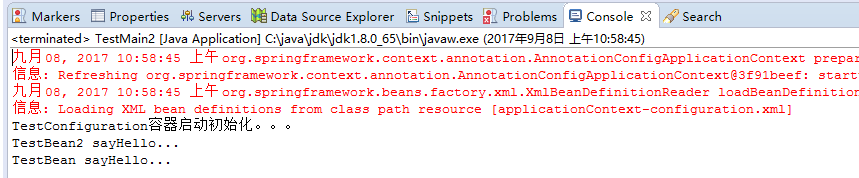
2.3、@configuration嵌套(嵌套的Configuration必须是静态类)
通过配置类嵌套的配置类,达到组合多个配置类的目的。但注意内部类必须是静态类。
上代码:
package com.dxz.demo.configuration3;

import org.springframework.stereotype.Component;

@Component

public class TestBean {

    private String username;

    private String url;

    private String password;

    public void sayHello() {

        System.out.println("TestBean sayHello...");

    }

    public String toString() {

        return "username:" + this.username + ",url:" + this.url + ",password:" + this.password;

    }

    public void start() {

        System.out.println("TestBean start");

    }

    public void cleanUp() {

        System.out.println("TestBean destory");

    }

}
package com.dxz.demo.configuration3;

public class DataSource {

    private String dbUser;

    private String dbPass;

    public String getDbUser() {

        return dbUser;

    }

    public void setDbUser(String dbUser) {

        this.dbUser = dbUser;

    }

    public String getDbPass() {

        return dbPass;

    }

    public void setDbPass(String dbPass) {

        this.dbPass = dbPass;

    }

    @Override

    public String toString() {

        return "DataSource [dbUser=" + dbUser + ", dbPass=" + dbPass + "]";

    }

}
配置类:
package com.dxz.demo.configuration3;

import org.springframework.context.annotation.Bean;

import org.springframework.context.annotation.ComponentScan;

import org.springframework.context.annotation.Configuration;

@Configuration

@ComponentScan(basePackages = "com.dxz.demo.configuration3")

public class TestConfiguration {

    public TestConfiguration() {

        System.out.println("TestConfiguration容器启动初始化。。。");

    }

    @Configuration

    static class DatabaseConfig {

        @Bean

        DataSource dataSource() {

            return new DataSource();

        }

    }

}
启动类:
package com.dxz.demo.configuration3;

import org.springframework.context.ApplicationContext;

import org.springframework.context.annotation.AnnotationConfigApplicationContext;

public class TestMain {

    public static void main(String[] args) {

        // @Configuration注解的spring容器加载方式,用AnnotationConfigApplicationContext替换ClassPathXmlApplicationContexts

        ApplicationContext context = new AnnotationConfigApplicationContext(TestConfiguration.class);

         //bean

        TestBean tb = (TestBean) context.getBean("testBean");

        tb.sayHello();

        DataSource ds = (DataSource) context.getBean("dataSource");

        System.out.println(ds);

    }

}
结果:
TestConfiguration容器启动初始化。。。

TestBean sayHello...

DataSource [dbUser=null, dbPass=null]
3、@EnableXXX注解
配合@Configuration使用,包括 @EnableAsync, @EnableScheduling, @EnableTransactionManagement, @EnableAspectJAutoProxy, @EnableWebMvc。
@EnableAspectJAutoProxy---《spring AOP 之:@Aspect注解》
@EnableScheduling--《Spring 3.1新特性之二:@Enable*注解的源码,spring源码分析之定时任务Scheduled注解》
4、@Profile逻辑组配置
5、使用外部变量
1、@PropertySource + Environment,通过@PropertySource注解将properties配置文件中的值存储到Spring的 Environment中,Environment接口提供方法去读取配置文件中的值,参数是properties文件中定义的key值。
2、@PropertySource(PropertySourcesPlaceholderConfigurer)+@Value
@Configuration的使用的更多相关文章
- PhpStorm和WAMP配置调试参数,问题描述Error. Interpreter is not specified or invalid. Press “Fix” to edit your project configuration.
PhpStorm和WAMP配置调试参数 问题描述: Error. Interpreter is not specified or invalid. Press “Fix” to edit your p ...
- Apache2.4:AH01630 client denied by server configuration
问题说明:Apache服务总共有4个,是为了防止单点故障和负载均衡,负载均衡控制由局方的F5提供. 访问的内容在NAS存储上,现象是直接访问每个apache的服务内容都是没有问题,但是从负载地址过来的 ...
- Fedora 22中的Locale and Keyboard Configuration
Introduction The system locale specifies the language settings of system services and user interface ...
- ABP源码分析四:Configuration
核心模块的配置 Configuration是ABP中设计比较巧妙的地方.其通过AbpStartupConfiguration,Castle的依赖注入,Dictionary对象和扩展方法很巧妙的实现了配 ...
- External Configuration Store Pattern 外部配置存储模式
Move configuration information out of the application deployment package to a centralized location. ...
- SCVMM中Clone虚拟机失败显示Unsupported Cluster Configuration状态
在SCVMM进行虚拟机的Clone,虽然失败了,但是Clone出虚拟机却显示在SCVMM控制台的虚拟机的列表中,并且状态是Unsupported Cluster Configuration.无法修复, ...
- commons configuration管理项目的配置文件
Commons Confifutation commons configuration可以很方便的访问配置文件和xml文件中的的内容.Commons Configuration 是为了提供对属性文件. ...
- Elasticsearch Configuration 中文版
##################### Elasticsearch Configuration Example ##################### # This file contains ...
- Spark 官方文档(4)——Configuration配置
Spark可以通过三种方式配置系统: 通过SparkConf对象, 或者Java系统属性配置Spark的应用参数 通过每个节点上的conf/spark-env.sh脚本为每台机器配置环境变量 通过lo ...
- spring configuration 注解
org.springframework.context.annotation @annotation.Target({ElementType.TYPE}) @annotation.Retention( ...
随机推荐
- spring jar包依赖
- WIN10下,JAVA安装及环境变量配置(cmd可以运行java,却不能运行javac)
1.安装JDK 选择安装目录 安装过程中会出现两次 安装提示 . 第一次是安装 jdk ,第二次是安装 jre .建议两个都安装在同一个java文件夹中的不同文件夹中.(不能都安装在java文件夹的根 ...
- 【题解】Luogu P2153 [SDOI2009]晨跑
原题传送门 一眼应该就能看出是费用流 因为每个交叉路口只能通过一次,所以我们进行拆点,连一条流量为1费用为0的边 再按照题目给的边(是单向边)建图 跑一下MCMF就行了 拆点很套路的~ #includ ...
- poj 3294 Life Forms - 后缀数组 - 二分答案
题目传送门 传送门I 传送门II 题目大意 给定$n$个串,询问所有出现在严格大于$\frac{n}{2}$个串的最长串.不存在输出'?' 用奇怪的字符把它们连接起来.然后求sa,hei,二分答案,按 ...
- 分类统计的controller和service
SpringMVC框架下的 部分代码: Controller控制器: @Resource ReviewTitleService reviewTitleService;//调用ReviewTitleSe ...
- Learning-Python【23】:面向对象三大特性
继承 封装 多态
- vivado 创建PL工程
参考来源 https://china.xilinx.com/video/hardware/i-and-o-planning-overview.html 前言 我Win10系统上的Xilinx Plat ...
- dom常用操作
创建节点:document.createElement(元素名), document.createTextNode(文本内容) 添加节点:parent.appendChild(newChild) 移除 ...
- fabric网络环境启动过程详解
这篇文章对fabric的网络环境启动过程进行讲解,也就是我们上节讲到的启动测试fabric网络环境时运行network_setup.sh这个文件的执行流程 fabric网络环境启动过程详解 上一节我们 ...
- Android Studio 使用本地gradle配置详解
由于国内墙的原因,我们的Gradle无法使用 但是我们可以通过去下载我们想要的Gradle版本 然后再AndoidStudio内去配置本地的版本 进而去实现了Gradle的配置 注意一: so我们按照 ...