
Using SQLite database in your Windows 10 apps
MVP可以在channel 9上传视频了,所以准备做个英文视频传上去分享给大家,本文做稿子。
Hello everyone,
As we all know, SQLite is a great and popular local database running on mobile devices. Consider of its powerful and useful features, lots of apps use SQLite database as the main way of application data storage, including Android and iOS apps. What's more, SQLite is a cross-platform database and also have windows version so that windows apps are easy to integrate with it. Today I will give a lesson about using SQLite in UWP project.
Install
Firstly, it's necessary for us to install SQLite for windows. you can download the binary install file here. Actually, you can alse download the source and build it by youself, if you like source more. After you finnished installation, you can find the sqlite extension in the refrence window. It will look like this:

And we need to add the VC++ 2015 Runtime refrence too.
Project Configuration
Secondly, we need to add a framework named SQLite.Net for using SQLite effectively. In other words, SQLite.Net libary will help us access sqlite database more esaily. It have some relese versions which you can find in NuGet, and two of them are most useful, including SQLite.Net-PCL and SQLite.Net.Async-PCL.
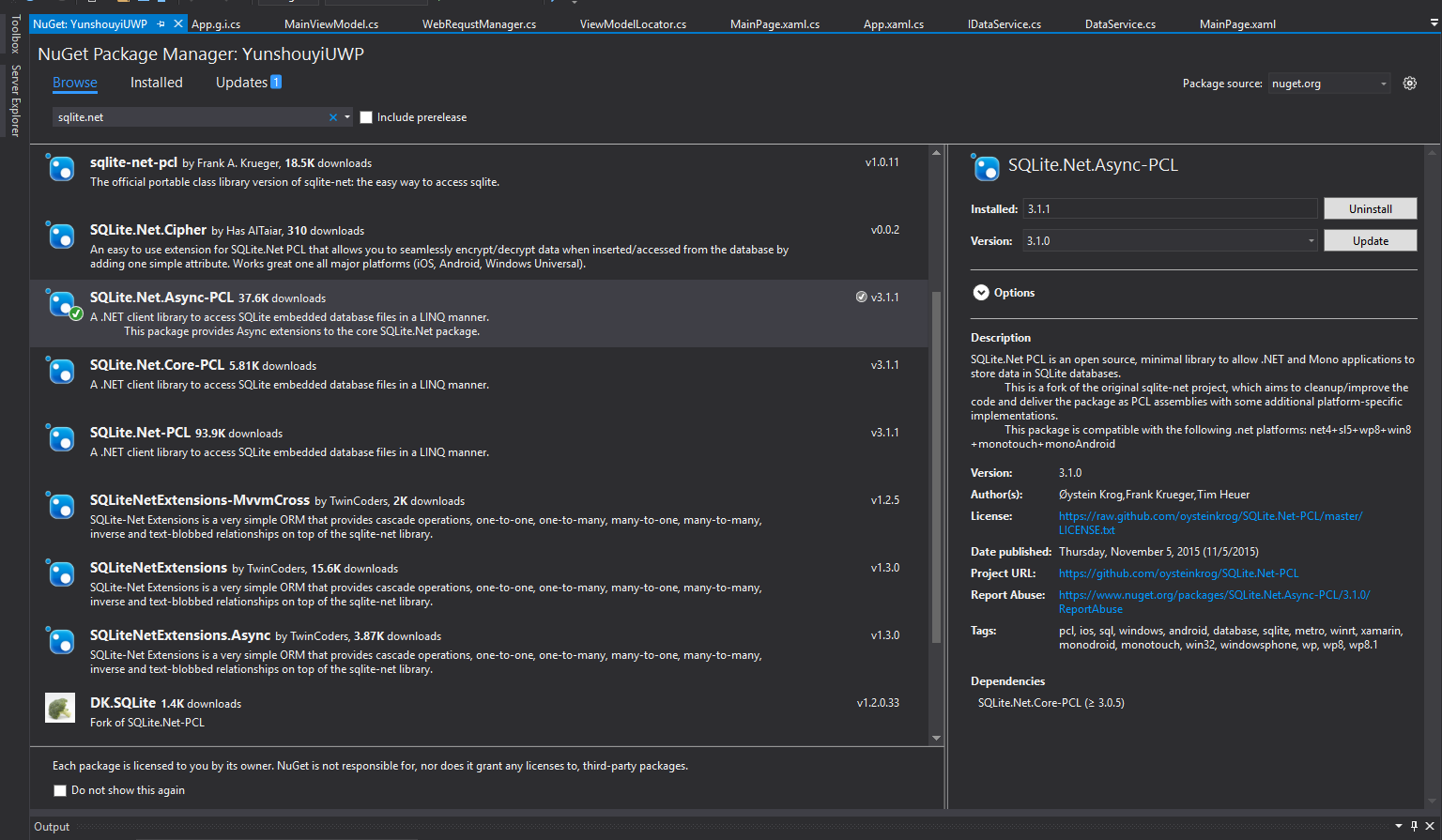
What's the defference between SQLite.Net-PCL and SQLite.Net.Async-PCL framework is that SQLite.Net.Async-PCL support asynchronous operations. Actually I like async-await more, so I will install SQLite.Net.Async-PCL framework. Once we finish configurations, we can write some code to use SQLite now.
SQLiteDBManager
Let's we have some interesting codes to begin using this amazing tool now. What's more, I will provide some example codes written by myself for you. The mainly code is used to manager local SQLite database file and access it more easily, so I named it SQLiteDBMnager.
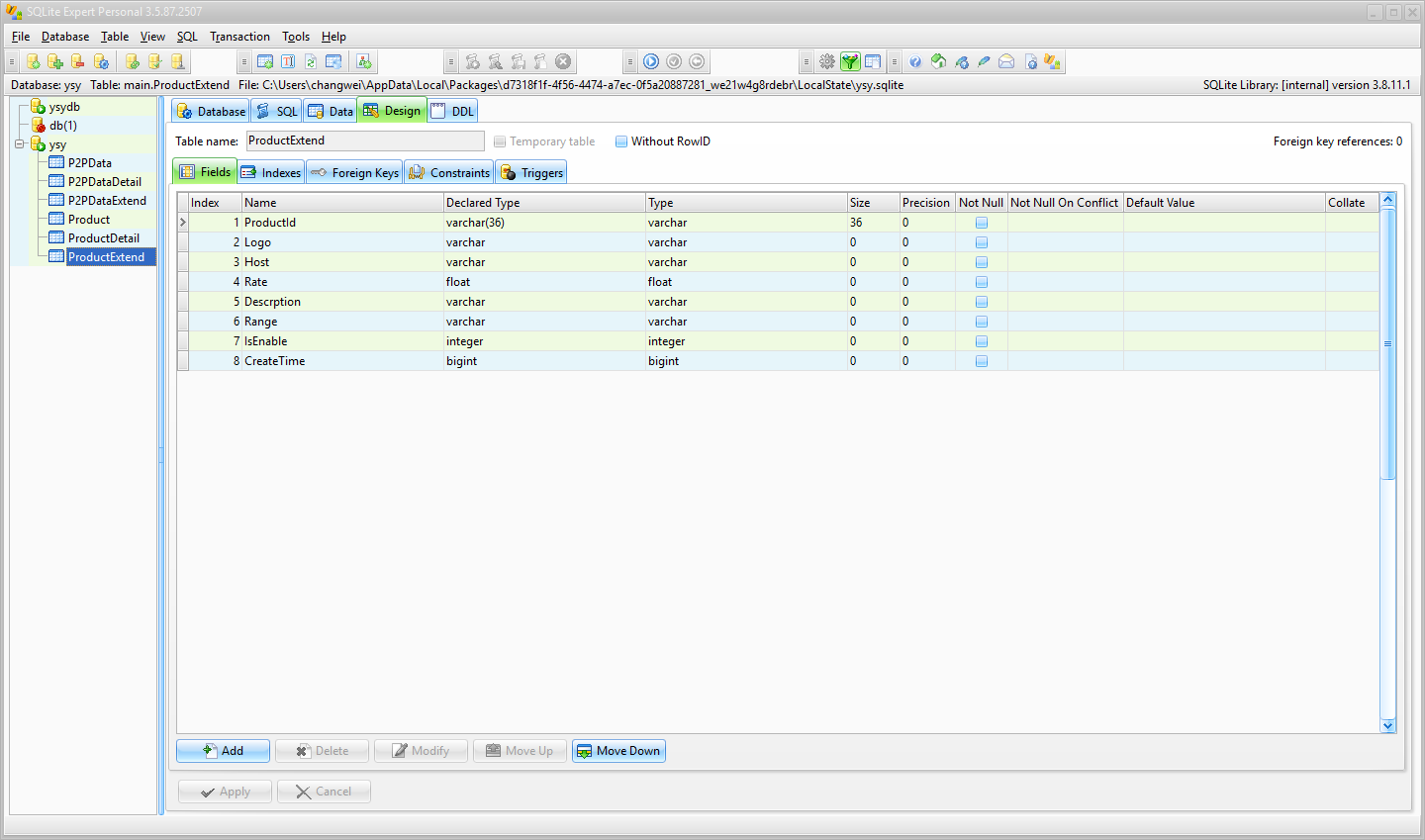
Before we access the data of database, we need import and manage the database file. In windows runtime framework we need to move or create database file in ApplicationData folder. And you can create a database file using SQLite Expert which is famous manage tool for SQLite database.
/// <summary>

        /// init db

        /// </summary>

        private static async void InitDBAsync()

        {

            try

            {

                var file = await ApplicationData.Current.LocalFolder.TryGetItemAsync("ysy.sqlite");

                if (file == null)

                {

                    var dbFile = await StorageFile.GetFileFromApplicationUriAsync(new Uri("ms-appx:///Data/ysy.sqlite"));

                    file = await dbFile.CopyAsync(ApplicationData.Current.LocalFolder);

                    var dbConnect = new SQLiteAsyncConnection(() => new SQLiteConnectionWithLock(new SQLite.Net.Platform.WinRT.SQLitePlatformWinRT(), new SQLiteConnectionString(file.Path, true)));

                    //create db tables

                    var result = await dbConnect.CreateTablesAsync(new Type[] { typeof(Product), typeof(P2PData), typeof(ProductDetail), typeof(P2PDataDetail), typeof(ProductExtend), typeof(P2PDataExtend) });

                    Debug.WriteLine(result);

                }

            }

            catch (Exception ex)

            {

                Debug.WriteLine(ex.Message);

            }

        }
After we initialize database, we need to access the data of database. Fortunately, SQLite.NET provides some method for us, but we still do some works to simplify codes.
/// <summary>

        /// get current DBConnection

        /// </summary>

        /// <returns></returns>

        public async Task<SQLiteAsyncConnection> GetDbConnectionAsync()

        {

            if (dbConnection == null)

            {

                var path = await GetDBPathAsync();

                dbConnection = new SQLiteAsyncConnection(() => new SQLiteConnectionWithLock(new SQLite.Net.Platform.WinRT.SQLitePlatformWinRT(), new SQLiteConnectionString(path, true)));

            }

            return dbConnection;

        }
Add/Delete/Modify/Find
/// <summary>

        /// insert a item

        /// </summary>

        /// <param name="item">item</param>

        /// <returns></returns>

        public async Task<int> InsertAsync(object item)

        {

            try

            {

                var dbConnect = await GetDbConnectionAsync();

                return await dbConnect.InsertOrReplaceAsync(item);

            }

            catch (Exception ex)

            {

                Debug.WriteLine(ex.Message);

                return -;

            }

        }

        /// <summary>

        /// insert lots of items

        /// </summary>

        /// <param name="items">items</param>

        /// <returns></returns>

        public async Task<int> InsertAsync(IEnumerable items)

        {

            try

            {

                var dbConnect = await GetDbConnectionAsync();

                return await dbConnect.InsertOrReplaceAllAsync(items);

            }

            catch (Exception ex)

            {

                Debug.WriteLine(ex.Message);

                return -;

            }

        }

        /// <summary>

        /// find a item in database

        /// </summary>

        /// <typeparam name="T">type of item</typeparam>

        /// <param name="pk">item</param>

        /// <returns></returns>

        public async Task<T> FindAsync<T>(T pk) where T : class

        {

            try

            {

                var dbConnect = await GetDbConnectionAsync();

                return await dbConnect.FindAsync<T>(pk);

            }

            catch (Exception ex)

            {

                Debug.WriteLine(ex.Message);

                return null;

            }

        }

        /// <summary>

        /// find a collection of items

        /// </summary>

        /// <typeparam name="T">type of item</typeparam>

        /// <param name="sql">sql command</param>

        /// <param name="parameters">sql command parameters</param>

        /// <returns></returns>

        public async Task<List<T>> FindAsync<T>(string sql, object[] parameters) where T : class

        {

            try

            {

                var dbConnect = await GetDbConnectionAsync();

                return await dbConnect.QueryAsync<T>(sql, parameters);

            }

            catch (Exception ex)

            {

                Debug.WriteLine(ex.Message);

                return null;

            }

        }

        /// <summary>

        /// update item in table

        /// </summary>

        /// <typeparam name="T">type of item</typeparam>

        /// <param name="item">item</param>

        /// <returns></returns>

        public async Task<int> UpdateAsync<T>(T item) where T : class

        {

            try

            {

                var dbConnect = await GetDbConnectionAsync();

                return await dbConnect.UpdateAsync(item);

            }

            catch (Exception ex)

            {

                Debug.WriteLine(ex.Message);

                return -;

            }

        }

        /// <summary>

        /// update lots of items in table

        /// </summary>

        /// <typeparam name="T">type of item</typeparam>

        /// <param name="items">items</param>

        /// <returns></returns>

        public async Task<int> UpdateAsync<T>(IEnumerable items) where T : class

        {

            try

            {

                var dbConnect = await GetDbConnectionAsync();

                return await dbConnect.UpdateAllAsync(items);

            }

            catch (Exception ex)

            {

                Debug.WriteLine(ex.Message);

                return -;

            }

        }

        /// <summary>

        /// delete data from table

        /// </summary>

        /// <typeparam name="T">type of item</typeparam>

        /// <param name="item">item</param>

        /// <returns></returns>

        public async Task<int> DeleteAsync<T>(T item) where T : class

        {

            try

            {

                var dbConnect = await GetDbConnectionAsync();

                return await dbConnect.DeleteAsync<T>(item);

            }

            catch (Exception ex)

            {

                Debug.WriteLine(ex.Message);

                return -;

            }

        }

        /// <summary>

        /// delete all items in table

        /// </summary>

        /// <param name="t">type of item</param>

        /// <returns></returns>

        public async Task<int> DeleteAsync(Type t)

        {

            try

            {

                var dbConnect = await GetDbConnectionAsync();

                return await dbConnect.DeleteAllAsync(t);

            }

            catch (Exception ex)

            {

                Debug.WriteLine(ex.Message);

                return -;

            }

        }
Last but not least, we can access the database easily. For example,
 /// <summary>

        /// get product tabele data

        /// </summary>

        /// <returns></returns>

        private async Task<List<Fund>> GetFundDataFromDataBaseAsync()

        {

            var manager = SQLiteDBManager.Instance();

            var funds =new List<Fund>();

            var products = await manager.FindAsync<Product>("select * from Product", null);

            products.ForEach(p => {

                funds.Add(new Fund { Id=p.ProductId.ToString(), Host=p.Company, Image=p.Icon, Name=p.Name, Platform=p.FoundationName, QRNH=p.QRNH, WFSY=p.WFSY });

            });

            if (funds != null && funds.Count > )

            {

                return funds;

            }

            return null;

        }
You can get entire file here.
Conclusion
SQLite database is a good choice as application data storage container, and more excellent that ApplicationSettings and Xml/Json data files in many ways, I think.
Using SQLite database in your Windows 10 apps的更多相关文章
- Always run a program in administrator mode in Windows 10
From: https://www.cnet.com/how-to/always-run-a-program-in-administrator-mode-in-windows-10/ If you'r ...
- SQLite.Net-PCLUSING SQLITE IN WINDOWS 10 UNIVERSAL APPS
USING SQLITE IN WINDOWS 10 UNIVERSAL APPS 1.下载SQLite VSIX package并安装 http://sqlite.org/download.html ...
- SQLite in Windows Store Apps
Using SQLite in Windows Store Apps : https://channel9.msdn.com/Shows/Visual-Studio-Toolbox/Using-SQL ...
- Build better apps: Windows 10 by 10 development series
http://blogs.windows.com/buildingapps/2015/08/05/build-better-apps-windows-10-by-10-development-seri ...
- UWP深入学习六:Build better apps: Windows 10 by 10 development series
Promotion in the Windows Store In this article, I walk through how to Give your Store listing a mak ...
- New Windows 10 SDK - Multi-instance UWP apps
概述 前面一篇 About Windows 10 SDK Preview Build 17110 中,我们简单介绍了 Multi-instance UWP Apps,今天结合开发过程详细讲解一下. 在 ...
- Building Apps for Windows 10 on LattePanda–Jump Start
1.引言 目前来看,LattePanda应该是最小的运行Full Windows 10系统的开发板了(注意,不是Windows 10 for Mobile,也不是Windows 10 IoT系列,而是 ...
- DB 查询分析器 6.04 在 Windows 10 上的安装与运行展示
DB查询分析器 6.04 在 Windows 10 上的安装与运行展示 中国本土程序员马根峰(CSDN专访马根峰:海量数据处理与分析大师的中国本土程序员 http://www.csdn.net/art ...
- 【本人译作推荐】Windows 8应用开发:C#和XAML卷(原名:Building Windows 8 Apps with C# and XAML)
[图书推荐] 译名:Windows 8应用开发:C#和XAML卷 原名:Building Windows 8 Apps with C# and XAML 编辑推荐 国内第一本使用XAML与C#语言 ...
随机推荐
- OkHttp 同步异步操作
OkHttp是一个Java和Android的HTTP和HTTP/2的客户端,负责发送HTTP请求以及接受HTTP响应. 一.使用OkHttp OkHttp发送请求后,可以通过同步或异步地方式获取响应. ...
- 动画之一:视图动画 View Animation
原文:https://blog.csdn.net/pzm1993/article/details/77167049 view动画支持4中动画效果,分别是: 透明度动画(AlphaAnimation) ...
- 2018 宁夏省赛 F. Moving On
题目链接 https://nanti.jisuanke.com/t/28406 大意是 有n(<=200)个城市,城市间有路(Input给了邻接矩阵) 每个城市有一个危险值,然后是q(2e4) ...
- Vue框架H5商城类项目商品详情点击返回弹出推荐商品弹窗的实现方案
需求场景: 非推荐商品详情页返回的时候弹出弹窗推荐商品,点击弹窗按钮可以直接访问推荐商品: 只有直接进入商品详情页返回才会弹出推荐商品弹窗: 每个用户访问只能弹一次(除非清除缓存). 需求分析: 1. ...
- Python练习-高阶函数-2018.12.03
1.函数式编程的概念 在计算机的层次上,CPU执行的是加减乘除的指令代码,以及各种条件判断和跳转指令,所以,汇编语言是最贴近计算机的语言. 而计算则指数学意义上的计算,越是抽象的计算,离计算机硬件越远 ...
- Py西游攻关之RabbitMQ、Memcache、Redis
Py西游攻关之RabbitMQ.Memcache.Redis RabbitMQ 解释RabbitMQ,就不得不提到AMQP(Advanced Message Queuing Protocol)协议 ...
- PHP开发——数组
数组的概念 l 数组是一组数的集合.如:$arr = array(1,2,3,4,5,6) l 标量数据类型是一个值的容器,而数组就是多个值的容器. 数组的分类 l 枚举数组:数组元素的下标(索 ...
- java30
1.类的组合关系 当一个类中的字段是一个类时,就称类依赖于字段这个类,也称这两个类为组合关系 2.快捷键:ctrl+shift+c,多行的// ctrl+shift+/,多行的/-----/ 3.类的 ...
- ABP框架系列之十:(Application-Services-应用服务)
Application Services are used to expose domain logic to the presentation layer. An Application Servi ...
- ABP框架系列之五十:(Swagger-UI-集成)
Introduction From it's web site: "....with a Swagger-enabled API, you get interactive documenta ...