
Prometheus配置文件
在prometheus监控系统,prometheus的职责是采集,查询和存储和推送报警到alertmanager。本文主要介绍下prometheus的配置文件。
全局配置文件简介
默认配置文件
按 Ctrl+C 复制代码

按 Ctrl+C 复制代码
- global: 此片段指定的是prometheus的全局配置, 比如采集间隔,抓取超时时间等。
- rule_files: 此片段指定报警规则文件, prometheus根据这些规则信息,会推送报警信息到alertmanager中。
- scrape_configs: 此片段指定抓取配置,prometheus的数据采集通过此片段配置。
- alerting: 此片段指定报警配置, 这里主要是指定prometheus将报警规则推送到指定的alertmanager实例地址。
- remote_write: 指定后端的存储的写入api地址。
- remote_read: 指定后端的存储的读取api地址。
global片段主要参数

  # How frequently to scrape targets by default.

  [ scrape_interval: <duration> | default = 1m ]      # 抓取间隔

  # How long until a scrape request times out.

  [ scrape_timeout: <duration> | default = 10s ]     # 抓取超时时间

  # How frequently to evaluate rules.

  [ evaluation_interval: <duration> | default = 1m ]   # 评估规则间隔

  # The labels to add to any time series or alerts when communicating with

  # external systems (federation, remote storage, Alertmanager).

  external_labels:                                                  # 外部一些标签设置

    [ <labelname>: <labelvalue> ... ]
scrapy_config片段主要参数
一个scrape_config 片段指定一组目标和参数, 目标就是实例,指定采集的端点, 参数描述如何采集这些实例, 主要参数如下
- scrape_interval: 抓取间隔,默认继承global值。
- scrape_timeout: 抓取超时时间,默认继承global值。
- metric_path: 抓取路径, 默认是/metrics
- scheme: 指定采集使用的协议,http或者https。
- params: 指定url参数。
- basic_auth: 指定认证信息。
- *_sd_configs: 指定服务发现配置
- static_configs: 静态指定服务job。
- relabel_config: relabel设置。
static_configs样例
scrape_configs:

  # The job name is added as a label `job=<job_name>` to any timeseries scraped from this config.

  - job_name: 'prometheus'

    # metrics_path defaults to '/metrics'

    # scheme defaults to 'http'.

    static_configs:

    - targets: ['localhost:9090']

  - job_name: "node"

    static_configs:

    - targets:

      - "192.168.100.10:20001"
      - "192.168.100.11:20001
      - "192.168.100.12:20001"
file_sd_configs样例
scrape_configs:

  # The job name is added as a label `job=<job_name>` to any timeseries scraped from this config.

  - job_name: 'prometheus'

    # metrics_path defaults to '/metrics'

    # scheme defaults to 'http'.

    static_configs:

    - targets: ['localhost:9090']

  - job_name: "node"

    file_sd_configs:

    - refresh_interval: 1m

      files:

      - "/usr/local/prometheus/prometheus/conf/node*.yml"
 # 独立文件配置如下 cat conf/node-dis.conf

- targets:
  - "192.168.100.10:20001"
  - "192.168.100.11:20001"
  - "192.168.100.12:20001"

或者可以这样配置 [root@node00 conf]# cat node-dis.yml

- targets:
  - "192.168.100.10:20001"
  labels:
    hostname: node00
- targets:
  - "192.168.100.11:20001"
  labels:
    hostname: node01
- targets:
  - "192.168.100.12:20001"
  labels:
    hostname: node02
通过file_fd_files 配置后我们可以在不重启prometheus的前提下, 修改对应的采集文件(node_dis.yml), 在特定的时间内(refresh_interval),prometheus会完成配置信息的载入工作。
consul_sd_file样例
由于consul的配置需要有consul的服务提供, 这里简单部署下consul的服务。
# 进入下载目录
[root@node00 prometheus]# cd /usr/src/
# 下载

[root@node00 src]# wget https://releases.hashicorp.com/consul/1.6.1/consul_1.6.1_linux_amd64.zip
# 解压

[root@node00 src]# unzip consul_1.6.1_linux_amd64.zip

Archive:  consul_1.6.1_linux_amd64.zip

  inflating: consul
# 查看

[root@node00 src]# ls

consul  consul_1.6.1_linux_amd64.zip  debug  kernels  node_exporter-0.18.1.linux-amd64.tar.gz  prometheus-2.12.0.linux-amd64.tar.gz
# 查看文件类型

[root@node00 src]# file consul

consul: ELF 64-bit LSB executable, x86-64, version 1 (SYSV), statically linked, not stripped
# 防止到系统bin目录

[root@node00 src]# mv consul /usr/local/bin/
# 确保环境变量包含

[root@node00 src]# echo $PATH

/usr/local/sbin:/usr/local/bin:/usr/sbin:/usr/bin:/root/bin


# 运行测试

[root@node00 consul.d]# consul agent -dev
# 测试获取成员
[root@node00 ~]# consul members

# 创建配置目录

[root@node00 ~]#mkdir /etc/consul.d

[root@node00 consul.d]# cat prometheus-node.json

{
  "addresses": {
                        "http": "0.0.0.0",
                        "https": "0.0.0.0"
           },
  "services": [{
                "name": "prometheus-node",
                "tags": ["prometheus","node"],
                "port": 20001
             }]

}
# 指定配置文件运行
consul  agent -dev -config-dir=/etc/consul.d
打开web管理界面 192.169.100.10:8500,查看相应的服务信息。

上面我们可以看到有2个service , 其中prometheus-node是我们定义的service。
和prometheus集成样例:
scrape_configs:
  # The job name is added as a label `job=<job_name>` to any timeseries scraped from this config.
  - job_name: 'prometheus'

    # metrics_path defaults to '/metrics'
    # scheme defaults to 'http'.
    static_configs:
    - targets: ['localhost:9090']

  - job_name: "node"
    consul_sd_configs:
    - server: localhost:8500
      services:
      - prometheus-node
    #  tags:
    #  - prometheus
    #  - node
    #- refresh_interval: 1m
  - job_name: 'node_exporter'

    consul_sd_configs:

      - server: 'consul_ip:8500'

        services: ['node_exporter']
# 匹配service关键字

  - job_name: 'service'

    consul_sd_configs:

    - server: 'consul_ip:8500'

      services: []

    relabel_configs:

    - source_labels: [__meta_consul_tags]

      regex: .*service.*

      action: keep
在prometheus的target界面上我们看到服务注册发现的结果。
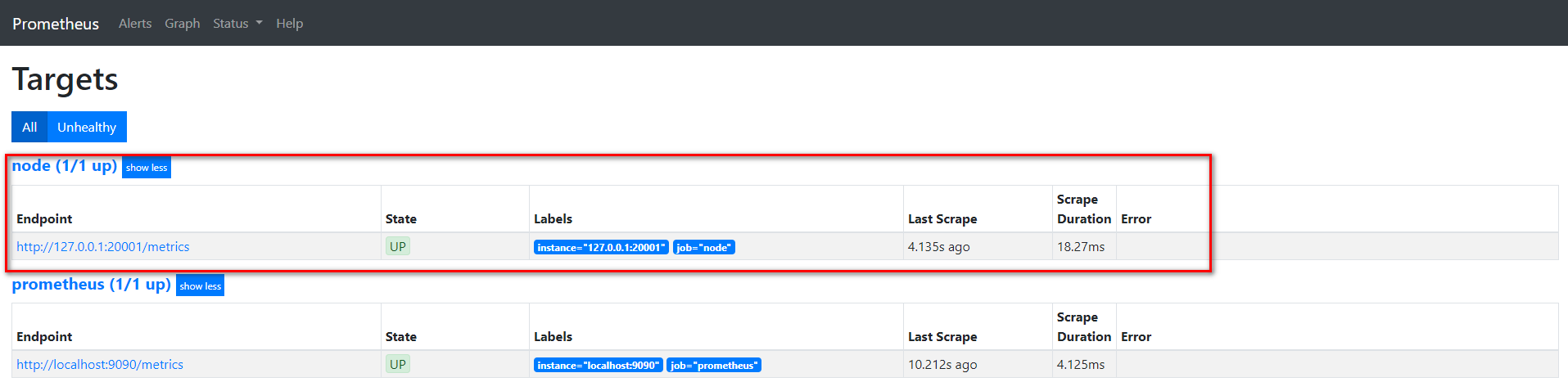
我们通过api接口给该service添加一个节点, 看看是否可以同步过来。
[root@node00 ~]# curl -XPUT -d@node01.json  127.0.0.1:8500/v1/catalog/register
true
[root@node00 ~]# cat node01.json
{
        "id":"0cc931ea-9a3a-a6ff-3ef5-e0c99371d77d",
        "Node": "node01",
        "Address": "192.168.100.11",
        "Service":
                {
                        "Port": 20001,
                        "ID": "prometheus-node",
                        "Service": "prometheus-node"
                }
}
在consul和prometheus中查看


可以发现通过向consul中特定服务加入节点, 就可以在prometheus动态变动采集的实例地址。
Prometheus配置文件的更多相关文章
- Prometheus 配置文件详解
Prometheus 配置文件详解 官方文档:https://prometheus.io/docs/prometheus/latest/configuration/configuration/ 指标说 ...
- Prometheus 配置文件中 metric_relabel_configs 配置--转载
Prometheus 配置文件中 metric_relabel_configs 配置 参考1:https://www.baidu.com/link?url=YfpBgnD1RoEthqXOL3Lgny ...
- prometheus学习系列五: Prometheus配置文件
在prometheus监控系统,prometheus的职责是采集,查询和存储和推送报警到alertmanager.本文主要介绍下prometheus的配置文件. 全局配置文件简介 默认配置文件 [ro ...
- Kubernetes集群部署史上最详细(二)Prometheus监控Kubernetes集群
使用Prometheus监控Kubernetes集群 监控方面Grafana采用YUM安装通过服务形式运行,部署在Master上,而Prometheus则通过POD运行,Grafana通过使用Prom ...
- prometheus — 基于文件的服务发现
基于文件的服务发现方式不需要依赖其他平台与第三方服务,用户只需将要新的target信息以yaml或json文件格式添加到target文件中 ,prometheus会定期从指定文件中读取target信息 ...
- prometheus监控示例
prometheus架构图 prometheus 各组件介绍 Prometheus Server: 使用pull方式采集监控数据,在该组件上配置监控数据的采集和告警规则. Client Library ...
- Prometheus+AlertManager实现邮件报警
AlertManager下载 https://prometheus.io/download/ 解压 添加配置文件test.yml,配置收发邮件邮箱 参考配置: global: smtp_smartho ...
- Prometheus 监控进程
Process-exporter process-exporter可以用来检测所选进程的存活状态 下载process-exporter 下载地址:https://github.com/ncabatof ...
- Prometheus监控学习笔记之360基于Prometheus的在线服务监控实践
0x00 初衷 最近参与的几个项目,无一例外对监控都有极强的要求,需要对项目中各组件进行详细监控,如服务端API的请求次数.响应时间.到达率.接口错误率.分布式存储中的集群IOPS.节点在线情况.偏移 ...
随机推荐
- 如何把前端用ajax发过来的图片传到node上,并且用node保存在oss图片服务器上?
一:只上传一张图片 1.1:node需要安装的插件,先安好 npm install ali-oss uuid co --save A.ali-oss 用途:aliyun OSS(Object Stor ...
- img中alt和title属性的区别
在图像标签img中,除了常用的宽度width和高度height属性之外,还有两个比较重要并且也会用到的属性,就是alt和title,这都是用来显示图片内容的具体信息的,但是这两个属性也有不同的地方.a ...
- H5打开app指定页面(H5+app项目)
H5+app项目,在HBuilderX中设置 详情参考官方 https://ask.dcloud.net.cn/article/64 给h5+app设置scheme值,作用:在其它app和h5页面中启 ...
- Selenium文件上传
转自:https://www.cnblogs.com/miaojjblog/p/9679915.html Web上本地上传图片,弹出的框Selenium是无法识别的,也就是说,selenium本身没有 ...
- mysql order by基于时间的盲注
order by后面的注入,一般先尝试报错注入,无报错的时候可以通过rand(ture)和rand(false)来进行bool型盲注,但是今天遇到完全没有数据回显的(也就是数据库中没有数据)情况,这就 ...
- python网络爬虫入门(二)
刚去看了一下,18年2月份写了第一篇关于爬虫的文章(仅仅介绍了使用requests库去获取HTML代码),一年多之后看来很稚嫩也没有多少参考的意义,但没想着要去修改它,留着也是一个回忆吧.至少证明着我 ...
- 那些年伴我一起成长的SAP装备
今天这篇文章无关技术,我们来聊聊SAP装备,即打上了SAP logo的那些物品. 但凡在SAP圈子工作过一段时间的从业者们,手上或多或少都拥有一些此类装备.Jerry当然也不例外,这些装备无论物品本身 ...
- UML类图的几种关系总结
本文摘自:UML类图关系总结 在UML类图中,常见的有以下几种关系: 泛化(Generalization), 实现(Realization),关联(Association),聚合(Aggregati ...
- Centos 端口被占用,kill被占用的进程
1.yum install lsof 2.输入netstat -tln,查看系统当前所有被占用端口 3.根据端口查询进程,输入lsof -i :9555,切记不要忘了添加冒号 4. 既然知道进程号了, ...
- Host is not allowed to connect to this MySQL server
解决方法: [root@GYQ-Prod-Zabbix ~]# mysql -u root -p Enter password: Welcome to the MariaDB monitor. Com ...