
HTML / CSS – Email Marketing HTML Template
前言
虽然现在的 Email Client 有在进步, 但是比起 browser 还是差太远了. 假如你用 HTML5 + CSS3 的方式去写 Email Template 的话是不行的.
这篇特地学习一下如何写好 Email Marketing HTML Template.
参考
Youtube – The RIGHT WAY to Build HTML Email Templates 2022
Youtube – HTML Email Template Built the RIGHT WAY - 2022! (主要参考)
HTML and CSS in Emails: What Works in 2022?
Email Client Testing Explained (一些 checker 确保写的没有错)
Mailtrap HTML Email Checker (我在用的 checker)
概念
Email Client 有超级无敌多的 CSS 是不支持的, 而且即便它支持, 也可能需要 follow 一些特定条件.
所以一个好的思路是, 只要你不知道它能不能用, 那就是不能用. 只用那些教程里面教的方法去做就好了.
给几个例子, 感受一下它有多糟糕:
1. 不要用 div, 全部用 table.
2. 不要用 marigin, 用 padding, 而且只用在特定 element 上用, 比如 td, span 之类的.
3. 只用原始的 font family 比如 serif, san-serif
4. 可以用 attribute 实现就不要用 style, 比如 table width="100%"
5. 只能用 inline style
DOCTYPE, html, meta
DOCTYPE
我们写网页的 DOCTYPE 是这样的
<!DOCTYPE html>
但在 email client, 这个是不 ok 的.
参考: Which Doctype Should I Use in HTML Email?
要用 XHTML 1.0 Transitional doctype
<!DOCTYPE html PUBLIC "-//W3C//DTD XHTML 1.0 Transitional//EN" "http://www.w3.org/TR/xhtml1/DTD/xhtml1-transitional.dtd">
html
<html xmlns="http://www.w3.org/1999/xhtml">
meta
<meta http-equiv="content-type" content="text/html; charset=UTF-8">
提醒, IE=edge 和 viewport 和平常的网页是一样的
<meta http-equiv="X-UA-Compatible" content="IE=edge" />

<meta name="viewport" content="width=device-width, initial-scale=1.0" />
Standard CSS Reset
body {

  margin: 0;

}

table {

  border-spacing: 0;

}

td {

  padding: 0;

}

img {

  border: 0;

}
注: 上面写的是 CSS Style 而不是 inline style, 那是因为我用 Gulp 打包. 最终它会变成 inline style 的. 参考: Gulp for inline style email template
大体结构
写网站一般上的结构类似下面这样
<body>

  <header></header>

  <main>

    <section>

      <div class="container grid">

        <div class="left-column"></div>

        <div class="right-column"></div>

      </div>

    </section>

  </main>

  <footer></footer>

</body>
container 通常会有 max-width, margin-inline: auto (for 居中), 然后 column 就用 grid 1fr, 1fr 这样搞布局.
而 Email Client 差很多...
<body>

  <center> <!--main wrapper-->

    <table> <!--main-->

      <tr><td></td></tr> <!--section / header-->

      <tr> <!--section -->

        <td>

          <table></table> <!-- 下面会讲 -->

        </td>

      </tr>

      <tr><td></td></tr> <!--section -->

      <tr><td></td></tr> <!--section / footer -->

    </table>

  </center>

</body>
1. 没有 div, 基本上全部都是 table > tr > td (经常会出现只有 1 个 tr 1 个 td 但依然得写整个 table 结构, 相当繁琐)
2. <center> 会把里面的 table 居中. 相等于 table margin-inline: auto. (Email Client 是无法写 margin 的, 要做 spacing 靠 padding)
3. wrapper 负责整个 body 的 background-color
4. main 是所以内容的 container, 通常 max-width: 600px
5. main 里面就是每一个 "section" 了, 里面再开一个 table for 内容
6. 提醒: table width 默认是 hug content 哦, 通常需要 set 成 100% 如果要 td 平均的话 table-layout: fixed
接着 section 里的 table 长这样
<table class="two-column">

  <tr>

    <td>

      <table class="column">

        <tr>

          <td>

            <!-- 内容 -->

              <h1></h1>

              <p></p>

          </td>

        </tr>

      </table>

      <table class="column">

        <tr>

          <td>

            <!-- 内容 -->

            <a href=""><img src="" alt=""></a>

            <a href=""><img src="" alt=""></a>

          </td>

        </tr>

      </table>

    </td>

  </tr>

</table>
看你需要多少 column, 就开多少 table
以上就是大体的结构. 概念就是 nested table 很多.
如何做 RWD & Spacing & Alignment
用 padding 做 spacing
把 table.column 变成 display: inline-block 做 RWD
text-align, verical-align 以外. 如果想居中可以靠 padding 推. (因为大部分 dimension 都是写死的, 要居中可以硬硬算出来)
看 Youtube – HTML Email Template Built the RIGHT WAY - 2022! 就能体会它怎样做 RWD, Spacing, Alignment 了.
可以用的 CSS
width : px, %
max-width
padding (apply to td), 支持 shorthand
background-color: rgba, hex
color
box-shadow
font-size
display
不可用 CSS
text-align (用 td attribute align 代替)
vertical-align (用 td attribute valigh 代替)
white-space: preline (用 <br> 代替)
可以用的 Attribute
td height, align, valign
img width
table width
CSS – 冷知识 – font-size: 0 clear anchor spacing between
Mailtrap HTML Email Checker
很好的工具. 可以检查我们写的 HTML 对不对. Free version 有使用 limit. 但基本够用
Sign in 好了之后去 Control Panel 拿 username password
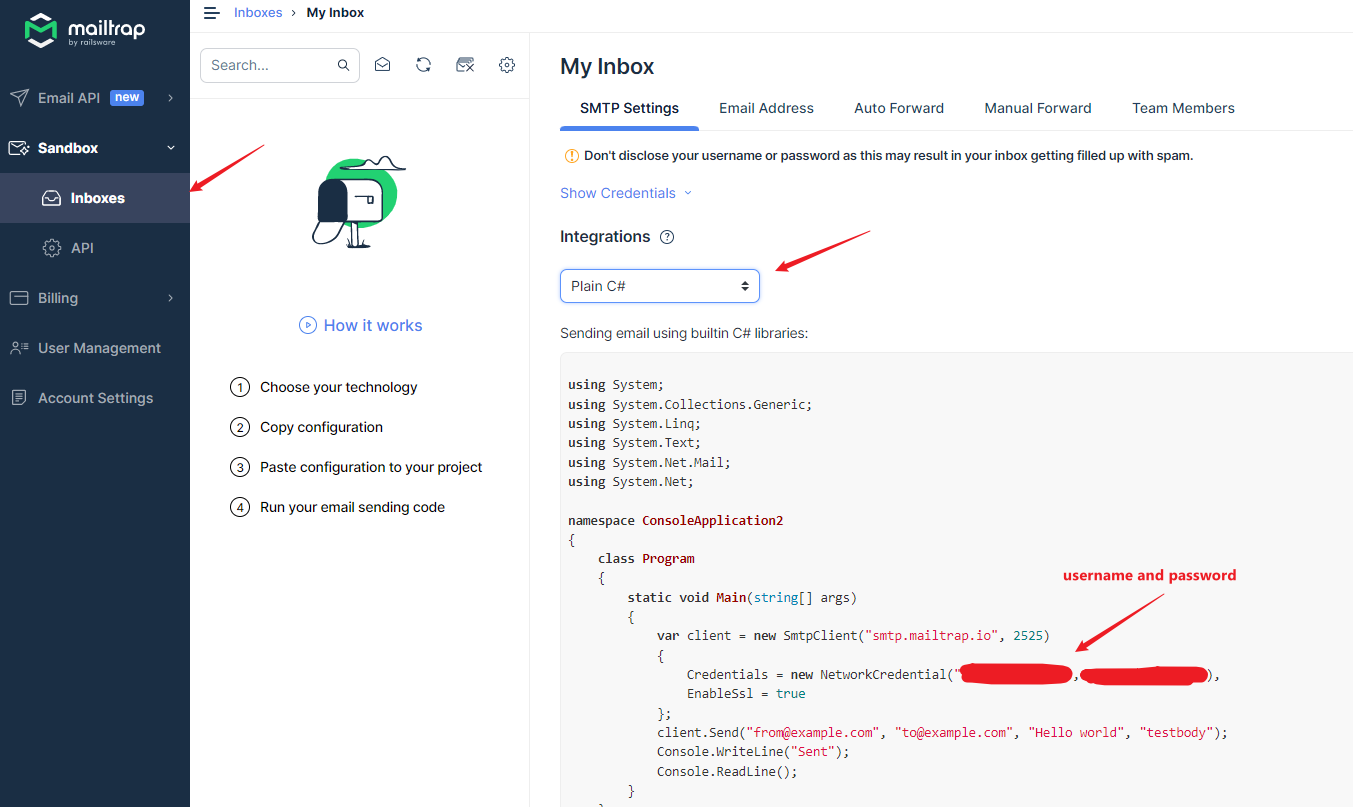
下面是 MailKit SMTP Client 演示代码


var username = "abc";

var password = "xyz";

var htmlFile = @"C:\path\email-template.html";

using var client = new SmtpClient();

await client.ConnectAsync(

    host: "smtp.mailtrap.io",

    port: 2525,

    options: MailKit.Security.SecureSocketOptions.StartTls

);

await client.AuthenticateAsync(username, password);

var message = new MimeMessage();

message.From.Add(new MailboxAddress("", "from@example.com"));

message.To.Add(new MailboxAddress("", "to@example.com"));

var builder = new BodyBuilder

{

    HtmlBody = await System.IO.File.ReadAllTextAsync(htmlFile, System.Text.Encoding.UTF8),

    TextBody = "Test Email Only"

};

message.Subject = "Hello world";

message.Body = builder.ToMessageBody();

await client.SendAsync(message);

await client.DisconnectAsync(quit: true);
发送之后, 就可以到 inbox 查看了
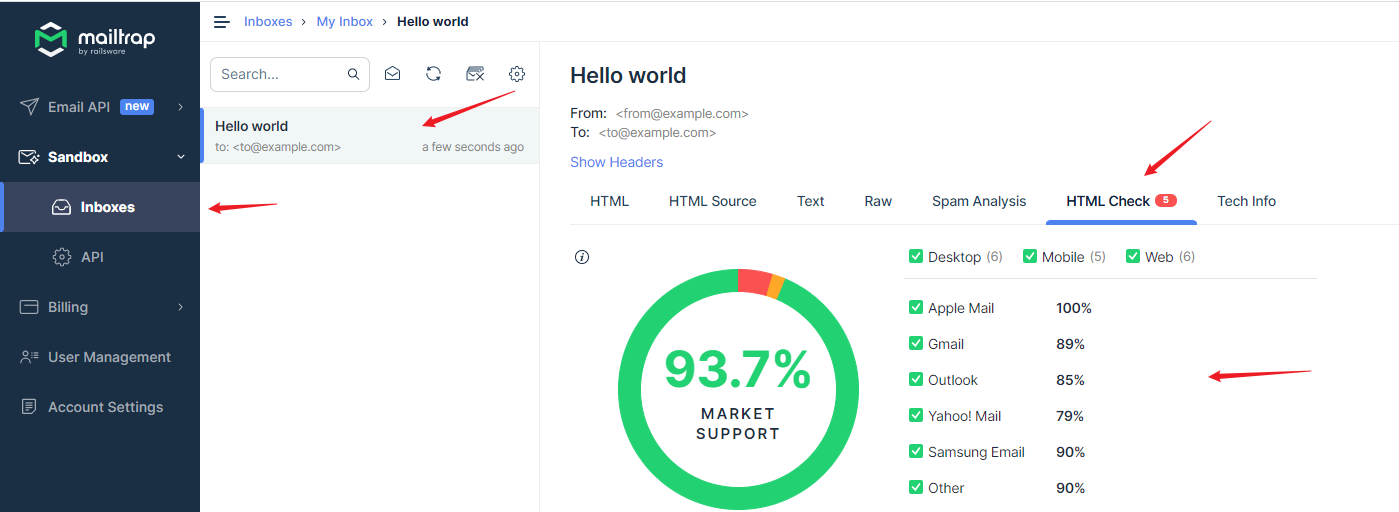
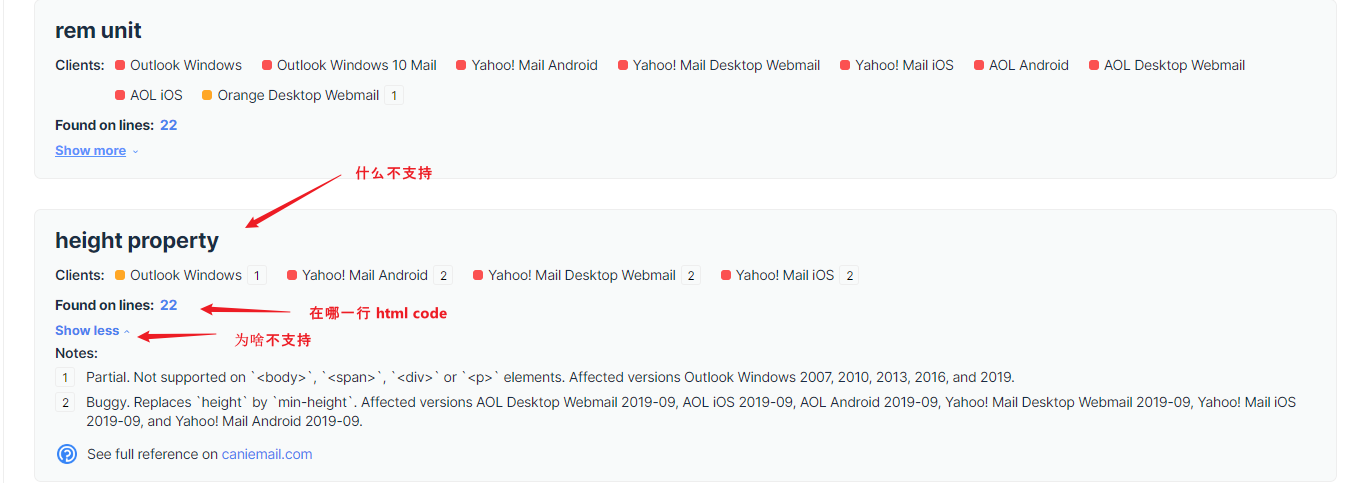
它下面会逐个列出有问题的. 红色是不支持, 黄色是 partial 部分支持
总结
我还没有机会真的做一个 Marketing Email. 目前只是用来做 forgot password 这类 internal 自己用的.
所以 design 再丑也无所谓. 以后做了美美的在来完整这篇.
HTML / CSS – Email Marketing HTML Template的更多相关文章
- html & email template
html & email template inline style build tools https://templates.mailchimp.com/getting-started/h ...
- [TypeStyle] Generate static css + html files using TypeStyle
You can easily use TypeStyle to build static html files with encapsulated CSS. You can use this patt ...
- Marketing with Microsoft Dynamics CRM IDEA CONFERENCE
Object:Marketing with Microsoft Dynamics CRM IDEA CONFERENCE 24 SEPTEMBER 2015 | BROADCAST ONLINE ...
- How to Verify Email Address
http://www.ruanyifeng.com/blog/2017/06/smtp-protocol.html 如何验证 Email 地址:SMTP 协议入门教程 https://en.wiki ...
- webpack4 单独抽离打包 css 的新实现
webpack4 单独抽离打包 css 的新实现 前言 之前我们使用的打包 css 无非两种方式:① 将 css 代码打包进 入口 js 文件中:② 使用第三方插件(extract-text-webp ...
- 四、Vue过渡与动画、过渡css类名、自定义指定、过滤器
一.过渡 动画 1.1简单的过渡动画使用 parent.vue [0]定义一个待显示的数据 [1]定义一个显示隐藏flag [2]使用动画过滤标签,name用来连接style样式:v-show用来控制 ...
- css 实现输入效果
<template> <h1>Pure CSS Typing animation.</h1> </template> <script> ...
- git全局配置
使用git的童鞋都知道,git是非常好的版本管理工具,工具再好要想用的得心应手还是要下凡功夫的,比如可以通过对git的全局配置文件.gitconfig进行适当的配置,可以在日常项目开发中节省很多的时间 ...
- discuz默认模板文件结构详解-模板文件夹介绍
| — template — default 系统内置风格模板(默认风格)| — template — default – discuz_style_default.xml 风格安装文件,可用 ...
- 02: vue.js常用指令
目录:Vue其他篇 01: vue.js安装 02: vue.js常用指令 目录: 1.1 vuejs简介 1.2 选择器:根据id.class等查找 1.3 静态绑定数据 data 1.4 插值 { ...
随机推荐
- 如何在 Vue 项目中优雅地使用图标
1. 字体图标与矢量图标 目前主要有两种图标类型:字体图标和矢量图标. 字体图标是在网页打开时,下载一整个图标库,通常可以通过特定标签例如 <i> 来使用,优点是方便地实现文字混排,缺点是 ...
- Flink 内存配置学习总结
设置进程内存(Process Memory) Apache Flink通过严格控制其各种组件的内存使用,在JVM之上提供高效的工作负载. 配置总内存(Total Memory) Flink JVM进程 ...
- 🚀RabbitMQ+redis+Redisson分布式锁+seata实现订单服务
引言 订单服务涉及许多方面,分布式事务,分布式锁,例如订单超时未支付要取消订单,订单如何防止重复提交,如何防止超卖.这里都会使用到. 开启分布式事务可以保证跨多个服务的数据操作的一致性和完整性, 使用 ...
- jwt redis,微信登陆知识复习 uniapp 请求封装,统一异常处理 相关, HutoolDemo工具介绍)
第三节 后台布局搭建,代码可以人工智能来写,但是环境初步搭建需要我们先建起来,所以以下记录快带搭建的过程, 思路: 后台首页的搭建 第一 用到了element--UI 自带的页面布局组件,它就 ...
- 免费使用TasteWP一键搭建线上临时WordPress网站
虽然用宝塔面板或者1Panel面板可以非常快速的搭建一个WordPress网站,但是有时候只想测试下我设计的页面或者开发的主题和插件,又得买服务器,绑定域名,安装程序,搭建起来也过于浪费时间了:再或者 ...
- 【Java-GUI】12 Swing07 JList
列表和下拉选择: package cn.dzz; import javax.swing.*; import javax.swing.border.EtchedBorder; import javax. ...
- 【Tutorial C】05 操作符 & 表达式
基本运算符 C使用运算符(operator)来代表算术运算.例如,+运算符可以使它两侧的值加在一起. 如果您觉得术语"运算符"听起来比较奇怪,那么请您记住那些东西总得有个名称. 与 ...
- 【Shiro】04 ini授权实现
[授权概念] 访问控制,即在应用中控制谁能访问哪些资源(如访问页面/编辑数据/页面操作等). 在授权中需了解的几个关键对象:主体(Subject).资源(Resource).权限(Permission ...
- 《Python数据可视化之matplotlib实践》 源码 第一篇 入门 第四章
图 4.1 import matplotlib import matplotlib.pyplot as plt import numpy as np # 设置matplotlib正常显示中文和负号 m ...
- 并行化强化学习 —— 初探 —— 并行reinforce算法的尝试 (上篇:强化学习在多仿真环境下单步交互并行化设计的可行性)
强化学习由于难收敛所以训练周期较长,同时由于强化学习在训练过程中起训练数据一般都为实时生成的,因此在训练的同时算法还需要生成待训练的数据,强化学习算法的基本架构可以视作下图:(取自:深度学习中使用Te ...