
[iOS 多线程 & 网络 - 3.0] - 在线动画Demo
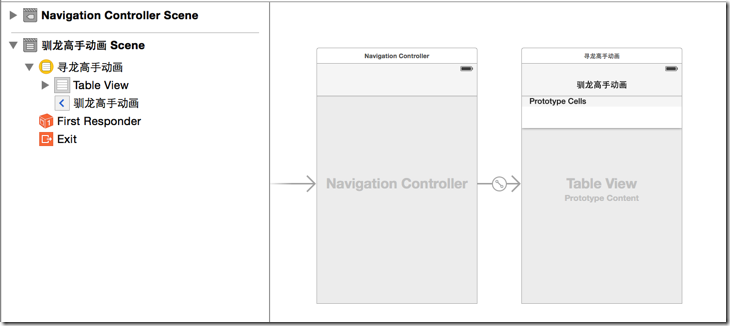
- 所有数据都从服务器下载
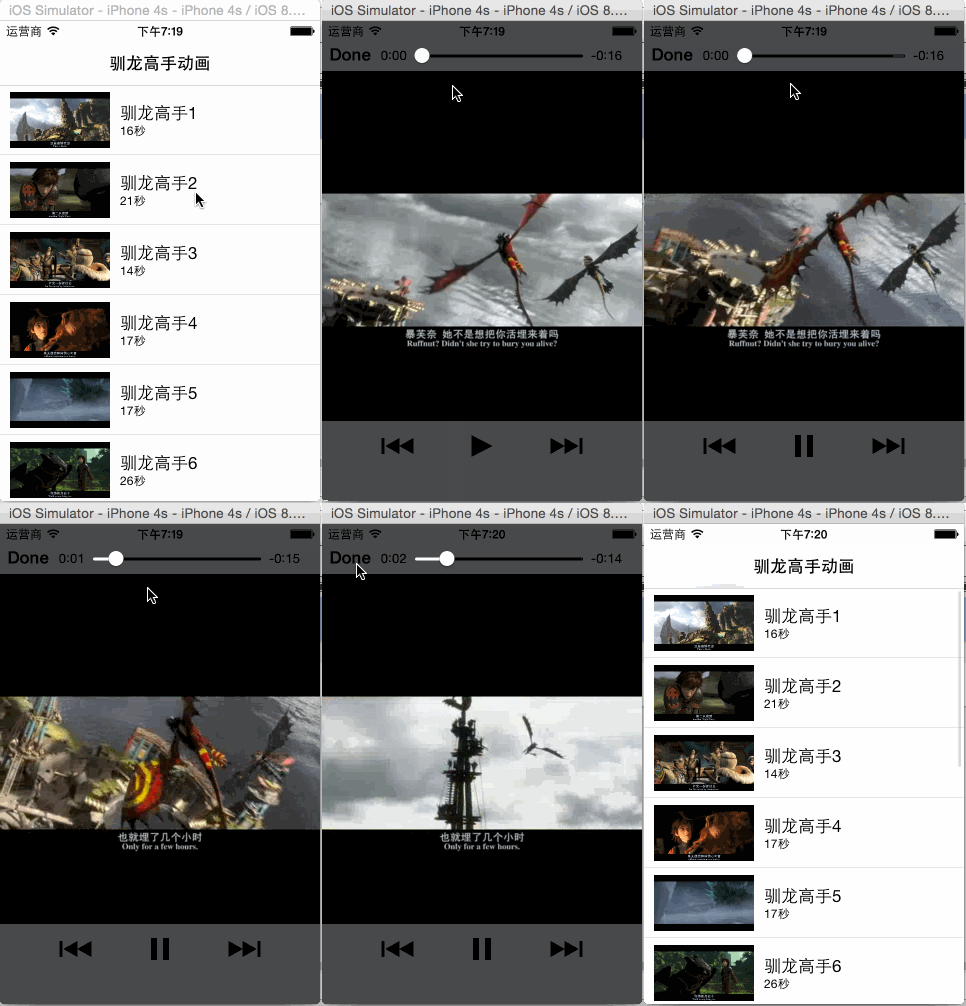
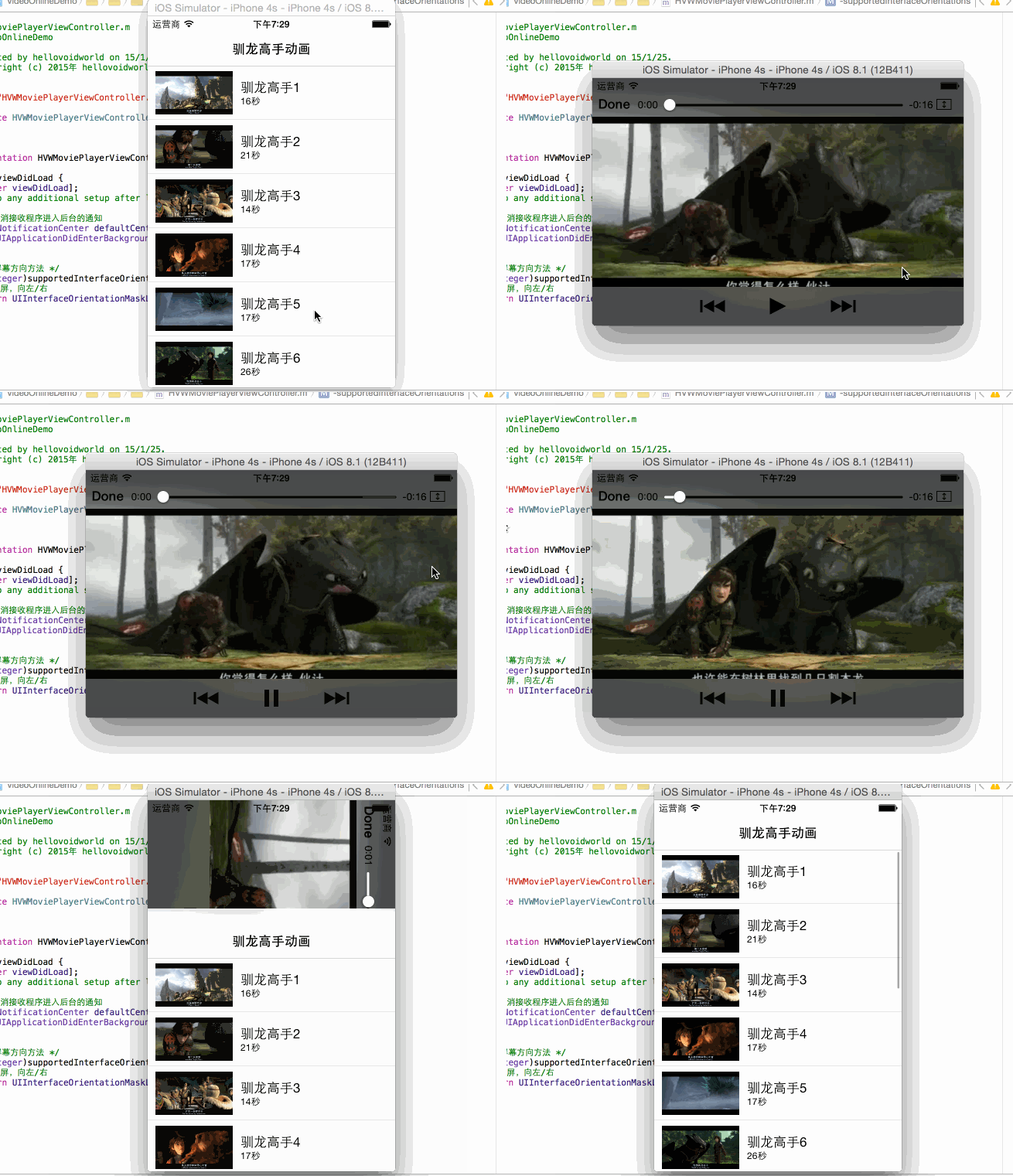
- 动画列表包含:图片、动画名标题、时长副标题
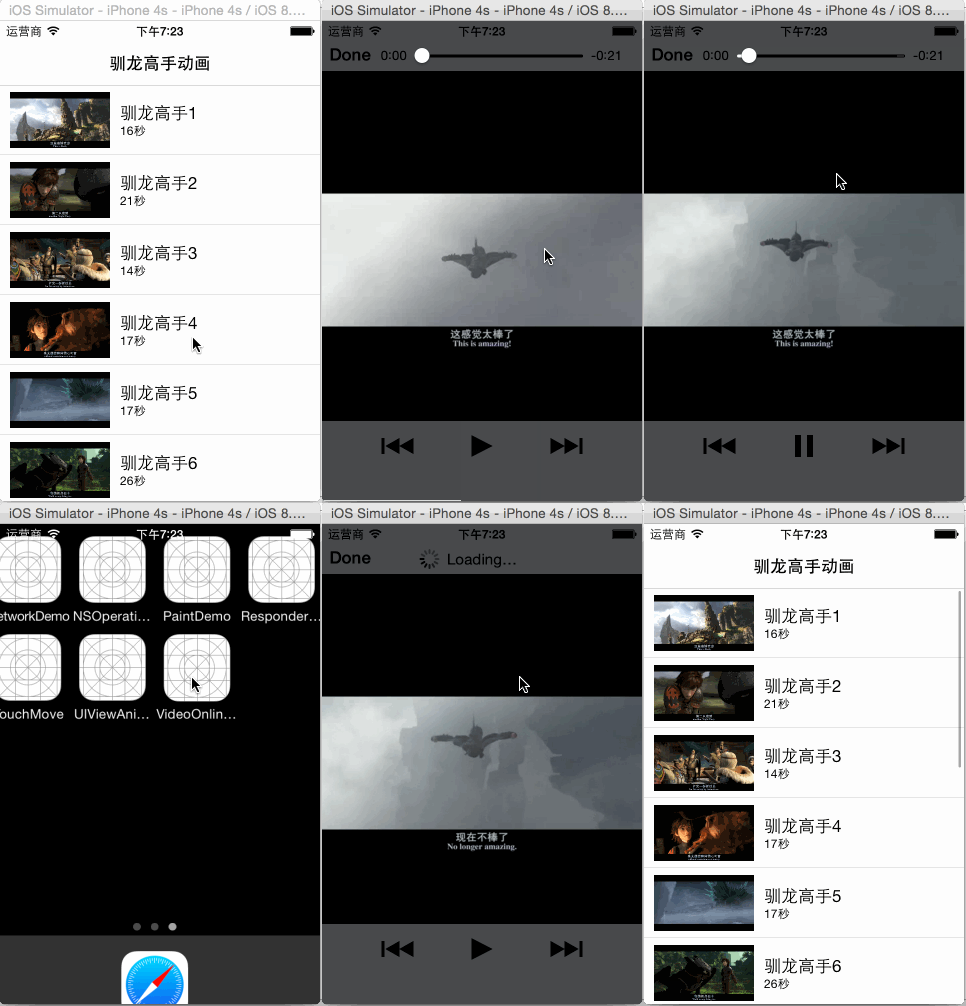
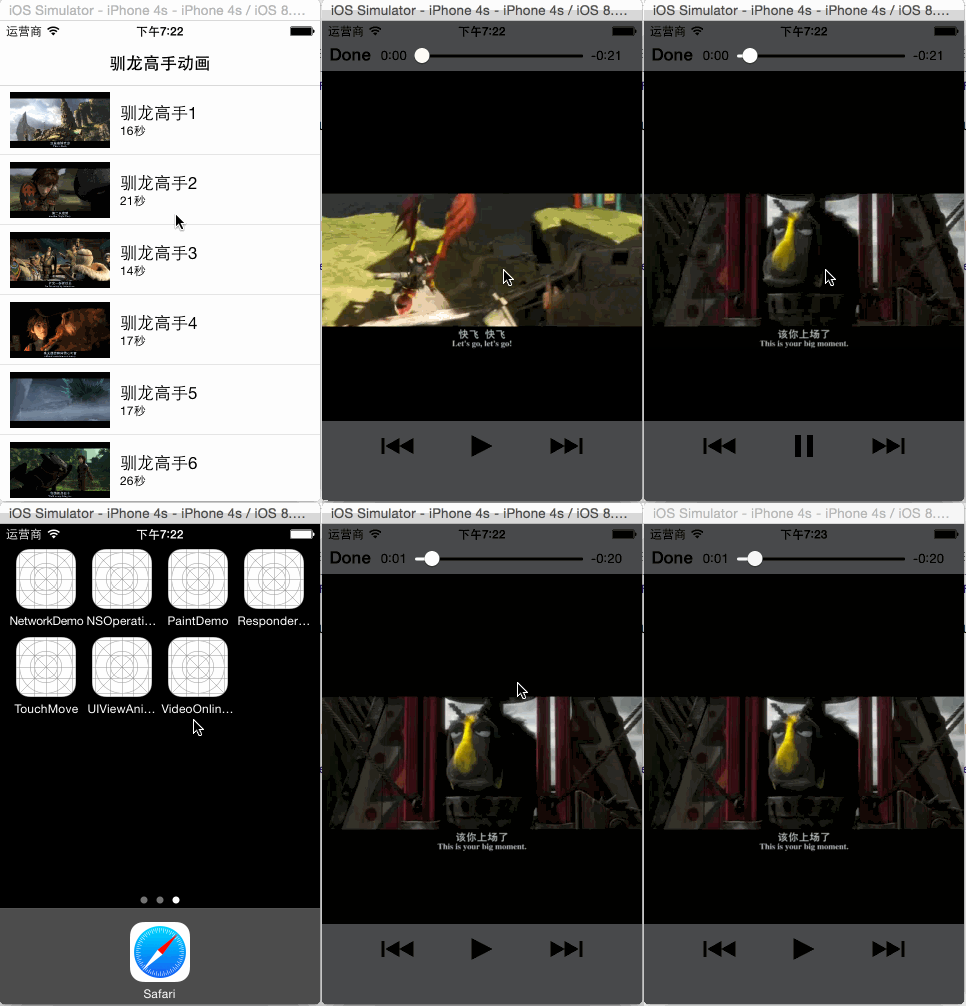
- 点击打开动画观看

 //

 //  HVWVideo.h

 //  VideoOnlineDemo

 //

 //  Created by hellovoidworld on 15/1/24.

 //  Copyright (c) 2015年 hellovoidworld. All rights reserved.

 //

 #import <Foundation/Foundation.h>

 @interface HVWVideo : NSObject

 @property(nonatomic, strong) NSString *name;

 @property(nonatomic, strong) NSString *length;

 @property(nonatomic, strong) NSString *image;

 @property(nonatomic, strong) NSString *video;

 + (instancetype) videoWithDict:(NSDictionary *) dict;

 @end
- 使用代理方法发送请求,接收json数据
- 解析json数据,封装到模型中
- 使用SDWebImage框架加载服务器图片
 //

 //  HVWVideoViewController.m

 //  VideoOnlineDemo

 //

 //  Created by hellovoidworld on 15/1/25.

 //  Copyright (c) 2015年 hellovoidworld. All rights reserved.

 //

 #import "HVWVideoViewController.h"

 #import "HVWVideo.h"

 #import "UIImageView+WebCache.h"

 #define ServerIP @"http://192.168.0.21:8080/MyTestServer"

 @interface HVWVideoViewController () <UITableViewDataSource, UITableViewDelegate, NSURLConnectionDataDelegate>

 /** 接收到的二进制数据 */

 @property(nonatomic, strong) NSMutableData *data;

 /** 所有的录像模型数据 */

 @property(nonatomic, strong) NSArray *videos;

 @end

 @implementation HVWVideoViewController

 - (void)viewDidLoad {

     [super viewDidLoad];

     self.tableView.dataSource = self;

     self.tableView.delegate = self;

     // 读取服务器数据

     [self acceptDataFromServer];

 }

 - (void)didReceiveMemoryWarning {

     [super didReceiveMemoryWarning];

     // Dispose of any resources that can be recreated.

 }

 /** 读取服务器数据 */

 - (void) acceptDataFromServer {

     NSURL *url = [NSURL URLWithString:[NSString stringWithFormat:@"%@/video", ServerIP]];

     NSURLRequest *request = [NSURLRequest requestWithURL:url];

     NSURLConnection *connection = [NSURLConnection connectionWithRequest:request delegate:self];

     [connection start];

 }

 #pragma mark - UITableViewDataSource

 - (NSInteger)numberOfSectionsInTableView:(UITableView *)tableView {

     return ;

 }

 - (NSInteger)tableView:(UITableView *)tableView numberOfRowsInSection:(NSInteger)section {

     return self.videos.count;

 }

 - (UITableViewCell *) tableView:(UITableView *)tableView cellForRowAtIndexPath:(NSIndexPath *)indexPath {

     static NSString *ID = @"VideoCell";

     UITableViewCell *cell = [tableView dequeueReusableCellWithIdentifier:ID];

     if (nil == cell) {

         cell = [[UITableViewCell alloc] initWithStyle:UITableViewCellStyleValue1 reuseIdentifier:ID];

     }

     HVWVideo *video = self.videos[indexPath.row];

     // 设置标题 & 副标题

     cell.textLabel.text = video.name;

     cell.detailTextLabel.text = video.length;

     // 下载图片

     NSString *imageUrlStr = [NSString stringWithFormat:@"%@/%@", ServerIP, video.image];

     NSURL *imageUrl = [NSURL URLWithString:imageUrlStr];

     [cell.imageView setImageWithURL:imageUrl placeholderImage:[UIImage imageNamed:@"placeholder"]];

     // 下载录像

     return cell;

 }

 #pragma mark - UITableViewDelegate

 #pragma mark - NSURLConnectionDataDelegate 代理方法

 - (void)connection:(NSURLConnection *)connection didReceiveResponse:(NSURLResponse *)response {

     NSLog(@"开始接收数据");

     self.data = [NSMutableData data];

 }

 - (void)connection:(NSURLConnection *)connection didReceiveData:(NSData *)data {

     NSLog(@"接收数据中...");

     [self.data appendData:data];

 }

 - (void)connectionDidFinishLoading:(NSURLConnection *)connection {

     NSLog(@"接收数据完毕");

     if (self.data) {

         // 加载录像资料

         NSDictionary *jsonDict = [NSJSONSerialization JSONObjectWithData:self.data options:NSJSONReadingMutableLeaves error:nil];

         //        NSLog(@"%@", jsonDict);

         NSArray *jsonArray = jsonDict[@"videos"];

         //        NSLog(@"%@", jsonArray);

         NSMutableArray *videoArray = [NSMutableArray array];

         for (NSDictionary *dict in jsonArray) {

             NSLog(@"%@", dict);

             HVWVideo *video = [HVWVideo videoWithDict:dict];

             [videoArray addObject:video];

         }

         self.videos = videoArray;

         [self.tableView reloadData];

     }

 }

 @end
 //

 //  HVWVideoCell.m

 //  VideoOnlineDemo

 //

 //  Created by hellovoidworld on 15/1/25.

 //  Copyright (c) 2015年 hellovoidworld. All rights reserved.

 //

 #import "HVWVideoCell.h"

 #import "UIImageView+WebCache.h"

 #define ServerIP @"http://192.168.0.21:8080/MyTestServer"

 @interface HVWVideoCell()

 /** 分割线 */

 @property(nonatomic, strong) UIView *separatorLine;

 @end

 @implementation HVWVideoCell

 + (instancetype) cellWithTableView:(UITableView *) tableView {

     static NSString *ID = @"VideoCell";

     HVWVideoCell *cell = [tableView dequeueReusableCellWithIdentifier:ID];

     if (nil == cell) {

         cell = [[HVWVideoCell alloc] initWithStyle:UITableViewCellStyleSubtitle reuseIdentifier:ID];

     }

     return cell;

 }

 - (instancetype)initWithStyle:(UITableViewCellStyle)style reuseIdentifier:(NSString *)reuseIdentifier {

     if (self = [super initWithStyle:style reuseIdentifier:reuseIdentifier]) {

         // 重写样式

         // 自定义分割写

         UIView *separatorLine = [[UIView alloc] init];

         separatorLine.backgroundColor = [UIColor lightGrayColor];

         separatorLine.alpha = 0.3;

         [self.contentView addSubview:separatorLine];

         self.separatorLine = separatorLine;

     }

     return self;

 }

 /** 重写内部子控件的位置尺寸 */

 - (void)layoutSubviews {

     [super layoutSubviews];

     // 设置图片

     CGFloat imageWidth = ;

     CGFloat imageHeight = ;

     CGFloat imageX = ;

     CGFloat imageY = (self.frame.size.height - imageHeight) / ;

     CGRect imageFrame = CGRectMake(imageX, imageY, imageWidth, imageHeight);

     self.imageView.frame = imageFrame;

     // 设置标题

     CGRect textFrame = self.textLabel.frame;

     textFrame.origin.x = imageX + imageWidth + ;

     self.textLabel.frame = textFrame;

     // 设置副标题

     CGRect detailFrame = self.detailTextLabel.frame;

     detailFrame.origin.x = self.textLabel.frame.origin.x;

     self.detailTextLabel.frame = detailFrame;

     // 设置分割线

     CGFloat separatorLineY = self.frame.size.height - ;

     self.separatorLine.frame = CGRectMake(, separatorLineY, self.frame.size.width, );

 }

 /** 设置数据 */

 - (void)setVideo:(HVWVideo *)video {

     _video = video;

     // 设置标题 & 副标题

     self.textLabel.text = video.name;

     self.detailTextLabel.text = video.length;

     // 下载图片

     NSString *imageUrlStr = [NSString stringWithFormat:@"%@/%@", ServerIP, video.image];

     NSURL *imageUrl = [NSURL URLWithString:imageUrlStr];

     [self.imageView setImageWithURL:imageUrl placeholderImage:[UIImage imageNamed:@"placeholder"]];

 }

 @end
#import <MediaPlayer/MediaPlayer.h>
 - (void) tableView:(UITableView *)tableView didSelectRowAtIndexPath:(NSIndexPath *)indexPath {

     // 加载视频

     HVWVideo *video = self.videos[indexPath.row];

     NSString *videoUrlStr = [NSString stringWithFormat:@"%@/%@", ServerIP, video.video];

     NSURL *videoUrl = [NSURL URLWithString:videoUrlStr];

     NSLog(@"%@", videoUrlStr);

     // 使用MediaPlayer框架播放视频

     MPMoviePlayerViewController *mvController = [[MPMoviePlayerViewController alloc] initWithContentURL:videoUrl];

     [self presentMoviePlayerViewControllerAnimated:mvController];

 }
 //

 //  HVWMoviePlayerViewController.m

 //  VideoOnlineDemo

 //

 //  Created by hellovoidworld on 15/1/25.

 //  Copyright (c) 2015年 hellovoidworld. All rights reserved.

 //

 #import "HVWMoviePlayerViewController.h"

 @interface HVWMoviePlayerViewController ()

 @end

 @implementation HVWMoviePlayerViewController

 - (void)viewDidLoad {

     [super viewDidLoad];

     // Do any additional setup after loading the view.

     // 取消接收程序进入后台的通知

     [[NSNotificationCenter defaultCenter] removeObserver:self name:UIApplicationDidEnterBackgroundNotification object:nil];

 }

 /** 重写屏幕方向方法 */

 - (NSUInteger)supportedInterfaceOrientations {

     // 横屏,向左/右

     return UIInterfaceOrientationMaskLandscape;

 }

 @end
 /** 重写屏幕方向方法 */

 - (NSUInteger)supportedInterfaceOrientations {

     // 横屏,向左/右

     return UIInterfaceOrientationMaskLandscape;

 }
[iOS 多线程 & 网络 - 3.0] - 在线动画Demo的更多相关文章
- [iOS 多线程 & 网络 - 2.0] - 发送接收 服务器信息
A.搭建java服务器 使用eclipse.tomcat和struts2框架搭建一个简单的服务器 1.准备好合适版本的JDK.eclipse EE.tomcat.struts2 框架包 2.配置JDK ...
- [iOS 多线程 & 网络 - 1.0] - 多线程概述
A.进程 什么是进程进程是指在系统中正在运行的一个应用程序 每个进程之间是独立的,每个进程均运行在其专用且受保护的内存空间内 比如同时打开QQ.Xcode,系统就会分别启动2个进程 通过"活 ...
- [iOS 多线程 & 网络 - 4.0] - AFN框架简单使用
A.AFN基本知识 1.概念 AFNetworking 是对NSURLConnection的封装 运行效率没有ASI高(因为ASI基于CFNetwork),但是使用简单 AFN支持ARC B. ...
- [iOS 多线程 & 网络 - 2.9] - ASI框架
A.ASI基本知识 1.ASI简单介绍 ASI:全称是ASIHTTPRequest,外号“HTTP终结者”,功能十分强大. ASI的实现基于底层的CFNetwork框架,因此运行效率很高. ASI的g ...
- [iOS 多线程 & 网络 - 2.3] - 解析xml
A.XML基本知识 1.xml概念 什么是XML全称是Extensible Markup Language,译作“可扩展标记语言”跟JSON一样,也是常用的一种用于交互的数据格式一般也叫XML文档(X ...
- [iOS 多线程 & 网络 - 2.1] - 解析json
A.iOS中json的基本使用 1.解析json数据 (1)json反序列化 对象{}格式 {key : value, key : value,...} 的键值对的结构可以反序列化为OC中的NSDic ...
- [iOS 多线程 & 网络 - 1.1] - 多线程NSThread
A.NSThread的基本使用 1.创建和启动线程 一个NSThread对象就代表一条线程创建.启动线程NSThread *thread = [[NSThread alloc] initWithTar ...
- 【重点突破】—— Vue2.0 transition 动画Demo实践填坑
前言:vue1.0版本和2.0版本的过渡系统改变是很大的,具体请详看文档介绍.本文转载自郭锦荣的博客,一共列举了四种transition的使用实践,分别是css过渡.css动画.javascript钩 ...
- [iOS 多线程 & 网络 - 2.11] - ASI框架上传文件
A.ASI的上传功能基本使用 1.实现步骤 (1)创建请求 使用ASIFormDataRequest (2)设置上传文件路径 (3)发送请求 2.上传相册相片 UIImagePickerCon ...
随机推荐
- AWS Python SDK boto3中的基本概念与使用方法
最近在用boto3编写AWS的lamda函数,学习到了boto3中的一些基本概念与使用方法.在此进行总结. 1. boto3提供了两个级别的接口来访问AWS服务:High Level的Resource ...
- 面试题_ Java EE 相关的面试题
为了做 Java EE 的朋友,这里列出了一些 web 开发的特定问题,你们可以用来准备 JEE 部分的面试: 10 大 Spring 框架面试题及答案(参见)10 个非常好的 XML 面试问题(Ja ...
- git for windows+TortoiseGit客户端的使用
一.安装Git客户端 全部安装均采用默认! 1. 安装支撑软件 : https://code.google.com/p/msysgit/downloads/list?q=full+instal ...
- UVa 1635 (唯一分解定理) Irrelevant Elements
经过紫书的分析,已经将问题转化为求组合数C(n-1, 0)~C(n-1, n-1)中能够被m整除的个数,并输出编号(这n个数的编号从1开始) 首先将m分解质因数,然后记录下每个质因子对应的指数. 由组 ...
- Asp.Net读写XML简单方法
xml文件 <?xml version="1.0" encoding="utf-8"?> <book> <title>web ...
- MongoDB入门分享-笔记整理精选
最近在学习MongoDB,怕以后忘记,自己做了一个整理,给不知道的小伙伴一起分享学习一下. 第一步> 首先到官网下载,安装MongoDB.(注意MongoDB还有一个可视化管理工具叫: Mong ...
- objective-c里的方法指针IMP的用法
SGPopSelectView.h @interface SGPopSelectView : UIView @property (nonatomic, assign) SEL selector; @p ...
- Linux likely unlikely
/************************************************************************* * Linux likely unlikely * ...
- 【转】No JVM could be found on your system解决方法
原文网址:http://my.oschina.net/liusicong/blog/324964 在安装android studio时,报错: Error launching android Stud ...
- [Everyday Mathematics]20150115
试计算积分 $$\bex \int_{-\pi}^\pi \frac{\sin nx}{(1+2^x)\sin x}\rd x, \eex$$ 其中 $n$ 是自然数.