
HTML连载56-网易注册界面实战之全部代码
一、今天完成了网易邮箱注册界面的全部编写,编写一个小小的网页就需要这么多时间来进行设计、测量、排版、编写、测试,才能进行使用,同时编写这个网页复习了几乎前面的所有内容,最后来一个汇总就可以了。
<!DOCTYPE html>
<html lang="en">
<head>
<meta charset="UTF-8">
<title>D139_FrameworkeOfNeteasyInterface</title>
<style>
.header{
width:960px;
height:80px;
/*background-color: red;*/
margin: 0 auto;
overflow: hidden;
padding-top:14px;
box-sizing: border-box;/*这里我们采用内上边距的办法将logo挤下去达到垂直居中的目的*/
/*同时这个box-sizing的属性就是将这个header固定住,不让他因为内边距而变化大小了*/
}
.content{
width: 960px;
height: 600px;
/*background-color: blue;*/
margin: 0 auto;
}
.footer{
width: 960px;
height: 48px;
/*background-color: yellow;*/
margin: 0 auto ;
}
.header .logo{
width:748px;
height: 47px;
background:url("image/netEasyLogo.jpg") no-repeat 0 0;/*从图片的坐标(0,0)开始铺,no-repeat就是只铺这一张不要多铺*/
/*margin-top: 12px;*/
float:left;
}
.header .links{
height: 42px;
width: 150px;
/*background-color: red;*/
float:right;
}
.header .logo a {
width:156px;
height:45px;/*测量出那一块区域,然后这一块区域都是超级链接*/
/*background-color: red;*/
display: inline-block;/*转换为行内块级标签*/
}
.header .links a{
text-decoration:none;/*去掉下划线*/
font-size: 16px;
color:black;
line-height: 45px;/*这里复习了文字不能居中,使用这个属性让它和links盒子的高度一致,那就做到文字在盒子中居中*/
text-align: right;/*复习了文字右对齐*/
}
.content{
width: 960px;
height: 600px;
}
.content .top{
width: 960px;
height: 38px;
/*background-color: red;*/
background: url("image/wangyi_center.jpg") 0 0;/*让这张小图片把top这个区域全部铺满*/
/*border: solid black 1px;*/
}
.content .bottom{
width: 960px;
height: 562px;
/*background-color: green;*/
border: solid black 1px;
}
/*下面这两个属性设置,就是为了content的top部的两边能使用我们指定的格式,我们采用的盒子嵌套盒子来进行背景的演示*/
/*.content .top .left{*/
/*width:960px;*/
/*height: 38px;*/
/*background:url("image/line_left.jpg") no-repeat left 0 ;*/
/*!*display: inline;*!*/
/*}*/
/*.content .top .left .right{*/
/*width:960px;*/
/*height: 38px;*/
/*background:url("image/line_left.jpg") no-repeat right 0 ;*/
/*}*/
.content .top .left .right h3{
color: white;
line-height:38px;/*设置行高就是为了让文字能够在top条中垂直居中*/
text-align: center;/*文字水平居中,当然我们也可以设置margin-left来设置左边距,但是一旦分辨率改变将导致网页变形*/
}
.content .bottom .article{
width:638px;
height: 562px;
/*background-color: red;*/
float:left;/*这里填写了这个float属性才行,并且右面的盒子也需要float属性,div是行内标签,不写float会另起一行*/
box-sizing: border-box;/*这个设置是为了让外面的大盒子不会因为设置内边距,而导致外面的的大盒子变形*/
padding-top:50px;/*这里我们设置了内边距,那么里面的内容就可以从这里面进行配置了,一开始我想到的是不设置这个内边距*/
/*让里面的东西有外边距,当然这样也可以达到效果,但是有一个缺点,里面的每一个盒子都要单独设置外边距,相比设置*/
/*外面盒子的内边距会更加省力,而且里面的内容,自然而然就会对齐*/
padding-left: 80px;
}
.content .bottom .aside{
width: 320px;/*这里我们本来写的322,但是发现写上322就会造成aside这个图片溢出到下面了,原来是左边距有2px.这样*/
/*320+2+638=960就正好了,溢出原因就是float属性导致的,达到了962,就装不下了*/
height: 562px;
/*background-color: green;*/
background:url("image/content_aside.jpg") no-repeat 0;
float:right;
border-left:2px black solid;
}
.content .article .articletop{
width: 560px;
height: 60px;
/*background-color: yellow;*/
}
.content .article .articletop ul{
width: 511px;
height: 34px;
/*background-color: tomato;*/
list-style:none;/*这个属性是为了去掉li的小圆点*/
}
.content .article .articletop ul li{
float:left;
width: 137px;
height: 34px;
/*background-color: skyblue;*/
line-height: 37px;
text-align: center;/*文字水平居中*/
background:url("image/content_article.jpg") 0 0;
border:1px solid black;
}
.content .article .articlebottom{
width: 560px;
height: 373px;
background-color: white;
}
.content .article .articlebottom .line{
width: 413px;
height: 28px;
/*background-color: yellow;*/
}
.content .article .articlebottom .line span{
float:left;
height: 28px;
width: 80px;
font-size:12px;
line-height:28px;
text-align:left;
}
.content .article .articlebottom .line .star{
width: 6px;
float:left;
}
.content .article .artilclebottom .line div{
float: left;
height: 28px;
height: 333px;
}
.content .bottom .articlebottom .line input{
width: 214px;
height: 18px;
}
.content .bottom .articlebottom .line select{
width: 80px;
height: 24px;
}
.content .bottom .articlebottom p{
/*text-align: left;*/
font-size: 12px;
margin-left: 110px;
}
.content .bottom .articlebottom .service{
/*text-align: left;*/
margin-top: 50px;
font-size: 12px;
margin-left: 40px;
}
.content .bottom .articlebottom input[type=submit]{/*这里复习了,另一种CSS定位的形式,对于input标签可以使用这种方式来单独进行定位,而不需要使用class属性来进行设置属性*/
width:119px;
height: 37px;
background-color: #51ad3b;
margin-left: 40px;
border: none;/*复习了去掉边框的方式*/
}
.footer p{
text-align: center;
}
/*复习一下清空默认样式
a{
text-decoration:none;}
ul,ol{
list-style:none:}
利用body可以用来设置整个界面的文字信息,文字大小,文字颜色,文字样式,可以节约很多代码
*/
</style>
</head>
<body>
<div class="header">
<div class="logo" >
<a href="https://www.163.com/" title="网易163免费邮箱"></a><a href="https://www.126.com/" title="网易126免费邮箱"></a><a href="#" title="网易yeah免费邮箱"></a>
<!--复习了a标签的使用,title就是指鼠标放到超链接上就会显示的文字-->
</div>
<div class="links">
<a href="http://www.baidu.com">了解更多</a>|<a href="#">反馈意见</a>
</div>
</div>
<div class="content">
<div class="top">
<div class="left">
<div class="right"><h3>欢迎注册无限容量的网易邮箱!邮件地址可以登录使用其他网易旗下的产品</h3></div>
</div>
</div>
<div class="bottom">
<div class="article">
<div class="articletop">
<ul>
<li>注册字母邮箱</li><!--看到导航条就应该想到ul.li-->
<li>注册手机号邮箱</li>
<li>注册VIP邮箱</li>
</ul>
</div>
<div class="articlebottom">
<div class="line">
<span class="star">*</span><!--这里的星号代表必填项--><span>邮箱地址</span>
<div>
<input type="text" value="建议手机号码注册">@
<select>
<option value="163.com">163.com</option><!--复习了选项的标签select和Option,这里的value是传给浏览器的-->
<option value="126.com">126.com</option>
<option value="lnj.net">lnj.net</option>
</select>
</div>
</div>
<p>6~18个字符,可使用字母、数字、下划线,需以字母开头</p>
<div class="line">
<span class="star">*</span><span>密码</span>
<div>
<input type="password">
</div>
</div>
<p>6~16个字符,区分大小写</p>
<div class="line">
<span class="star">*</span><span>再次确认密码</span>
<div>
<input type="password"><!--这里复习了密码的输入方法-->
</div>
</div>
<p>请再次填写密码</p>
<dic class="line">
<span class="star">*</span><span>手机号码</span>
<div>
<input type="number">
</div>
</dic>
<p>输入手机号</p>
<div class="line">
<span class="star">*</span><span>验证码</span>
<div>
<input type="text" class="yanzhengma"><img src="data:image/yanzhengma.jpg" alt="">
</div>
</div>
<p class="service">
<input type="checkbox" checked="checked"><!--复习了多选框的类型为checkbox,并且多选框是默认选中的-->
同意<a href="#">《服务条款》</a>、<a href="#">《隐私政策》</a>和<a href="#">《儿童隐私政策》</a>
</p>
<input class="submitbutton" type="submit" value="立即注册"><!--复习了提交按钮的类型,以及按钮里面的值-->
</div>
</div>
<div class="aside"></div>
</div>
</div>
<div class="footer">
<p><a href="#">关于网易</a> <a href="#">客户服务 </a> <a href="#">隐私政策</a> | 网易公司版权所有 © 1997-2019</p>
<p>数据来源:艾媒咨询《2015-2018中国个人邮箱行业研究报告》</p>
</div>
</body>
</html>
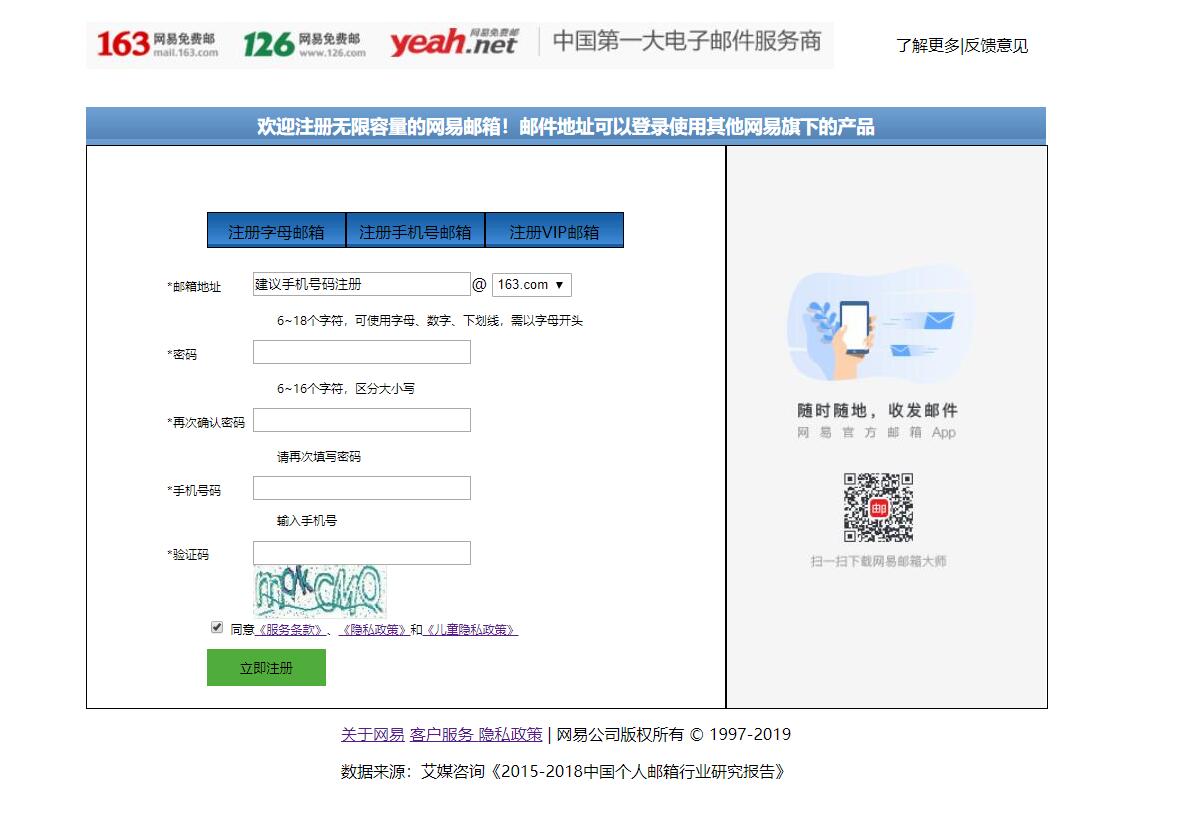
三、源码:
D139_FrameworkeOfNeteasyInterface.html
地址:
https://github.com/ruigege66/HTML_learning/blob/master/D139_FrameworkeOfNeteasyInterface.html
2.CSDN:https://blog.csdn.net/weixin_44630050
3.博客园:https://www.cnblogs.com/ruigege0000/
4.欢迎关注微信公众号:傅里叶变换,个人账号,仅用于技术交流,后台回复“礼包”获取Java大数据学习视频礼包

HTML连载56-网易注册界面实战之全部代码的更多相关文章
- HTML连载55-网易注册界面实战之input填充
一.又学一招:想要让两个盒子高度对齐,那么让他们浮动起来 <!DOCTYPE html> <html lang="en"> <head> < ...
- HTML连载54-网易注册界面实战之信息填写
一.完成了内容中的右边的一部分.练习了三点:小盒子在大盒子中的位置,最好用大盒子的内边距完成布局,而不是用小盒子的外边距来进行布局:复习了ul,li的用法. <!DOCTYPE html> ...
- HTML连载53-网易注册界面实战之content的头部、content注册信息
一. 这次完成了content部分的右边图片以及content的top部分的边角填充 <!DOCTYPE html> <html lang="en"> &l ...
- HTML51-清除浮动overflow、网易注册界面基本结构搭建
一.overflow:hidden;作用 (1)可以将超出标签范围的内容裁剪掉 (2)清除浮动 .box1{ background-color: red; /*border:1px white sol ...
- HTML连载52-网易注册界面之上部完成、中部初探
一.看一下注释即可,都是前面学到的知识,然后进行整合完成网页的制作,未完待续,这个网易界面跨度可大三天. <!DOCTYPE html> <html lang="en&qu ...
- Python 实现简单的登录注册界面
Python 实现简单的登录注册界面 注意:编写代码之前需要导入很重要的包 import tkinter as tk import pickle from tkinter import message ...
- H5 71-网易注册界面4
<!DOCTYPE html> <html lang="en"> <head> <meta charset="UTF-8&quo ...
- HTML登录注册界面怎么制作?
在没有学习CSS样式的前提下,是如何做一个简单的注册界面的. 一.表单标签(form) 首先我们先写一个<form></form>的标签,form标签属于表单标签,通常我们的登 ...
- iOS开发——UI进阶篇(八)pickerView简单使用,通过storyboard加载控制器,注册界面,通过xib创建控制器,控制器的view创建,导航控制器的基本使用
一.pickerView简单使用 1.UIPickerViewDataSource 这两个方法必须实现 // 返回有多少列 - (NSInteger)numberOfComponentsInPicke ...
随机推荐
- 打算写一个《重学Node.js》系列,希望大家多多支持
先放上链接吧,项目已经开始2周了:https://github.com/hellozhangran/happy-egg-server 想法 现在是2019年11月24日,还有人要开始学习Node.js ...
- es5设置属性不能修改
/*es5*/ { var Person ={ name:'es5', age:19 } Object.defineProperty(Person,'sex',{ writable:false, va ...
- 浅谈Python中函数式编程、面向对象编程以及古怪的PythonIC
1.函数式编程作为结构化编程的一种,正在受到越来越多的重视.那么什么事函数式编程呢? 在维基百科中给出了详细的定义,函数式编程又称泛函数编程,是一种编程规范,它将函数运算视为数学上的函数计算.简单的来 ...
- P1055 ISBN号码
题目描述 每一本正式出版的图书都有一个ISBN号码与之对应,ISBN码包括99位数字.11位识别码和33位分隔符,其规定格式如x-xxx-xxxxx-x,其中符号-就是分隔符(键盘上的减号),最后一位 ...
- KFC-位置分页爬虫
import requests import json if name == 'main': #记录总数 raw_count=0 #查询页数 page=1 #存储数据 data=[] #判断有无数据条 ...
- 【Luogu P3174 】[HAOI2009]毛毛虫
前言: 虽然很多人和我想法一样 ,但我还是不要脸地写了这题解 题目: 链接 大意: 在一棵树上取一条最长链以及它所连接的结点总共的结点个数 思路: 取链: 用树形\(DP\)就可以轻而易举的解决这个问 ...
- git的用法 回到某个版本
进入到项目文件夹 如果新建项目时没有勾选git 进入到项目中
- 【CKB.DEV 茶话会】如何在 CKB 上实现用户自定义 Token
本贴内容主要来自于 CKB.DEV 茶话会第一期,本期主题是:如何在 CKB 上实现 UDT,分享人是:Cipher 王博. 茶话会现场视频: https://v.qq.com/x/page/x303 ...
- 使用Python开发小说下载器,不再为下载小说而发愁 #华为云·寻找黑马程序员#
需求分析 免费的小说网比较多,我看的比较多的是笔趣阁.这个网站基本收费的章节刚更新,它就能同步更新,简直不要太叼.既然要批量下载小说,肯定要分析这个网站了- 在搜索栏输入地址后,发送post请求获取数 ...
- 【LiteOS】LiteOS移植常见问题
发现很多人在LiteOS的移植过程中总会遇到一些问题,现在简单做一些总结.后续有新的问题提再继续补充. 1.CMSIS版本导致的问题 问题现象一般如下图所示,编译后报错,Undefined symbo ...