
Spring使用AspectJ开发AOP:基于XML
基于XML的声明式
基于 XML 的声明式是指通过 Spring 配置文件的方式定义切面、切入点及声明通知,而所有的切面和通知都必须定义在 <aop:config> 元素中。
下面通过案例演示 Spring 中如何使用基于 XML 的声明式实现 AOP 的开发。
1. 导入 JAR 包
使用 AspectJ 除了需要导入 Spring AOP 的 JAR 包以外,还需要导入与 AspectJ 相关的 JAR 包,具体如下。
- spring-aspects-3.2.13.RELEASE.jar:Spring 为 AspectJ 提供的实现,在 Spring 的包中已经提供。
- com.springsource.org.aspectj.weaver-1.6.8.RELEASE.jar:是 AspectJ 提供的规范,可以在官方网址https://repo.spring.io/webapp/#/search/quick/ 中搜索并下载。
2. 创建切面类 MyAspect
在 src 目录下创建一个名为 com.mengma.aspectj.xml 的包,在该包下创建切面类 MyAspect,编辑后如下所示。
package com.mengma.aspectj.xml;

import org.aspectj.lang.JoinPoint;

import org.aspectj.lang.ProceedingJoinPoint;

//切面类

public class MyAspect {

// 前置通知

public void myBefore(JoinPoint joinPoint) {

System.out.print("前置通知,目标:");

System.out.print(joinPoint.getTarget() + "方法名称:");

System.out.println(joinPoint.getSignature().getName());

}

// 后置通知

public void myAfterReturning(JoinPoint joinPoint) {

System.out.print("后置通知,方法名称:" + joinPoint.getSignature().getName());

}

// 环绕通知

public Object myAround(ProceedingJoinPoint proceedingJoinPoint)

throws Throwable {

System.out.println("环绕开始"); // 开始

Object obj = proceedingJoinPoint.proceed(); // 执行当前目标方法

System.out.println("环绕结束"); // 结束

return obj;

}

// 异常通知

public void myAfterThrowing(JoinPoint joinPoint, Throwable e) {

System.out.println("异常通知" + "出错了" + e.getMessage());

}

// 最终通知

public void myAfter() {

System.out.println("最终通知");

}

}
上述代码中,分别定义了几种不同的通知类型方法,在这些方法中,通过 JoinPoint 参数可以获得目标对象的类名、目标方法名和目标方法参数等。需要注意的是,环绕通知必须接收一个类型为 ProceedingJoinPoint 的参数,返回值必须是 Object 类型,且必须抛出异常。异常通知中可以传入 Throwable 类型的参数,用于输出异常信息。
3. 创建 Spring 配置文件
在 com.mengma.aspectj.xml 包下创建 applicationContext.xml 的配置文件,如下所示。
<?xml version="1.0" encoding="UTF-8"?>

<beans xmlns="http://www.springframework.org/schema/beans"

xmlns:xsi="http://www.w3.org/2001/XMLSchema-instance" xmlns:aop="http://www.springframework.org/schema/aop"

xsi:schemaLocation="

http://www.springframework.org/schema/beans

http://www.springframework.org/schema/beans/spring-beans-2.5.xsd

http://www.springframework.org/schema/aop

http://www.springframework.org/schema/aop/spring-aop-2.5.xsd">

<!--目标类 -->

<bean id="customerDao" class="com.mengma.dao.CustomerDaoImpl" />

<!--切面类 -->

<bean id="myAspect" class="com.mengma.aspectj.xml.MyAspect"></bean>

<!--AOP 编程 -->

<aop:config>

<aop:aspect ref="myAspect">

<!-- 配置切入点,通知最后增强哪些方法 -->

<aop:pointcut expression="execution ( * com.mengma.dao.*.* (..))"

id="myPointCut" />

<!--前置通知,关联通知 Advice和切入点PointCut -->

<aop:before method="myBefore" pointeut-ref="myPointCut" />

<!--后置通知,在方法返回之后执行,就可以获得返回值returning 属性 -->

<aop:after-returning method="myAfterReturning"

pointcut-ref="myPointCut" returning="returnVal" />

<!--环绕通知 -->

<aop:around method="myAround" pointcut-ref="myPointCut" />

<!--抛出通知:用于处理程序发生异常,可以接收当前方法产生的异常 -->

<!-- *注意:如果程序没有异常,则不会执行增强 -->

<!-- * throwing属性:用于设置通知第二个参数的名称,类型Throwable -->

<aop:after-throwing method="myAfterThrowing"

pointcut-ref="myPointCut" throwing="e" />

<!--最终通知:无论程序发生任何事情,都将执行 -->

<aop:after method="myAfter" pointcut-ref="myPointCut" />

</aop:aspect>

</aop:config>

</beans>
上述代码中,首先在第 4、7、8 行代码中分别导入了 AOP 的命名空间。第 12 行代码指定了切面类。
第 17、18 行代码配置了切入点,通知需要增强哪些方法,expression="execution(*com.mengma.dao.*.*(..))的意思是增强 com.mengma.dao 包下所有的方法。
第 20~32 行代码用于关联通知(Advice)和切入点(PointCut)。以第 20 行代码前置通知为例,<aop:before> 标签的 method 属性用于指定通知,pointcut-ref 属性用于指定切入点,也就是要增强的方法,其他几种通知的配置可以参考代码注释。
4. 创建测试类
在 com.mengma.aspectj.xml 包下创建测试类 XMLTest,如下所示。
package com.mengma.aspectj.xml;

import org.junit.Test;

import org.springframework.context.ApplicationContext;

import org.springframework.context.support.ClassPathXmlApplicationContext;

import com.mengma.dao.CustomerDao;

public class XMLTest {

@Test

public void test() {

String xmlPath = "com/mengma/aspectj/xml/applicationContext.xml";

ApplicationContext applicationContext = new ClassPathXmlApplicationContext(

xmlPath);

// 从spring容器获取实例

CustomerDao customerDao = (CustomerDao) applicationContext

.getBean("customerDao");

// 执行方法

customerDao.add();

}

}
5. 运行项目并查看结果
使用 JUnit 测试运行 test() 方法,运行成功后,控制台的输出结果如图 1 所示。
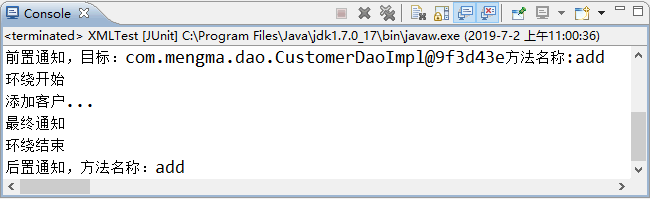
图 1 运行结果
为了更好地演示异常通知,接下来在 CustomerDaoImpl 类的 add() 方法中添加一行会抛出异常的代码,如“int i=1/0;”,重新运行 XMLTest 测试类,可以看到异常通知执行了,此时控制台的输出结果如图 2 所示。
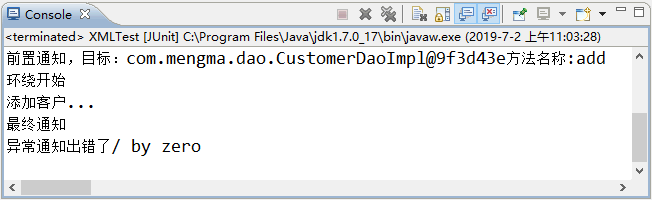
图 2 运行结果
从图 1 和图 2 的输出结果中可以看出,基于 XML 声明式的 AOP 开发已经成功实现。
Spring使用AspectJ开发AOP:基于XML的更多相关文章
- 吴裕雄--天生自然JAVA SPRING框架开发学习笔记:Spring使用AspectJ开发AOP基于XML和基于Annotation
AspectJ 是一个基于 Java 语言的 AOP 框架,它扩展了 Java 语言.Spring 2.0 以后,新增了对 AspectJ 方式的支持,新版本的 Spring 框架,建议使用 Aspe ...
- Spring使用AspectJ开发AOP:基于Annotation
基于 Annotation 的声明式 在 Spring 中,尽管使用 XML 配置文件可以实现 AOP 开发,但是如果所有的相关的配置都集中在配置文件中,势必会导致 XML 配置文件过于臃肿,从而给维 ...
- Spring使用@AspectJ开发AOP(零配置文件)
前言: AOP并不是Spring框架特有的.Spring只是支持AOP编程 (面向切面编程) 的框架之一. 概念: 1.切面(Aspect) 一系列Advice + Pointcut 的集合. 2.通 ...
- (转)Spring使用AspectJ进行AOP的开发:注解方式
http://blog.csdn.net/yerenyuan_pku/article/details/69790950 Spring使用AspectJ进行AOP的开发:注解方式 之前我已讲过Sprin ...
- Spring整合AspectJ的AOP
学而时习之,不亦说乎! --<论语> 看这一篇之前最好先看前面关于AOP的两篇. http://www.cnblogs.com/z ...
- Unit03: Spring Web MVC简介 、 基于XML配置的MVC应用 、 基于注解配置的MVC应用
Unit03: Spring Web MVC简介 . 基于XML配置的MVC应用 . 基于注解配置的MVC应用 springmvc (1)springmvc是什么? 是一个mvc框架,用来简化基于mv ...
- spring-第十八篇之spring AOP基于XML配置文件的管理方式
1.在XML配置文件中配置切面.切入点.增强处理.spring-1.5之前只能使用XML Schema方式配置切面.切入点.增强处理. spring配置文件中,所有的切面.切入点.增强处理都必须定义在 ...
- 在Spring整合aspectj实现aop的两种方式
-----------------------------基于XML配置方案目标对象接口1 public interface IUserService { public void add(); pub ...
- 7 -- Spring的基本用法 -- 11... 基于XML Schema的简化配置方式
7.11 基于XML Schema的简化配置方式 Spring允许使用基于XML Schema的配置方式来简化Spring配置文件. 7.11.1 使用p:命名空间简化配置 p:命名空间不需要特定的S ...
随机推荐
- 删除linux自带jdk
提示:error: can't create transaction lock on /var/lib/rpm/.rpm.lock (Permission denied):代表权限不够 执行:su r ...
- adb命令整理(持续整理)
用到过的adb命令都整理下来,省的一直百度,还不一定能找到合适的答案 获得正在运行app的包名 :adb shell dumpsys window | findstr mCurrentFocus 1. ...
- lcx端口转发
目录 0x01 正向端口转发 0x02 反向端口转发 0x03 msf正向shell 0x04 msf反向shell 注: 边界机器 win08 192.168.222.175 内网机器 win7 1 ...
- Android Studio [ImageView/使用第三方库加载图片]
ImageViewActivity.class package com.xdw.a122; import android.support.v7.app.AppCompatActivity; impor ...
- 工厂模式(整理自李建忠<C++设计模式>视频)
整理自李建忠<C++设计模式>视频 一.导入:"对象创建"模式和工厂模式 工厂模式只是该模式下的一种. 二.举例说明 有这样一个场景:需要在MainForm中设计一个按 ...
- WPF中资源的引用方法
一.引用同一个程序中的资源 1.使用相对Uri来引用资源,如下所示 img.Source=new BitmapImage(new Uri(@"d"\iamges\Backgroun ...
- 初识PE文件结构
前言 目前网络上有关PE文件结构说明的文章太多了,自己的这篇文章只是单纯的记录自己对PE文件结构的学习.理解和总结. 基础概念 PE(Portable Executable:可移植的执行体)是Win3 ...
- layui table异步调用数据的时候,数据展示不出来现象解决方案
最近使用layui table进行异步获取数据并填充的时候,控制台打印出数据长度为0,但是其中还有数据,网上找了很多办法,下边是我最后使用的. 一般,render渲染表格是独立的书写格式,但是我在做数 ...
- 微信小程序开发实战-天气小程序
园龄6年8个月了,还一篇文章都没写过,惭愧! 最近周末做了个天气预报小程序,在这里整理一下开发过程和注意点,给对小程序开发感兴趣的伙伴们提供点参考. 废话不多说,先上图最终效果: 下面进入正文: 第一 ...
- HBase学习与实践
Photo by bealach verse on Unsplash 参考书籍:<HBase 权威指南> -- Lars George著. 文章为个人从零开始学习记录,如有错误,还请不吝赐 ...