
Android笔记之自定义的RadioGroup、RadioButton,以及View实例状态的保存与恢复
效果图
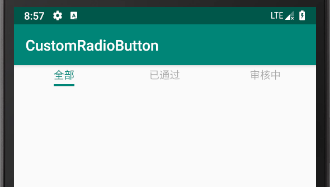
activity_main.xml
<?xml version="1.0" encoding="utf-8"?>

<LinearLayout xmlns:android="http://schemas.android.com/apk/res/android"

    xmlns:app="http://schemas.android.com/apk/res-auto"

    android:layout_width="match_parent"

    android:layout_height="match_parent"

    android:orientation="vertical">

    <com.bu_ish.custom_radio_button.RadioGroup

        android:id="@+id/rgTab"

        android:layout_width="match_parent"

        android:layout_height="wrap_content"

        app:checkedButton="@id/urbApproved">

        <com.bu_ish.custom_radio_button.UnderlineRadioButton

            android:id="@+id/urbAll"

            android:layout_width="0dp"

            android:layout_height="wrap_content"

            android:layout_weight="1"

            app:text="全部"

            app:textColorChecked="@color/colorPrimary"

            app:textColorUnchecked="#55000000"

            app:textMarginBottom="3dp"

            app:textMarginTop="3dp"

            app:underlineColorChecked="@color/colorPrimary"

            app:underlineColorUnchecked="@android:color/transparent"

            app:underlineHeight="3dp" />

        <com.bu_ish.custom_radio_button.UnderlineRadioButton

            android:id="@+id/urbApproved"

            android:layout_width="0dp"

            android:layout_height="wrap_content"

            android:layout_weight="1"

            app:text="已通过"

            app:textColorChecked="@color/colorPrimary"

            app:textColorUnchecked="#55000000"

            app:textMarginBottom="3dp"

            app:textMarginTop="3dp"

            app:underlineColorChecked="@color/colorPrimary"

            app:underlineColorUnchecked="@android:color/transparent"

            app:underlineHeight="3dp" />

        <com.bu_ish.custom_radio_button.UnderlineRadioButton

            android:id="@+id/urbVerifying"

            android:layout_width="0dp"

            android:layout_height="wrap_content"

            android:layout_weight="1"

            app:text="审核中"

            app:textColorChecked="@color/colorPrimary"

            app:textColorUnchecked="#55000000"

            app:textMarginBottom="3dp"

            app:textMarginTop="3dp"

            app:underlineColorChecked="@color/colorPrimary"

            app:underlineColorUnchecked="@android:color/transparent"

            app:underlineHeight="3dp" />

    </com.bu_ish.custom_radio_button.RadioGroup>

    <TextView

        android:id="@+id/tvContent"

        android:layout_width="match_parent"

        android:layout_height="0dp"

        android:layout_weight="1"

        android:gravity="center"

        android:text="已通过" />

</LinearLayout>
MainActivity.java
package com.bu_ish.custom_radio_button;

import android.support.v7.app.AppCompatActivity;

import android.os.Bundle;

import android.widget.TextView;

public class MainActivity extends AppCompatActivity {

    private RadioGroup rgTab;

    private TextView tvContent;

    @Override

    protected void onCreate(Bundle savedInstanceState) {

        super.onCreate(savedInstanceState);

        setContentView(R.layout.activity_main);

        rgTab = findViewById(R.id.rgTab);

        tvContent = findViewById(R.id.tvContent);

        rgTab.setOnCheckedChangeListener(new RadioGroup.OnCheckedChangeListener() {

            @Override

            public void onCheckedChanged(int checkedId) {

                switch (checkedId) {

                    case R.id.urbAll:

                        tvContent.setText("全部");

                        break;

                    case R.id.urbApproved:

                        tvContent.setText("已通过");

                        break;

                    case R.id.urbVerifying:

                        tvContent.setText("审核中");

                }

            }

        });

    }

}
RadioGroup.java
package com.bu_ish.custom_radio_button;

import android.content.Context;

import android.content.res.TypedArray;

import android.os.Bundle;

import android.os.Parcelable;

import android.util.AttributeSet;

import android.view.View;

import android.view.ViewGroup;

import android.widget.LinearLayout;

public class RadioGroup extends LinearLayout {

    private int checkedId;

    private OnCheckedChangeListener onCheckedChangeListener;

    private static final String KEY_SUPER_PARCELABLE = "SuperParcelableKey";

    private static final String KEY_CHECKED_ID = "CheckedIdKey";

    public RadioGroup(Context context, AttributeSet attrs) {

        super(context, attrs);

        TypedArray typedArray = context.obtainStyledAttributes(attrs, R.styleable.RadioGroup);

        checkedId = typedArray.getResourceId(R.styleable.RadioGroup_checkedButton, NO_ID);

        typedArray.recycle();

    }

    @Override

    protected void onFinishInflate() {

        super.onFinishInflate();

        if (checkedId != NO_ID) {

            setCheckedStateForView(checkedId, true);

        }

    }

    @Override

    protected Parcelable onSaveInstanceState() {

        Parcelable superParcelable = super.onSaveInstanceState();

        Bundle bundle = new Bundle();

        bundle.putParcelable(KEY_SUPER_PARCELABLE, superParcelable);

        bundle.putInt(KEY_CHECKED_ID, checkedId);

        return bundle;

    }

    @Override

    protected void onRestoreInstanceState(Parcelable state) {

        Bundle bundle = (Bundle) state;

        super.onRestoreInstanceState(bundle.getParcelable(KEY_SUPER_PARCELABLE));

        int id = bundle.getInt(KEY_CHECKED_ID);

        check(id);

    }

    @Override

    public void addView(View child, int index, ViewGroup.LayoutParams params) {

        UnderlineRadioButton button = (UnderlineRadioButton) child;

        if (button.isChecked()) {

            int buttonId = button.getId();

            if (buttonId != checkedId) {

                setCheckedId(buttonId);

                if (checkedId != NO_ID) {

                    setCheckedStateForView(checkedId, false);

                }

            }

        }

        button.setOnClickListener(new OnClickListener() {

            @Override

            public void onClick(View v) {

                int id = v.getId();

                if (id != checkedId) {

                    check(id);

                }

            }

        });

        super.addView(child, index, params);

    }

    public void check(int id) {

        if (id != checkedId) {

            setCheckedStateForView(checkedId, false);

            setCheckedStateForView(id, true);

            setCheckedId(id);

        }

    }

    public void setOnCheckedChangeListener(OnCheckedChangeListener listener) {

        onCheckedChangeListener = listener;

    }

    private void setCheckedStateForView(int viewId, boolean checked) {

        UnderlineRadioButton button = findViewById(viewId);

        button.setChecked(checked);

    }

    private void setCheckedId(int id) {

        checkedId = id;

        if (onCheckedChangeListener != null) {

            onCheckedChangeListener.onCheckedChanged(id);

        }

    }

    public interface OnCheckedChangeListener {

        void onCheckedChanged(int checkedId);

    }

}
UnderlineRadioButton.java
package com.bu_ish.custom_radio_button;

import android.content.Context;

import android.content.res.TypedArray;

import android.util.AttributeSet;

import android.view.Gravity;

import android.view.View;

import android.widget.FrameLayout;

import android.widget.LinearLayout;

import android.widget.TextView;

public class UnderlineRadioButton extends FrameLayout {

    private TextView tvText;

    private View underline;

    private int textColorChecked, textColorUnchecked;

    private int underlineColorChecked, underlineColorUnchecked;

    private boolean checked;

    public UnderlineRadioButton(Context context, AttributeSet attrs) {

        super(context, attrs);

        TypedArray typedArray = context.obtainStyledAttributes(attrs, R.styleable.UnderlineRadioButton);

        LinearLayout ll = new LinearLayout(context);

        ll.setOrientation(LinearLayout.VERTICAL);

        LayoutParams llLayoutParams = new LayoutParams(LayoutParams.WRAP_CONTENT, LayoutParams.WRAP_CONTENT);

        llLayoutParams.gravity = Gravity.CENTER;

        tvText = new TextView(context);

        String text = typedArray.getString(R.styleable.UnderlineRadioButton_text);

        tvText.setText(text);

        LinearLayout.LayoutParams tvTextLayoutParams = new LinearLayout.LayoutParams(LinearLayout.LayoutParams.WRAP_CONTENT, LinearLayout.LayoutParams.WRAP_CONTENT);

        tvTextLayoutParams.gravity = Gravity.CENTER;

        tvTextLayoutParams.topMargin = typedArray.getDimensionPixelSize(R.styleable.UnderlineRadioButton_textMarginTop, 0);

        tvTextLayoutParams.bottomMargin = typedArray.getDimensionPixelSize(R.styleable.UnderlineRadioButton_textMarginBottom, 0);

        ll.addView(tvText, tvTextLayoutParams);

        underline = new View(context);

        int underlineHeight = typedArray.getDimensionPixelSize(R.styleable.UnderlineRadioButton_underlineHeight, 0);

        LinearLayout.LayoutParams underlineLayoutParams = new LinearLayout.LayoutParams(LinearLayout.LayoutParams.MATCH_PARENT, underlineHeight);

        ll.addView(underline, underlineLayoutParams);

        addView(ll, llLayoutParams);

        boolean checked = typedArray.getBoolean(R.styleable.UnderlineRadioButton_checked, false);

        textColorChecked = typedArray.getColor(R.styleable.UnderlineRadioButton_textColorChecked, 0);

        textColorUnchecked = typedArray.getColor(R.styleable.UnderlineRadioButton_textColorUnchecked, 0);

        underlineColorChecked = typedArray.getColor(R.styleable.UnderlineRadioButton_underlineColorChecked, 0);

        underlineColorUnchecked = typedArray.getColor(R.styleable.UnderlineRadioButton_underlineColorUnchecked, 0);

        setChecked(checked);

        typedArray.recycle();

    }

    public boolean isChecked() {

        return checked;

    }

    public void setChecked(boolean checked) {

        this.checked = checked;

        if (checked) {

            tvText.setTextColor(textColorChecked);

            underline.setBackgroundColor(underlineColorChecked);

        } else {

            tvText.setTextColor(textColorUnchecked);

            underline.setBackgroundColor(underlineColorUnchecked);

        }

    }

}
P.S.
onSaveInstanceState用于保存实例状态
onRestoreInstanceState用于恢复实例状态
onFinishInflate,完成填充的回调
完整Demo链接:https://pan.baidu.com/s/1E_kQoVaatxFMdstfzw8oZw,提取码:rg9c
Android笔记之自定义的RadioGroup、RadioButton,以及View实例状态的保存与恢复的更多相关文章
- Android笔记之自定义对话框
效果如下图 对话框布局 dialog_uninstallation_confirmation.xml <?xml version="1.0" encoding="u ...
- Android笔记之自定义PopupWindow
效果图 popup_window_addition.xml <?xml version="1.0" encoding="utf-8"?> <L ...
- Android之Activity状态的保存和恢复
系统在某些情况下会调用onSaveInstanceState()和onRestoreInstanceState() 这两个方法来保存和恢复Activity的状态. 一句话:Activity在" ...
- Android开发中Activity状态的保存与恢复
当置于后台的Activity因内存紧张被系统自动回收的时候,再次启动它的话他会重新调用onCretae()从而丢失了之前置于后台前的状态. 这时候就要重写Activity的两个方法来保存和恢复状态,具 ...
- 保存和恢复 Android Fragment 的状态
经过几年在 Android 应用开发中应用 Fragment 的努力之后,我必须要说尽管Fragment的概念非常优秀,但是它也同时带来了一堆问题.当我们处理实例的状态保存时就需要特别一件一件地修护好 ...
- React Native之(支持iOS与Android)自定义单选按钮(RadioGroup,RadioButton)
React Native之(支持iOS与Android)自定义单选按钮(RadioGroup,RadioButton) 一,需求与简单介绍 在开发项目时发现RN没有给提供RadioButton和Rad ...
- 【Android自定义控件】支持多层嵌套RadioButton的RadioGroup
前言 非常喜欢用RadioButton+RadioGroup做Tabs,能自动处理选中等效果,但是自带的RadioGroup不支持嵌套RadioButton(从源码可看出仅仅是判断子控件是不是Radi ...
- android单选按钮选择,RadioGroup,radioButton
android单选按钮选择,RadioGroup,radioButton 14. 四 / android基础 / 没有评论 单选布局绑定 如何识别选择
- Android RadioGroup/RadioButton
RadioGroup RadioButton的集合,提供多选一的机制 属性: android:orientation="horizontal/vertical&quo ...
随机推荐
- iptables 的学习资源
慕课网:https://www.imooc.com/video/7617 马哥linux视频:http://edu.51cto.com//center/course/lesson/index?id=9 ...
- 2017.6.27 跟开涛学spring3--spring概述
参考来自:http://www.importnew.com/17474.html 注意,项目中使用的是spring4,这里学习的是spring3.关于spring4的变化:http://ningand ...
- python学习的推荐教程
评注: 还未细看, http://www.crifan.com/files/doc/docbook/python_beginner_tutorial/release/html/python_begin ...
- UVa 10192 - Vacation & UVa 10066 The Twin Towers ( LCS 最长公共子串)
链接:UVa 10192 题意:给定两个字符串.求最长公共子串的长度 思路:这个是最长公共子串的直接应用 #include<stdio.h> #include<string.h> ...
- Laravel之Eloquent ORM访问器调整器及属性转换
一.查询构建器的get方法 查询构建器的get方法返回了一个集合 $users = App\User::where('active', 1)->get(); foreach ($users as ...
- DNS、bind 953端口
1.953端口是rndc 的端口 2.rndc是监控bind的统计数据用的,同时不需要为了更新某个zone而重启bind 3.输入rndc ,如果ok的话,是这样的 4.看到第一条语句了没. 不需要重 ...
- Nigix加入Hello World模块
详细资料:<深入理解Nginx> 1.编写第三方模块 建立文件夹hello,里面有两个文件: ngx_http_mytest_module.c #include <ngx_confi ...
- windows下WMI使用C++查询用户硬件信息
最近需要做下用户信息统计,发现WMI真是个好东西,同时觉得COM这东西,还真不能少>_<!! 下面是源码: /*************************************** ...
- Tomcat Https配置
一.生成KeyStore 打开命令行,输入:keytool -genkey -alias tomcat_server -keyalg RSA -storepass jimmypwd -validity ...
- excel表格快捷键
CTRL+A 全选 CTRL+B 加粗 CTRL+C 复制 CTRL+D 下拉(复制上一个单元格的格式和内容) CTRL+G 定位 CTRL+F ...