
springBoot 集成swagger2.9.2
加依赖
        <!-- https://mvnrepository.com/artifact/io.springfox/springfox-swagger-ui -->

        <dependency>

            <groupId>io.springfox</groupId>

            <artifactId>springfox-swagger-ui</artifactId>

            <version>2.9.2</version>

        </dependency>

        <!-- https://mvnrepository.com/artifact/io.springfox/springfox-swagger2 -->

        <dependency>

            <groupId>io.springfox</groupId>

            <artifactId>springfox-swagger2</artifactId>

            <version>2.9.2</version>

        </dependency>
springBoot的application.java的同级目录下新建SwaggerConfiguration类
package com.example.demo;

import org.springframework.context.annotation.Bean;

import org.springframework.context.annotation.Configuration;

import springfox.documentation.builders.ApiInfoBuilder;

import springfox.documentation.builders.PathSelectors;

import springfox.documentation.builders.RequestHandlerSelectors;

import springfox.documentation.service.ApiInfo;

import springfox.documentation.service.Contact;

import springfox.documentation.spi.DocumentationType;

import springfox.documentation.spring.web.plugins.Docket;

import springfox.documentation.swagger2.annotations.EnableSwagger2;

@Configuration

@EnableSwagger2

public class SwaggerConfiguration {

    @Bean

    public Docket api() {

        return new Docket(DocumentationType.SWAGGER_2)

                .apiInfo(getApiInfo())

                .select()

                .apis(RequestHandlerSelectors.basePackage("com.example.demo.controller")) //过滤的接口

                .paths(PathSelectors.any())

                .build();

    }

    private ApiInfo getApiInfo() {

        // 定义联系人信息

        Contact contact = new Contact("name","https://baidu.com", "test@test.com");

        return new ApiInfoBuilder()

                .title("标题")

                .description("描述")

                .version("版本")

                .license("Apache 2.0")

                .licenseUrl("http://www.apache.org/licenses/LICENSE-2.0")

                .contact(contact)

                .build();

    }

}
controller类:
@RestController

@Api(value = "/user",description = "这个是用户信息 ",tags = "用户信息")

@RequestMapping("/user")

public class UserContrller {

    @ApiOperation(value="获取用户列表", notes="")

    @GetMapping("")

    public List<User> getUserList() {

        return null;

    }

    @ApiOperation(value="创建用户", notes="根据User对象创建用户")

    @PostMapping("")

    public String postUser(@RequestBody User user) {

        return "success";

    }
}
浏览器输入 http://localhost:8080/swagger-ui.html 访问
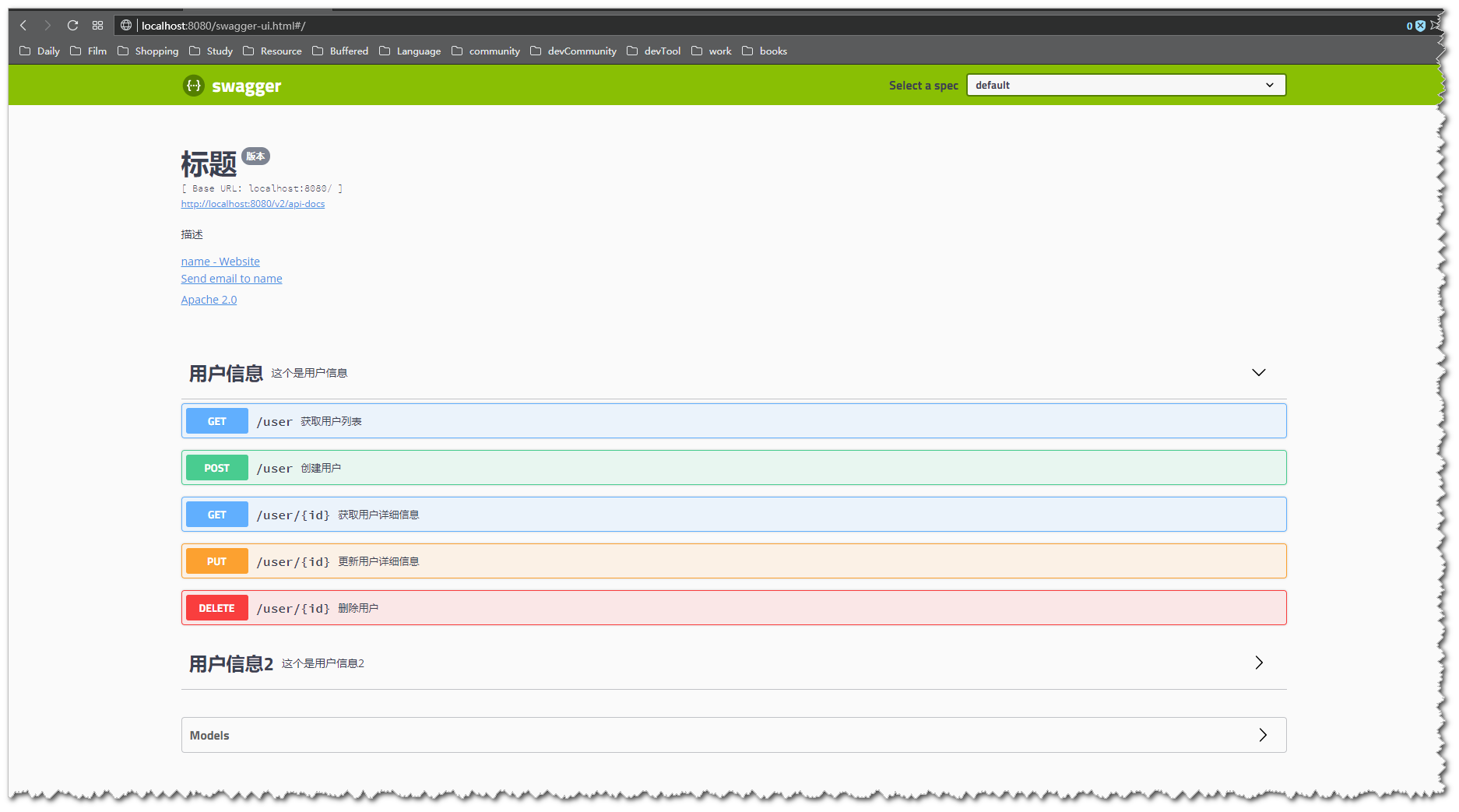
这样就完成了, 接下来就是去搜Swagger的常用注解怎么使用就ok了。 附上链接: https://github.com/swagger-api/swagger-core/wiki/annotations
——————————————————————————————————————
以下是我遇到的部分问题
@ApiImplicitParam 注解: 如果参数是实体类并且实体类中被@ApiModel和@ApiModelProperty注解修饰过, @ApiImplicitParam注解就不要加了。
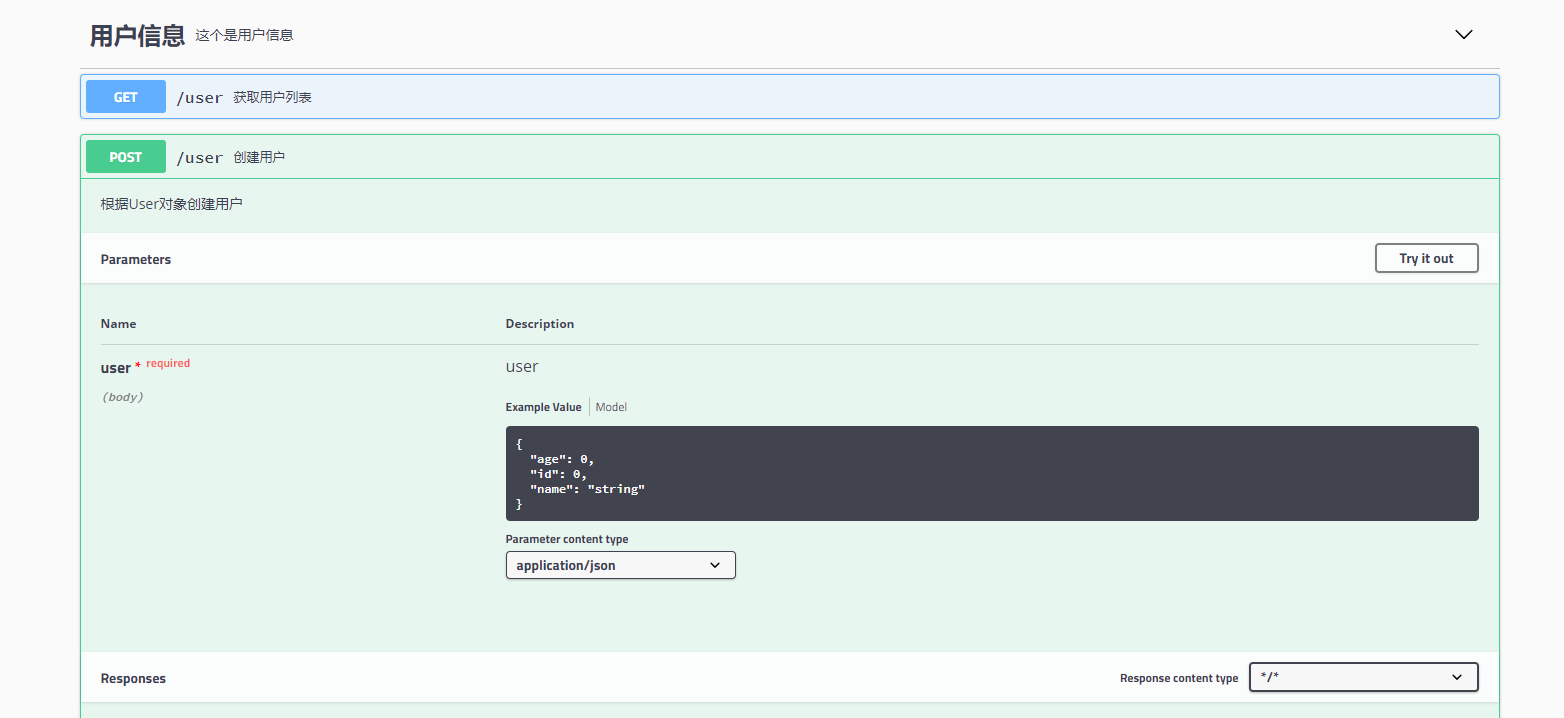
如果,没有实体类没有被@ApiModel和@ApiModelProperty注解修饰过, @ApiImplicitParam可加可不加, 另外在实体类参数之前加上@RequestBody 和不加@RequestBody,swagger的文档参数显示是不一样的
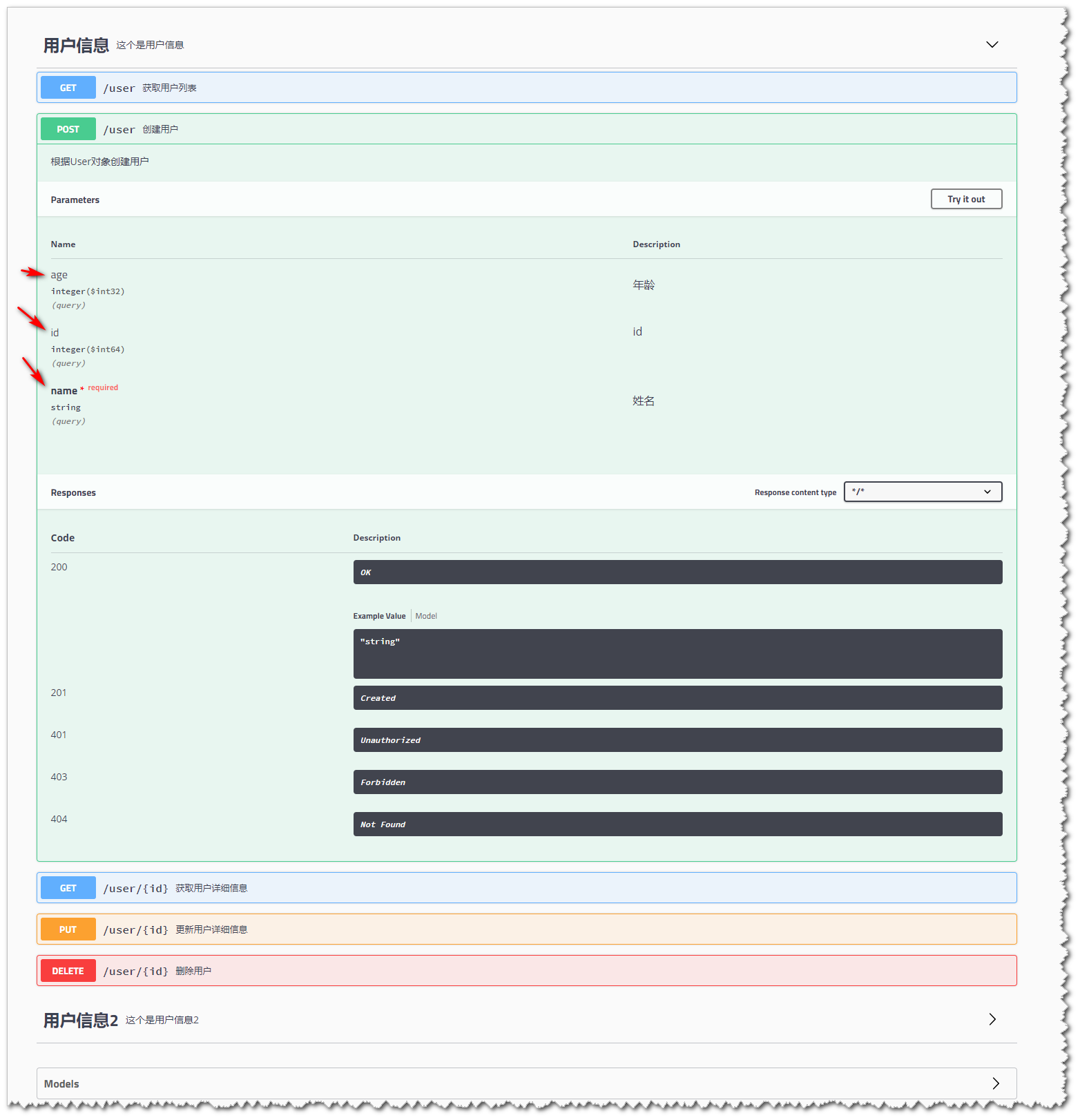
比如不加@RequestBody注解的代码:
@ApiOperation(value="创建用户", notes="根据User对象创建用户")
@PostMapping("")
public String postUser(User user) {
    users.put(user.getId(), user);
    return "success";
}
User实体:
package com.example.demo.model;

import io.swagger.annotations.ApiModel;

import io.swagger.annotations.ApiModelProperty;

import lombok.Data;

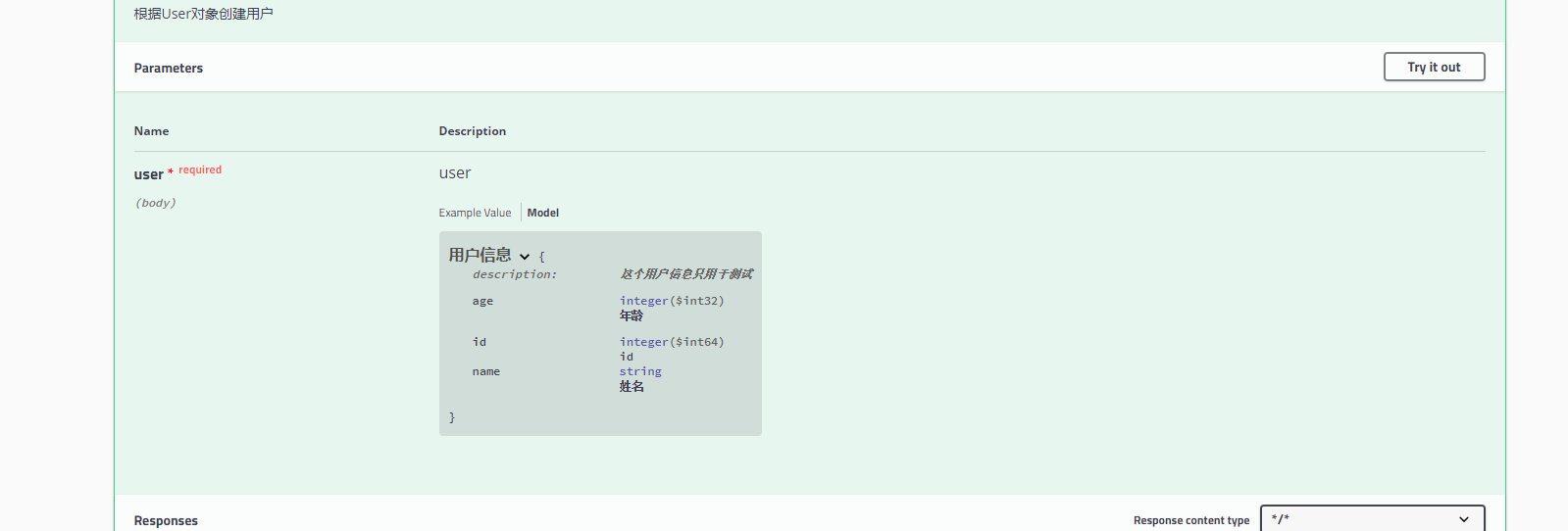
@ApiModel(value = "用户信息", description = "这个用户信息只用于测试")

@Data

public class User {

    @ApiModelProperty("id")

    private Long id;

    @ApiModelProperty(value="姓名",required=true)

    private String name;

    @ApiModelProperty("年龄")

    private Integer age;

}
swagger显示的参数是这样的
加了@RequestBody
    @ApiOperation(value="创建用户", notes="根据User对象创建用户")

    @PostMapping("")

    public String postUser(@RequestBody User user) {

        users.put(user.getId(), user);

        return "success";

    }
加了@RequestBody的swagger:
springBoot 集成swagger2.9.2的更多相关文章
- SpringBoot集成Swagger2实现Restful(类型转换错误解决办法)
1.pom.xml增加依赖包 <dependency> <groupId>io.springfox</groupId> <artifactId>spri ...
- springboot集成swagger2构建RESTful API文档
在开发过程中,有时候我们需要不停的测试接口,自测,或者交由测试测试接口,我们需要构建一个文档,都是单独写,太麻烦了,现在使用springboot集成swagger2来构建RESTful API文档,可 ...
- SpringBoot集成Swagger2在线文档
目录 SpringBoot集成Swagger2在线文档 前言 集成SpringBoot 登录接口文档示例 代码 效果 注解说明 总结 SpringBoot集成Swagger2在线文档 前言 不得不说, ...
- springboot 集成swagger2.x 后静态资源报404
package com.bgs360.configuration; import org.springframework.context.EnvironmentAware; import org.sp ...
- SpringBoot集成Swagger2并配置多个包路径扫描
1. 简介 随着现在主流的前后端分离模式开发越来越成熟,接口文档的编写和规范是一件非常重要的事.简单的项目来说,对应的controller在一个包路径下,因此在Swagger配置参数时只需要配置一 ...
- springboot集成swagger2报Illegal DefaultValue null for parameter type integer
springboot集成swagger2,实体类中有int类型,会报" Illegal DefaultValue null for parameter type integer"的 ...
- SpringBoot集成Swagger2 以及汉化 快速教程
(一) Swagger介绍 Swagger 是一款RESTFUL接口的文档在线自动生成+功能测试功能软件 (二)为什么使用Swagger 在现在的开发过程中还有很大一部分公司都是以口口相传的方式来进行 ...
- Springboot集成swagger2生成接口文档
[转载请注明]: 原文出处:https://www.cnblogs.com/jstarseven/p/11509884.html 作者:jstarseven 码字挺辛苦的..... 一 ...
- springboot 集成swagger2
使用Swagger 可以动态生成Api接口文档,在项目开发过程中可以帮助前端开发同事减少和后端同事的沟通成本,而是直接参照生成的API接口文档进行开发,提高了开发效率.这里以springboot(版本 ...
- [转] spring-boot集成swagger2
经测,spring-boot版本使用1.5.2+时需使用springfox-swagger2版本2.5+(spring-boot 1.2 + springfox-swagger2 2.2 在未扫描ja ...
随机推荐
- 根据经纬度反向地理编译出地址信息(如果报错:Error Domain=kCLErrorDomain Code=8 "(null)")
注意:Error Domain=kCLErrorDomain Code=8 "(null)" 如果出现这个错误 一定是 经纬度有问题 一定是 经纬度有问题 一定是 经纬度有问 ...
- js 中止程序继续进行(break continue return throw)
1.break 跳出循环 2.continue 跳出本次循环,进入下次循环 3.return 中止当前函数继续执行 4.throw 异常信息;中止程序抛出异常,可用于中止程序
- Memcache未授权访问漏洞利用及修复
Memcached是一套分布式的高速缓存系统.它以Key-Value(键值对)形式将数据存储在内存中,这些数据通常是应用读取频繁的.正因为内存中数据的读取远远大于硬盘,因此可以用来加速应用的访问.本文 ...
- Net Core微服务
Net Core微服务 http://www.cnblogs.com/qhbm/category/1235971.html 开发工具:VS2017 .Net Core 2.1 什么是微服务? 单体结构 ...
- 软件模拟I2C时输入与输出切换
一 为达到类似C51的操作需要添加以下位带操作:#include "stm32f10x_gpio.h"#include "stm32f10x_conf.h" / ...
- 「干货分享」模块化编程和maven配置实践一则
封面 说到模块化编程,对我个人而言首先起因于团队协作的需要,也就是组织架构结构特点来决定,而不是跟风求得自我认同,看看我们团队的组织结构: 其中: 基础平台部职责: 1.AI实验室:语音,图像 ...
- xxx cannot be resolved to a type
1.jdk不匹配(或不存在) 项目指定的jdk为“jdk1.6.0_18”,而当前eclipse使用的是“jdk1.6.0_22”.需要在BuildPath | Libraries,中做简单调 ...
- ListView 视图(View)
自定义视图,设置默认ListView,ListViewItems默认样式 public class VirtualStackPanelView : ViewBase { public static r ...
- linux-2.6.22.6/Makefile:416: *** mixed implicit and normal rules: deprecated syntax
今天在按照韦东山大哥的教程流程编译内核的时候出现了这个问题 linux-2.6.22.6/Makefile:416: *** mixed implicit and normal rules: ...
- HDU 3530Subsequence(单调队列)
题意 题目链接 给出$n$个数,找出最长的区间,使得区间中最大数$-$最小数 $>= m$ 且$<= k$ Sol 考虑维护两个单调队列. 一个维护$1 - i$的最大值,一个维护$1 - ...