
Windows Azure 配置Active Directory 主机(4)
步骤 6:设置在启动时加入域的虚拟机
若要创建其他在首次启动时加入域的虚拟机,请打开 Windows Azure PowerShell ISE,粘贴以下脚本,将占位符替换为您自己的值并运行该脚本。
若要确定域控制器的内部 IP 地址,请单击运行该控制器的虚拟网络的名称。
在以下示例中,域控制器的内部 IP 地址为 10.4.3.1。Add-AzureProvisioningConfig 还采用 -MachineObjectOU 参数,如果指定该参数(需要 Active Directory 中的完全可分辨名称),则可以在该容器中的所有虚拟机上设置组策略设置。
设置虚拟机后,通过使用用户主体名称 (UPN) 格式指定域帐户(如 administrator@corp.contoso.com)进行登录。
#Deploy a new VM and join it to the domain (部分)#
$vmname = 'MyTestVM1' $MyVM1 = New-AzureVMConfig -name $vmname -InstanceSize $size -ImageName $image | Add-AzureProvisioningConfig -WindowsDomain -Password $pwd -Domain 'corp' -DomainPassword 'p@$$w0rd' -DomainUserName 'Administrator' -JoinDomain 'corp.contoso.com'| Set-AzureSubnet -SubnetNames 'BackEnd' New-AzureVM -ServiceName $service -AffinityGroup $AG -VMs $MyVM1 -DnsSettings $myDNS -VNetName $vnet
步骤 7:备份域控制器
1.连接到 VMachine。
2.依次单击“开始”、“服务器管理器”和“添加功能”,然后选择“Windows Server Backup 功能”。按照说明进行操作来安装 Windows Server Backup。
3.依次单击“开始”、“Windows Server Backup”和“一次性备份”。
4.单击“其他选项”,然后单击“下一步”。
5.单击“完全服务器”,然后单击“下一步”。
6.单击“本地驱动器”,然后单击“下一步”。
7.选择不承载操作系统文件或 Active Directory 数据库的目标驱动器,然后单击“下一步”。
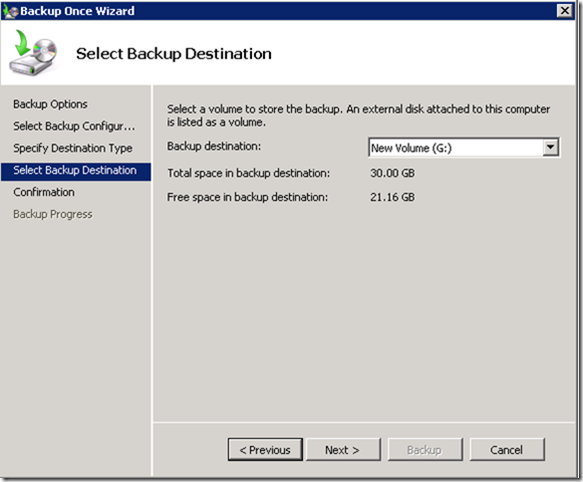
8.确认所选的备份设置,然后单击“备份”。
步骤 8:测试身份验证和授权
1.若要测试身份验证和授权,请在 Active Directory 中创建域用户帐户。登录到每个站点中的客户端虚拟机,然后在该虚拟机上创建共享文件夹
2.使用其他帐户、组和权限测试对共享文件夹的访问。
另请参阅:
附加文章:
Windows Azure 配置Active Directory 主机(1)
Windows Azure 配置Active Directory 主机(2)
Windows Azure 配置Active Directory 主机(3)
Windows Azure 配置Active Directory 主机(4)的更多相关文章
- Windows Azure 配置Active Directory 主机(3)
步骤 4:在 CloudSite 中安装附加域控制器 1.登录到 YourVMachine,单击“开始”,键入“dcpromo”,然后按 Enter. 2.在“欢迎使用”页上,单击“下一步”. 3.在 ...
- Windows Azure 配置Active Directory 主机(1)
现在越来越多企业将自己业务系统迁移云端,方便公司日常运维管理.这篇文章将简单介绍一下,从 Windows Azure 虚拟网络上的虚拟机 (VM) 中的 Corp Active Directory 林 ...
- Windows Azure 配置Active Directory 主机(2)
前一篇概况给大家介绍了,在云端部署一台DC 需要满足一些条件,接下来进入正题,云端VM安装域控制器具体步骤. 步骤1 :验证 主DC 的静态 IP 地址 1.登录到 Corp 网络上的 主DC. 2. ...
- Windows Server 2016-WinSer2016 Active Directory新增功能
Windows Server 2016 Active Directory 域服务 (AD DS)新增很多功能用来提升Active Directory域及组织环境安全等,并帮助他们面向云的部署或混合部署 ...
- 安装 Windows Server 2012 Active Directory 只读域控制器 (RODC)(级别 200)
安装 Windows Server 2012 Active Directory 只读域控制器 (RODC)(级别 200) 适用对象:Windows Server 2012 本主题介绍如何创建分步的 ...
- Prepare and Deploy Windows Server 2016 Active Directory Federation Services
https://docs.microsoft.com/en-us/windows/security/identity-protection/hello-for-business/hello-key-t ...
- Windows Azure 配置多个站点的虚拟网络连接
通过上一篇"Windows Azure 虚拟网络配置(Site to Site)" 我们建立了可以进行Site to Site连接的虚拟网络,配置过后有些朋友会有疑问:如果需要连接 ...
- Weblogic中配置Active Directory Authentication Provider
其要点或者容易出错的关键点是:(<>及其中说明代表需要替换的内容) Host: ads.yourdomain.com Host填AD服务器的域名或IP ...
- Windows Server 2016 Active Directory 图文搭建指南
1. 首先打开Manage --> Add Roles and Features 2. 点击Next 3. 不做修改,点击Next 4. 不做修改,点击Next 5. 选择Active Dire ...
随机推荐
- Virtualenwrapper
1. Introduction Virtualenvwrapper is a set of extensions to Ian Bicking's virtualenv tool. The exten ...
- 微信小程序之自定义组件与使用
一般我们在定义了一个组件之后,为了复用,需要将它导出以提供给其他页面使用. 组件导出的关键字是 exprot default 没有加default时,例如: export class Template ...
- Ext.Net 复制GridPanel的数据
Ext.Net 复制GridPanel的数据 2013-11-28 09:50:04| 分类: Ext.net | 标签: |举报 |字号大中小 订阅 CSS: <styletype ...
- POJ - 2349 ZOJ - 1914 Arctic Network 贪心+Kru
Arctic Network The Department of National Defence (DND) wishes to connect several northern outposts ...
- SCUT - 12 - 西方国家 - 矩阵快速幂
https://scut.online/p/12 可以用矩阵快速幂来做. #include<bits/stdc++.h> using namespace std; typedef long ...
- 《深入理解Java虚拟机》笔记04 -- 并发锁
Java虚拟机在操作系统层面会先尽一切可能在虚拟机层面上解决竞争关系,尽可能避免真实的竞争发生.同时,在竞争不激烈的场合,也会试图消除不必要的竞争.实现这些手段的方法包括:偏向锁.轻量级锁.自旋锁.锁 ...
- 2017-9-2 NOIP模拟赛
“与” (and.pas/.c/.cpp) 时间限制:1s:空间限制64MB 题目描述: 给你一个长度为n的序列A,请你求出一对Ai,Aj(1<=i<j<=n)使Ai“与”Aj最大. ...
- python之格式化字符串( format )
用法: 它通过 { } 和 : 来代替传统 % 方式 1.使用位置参数 要点:从以下例子可以看出位置参数不受顺序约束,且可以为 { }, 只要 format 里有相对应的参数值即可,参数索引从0开,传 ...
- appium运行遇到的坑01
..... File "build\bdist.win32\egg\appium\webdriver\errorhandler.py", line 29, in check_res ...
- UIActionSheet的最后一项点击失效
在开发过程中,发现有时候UIActionSheet的最后一项点击失效,点最后一项的上半区域时有效,这是在特定情况下才会发生,这个场景就是试用了UITabBar的时候才有.解决办法: 在showView ...