
WPF之DataGrid控件根据某列的值设置行的前景色(色
一种方法是 使用 datagrid的LoadingRow事件:
  private void DataGrid_LoadingRow(object sender, DataGridRowEventArgs e)

        {

            Employee model = e.Row.Item as Employee;

            if (model!=null)

            {

                if (model.Age<)

                {

                    e.Row.Foreground = new SolidColorBrush(Colors.Blue);

                }

            }

        }
这种方法的缺点是只有在加载数据或新增数据时才起效果。
第二种方法就是用 行的样式(RowStyle)+转换器:
转换器类:
 //定义值转换器

    [ValueConversion(typeof(int), typeof(Brush))]

    public class IntToBrushConvert : IValueConverter

    {

        public object Convert(object value, Type targetType, object parameter, CultureInfo culture)

        {

            int reValue = System.Convert.ToInt32(value);

            if (reValue == )

            {

                return new SolidColorBrush(Colors.Red);

            }

            else

            {

                return new SolidColorBrush(Colors.Black);

            }

        }

        public object ConvertBack(object value, Type targetType, object parameter, CultureInfo culture)

        {

            string strValue = value.ToString();

            return value;

        }

    }
声明转换器类:
    <Window.Resources>

        <local:IntToBrushConvert x:Key="IntToBrushConvert"/>

    </Window.Resources>
DataGrid的行样式已经绑定转换器:
<DataGrid HeadersVisibility="Column" ItemsSource="{Binding Path=Employees}"

                        SelectedItem="{Binding Path=SelectedEmployee}" CanUserAddRows="False" IsReadOnly="True"

                        AutoGenerateColumns="False">

            <DataGrid.RowStyle>

                <Style TargetType="DataGridRow">

                    <Setter Property="Foreground"

        Value="{Binding Path=Flag,Converter={StaticResource ResourceKey=IntToBrushConvert}}"></Setter>

                </Style>

            </DataGrid.RowStyle>

            <DataGrid.Columns>

                <DataGridTextColumn  Header="工号" Binding="{Binding Path=EmployeeNum}" />

                <DataGridTextColumn  Header="名称" Binding="{Binding Path=EmployeeName}" />

                <DataGridTextColumn  Header="职位" Binding="{Binding Path=Title}" />

                <DataGridTextColumn  Header="年龄" Binding="{Binding Path=Age}" />

                <DataGridTextColumn  Header="状态" Binding="{Binding Path=Status,Converter={StaticResource ResourceKey=IntToStringConvert}}"/>

            </DataGrid.Columns>

        </DataGrid>
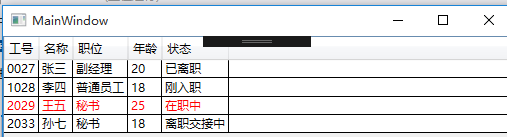
当Age属性大于22时,把Flag属性赋值为1:
 private int m_age;

        /// <summary>

        /// 年龄

        /// </summary>

        public int Age

        {

            get { return m_age; }

            set

            {

                if (value != m_age)

                {

                    m_age = value;

                    if (m_age > 22)

                    {

                        Flag = 1;

                    }

                    else

                    {

                        Flag = 0;

                    }

                    OnPropertyChanged("Age");

                }

            }

        }
运行截图:
WPF之DataGrid控件根据某列的值设置行的前景色(色的更多相关文章
- WPF的DataGrid控件从excel里复制数据然后粘贴
WPF的DataGrid控件不能像winform的DataGridView控件一样,支持值的粘贴.WPF的DataGrid控件本质上是跟数据绑定联系在一起,所以需要进行复制粘贴的操作,可以在wpf里用 ...
- WPF 4 DataGrid 控件(进阶篇一)
原文:WPF 4 DataGrid 控件(进阶篇一) 上一篇<WPF 4 DataGrid 控件(自定义样式篇)>中,我们掌握了DataGrid 列表头.行表头.行.单元格相关的 ...
- WPF 4 DataGrid 控件(进阶篇二)
原文:WPF 4 DataGrid 控件(进阶篇二) 上一篇<WPF 4 DataGrid 控件(进阶篇一)>中我们通过DataGridTemplateColumn 类自定义编辑 ...
- WPF 4 DataGrid 控件(基本功能篇)
原文:WPF 4 DataGrid 控件(基本功能篇) 提到DataGrid 不管是网页还是应用程序开发都会频繁使用.通过它我们可以灵活的在行与列间显示各种数据.本篇将详细介绍WPF 4 中 ...
- WPF 4 DataGrid 控件(自定义样式篇)
原文:WPF 4 DataGrid 控件(自定义样式篇) 在<WPF 4 DataGrid 控件(基本功能篇)>中我们已经学习了DataGrid 的基本功能及使用方法.本篇将继续 ...
- WPF 自定义DataGrid控件样式
内容转自https://www.cnblogs.com/xiaogangqq123/archive/2012/05/07/2487166.html 一.DataGrid基本样式(一) 小刚已经把Dat ...
- WPF中DataGrid控件内Button的Command和CommandParameter的绑定
场景:视频上传功能,上传列表使用DataGrid控件,视频有不同的状态对应不同的操作,DataGrid中最后一列为操作列,里面是Button控件.希望点击Button后执行对应的操作,但是设置Butt ...
- WPF中DataGrid控件的过滤(Filter)性能分析及优化
DataGrid控件是一个列表控件, 可以进行过滤,排序等.本文主要针对DataGrid的过滤功能进行分析, 并提供优化方案. 1)DataGrid的过滤过程: 用户输入过滤条件 ...
- 关于使用MVVM模式在WPF的DataGrid控件中实现ComboBox编辑列
最近在做一个组态软件的项目,有一个需求需要在建立IO设备变量的时候选择变量的类型等. 建立IO变量的界面是一个DataGrid实现的,可以一行一行的新建变量,如下如所示: 这里需要使用带有ComboB ...
随机推荐
- 用Dockerfile生成docker image
在docker的官方php镜像中,有独立的php和apache版本的,这里尝试用php-fpm7.2.1(alpine3.7)作为基础镜像,在把nginx1.13.8加进去. 第一步:拉取php镜像: ...
- ICML论文|阿尔法狗CTO讲座: AI如何用新型强化学习玩转围棋扑克游戏
今年8月,Demis Hassabis等人工智能技术先驱们将来到雷锋网“人工智能与机器人创新大会”.在此,我们为大家分享David Silver的论文<不完美信息游戏中的深度强化学习自我对战&g ...
- Github入门 - Github基本使用及Github桌面版使用
知识内容: 1.版本控制 2.Git介绍 3.Github介绍及基本使用 4.Github桌面版介绍及安装 5.Github桌面版基础使用 6.Github桌面版进阶使用 参考: http://www ...
- SQL函数汇总(MySQL教材)
1.SQL重复记录查询的几种方法 https://www.cnblogs.com/firstdream/p/5826238.html 2.SQL两列字段,合并为一个字符串,中间加符号 https:// ...
- python json.loads json.dumps(ensure_ascii = False) 汉字乱码问题解决
python 转换为json时候 汉字编码问题 2017年03月23日 18:50:04 阅读数:5604 有这样一个需求: 需要一个json 文件 数据从数据库里查询出来 1. 设置文件头 # -* ...
- Ceph实战入门系列(一)——三节点Ceph集群的安装与部署
安装文档:http://blog.csdn.net/u014139942/article/details/53639124
- DSHTTPService
DSHTTPService Filters 压缩过滤器的使用 The Filters property specifies the DataSnap communication filters for ...
- python global nonlocal
global: 方法之外在modual中的变量定义为全局变量.方法内的变量为局部变量. 一般情况下,全局变量可以被使用,但是不应该被修改,不然会报错. 不过一般不建议对全局变量做修改,如果有多个方法都 ...
- UI5-文档-4.22-Expression Binding
有时预定义的SAPUI5类型不够灵活,您希望在视图中执行简单的计算或格式化——这正是表达式真正有用的地方.我们使用它们根据数据模型中的当前数字格式化价格. Preview The price is n ...
- UI5-文档-4.18-Icons
我们的对话框仍然是空的.因为SAPUI5附带了一个包含500多个图标的大图标字体,所以我们将在对话框打开时添加一个图标来问候用户. Preview An icon is now displayed i ...