
UWP 滚动条私人定制
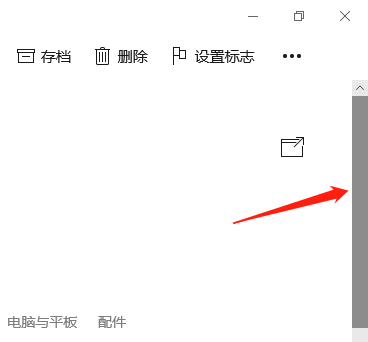
最近突然发现微软自带的滚动条好挫哦
微软哒(棒棒哒)
网上找的(美美哒)
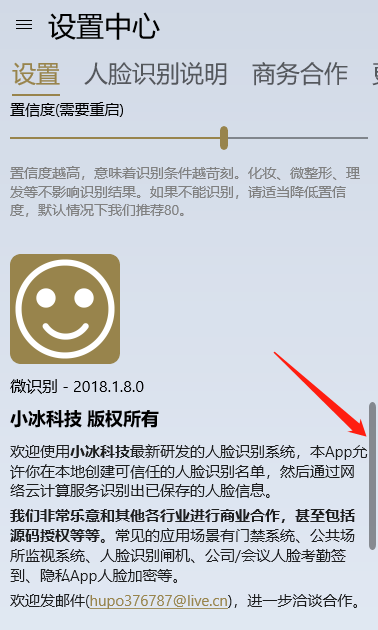
好了。
如果你想要棒棒哒,那么就不用往下看了(手动再见)。
如果你想要美美哒,就需要下面的神秘代码。

<Style TargetType="ScrollBar">
<Setter Property="MinWidth" Value="12" />
<Setter Property="MinHeight" Value="12" />
<Setter Property="Background" Value="Transparent" />
<Setter Property="Foreground" Value="Transparent" />
<Setter Property="BorderBrush" Value="Transparent" />
<Setter Property="IsTabStop" Value="False" />
<Setter Property="Template">
<Setter.Value>
<ControlTemplate TargetType="ScrollBar">
<Grid x:Name="Root">
<Grid.Resources>
<ControlTemplate x:Key="RepeatButtonTemplate" TargetType="RepeatButton">
<Grid x:Name="Root" Background="Transparent">
<VisualStateManager.VisualStateGroups>
<VisualStateGroup x:Name="CommonStates">
<VisualState x:Name="Normal" />
</VisualStateGroup>
</VisualStateManager.VisualStateGroups>
</Grid>
</ControlTemplate>
<ControlTemplate x:Key="HorizontalIncrementTemplate" TargetType="RepeatButton">
<Grid x:Name="Root">
<FontIcon
x:Name="Arrow"
FontFamily="{ThemeResource SymbolThemeFontFamily}"
FontSize="6"
Foreground="{ThemeResource SystemControlForegroundBaseHighBrush}"
Glyph=""
MirroredWhenRightToLeft="True" />
<VisualStateManager.VisualStateGroups>
<VisualStateGroup x:Name="CommonStates">
<VisualState x:Name="Normal" />
<VisualState x:Name="PointerOver">
<Storyboard>
<ObjectAnimationUsingKeyFrames Storyboard.TargetName="Root" Storyboard.TargetProperty="Background">
<DiscreteObjectKeyFrame KeyTime="0" Value="{ThemeResource SystemControlHighlightBaseMediumLowBrush}" />
</ObjectAnimationUsingKeyFrames>
<ObjectAnimationUsingKeyFrames Storyboard.TargetName="Arrow" Storyboard.TargetProperty="Foreground">
<DiscreteObjectKeyFrame KeyTime="0" Value="{ThemeResource SystemControlHighlightAltBaseHighBrush}" />
</ObjectAnimationUsingKeyFrames>
</Storyboard>
</VisualState>
<VisualState x:Name="Pressed">
<Storyboard>
<ObjectAnimationUsingKeyFrames Storyboard.TargetName="Root" Storyboard.TargetProperty="Background">
<DiscreteObjectKeyFrame KeyTime="0" Value="{ThemeResource SystemControlHighlightBaseMediumBrush}" />
</ObjectAnimationUsingKeyFrames>
<ObjectAnimationUsingKeyFrames Storyboard.TargetName="Arrow" Storyboard.TargetProperty="Foreground">
<DiscreteObjectKeyFrame KeyTime="0" Value="{ThemeResource SystemControlHighlightAltAltHighBrush}" />
</ObjectAnimationUsingKeyFrames>
</Storyboard>
</VisualState>
<VisualState x:Name="Disabled">
<Storyboard>
<ObjectAnimationUsingKeyFrames Storyboard.TargetName="Arrow" Storyboard.TargetProperty="Foreground">
<DiscreteObjectKeyFrame KeyTime="0" Value="{ThemeResource SystemControlDisabledBaseHighBrush}" />
</ObjectAnimationUsingKeyFrames>
</Storyboard>
</VisualState>
</VisualStateGroup>
</VisualStateManager.VisualStateGroups>
</Grid>
</ControlTemplate>
<ControlTemplate x:Key="HorizontalDecrementTemplate" TargetType="RepeatButton">
<Grid x:Name="Root">
<FontIcon
x:Name="Arrow"
FontFamily="{ThemeResource SymbolThemeFontFamily}"
FontSize="6"
Foreground="{ThemeResource SystemControlForegroundBaseHighBrush}"
Glyph=""
MirroredWhenRightToLeft="True" />
<VisualStateManager.VisualStateGroups>
<VisualStateGroup x:Name="CommonStates">
<VisualState x:Name="Normal" />
<VisualState x:Name="PointerOver">
<Storyboard>
<ObjectAnimationUsingKeyFrames Storyboard.TargetName="Root" Storyboard.TargetProperty="Background">
<DiscreteObjectKeyFrame KeyTime="0" Value="{ThemeResource SystemControlHighlightBaseMediumLowBrush}" />
</ObjectAnimationUsingKeyFrames>
<ObjectAnimationUsingKeyFrames Storyboard.TargetName="Arrow" Storyboard.TargetProperty="Foreground">
<DiscreteObjectKeyFrame KeyTime="0" Value="{ThemeResource SystemControlHighlightAltBaseHighBrush}" />
</ObjectAnimationUsingKeyFrames>
</Storyboard>
</VisualState>
<VisualState x:Name="Pressed">
<Storyboard>
<ObjectAnimationUsingKeyFrames Storyboard.TargetName="Root" Storyboard.TargetProperty="Background">
<DiscreteObjectKeyFrame KeyTime="0" Value="{ThemeResource SystemControlHighlightBaseMediumBrush}" />
</ObjectAnimationUsingKeyFrames>
<ObjectAnimationUsingKeyFrames Storyboard.TargetName="Arrow" Storyboard.TargetProperty="Foreground">
<DiscreteObjectKeyFrame KeyTime="0" Value="{ThemeResource SystemControlHighlightAltAltHighBrush}" />
</ObjectAnimationUsingKeyFrames>
</Storyboard>
</VisualState>
<VisualState x:Name="Disabled">
<Storyboard>
<ObjectAnimationUsingKeyFrames Storyboard.TargetName="Arrow" Storyboard.TargetProperty="Foreground">
<DiscreteObjectKeyFrame KeyTime="0" Value="{ThemeResource SystemControlDisabledBaseHighBrush}" />
</ObjectAnimationUsingKeyFrames>
</Storyboard>
</VisualState>
</VisualStateGroup>
</VisualStateManager.VisualStateGroups>
</Grid>
</ControlTemplate>
<ControlTemplate x:Key="VerticalIncrementTemplate" TargetType="RepeatButton">
<Grid x:Name="Root">
<FontIcon
x:Name="Arrow"
FontFamily="{ThemeResource SymbolThemeFontFamily}"
FontSize="6"
Foreground="{ThemeResource SystemControlForegroundBaseHighBrush}"
Glyph="" />
<VisualStateManager.VisualStateGroups>
<VisualStateGroup x:Name="CommonStates">
<VisualState x:Name="Normal" />
<VisualState x:Name="PointerOver">
<Storyboard>
<ObjectAnimationUsingKeyFrames Storyboard.TargetName="Root" Storyboard.TargetProperty="Background">
<DiscreteObjectKeyFrame KeyTime="0" Value="{ThemeResource SystemControlHighlightBaseMediumLowBrush}" />
</ObjectAnimationUsingKeyFrames>
<ObjectAnimationUsingKeyFrames Storyboard.TargetName="Arrow" Storyboard.TargetProperty="Foreground">
<DiscreteObjectKeyFrame KeyTime="0" Value="{ThemeResource SystemControlHighlightAltBaseHighBrush}" />
</ObjectAnimationUsingKeyFrames>
</Storyboard>
</VisualState>
<VisualState x:Name="Pressed">
<Storyboard>
<ObjectAnimationUsingKeyFrames Storyboard.TargetName="Root" Storyboard.TargetProperty="Background">
<DiscreteObjectKeyFrame KeyTime="0" Value="{ThemeResource SystemControlHighlightBaseMediumBrush}" />
</ObjectAnimationUsingKeyFrames>
<ObjectAnimationUsingKeyFrames Storyboard.TargetName="Arrow" Storyboard.TargetProperty="Foreground">
<DiscreteObjectKeyFrame KeyTime="0" Value="{ThemeResource SystemControlHighlightAltAltHighBrush}" />
</ObjectAnimationUsingKeyFrames>
</Storyboard>
</VisualState>
<VisualState x:Name="Disabled">
<Storyboard>
<ObjectAnimationUsingKeyFrames Storyboard.TargetName="Arrow" Storyboard.TargetProperty="Foreground">
<DiscreteObjectKeyFrame KeyTime="0" Value="{ThemeResource SystemControlDisabledBaseHighBrush}" />
</ObjectAnimationUsingKeyFrames>
</Storyboard>
</VisualState>
</VisualStateGroup>
</VisualStateManager.VisualStateGroups>
</Grid>
</ControlTemplate>
<ControlTemplate x:Key="VerticalDecrementTemplate" TargetType="RepeatButton">
<Grid x:Name="Root">
<FontIcon
x:Name="Arrow"
FontFamily="{ThemeResource SymbolThemeFontFamily}"
FontSize="6"
Foreground="{ThemeResource SystemControlForegroundBaseHighBrush}"
Glyph="" />
<VisualStateManager.VisualStateGroups>
<VisualStateGroup x:Name="CommonStates">
<VisualState x:Name="Normal" />
<VisualState x:Name="PointerOver">
<Storyboard>
<ObjectAnimationUsingKeyFrames Storyboard.TargetName="Root" Storyboard.TargetProperty="Background">
<DiscreteObjectKeyFrame KeyTime="0" Value="{ThemeResource SystemControlHighlightBaseMediumLowBrush}" />
</ObjectAnimationUsingKeyFrames>
<ObjectAnimationUsingKeyFrames Storyboard.TargetName="Arrow" Storyboard.TargetProperty="Foreground">
<DiscreteObjectKeyFrame KeyTime="0" Value="{ThemeResource SystemControlHighlightAltBaseHighBrush}" />
</ObjectAnimationUsingKeyFrames>
</Storyboard>
</VisualState>
<VisualState x:Name="Pressed">
<Storyboard>
<ObjectAnimationUsingKeyFrames Storyboard.TargetName="Root" Storyboard.TargetProperty="Background">
<DiscreteObjectKeyFrame KeyTime="0" Value="{ThemeResource SystemControlHighlightBaseMediumBrush}" />
</ObjectAnimationUsingKeyFrames>
<ObjectAnimationUsingKeyFrames Storyboard.TargetName="Arrow" Storyboard.TargetProperty="Foreground">
<DiscreteObjectKeyFrame KeyTime="0" Value="{ThemeResource SystemControlHighlightAltAltHighBrush}" />
</ObjectAnimationUsingKeyFrames>
</Storyboard>
</VisualState>
<VisualState x:Name="Disabled">
<Storyboard>
<ObjectAnimationUsingKeyFrames Storyboard.TargetName="Arrow" Storyboard.TargetProperty="Foreground">
<DiscreteObjectKeyFrame KeyTime="0" Value="{ThemeResource SystemControlDisabledBaseHighBrush}" />
</ObjectAnimationUsingKeyFrames>
</Storyboard>
</VisualState>
</VisualStateGroup>
</VisualStateManager.VisualStateGroups>
</Grid>
</ControlTemplate>
<ControlTemplate x:Key="VerticalThumbTemplate" TargetType="Thumb">
<Rectangle
x:Name="ThumbVisual"
Fill="{ThemeResource SystemControlForegroundBaseLowBrush}"
RadiusX="5"
RadiusY="5">
<VisualStateManager.VisualStateGroups>
<VisualStateGroup x:Name="CommonStates">
<VisualState x:Name="Normal" />
<VisualState x:Name="PointerOver">
<Storyboard>
<ObjectAnimationUsingKeyFrames Storyboard.TargetName="ThumbVisual" Storyboard.TargetProperty="Fill">
<DiscreteObjectKeyFrame KeyTime="0" Value="{ThemeResource SystemControlHighlightBaseMediumLowBrush}" />
</ObjectAnimationUsingKeyFrames>
</Storyboard>
</VisualState>
<VisualState x:Name="Pressed">
<Storyboard>
<ObjectAnimationUsingKeyFrames Storyboard.TargetName="ThumbVisual" Storyboard.TargetProperty="Fill">
<DiscreteObjectKeyFrame KeyTime="0" Value="{ThemeResource SystemControlHighlightBaseMediumBrush}" />
</ObjectAnimationUsingKeyFrames>
</Storyboard>
</VisualState>
<VisualState x:Name="Disabled">
<Storyboard>
<DoubleAnimation
Storyboard.TargetName="ThumbVisual"
Storyboard.TargetProperty="Opacity"
To="0"
Duration="0" />
</Storyboard>
</VisualState>
</VisualStateGroup>
</VisualStateManager.VisualStateGroups>
</Rectangle>
</ControlTemplate>
<ControlTemplate x:Key="HorizontalThumbTemplate" TargetType="Thumb">
<Rectangle
x:Name="ThumbVisual"
Fill="{ThemeResource SystemControlForegroundBaseLowBrush}"
RadiusX="5"
RadiusY="5">
<VisualStateManager.VisualStateGroups>
<VisualStateGroup x:Name="CommonStates">
<VisualState x:Name="Normal" />
<VisualState x:Name="PointerOver">
<Storyboard>
<ObjectAnimationUsingKeyFrames Storyboard.TargetName="ThumbVisual" Storyboard.TargetProperty="Fill">
<DiscreteObjectKeyFrame KeyTime="0" Value="{ThemeResource SystemControlHighlightBaseMediumLowBrush}" />
</ObjectAnimationUsingKeyFrames>
</Storyboard>
</VisualState>
<VisualState x:Name="Pressed">
<Storyboard>
<ObjectAnimationUsingKeyFrames Storyboard.TargetName="ThumbVisual" Storyboard.TargetProperty="Fill">
<DiscreteObjectKeyFrame KeyTime="0" Value="{ThemeResource SystemControlHighlightBaseMediumBrush}" />
</ObjectAnimationUsingKeyFrames>
</Storyboard>
</VisualState>
<VisualState x:Name="Disabled">
<Storyboard>
<DoubleAnimation
Storyboard.TargetName="ThumbVisual"
Storyboard.TargetProperty="Opacity"
To="0"
Duration="0" />
</Storyboard>
</VisualState>
</VisualStateGroup>
</VisualStateManager.VisualStateGroups>
</Rectangle>
</ControlTemplate>
</Grid.Resources>
<Grid x:Name="HorizontalRoot" IsHitTestVisible="False">
<Grid.ColumnDefinitions>
<ColumnDefinition Width="Auto" />
<ColumnDefinition Width="Auto" />
<ColumnDefinition Width="Auto" />
<ColumnDefinition Width="*" />
<ColumnDefinition Width="Auto" />
</Grid.ColumnDefinitions>
<Rectangle
x:Name="HorizontalTrackRect"
Grid.ColumnSpan="5"
Height="7"
Margin="0"
Fill="Transparent"
RadiusX="5"
RadiusY="5"
Stroke="{ThemeResource SystemControlForegroundTransparentBrush}"
StrokeThickness="{ThemeResource ScrollBarTrackBorderThemeThickness}" />
<RepeatButton
x:Name="HorizontalSmallDecrease"
Grid.Column="0"
Width="12"
MinHeight="12"
Margin="0"
VerticalAlignment="Center"
Interval="50"
IsTabStop="False"
Opacity="0"
Template="{StaticResource HorizontalDecrementTemplate}" />
<RepeatButton
x:Name="HorizontalLargeDecrease"
Grid.Column="1"
Width="0"
HorizontalAlignment="Stretch"
VerticalAlignment="Stretch"
Interval="50"
IsTabStop="False"
Opacity="0"
Template="{StaticResource RepeatButtonTemplate}" />
<Thumb
x:Name="HorizontalThumb"
Grid.Column="2"
Height="7"
MinWidth="12"
AutomationProperties.AccessibilityView="Raw"
Background="{ThemeResource SystemControlForegroundChromeHighBrush}"
Template="{StaticResource HorizontalThumbTemplate}" />
<RepeatButton
x:Name="HorizontalLargeIncrease"
Grid.Column="3"
HorizontalAlignment="Stretch"
VerticalAlignment="Stretch"
Interval="50"
IsTabStop="False"
Opacity="0"
Template="{StaticResource RepeatButtonTemplate}" />
<RepeatButton
x:Name="HorizontalSmallIncrease"
Grid.Column="4"
Width="12"
MinHeight="12"
Margin="0"
VerticalAlignment="Center"
Interval="50"
IsTabStop="False"
Opacity="0"
Template="{StaticResource HorizontalIncrementTemplate}" />
</Grid>
<Grid x:Name="HorizontalPanningRoot" MinWidth="24">
<Border
x:Name="HorizontalPanningThumb"
Height="2"
MinWidth="32"
Margin="0,2,0,2"
HorizontalAlignment="Left"
VerticalAlignment="Bottom"
Background="{ThemeResource SystemControlForegroundChromeDisabledLowBrush}"
BorderThickness="0" />
</Grid>
<Grid x:Name="VerticalRoot" IsHitTestVisible="False">
<Grid.RowDefinitions>
<RowDefinition Height="Auto" />
<RowDefinition Height="Auto" />
<RowDefinition Height="Auto" />
<RowDefinition Height="*" />
<RowDefinition Height="Auto" />
</Grid.RowDefinitions>
<Rectangle
x:Name="VerticalTrackRect"
Grid.RowSpan="5"
Height="7"
Margin="0"
RadiusX="5"
RadiusY="5"
Stroke="{ThemeResource SystemControlForegroundTransparentBrush}"
StrokeThickness="{ThemeResource ScrollBarTrackBorderThemeThickness}" />
<RepeatButton
x:Name="VerticalSmallDecrease"
Grid.Row="0"
Height="12"
MinWidth="12"
Margin="0"
HorizontalAlignment="Center"
Interval="50"
IsHitTestVisible="False"
IsTabStop="False"
Opacity="0"
Template="{StaticResource VerticalDecrementTemplate}" />
<RepeatButton
x:Name="VerticalLargeDecrease"
Grid.Row="1"
Height="0"
HorizontalAlignment="Stretch"
VerticalAlignment="Stretch"
Interval="50"
IsHitTestVisible="False"
IsTabStop="False"
Opacity="0"
Template="{StaticResource RepeatButtonTemplate}" />
<Thumb
x:Name="VerticalThumb"
Grid.Row="2"
Width="7"
MinHeight="12"
AutomationProperties.AccessibilityView="Raw"
Background="#FFEAEAEA"
Template="{StaticResource VerticalThumbTemplate}" />
<RepeatButton
x:Name="VerticalLargeIncrease"
Grid.Row="3"
HorizontalAlignment="Stretch"
VerticalAlignment="Stretch"
Interval="50"
IsHitTestVisible="False"
IsTabStop="False"
Opacity="0"
Template="{StaticResource RepeatButtonTemplate}" />
<RepeatButton
x:Name="VerticalSmallIncrease"
Grid.Row="4"
Height="12"
MinWidth="12"
Margin="0"
HorizontalAlignment="Center"
Interval="50"
IsHitTestVisible="False"
IsTabStop="False"
Opacity="0"
Template="{StaticResource VerticalIncrementTemplate}" />
</Grid>
<Grid x:Name="VerticalPanningRoot" MinHeight="24">
<Border
x:Name="VerticalPanningThumb"
Width="2"
MinHeight="32"
Margin="2,0,2,0"
HorizontalAlignment="Right"
VerticalAlignment="Top"
Background="#FFEAEAEA"
BorderThickness="0" />
</Grid>
<VisualStateManager.VisualStateGroups>
<VisualStateGroup x:Name="CommonStates">
<VisualState x:Name="Normal" />
<VisualState x:Name="PointerOver" />
<VisualState x:Name="Disabled">
<Storyboard>
<DoubleAnimation
Storyboard.TargetName="Root"
Storyboard.TargetProperty="Opacity"
To="0.5"
Duration="0" />
<ObjectAnimationUsingKeyFrames Storyboard.TargetName="HorizontalTrackRect" Storyboard.TargetProperty="Stroke">
<DiscreteObjectKeyFrame KeyTime="0" Value="{ThemeResource SystemControlDisabledTransparentBrush}" />
</ObjectAnimationUsingKeyFrames>
<ObjectAnimationUsingKeyFrames Storyboard.TargetName="VerticalTrackRect" Storyboard.TargetProperty="Stroke">
<DiscreteObjectKeyFrame KeyTime="0" Value="{ThemeResource SystemControlDisabledTransparentBrush}" />
</ObjectAnimationUsingKeyFrames>
<ObjectAnimationUsingKeyFrames Storyboard.TargetName="HorizontalPanningThumb" Storyboard.TargetProperty="Background">
<DiscreteObjectKeyFrame KeyTime="0" Value="{ThemeResource SystemControlDisabledChromeHighBrush}" />
</ObjectAnimationUsingKeyFrames>
</Storyboard>
</VisualState>
</VisualStateGroup>
<VisualStateGroup x:Name="ScrollingIndicatorStates">
<VisualState x:Name="TouchIndicator">
<Storyboard>
<FadeInThemeAnimation TargetName="HorizontalPanningRoot" />
<FadeInThemeAnimation TargetName="VerticalPanningRoot" />
<FadeOutThemeAnimation TargetName="HorizontalRoot" />
<FadeOutThemeAnimation TargetName="VerticalRoot" />
<ObjectAnimationUsingKeyFrames
Storyboard.TargetName="HorizontalRoot"
Storyboard.TargetProperty="Visibility"
Duration="0">
<DiscreteObjectKeyFrame KeyTime="0">
<DiscreteObjectKeyFrame.Value>
<Visibility>Collapsed</Visibility>
</DiscreteObjectKeyFrame.Value>
</DiscreteObjectKeyFrame>
</ObjectAnimationUsingKeyFrames>
<ObjectAnimationUsingKeyFrames
Storyboard.TargetName="VerticalRoot"
Storyboard.TargetProperty="Visibility"
Duration="0">
<DiscreteObjectKeyFrame KeyTime="0">
<DiscreteObjectKeyFrame.Value>
<Visibility>Collapsed</Visibility>
</DiscreteObjectKeyFrame.Value>
</DiscreteObjectKeyFrame>
</ObjectAnimationUsingKeyFrames>
</Storyboard>
</VisualState>
<VisualState x:Name="MouseIndicator">
<Storyboard>
<FadeInThemeAnimation TargetName="HorizontalRoot" />
<FadeInThemeAnimation TargetName="VerticalRoot" />
<FadeOutThemeAnimation TargetName="HorizontalPanningRoot" />
<ObjectAnimationUsingKeyFrames
Storyboard.TargetName="HorizontalPanningRoot"
Storyboard.TargetProperty="Visibility"
Duration="0">
<DiscreteObjectKeyFrame KeyTime="0">
<DiscreteObjectKeyFrame.Value>
<Visibility>Collapsed</Visibility>
</DiscreteObjectKeyFrame.Value>
</DiscreteObjectKeyFrame>
</ObjectAnimationUsingKeyFrames>
<FadeOutThemeAnimation TargetName="VerticalPanningRoot" />
<ObjectAnimationUsingKeyFrames
Storyboard.TargetName="VerticalPanningRoot"
Storyboard.TargetProperty="Visibility"
Duration="0">
<DiscreteObjectKeyFrame KeyTime="0">
<DiscreteObjectKeyFrame.Value>
<Visibility>Collapsed</Visibility>
</DiscreteObjectKeyFrame.Value>
</DiscreteObjectKeyFrame>
</ObjectAnimationUsingKeyFrames>
<ObjectAnimationUsingKeyFrames Storyboard.TargetName="HorizontalRoot" Storyboard.TargetProperty="IsHitTestVisible">
<DiscreteObjectKeyFrame KeyTime="0">
<DiscreteObjectKeyFrame.Value>
<x:Boolean>True</x:Boolean>
</DiscreteObjectKeyFrame.Value>
</DiscreteObjectKeyFrame>
</ObjectAnimationUsingKeyFrames>
<ObjectAnimationUsingKeyFrames Storyboard.TargetName="VerticalRoot" Storyboard.TargetProperty="IsHitTestVisible">
<DiscreteObjectKeyFrame KeyTime="0">
<DiscreteObjectKeyFrame.Value>
<x:Boolean>True</x:Boolean>
</DiscreteObjectKeyFrame.Value>
</DiscreteObjectKeyFrame>
</ObjectAnimationUsingKeyFrames>
</Storyboard>
</VisualState>
<VisualState x:Name="NoIndicator">
<Storyboard>
<FadeOutThemeAnimation BeginTime="0" TargetName="HorizontalPanningRoot" />
<FadeOutThemeAnimation BeginTime="0" TargetName="VerticalPanningRoot" />
<FadeOutThemeAnimation BeginTime="0" TargetName="HorizontalRoot" />
<FadeOutThemeAnimation BeginTime="0" TargetName="VerticalRoot" />
</Storyboard>
</VisualState>
</VisualStateGroup>
</VisualStateManager.VisualStateGroups>
</Grid>
</ControlTemplate>
</Setter.Value>
</Setter>
</Style>
这段神秘代码可以应用在ScrollViewer, ListView, TextBox(多行),GridView等等。
UWP 滚动条私人定制的更多相关文章
- UWP TextBox私人定制
这次私人定制的是背景透明的TextBox,普通的TextBox在获取焦点后,背景色就变白色了. 下面的代码可以让TextBox的背景始终是透明的. 其实很简单,就修改了 <Setter Prop ...
- 私人定制自己的linux小系统
私人定制自己的linux小系统 一.前言 linux操作系统至1991.10.5号诞生以来,就源其开源性和自由性得到了很多技术大牛的青睐,每个linux爱好者都为其贡献了自己的一份力,不管是在 ...
- 高级私人定制西服品牌:XUAN PRIVE 为定制而生_乐活_onlylady女人志
高级私人定制西服品牌:XUAN PRIVE 为定制而生_乐活_onlylady女人志 高级私人定制西服品牌:XUAN PRIVE 为定制而生
- OSX: 私人定制Dock默认程序图标
不论什么一个新用户第一次登陆后,OSX都会自己主动地在用户的Dock中列出系统默认的应用程序图标,这些图标随着OSX版本号的不同而不同. 系统管理员有的时候须要改变这些系统默认图标,或者加入自己的或者 ...
- 去英国Savile Row 做件私人定制手工西装_GQ男士网
去英国Savile Row 做件私人定制手工西装_GQ男士网 去英国Savile Row 做件私人定制手工西装
- 绫致时装讲述O2O细节:野心在“私人定制” - 移动购物 - 亿邦动力网
绫致时装讲述O2O细节:野心在"私人定制" - 移动购物 - 亿邦动力网 绫致时装讲述O2O细节:野心在"私人定制" 作者: 亿邦动力网来源: 亿邦动力网201 ...
- 私人定制javascript事件处理机制(浅谈)
看到园子里关于事件监听发表的文章,我都有点不好意思写了.不过想想我的题目以私人定制作开头也就妥妥地写吧. 事件相关概念 1.事件类型 发生事件的字符串 有传统事件类型 比如表单.window事件等 D ...
- 旅行app(游记、攻略、私人定制) | 顺便游旅行H5移动端实例
<顺便游旅行>是一款H5移动端旅行app,提供目的地(国内.国外.周边)搜索.旅游攻略查询.游记分享.私人定制4大模块,类似携程.同程.去哪儿.马蜂窝移动端,只不过顺便游app界面更为简洁 ...
- JWinner:一个私人定制的快速开发框架,为理想而生
关于JWinner JWinner是一个JAVA项目的快速开发框架,他已经实现了大多数项目开发之前需要进行的一些必备工作,还有很多在开发过程中可能会用到的工具集. JWinner的诞生并不是一蹴而就的 ...
随机推荐
- qt的共享内存
https://blog.csdn.net/gdutlyp/article/details/50468677
- IP地址分类/IP地址10开头和172开头和192开头的区别/判断是否同一网段(A、B、C三类地址)【转】
简单来说在公司或企业内部看到的就基本都是内网IP,ABC三类IP地址里的常见IP段. 每个IP地址都包含两部分,即网络号和主机号. InterNIC将IP地址分为五类:A类保留给ZF或大型企业,B类分 ...
- Excel截取特定字符后面的值
应该用到三个字符串函数:LEFT.RIGHT.MID 1.LEFT函数: 用法:LEFT(要提取字符所在单元格,从左侧开始提取的个数) 例如:=LEFT(A1,2) 意思是从A1单元格提取前两个字符. ...
- November 22nd 2016 Week 48th Tuesday
Eventually, you will learn to cry on the inside. 终有一天,你得学会让眼泪在心里流. Cry on the inside. I am tired, an ...
- 企业大数据之Elasticsearch的搜索类型
下面的 ES基于版本(V2.3.4) ES之默认 1.默认自动发先同一局域网的所有集群节点 2.默认一个索引库会有5个分片,(分片越多,效率越好) 由于这两个默认,所以统一索引库的分片对分布在不同机器 ...
- ascii2native 转码 解码
//把十六进制的编码转为原码function asciiHex2native(strAscii) { var output = ""; var posFrom = 0; var p ...
- 解决Struts2 json-plugin Date或Timestamp等日期格式带T的问题
如果没有对日期时间对象类进行json日期格式声明,会出现类似"2013-06-18T12:08:56.23"日期,在日期中间多出一个T字母: 从通过查询数据,以及调试程序发现直到返 ...
- HBase学习之路 (五)MapReduce操作Hbase
MapReduce从HDFS读取数据存储到HBase中 现有HDFS中有一个student.txt文件,格式如下 95002,刘晨,女,19,IS 95017,王风娟,女,18,IS 95018,王一 ...
- JS应该放在什么位置?
(1)放在底部,虽然放在底部照样会阻塞所有呈现,但不会阻塞资源下载 (2)如果嵌入JS放在head中,请把嵌入JS放在CSS头部 (3)使用defer(只支持IE) (4)不要在嵌入的JS中调用运行时 ...
- [转]浮动窗体中的OpenGL多视图的实现
由于在工作中需要结合浮动窗体实现OpenGL的多视图,用于得到三维实体的三视图观察效果,通过参考其它资料,设计了一个程序框架,在此基础之上大家可以根据自己的需要进行扩充,实现需要的功能. 程序实现效果 ...