
nRF5 SDK for Mesh(五) Light switch demo 点灯例子
Purpose
This demo project consists of four sub examples - The light switch server with and without GATT proxy support, the light switch client and a provisioner example.
It demonstrates the mesh eco system containing devices acting in two roles, a Provisioner role, and a Node role. In addition, it demonstrates how to use custom models by using the custom Simple OnOff model in a real application.
用途,目的
这个demo工程由4个示例组成,带有和没有GATT代理支持( proxy特性 )的灯开关服务器,灯开关客户端,一个启动配置设备(Provisioner) 示例。
它演示了mesh生态系统中两个设备角色,一个启动配置设备角色,一个节点角色。此外,它还演示了如何在真实的应用程序中使用定制的 Simple OnOff model来使用定制模型。2018年7月18日17:16:58
注:1、代理 (Proxy) 特性,代理节点能够实现GATT和蓝牙mesh节点之间的mesh消息发送与接收。承担这一角色的节点需要固定的电源和计算资源。
2、节点(Node),想象一下由数千台设备组成的网络,每台设备均通过低功耗蓝牙(LE)无线连接进行通信。蓝牙mesh网络中的这些设备被称为节点 (node) 。一些节点的复杂性高于其他节点,由多个称为元素(Element)的独立部分组成。
3、模型 (Model),无论节点位于制造厂房、酒店、办公楼、还是商业园区的网络中,节点的基本功能都由模型 (Model) 来定义和实施。模型位于元素内,元素必须具有至少一个模型。模型能够定义并实施节点的功能和行为,而状态 (State) 能够定义元素的条件。
4、启动配置(Provisioning)是向蓝牙mesh网络(如灯泡)添加新的未经启动配置设备的过程。该过程由启动配置设备(Provisioner)进行管理。启动配置设备和未经启动配置设备遵循蓝牙mesh规格中定义的固定过程。启动配置设备向未经启动配置设备提供使其成为蓝牙mesh节点的启动配置数据(provisioning data)。启动配置设备通常是运行启动配置应用程序的智能手机或其它移动计算设备。尽管每个网络只需要一台启动配置设备来执行启动配置,但可用的启动配置设备可以有多台。这里NRF公司用开发板实现了启动配置设备角色,APP也有了。
Getting started 快速开始
Hardware requirements
See compatiblity section for the supported boards.
- One development board for a client.
- One development board for the provisioner.
- One or more development boards for the servers. If you have more than thirty boards for the server, set
SERVER_NODE_COUNT(inlight_switch_example_common.h) to the number of boards available and rebuild the provisioner example.
硬件需求
- 需要一个开发板来运行客户端示例(我估计就是采集按键信息,然后把发送命令控制服务器端来控制LED灯)。
- 需要一个开发板来运行启动配置设备(Provisioner)示例.
- 一个或者多个开发板运行服务器示例. 如果您有超过30个开发板运行服务器示例,那么需要设置 SERVER_NODE_COUNT((in
light_switch_example_common.h)运行服务器开发板的数量,并重新编译供应者案例工程。
Running the demo 运行Demo
Running the example 运行示例
To build the examples, follow the instructions in Building the Mesh Stack. Refer to the How to run examples section in Examples README for the commands required to program a device using nrfjprog.
- Erase the device flash of your development board, and program the SoftDevice.
- Flash the provisioner and client firmware on individual boards and the server firmware on other boards.
- After a reset, press Button 1 on the provisioner to start the provisioning and configuration of the devices. The provisioner first provisions and configures the client and then moves on to provision and configure the servers, one by one.
- Use the RTT viewer to view the RTT output generated by the provisioner.
编译示例,(下载SEGGER Embedded Studio for ARM 3.40,把两个SDK放到同一个文件下解压,打开工程编译即可),请按照编译MESH协议栈的说明进行操作。请参考如何在 Examples README中运行的示例部分,以获得使用nrfjprog编程设备所需的命令。
1、擦除开发板上设备的flash,并下载新的程序。
2、分别在一块开发板上刷上 provisioner示例demo固件,和 client demo 固件。
3、重启开发板,在启动配置设备(Provisioner)固件运行的开发板上按下按钮1,来开始启动设备和配置设备。启动配置设备首先启动和配置客户端,启动和配置服务器。一个接一个。
4、使用 jlink 的 RTT viewer 工具看开发板打印的LOG 日志。
The provisioner prints details about the provisioning and the configuration process in the RTT log. When provisioner is scanning and provisioning a device, LED 1 on the Provisioner board is turned ON. When configuration procedure is underway, LED 2 on the provisioner board is turned ON.
The provisioner configures Button 1 on the client board to control the first server, Button 2 to control the second server, Button 3 to control the servers with Odd addresses, and Button 4 to control the servers with Even addresses.
Once provisioning and configuration of the client node and at least one of the server nodes is completed, you can press buttons on the client to see the LEDs getting toggled on the associated servers.
You can also press Button 1 on the first or second server to locally toggle the state of LED1 on them and the same state will be reflected on the LED1 and LED2 of the client board.
If an RTT terminal is available and connected to the client, sending the ASCII numbers 0–3 will have the same effect as pressing the buttons.
If any of the devices are powered off and back on, they will remember their configuration in flash and rejoin the network. More information about the flash manager can be found in the flash manager documentation.
If provisioner encounters the error during the provisioning or configuration process for a certain node, you can reset the provisioner to restart this process for that node.
Details 细节
Mesh provisioner 启动配置设备(Provisioner)
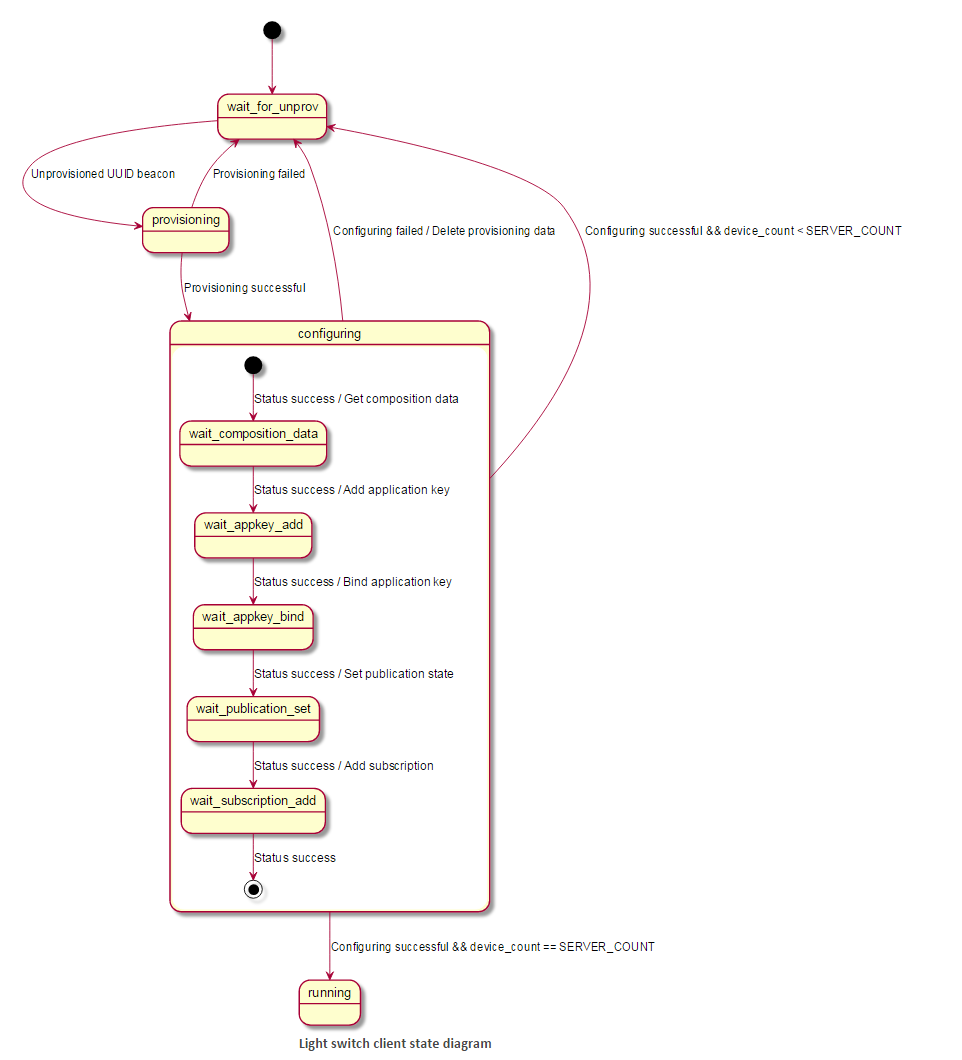
The provisoner provisions and configures the nodes to setup a demo mesh network. It is implemented as a multi-layered state machine due to the asynchronous nature of the provisioning and configuration process.
The provisioner first provisions and configures a client device with a known UUID. After this it moves on to provision and configure the server devices.
The following diagram shows the typical state transitions of the provisioner while provisioning and configuring light switch servers.
启动配置设备(Provisioner) 提供服务和配置节点建立一个mesh 网络 demo,由于启动和配置过程的异步特性,它被多层状态机实现。
启动配置设备(Provisioner)第一个启动和配置的客户端设备需要知道一个UUID,之后再启动和配置服务器设备。
下面图表显示了启动配置设备在启动和配置灯开关服务器时的状态机的 执行流程。
For more information on how a provisioner works, see the Mesh provisioning Guide.
更多信息关于启动配置设备(Provisioner)如何工作,请看 Mesh provisioning Guide.
Light switch client
The Light switch client has a provisionee role in the network. The client has four buttons to control state of the LED1 on servers. It instantiates four instances of simple OnOff Client model. The provisioner configures this client model instances to communicate with servers.
灯开关 客户端
灯开关客户端有一个启动配置规则在网络中,客户端有4个按钮去控制LED1 的状态在服务器开发板上,它包含了4中简单的开关客户端模型,启动配置设备配置这个客户端加入网络并和服务器通讯。
Light switch server
The Light switch server has a provisionee role in the network. It instantiates one instance of the simple OnOff server model to control state of the LED1.
灯开关 服务器
灯开关服务器有启动配置规则在网络中,它包含了一个简单的开关服务器模型去控制LED1的状态。

Light switch server (with Proxy server)
The proxy server example application has the same behavior as the light switch server, but additionally has the proxy role enabled. As proxy is only supported on the nRF52, cmake will not generate the proxy server example for nRF51.
The proxy server application can either be provisioned and configured by the provisioner device like the light switch server, or by a GATT-based provisioner. After provisioning, the proxy server application starts advertising a connectable proxy beacon, which can be connected to by a proxy client to interact with the mesh. The proxy client acts like any other mesh device, but sends all its mesh communication over a BLE connection to a proxy server, which relays it into the mesh.
灯开关服务器(带有代理特性 的服务器,即 能和手机用BLE协议进行连接,和手机直接通信)
代理特性的服务器应用启动和配置都和一个灯开关没有代理特性的服务器一样,或者利用基于 GATT 通信的 启动配置设备,比如手机,在配置的过程中,代理特性的服务器应用开始广播 可以连接 的 代理beacon,能被连接靠一个代理特性的客户端 带有MESH 协议的,代理特性的客户端像其他MESH设备一样,但是发送MESH信息是通过一个代理特性的服务器,也就是说未来APP可以变成 一个代理特性的客户端通过 开发板运行的代理特性的服务器进行收发MESH 消息。
Simple OnOff client/server model
The Simple OnOff Client/Server is a simple proprietary model for manipulating an on/off state. Note that when the server has a publish address set (as in this example), the server will publish any operation of its state to its publish address.
More information about the Simple OnOff model can be found in the Simple OnOff model README and in Creating new models.
简单开关 客户端/服务器 模型
简单开关 客户端/服务器 是一个简单的用于操作开关状态的简单模型,请注意,当服务器有一个发布集地址(如本例中)时,服务器将把它的状态的任何操作发布到其发布地址。
更多的信息关于简单开关模型,能够找到相关信息在 Simple OnOff model README and in Creating new models.
Mesh SDK APIs
See the Exploring Mesh APIs using light switch example document to get a quick overview of the various SDK APIs.
nRF5 SDK for Mesh(五) Light switch demo 点灯例子的更多相关文章
- nRF5 SDK for Mesh(二) Getting started 快速开始
Getting started To get started, take a look at the Light switch demo. It shows how a simple applicat ...
- 转-nRF5 SDK for Mesh(六) BLE MESH 的 基础概念
nRF5 SDK for Mesh(六) BLE MESH 的 基础概念 Basic Bluetooth Mesh concepts The Bluetooth Mesh is a profile s ...
- nRF5 SDK for Mesh(四) 源码编译
官方文档教程编译源码: http://infocenter.nordicsemi.com/index.jsp?topic=%2Fcom.nordic.infocenter.sdk%2Fdita%2Fs ...
- nRF5 SDK for Mesh(一) 介绍和下载源码
一: 官网介绍地址:http://www.nordicsemi.com/Products/Bluetooth-low-energy/nRF5-SDK-for-Mesh Nordic offers a ...
- nRF5 SDK for Mesh(三) Installing the mesh toolchain 安装编译工具链
Installing the mesh toolchain To build the example applications, a toolchain based on either CMake o ...
- nRF5 SDK for Mesh(八) Exploring Mesh APIs using light switch example,使用 灯开关 案例探索BLE mesh 的APIS
Exploring Mesh APIs using light switch example The light switch example is meant to showcase the API ...
- nRF5 SDK for Mesh(六) BLE MESH 的 基础概念
Basic Bluetooth Mesh concepts The Bluetooth Mesh is a profile specification developed and published ...
- nRF5 SDK for Mesh( 七 ) BLE MESH 的 架构(rchitecture)
The mesh architecture The mesh stack consists of a number of subsystems that are interfaced throug ...
- Nordic nRF5 SDK和softdevice介绍
SDK和Softdevice的区别是什么?怎么选择SDK和softdevice版本?芯片,SDK和softdevice有没有版本兼容问题?怎么理解SDK目录结构?SDK帮助文档在哪里?Softdevi ...
随机推荐
- Hibernate入门(三)—— 一对多、多对多关系
一.一对多关系 1.概念 一对多关系是关系型数据库中两个表之间的一种关系.通常在数据库层级中,两表之间是有主外键关系的.在ORM中,如何通过对象描述表之间的关系,是ORM核心. 2.Hiberna ...
- C/C++:判断机器是32位还是64位
要求是不使用sizeof,一开始写了个看似可以,但是有问题的方法: long* a = NULL; ; int n = (char*)b - (char*)a; 这个方法等价于sizeof(long) ...
- 基于jQuery日历插件制作日历
这篇文章主要介绍了基于jQuery日历插件制作日历的相关资料,需要的朋友可以参考下 来看下最终效果图吧: 是长得丑了一点,不要吐槽我-.- 首先来说说这个日历主要的制作逻辑吧: ·一个月份最多有31天 ...
- 关于js的两个函数
注:这两个函数结合其他主要实现异步的默认checkbox选中和其他选中,从php页面穿过来已经选中的值,用jQuery 回绑:关键点在于$.each(),遍历,再用$.attr() 回绑:第二步关键点 ...
- drupal7 自定义登录&找回密码页面,注意事项
1.登录页面的 $form['form_id'] 和 $form['form_build_id'],是这样输出的: <?php print drupal_render($form['form_i ...
- 【转载】python实例手册
今天写爬虫的时候遇到了问题,在网上不停地查找资料,居然碰到两篇好文章: 1.python实例手册 作者:没头脑的土豆 另一篇在这:shell实例手册 python实例手册 #encoding:ut ...
- Leetcode算法比赛----First Unique Character in a String
问题描述 Given a string, find the first non-repeating character in it and return it's index. If it doesn ...
- BAT脚本编写教程简单入门篇
BAT脚本编写教程简单入门篇 批处理文件最常用的几个命令: echo表示显示此命令后的字符 echo on 表示在此语句后所有运行的命令都显示命令行本身 echo off 表示在此语句后所有运行的命 ...
- ListView中Item与Checkable子类控件抢焦点问题
Android开发中,经常需要为ListView定制Adapter,绑定各种子类控件.如果Item包含Button等Checkable的控件,那么就会发生点击Item无法响应的问题.原因是自己定义的I ...
- Centos7 下编译 Openjdk8
本文主要介绍如何在 Centos7 下编译 Openjdk8 源码,<深入理解java虚拟机>第二版网上好多 openjdk7 的帖子,编译 jdk8 和 7 还是有些差别的,比如大家经常 ...