
springboot+thymeleaf打war包在外部tomcat运行
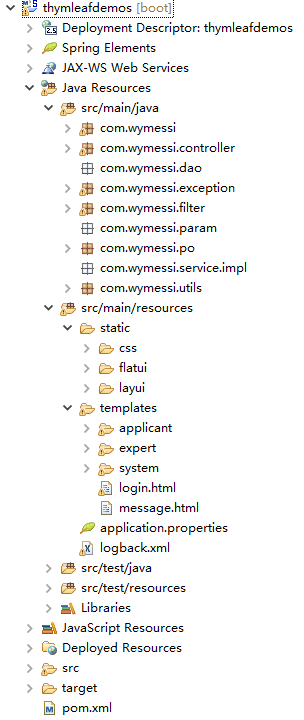
工程目录
pom文件注意点
<packaging>war</packaging>
<dependency>

          <groupId>org.springframework.boot</groupId>

          <artifactId>spring-boot-starter-tomcat</artifactId>

          <scope>provided</scope>

        </dependency>
<build>

        <finalName>prs</finalName>

        <plugins>

          <plugin>

            <groupId>org.apache.maven.plugins</groupId>

            <artifactId>maven-compiler-plugin</artifactId>

          </plugin>

        </plugins>

    </build>
配置文件application.properties
server.port=

server.session.timeout=

server.context-path=/prs

#thymelea模板配置

spring.thymeleaf.prefix=classpath:/templates/

spring.thymeleaf.suffix=.html

spring.thymeleaf.mode=HTML5

spring.thymeleaf.encoding=UTF-

spring.thymeleaf.content-type=text/html

spring.thymeleaf.cache=false

#spring.resources.chain.strategy.content.enabled=true

#spring.resources.chain.strategy.content.paths=/**

# 上传文件大小配置

spring.http.multipart.maxFileSize=10MB

spring.http.multipart.maxRequestSize=10MB

#spring.mvc.async.request-timeout=600000

#spring.http.multipart.max-request-size=200MB

#spring.aop.auto=true

#spring.aop.proxy-target-class=false

#server.tomcat.uri-encoding=UTF-8

#server.tomcat.max-threads=100

logging.config=classpath:logback.xml

#mybatis.configLocation=classpath:mybatis/mybatis-config.xml

#mybatis.mapperLocations=classpath:mybatis/mapper/*.xml

#spring.datasource.driverClassName = com.mysql.jdbc.Driver

#com.microsoft.sqlserver.jdbc.SQLServerDriver

#spring.datasource.url = jdbc:mysql://127.0.0.1:3306/test

#jdbc:sqlserver://104.15.202.101:1105;DatabaseName=tt

#spring.datasource.username = root

#spring.datasource.password = 123456

#spring.datasource.initialSize=2

#spring.datasource.minIdle=0

#spring.datasource.maxActive=5

#spring.datasource.maxWait=60000

#spring.datasource.validationQuery=select 1

#spring.datasource.timeBetweenEvictionRunsMillis=60000

#spring.datasource.testWhileIdle=true

#spring.datasource.testOnBorrow=true

#spring.datasource.testOnReturn=false

#spring.datasource.poolPreparedStatements=true

#spring.datasource.maxPoolPreparedStatementPerConnectionSize=20
server.context-path=/prs这里的路径名最好和上面pom里的finalName最好是一致的,因为当我们把打包好的war包放到tomcat的webapp里时,访问路径前缀就是这个finalName
启动类
@ComponentScan(basePackages= {"com.wymessi"})//扫描组件

@SpringBootApplication

@EnableAspectJAutoProxy

@EnableTransactionManagement(proxyTargetClass = true)

@EnableAutoConfiguration(exclude = { DataSourceAutoConfiguration.class})

public class SpringbootApplication extends SpringBootServletInitializer {

    public static void main(String[] args) {

        SpringApplication.run(SpringbootApplication.class, args);

    }

    @Override

    protected SpringApplicationBuilder configure(SpringApplicationBuilder builder) {

        // 注意这里要指向原先用main方法执行的Application启动类

        return builder.sources(SpringbootApplication.class);

    }

//    @Bean

//    public HttpMessageConverters fastJsonHttpMessageConverters() {

//        FastJsonHttpMessageConverter fastConverter = new FastJsonHttpMessageConverter();

//        FastJsonConfig fastJsonConfig = new FastJsonConfig();

//        // fastJsonConfig.setSerializerFeatures(SerializerFeature.BrowserCompatible);

//        // fastJsonConfig.setSerializerFeatures(SerializerFeature.BrowserSecure);

//        fastJsonConfig.setSerializerFeatures(SerializerFeature.DisableCircularReferenceDetect);

//        // fastJsonConfig.setSerializerFeatures(SerializerFeature.WriteMapNullValue);

//        SerializeConfig config = new SerializeConfig();

//        config.put(Date.class, new SimpleDateFormatSerializer("yyyy-MM-dd HH:mm:ss"));

//        fastJsonConfig.setSerializeConfig(config);

//        fastConverter.setFastJsonConfig(fastJsonConfig);

//        HttpMessageConverter<?> converter = fastConverter;

//        return new HttpMessageConverters(converter);

//    }

}
和打jar包的区别是继承了SpringBootServletInitializer这个类,然后重写了configure方法。
运行程序
eclipse里运行
右击项目名,run as - spring boot app。
浏览器里输入http://127.0.0.1:8013/prs
打包成war包在tomcat里运行
右击项目名,run as - maven - build,看到success就代表打包成功了。

把打包好的prs放到tomcat的webapp里,然后启动tomcat。
这里要注意,tomcat的访问端口要设置成和配置文件里的一样,不然用配置文件里的port是访问不到的。
打包的名称要和server.context-path=/prs的名称一致,不然也是访问不到的,这个上面已经说过了。
浏览器里输入http://127.0.0.1:8013/prs
springboot+thymeleaf打war包在外部tomcat运行的更多相关文章
- SpringBoot之打成war包部署到Tomcat
正常情况下SpringBoot项目是以jar包的形式,正常情况下SpringBoot项目是以jar包的形式,并且SpringBoot是内嵌Tomcat服务器,所以每次重新启动都是用的新的Tomcat服 ...
- springBoot项目打war包部署到tomcat上
1 首先得在本地跑通. 2 处理启动类Application @SpringBootApplication public class Application extends SpringBootSer ...
- IDEA下spring boot项目打包war包部署外部tomcat问题
第一步,修改配置pom.xml文件 <packaging>war</packaging> <dependency> <groupId>org.sprin ...
- SpringBoot webmvc项目导出war包并在外部tomcat运行产生的诸多问题以及解决方案
背景: 有需求要将原来的Spring(3.2.6) + Springmvc + Hibernate项目重构为Springboot(1.5.2)项目 描述: 记录重构过程,以及期间遇到的种种问题和对应的 ...
- Springboot项目打成jar包运行 和 打成war包 外部tomcat运行
Jar打包方式运行 类型为jar时 <packaging>jar</packaging> 1.使用命令mvn clean package 打包 2.使用java –jar 包 ...
- 基于springboot多模块项目使用maven命令打成war包放到服务器上运行的问题
首先,大家看到这个问题,可能并不陌生,而且脑子里第一映像就是使用mava中的clear package 或者 clear install进行打包,然后在项目中的target文件夹下面找到xxx.war ...
- SpringBoot打war包并部署到外部tomcat运行(jar工程改造为正war工程)
如果你的SpringBoot工程是一个jar工程,而想把它改造成war工程,并打成war包放到外部的tomcat下运行,该怎么修改配置呢?这里以Maven工程为例进行介绍. (1)将pom.xml中的 ...
- SpringBoot 项目打war包 tomcat部署
今天看了一下springboot的项目,个人习惯是接触新的语言或框架,首先要做的就是程序员届最常用的“Hello World”,然后进行项目部署,然今天部署却发现一直都是404,查看tomcat的we ...
- Springboot项目打成war包,部署到tomcat上,正常启动访问报错404
前言: 项目介绍,此项目是一个Maven多模块项目,模块项目:all(父模块):util (公用的工具类):dao(实体类.业务类.mapper.mapper.xml):business(业务serv ...
随机推荐
- 17、Django实战第17天:机构详情展示
1.进入xadmin添加测试数据(教师.课程) 2.把以下4个前端页面复制到templates中 先打开这几个页面分析,它们和之前的课程机构列表页是不一样的机构,且没有共同的部分,但是这4个页面却是类 ...
- Dumpzilla工具第615行bug的解决办法
Dumpzilla工具第615行bug的解决办法 在Dumpzilla使用选项frequency时,会提示SQL语法错误.这是由于其中SQL语句编写错误.需要将615行中: where url l ...
- REST SOAP XML-RPC分析比较
本文的标题“REST与SOAP之比较”确实有些让人误解.REST是代表性状态传输的名称首字母缩写,与其说它是标准,不如说是一种风格.然而,在我的前一篇文章中,正如我们所讨论的,众多从事Web服务的软件 ...
- small test on 5.30 night T1
数学题使劲推就对了. 让我们设 g(x) = ∑ C(i,x) * b^i ,然后后面验算了一张纸QWQ,懒得再打一遍了,回家我就把这张演算纸补上QWQ,先上代码. #include<cstd ...
- [CF441E]Valera and Number
题意:给定$x,k,p$和一份伪代码,伪代码大致是循环$k$次,每次有$p\%$的概率把$x$乘$2$,有$(100-p)\%$的概率把$x$加$1$,问最后在二进制下$x$的末尾期望$0$个数 鸽了 ...
- 【kmp算法】poj2406 Power Strings
如果next[n]<n/2,一定无解. 否则,必须要满足n mod (n-next[n]) = 0 才行,此时,由于next数组的性质,0~n-next[n]-1的部分一定是最小循环节. [ab ...
- 【构造】Codeforces Round #397 by Kaspersky Lab and Barcelona Bootcamp (Div. 1 + Div. 2 combined) D. Artsem and Saunders
根据那两个式子 g(h(x))=x h(g(x))=f(x) 可以推出来两个新的式子 g(f(x))=g(x) h(x)=f(h(x)) 于是,我们先找到f(x)的所有不动点,有几个不动点,m就是多少 ...
- [转]iOS ARC机制 weak strong
写在开头 虽然距离WWDC2011和iOS 5已经快一年时间,但是很多开发者并没有利用新方法来提高自己的水平,这点在ARC的使用上非常明显(特别是国内,基本很少见到同行转向ARC).我曾经询问过一些同 ...
- ajax变量作用域的问题
需求:使得一个变量在ajax内外都有作用域 方法:设置为同步请求 async:false
- 关于css解决俩边等高的问题(等高布局)
等高布局 前段时间公司需哦一个后台管理系统,左侧是导航栏,右侧是content区域.然厚刚开始用的是js 去控制的,但是当页面的椰蓉过长的时候,有与js单线程,加载比较慢,就会有那么一个过程,查找了很 ...