
Linux下实现免密码登录
1.Linux下生成密钥
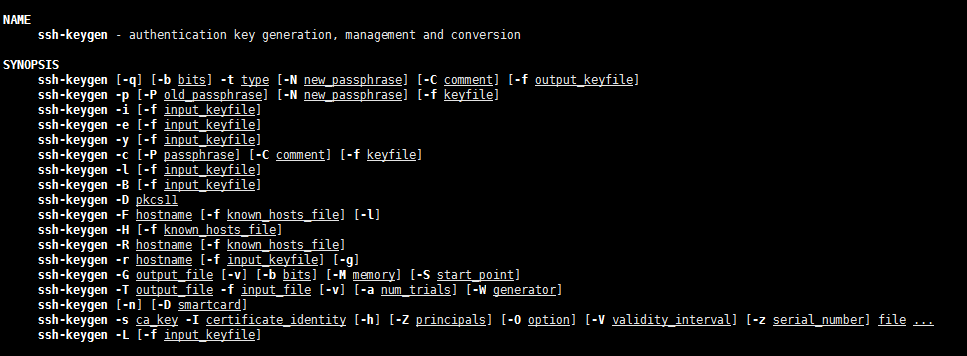
ssh-keygen的命令手册,通过”man ssh-keygen“命令:
通过命令”ssh-keygen -t rsa“
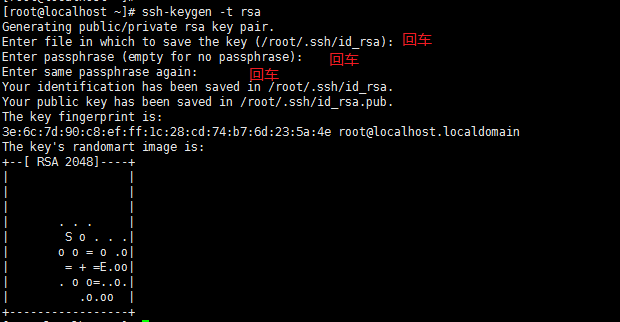
生成之后会在用户的根目录生成一个 “.ssh”的文件夹

进入“.ssh”会生成以下几个文件
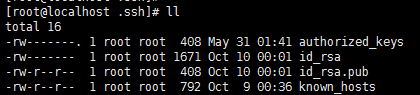
authorized_keys:存放远程免密登录的公钥,主要通过这个文件记录多台机器的公钥
id_rsa : 生成的私钥文件
id_rsa.pub : 生成的公钥文件
know_hosts : 已知的主机公钥清单
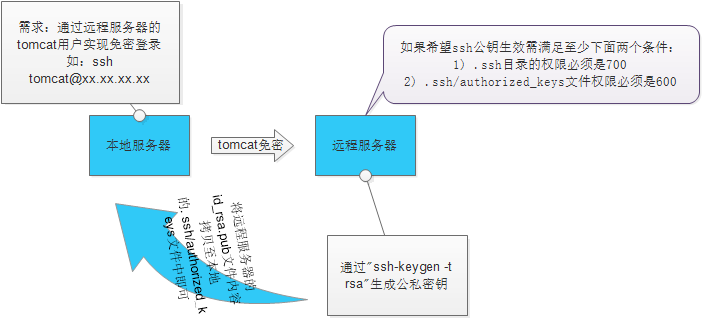
如果希望ssh公钥生效需满足至少下面两个条件:
1) .ssh目录的权限必须是700
2) .ssh/authorized_keys文件权限必须是600
2.远程免密登录
原理图:
常用以下几种方法:
2.1 通过ssh-copy-id的方式
命令: ssh-copy-id -i ~/.ssh/id_rsa.pub <romte_ip>
举例:
|
1
2
3
4
5
6
7
8
9
10
11
|
[root@test .ssh]# ssh-copy-id -i ~/.ssh/id_rsa.pub 192.168.91.135 root@192.168.91.135's password: Now try logging into the machine, with "ssh '192.168.91.135'", and check in:.ssh/authorized_keysto make sure we haven't added extra keys that you weren't expecting.[root@test .ssh]# ssh root@192.168.91.135Last login: Mon Oct 10 01:25:49 2016 from 192.168.91.133[root@localhost ~]# |
常见错误:
[root@test ~]# ssh-copy-id -i ~/.ssh/id_rsa.pub 192.168.91.135
-bash: ssh-copy-id: command not found //提示命令不存在
解决办法:yum -y install openssh-clients
2.2 通过scp将内容写到对方的文件中
命令:scp -p ~/.ssh/id_rsa.pub root@<remote_ip>:/root/.ssh/authorized_keys
举例:
|
1
2
3
4
5
6
7
8
9
|
[root@test .ssh]# scp -p ~/.ssh/id_rsa.pub root@192.168.91.135:/root/.ssh/authorized_keysroot@192.168.91.135's password: id_rsa.pub 100% 408 0.4KB/s 00:00 [root@test .ssh]# [root@test .ssh]# [root@test .ssh]# [root@test .ssh]# ssh root@192.168.91.135Last login: Mon Oct 10 01:27:02 2016 from 192.168.91.133[root@localhost ~]# |
也可以分为两步操作:
$ scp ~/.ssh/id_rsa.pub root@<remote_ip>:pub_key //将文件拷贝至远程服务器
$ cat ~/pub_key >>~/.ssh/authorized_keys //将内容追加到authorized_keys文件中, 不过要登录远程服务器来执行这条命令
Linux下实现免密码登录的更多相关文章
- Linux下SSH免密码登录
转自:http://haitao.iteye.com/blog/1744272 ssh配置 主机A:10.0.5.199 主机B:10.0.5.198 需要配置主机A无密码登录主机A,主机B 先确保所 ...
- Linux下SSH免密码登录(转)
搭建hadoop集群的时候一定会用到的就是SSH免密码登录 [hadoop@hadoop1 ~]$ ssh-keygen -t rsa Generating public/private rsa ke ...
- SSH配置—Linux下实现免密码登录
首先,假设我们有两台服务器,服务器名称分别是 master 和 slave1,我们现在需要做的就是在服务器 master 上面登录 服务器 slave1 不需要输入密码就可以登录成功,如下图所示. 下 ...
- Mac下到Linux主机ssh免密码登录
最近忙得忘乎所以,写篇博客放松放松,RT,直接上命令好了 # Local ssh-keygen -t rsa scp ~/.ssh/id_rsa.pub username@server:~/.ssh/ ...
- linux实现ssh免密码登录
linux实现ssh免密码登录 本地系统执行 ssh-keygen -t rsa 命令,生成密钥文件 在相应的目录下查看生成的密钥文件,其中:id_rsa为私钥文件,id_rsa.pub为公钥文件 本 ...
- Linux 配置ssh 免密码登录
在平常应用中,我们经常会登录到其他主机,比如说服务器,每次都需要用户名和密码. 我们可以通过ssh免密码登录服务器而不需要输入密码. 现在有一台ubuntu的阿里云服务器,称之为 server. 公 ...
- linux ssh公钥免密码登录
ssh 无密码登录要使用公钥与私钥.linux下可以用用ssh-keygen生成公钥/私钥对,下面我以CentOS为例. 一.SSH公钥登录原理 在平时工作中我们经常要远程登录服务器,这就要用到SSH ...
- jenkins发布项目到远程主机上,配置linux使用SSH免密码登录
一.首先要配置两台linux如何使用SSH免密码登录,这样脚本执行scp命令以及远程执行脚本都不需要输入密码: A为本地主机(即用于控制其他主机的机器,jenkins服务器) ; B为远程主机(即被控 ...
- linux 配置ssh免密码登录
1.确保主机名唯一 主机名修改方法: a.修改/etc/sysconfig/network,HOSTNAME=想要设置的主机名称 b.修改/etc/hosts,127.0.0.1 localhos ...
随机推荐
- HDU 6357.Hills And Valleys-动态规划(区间翻转l,r找最长非递减子序列)
题意:给一串由n个数字组成的字符串,选择其中一个区间进行翻转,要求翻转后该字符串的最长非降子序列长度最长,输出这个最长非降子序列的长度以及翻转的区间的左右端点 #include<bits/std ...
- UVA - 10125 哈希
题意:求集合中最大的\(d\)使得\(a+b=d-c\) 学习一下哈希的姿势(原来所谓链地址法就是直接跑个图啊) 哈希真有趣,全靠xjb乱搞 就叫这套hash为xjb-fibonacci-lpy-ha ...
- 1148 Werewolf - Simple Version (20 分)
Werewolf(狼人杀) is a game in which the players are partitioned into two parties: the werewolves and th ...
- 关于XML的验证(DTD与XSD)一点实践
[转自] http://blog.chinaunix.net/uid-276853-id-366491.html 关于XML的验证一点实践 1)此方法是在XML文档中绑定对应的DTD文件来进行的 // ...
- 转: centos系统home下的中文目录改为英文目录
转自h t t p : / /xugang-1017-126-com.iteye.com/blog/2081845 如果安装了中文版的Cent OS之后,root目录和home目录下会出现中文的路径名 ...
- postgreSQL 常用命令 二
本次测试基与PostgreSQL 10.x版本 创建用户 [postgres@rtm2 data]$ /opt/pgsql-10/bin/createuser rentaomin [postgres@ ...
- 千图网爬图片(BeautifulSoup)
import requests from bs4 import BeautifulSoup import os #导入os模块 class TuKuSpider(): ""&quo ...
- HDU 1069—— Monkey and Banana——————【dp】
Monkey and Banana Time Limit:1000MS Memory Limit:32768KB 64bit IO Format:%I64d & %I64u S ...
- BNU27932——Triangle——————【数学计算面积】
Triangle Time Limit: 1000ms Memory Limit: 65536KB 64-bit integer IO format: %lld Java class nam ...
- 记自己的hexo个人博客
https://othercoding.github.io/