
C++ GUI Qt4编程(12)-6.1FindFileDialog
1. 主要介绍了QGridLayout, QHBoxLayout, QVBoxLayout3种布局管理器的使用方法。
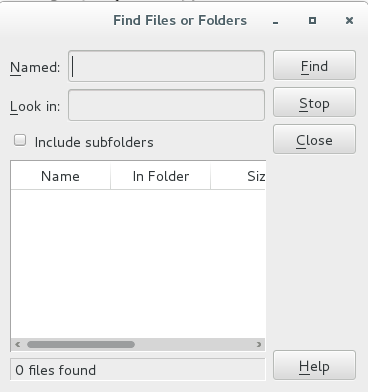
2. 在linux中,继承自QDialog的对话框,没有最大化、最小化、关闭按钮,如果需要这3个按钮,
需要增加: setWindowFlags(Qt::Widget);
在windows中,即使不加:setWindowFlags(Qt::Widget); 也会有最大化、最小化、关闭按钮。
3. findfiledialog.h
 /**/

 #ifndef FINDFILEDIALOG_H

 #define FINDFILEDIALOG_H

 #include <QDialog>

 class QLabel;

 class QLineEdit;

 class QPushButton;

 class QCheckBox;

 class QTableWidget;

 class QHBoxLayout;

 class QVBoxLayout;

 class QGridLayout;

 class FindFileDialog : public QDialog

 {

     Q_OBJECT

 public:

     FindFileDialog(QWidget *parent = );

 private:

     QLabel *namedLabel;

     QLabel *lookInLabel;

     QLineEdit *namedLineEdit;

     QLineEdit *lookInLineEdit;

     QCheckBox *subfoldersCheckBox;

     QTableWidget *tableWidget;

     QLabel *messageLabel;

     QPushButton *findButton;

     QPushButton *stopButton;

     QPushButton *closeButton;

     QPushButton *helpButton;

     QGridLayout *leftLayout;

     QVBoxLayout *rightLayout;

     QHBoxLayout *mainLayout;

 };

 #endif
4. findfiledialog.cpp
 /**/

 #include "findfiledialog.h"

 #include <QLabel>

 #include <QLineEdit>

 #include <QPushButton>

 #include <QCheckBox>

 #include <QTableWidget>

 #include <QHBoxLayout>

 #include <QVBoxLayout>

 #include <QGridLayout>

 FindFileDialog::FindFileDialog(QWidget *parent)

     : QDialog(parent)

 {

     namedLabel = new QLabel(tr("&Named:"));

     namedLineEdit = new QLineEdit;

     namedLabel->setBuddy(namedLineEdit);

     lookInLabel = new QLabel(tr("&Look in:"));

     lookInLineEdit = new QLineEdit;

     lookInLabel->setBuddy(lookInLineEdit);

     subfoldersCheckBox = new QCheckBox(tr("Include subfolders"));

     QStringList labels;

     labels << tr("Name") << tr("In Folder")

            << tr("Size") << tr("Modified");

     tableWidget = new QTableWidget;

     tableWidget->setColumnCount();

     tableWidget->setHorizontalHeaderLabels(labels);

     messageLabel = new QLabel(tr("0 files found"));

     messageLabel->setFrameShape(QFrame::Panel);

     messageLabel->setFrameShadow(QFrame::Sunken);

     /*  QGridLayout

     void    addWidget(QWidget * widget,

                       int fromRow,int fromColumn,

                       int rowSpan,int columnSpan,

                       Qt::Alignment alignment = 0)

     */

     leftLayout = new QGridLayout;

     leftLayout->addWidget(namedLabel, , );

     leftLayout->addWidget(namedLineEdit, , );

     leftLayout->addWidget(lookInLabel, , );

     leftLayout->addWidget(lookInLineEdit, , );

     /*subfoldersCheckBox的位置坐标(2, 0),占1行,占2列*/

     leftLayout->addWidget(subfoldersCheckBox, , , , );

     leftLayout->addWidget(tableWidget, , , , );

     leftLayout->addWidget(messageLabel, , , , );

     findButton = new QPushButton(tr("&Find"));

     stopButton = new QPushButton(tr("&Stop"));

     closeButton = new QPushButton(tr("&Close"));

     helpButton = new QPushButton(tr("&Help"));

     connect(closeButton, SIGNAL(clicked()), this, SLOT(close()));

     rightLayout = new QVBoxLayout;

     rightLayout->addWidget(findButton);

     rightLayout->addWidget(stopButton);

     rightLayout->addWidget(closeButton);

     rightLayout->addStretch();

     rightLayout->addWidget(helpButton);

     mainLayout = new QHBoxLayout;

     mainLayout->addLayout(leftLayout);

     mainLayout->addLayout(rightLayout);

     setLayout(mainLayout);

     setWindowTitle(tr("Find Files or Folders"));

     /*在linux中,继承自QDialog的对话框没有最大化最小化和关闭按钮*/

     setWindowFlags(Qt::Widget);     /*在linux中让对话框有最大最小和关闭按钮*/

 }
5. main.cpp
 /**/

 #include <QApplication>

 #include "findfiledialog.h"

 int main(int argc, char *argv[])

 {

     QApplication app(argc, argv);

     FindFileDialog dialog;

     dialog.show();

     return app.exec();

 }
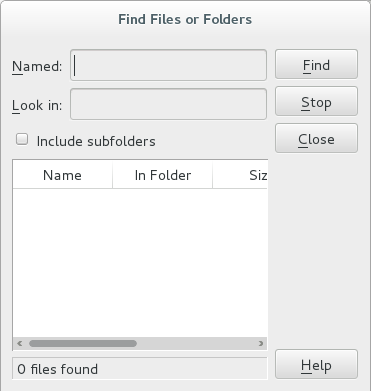
6. 不带关闭按钮:
带关闭按钮:
C++ GUI Qt4编程(12)-6.1FindFileDialog的更多相关文章
- C++ GUI Qt4编程(10)-3.4spreadsheet
1. C++ GUI Qt4编程第三章,增加spreadsheet. 2. spreadsheet.h /**/ #ifndef SPREADSHEET_H #define SPREADSHEET_H ...
- C++ GUI Qt4编程(09)-3.3spreadsheet-toolbar
1. C++ GUI Qt4编程第三章,增加工具栏.状态栏和快捷键. 2. mainwindow.h /**/ #ifndef MAINWINDOW_H #define MAINWINDOW_H #i ...
- C++ GUI Qt4编程(08)-3.2spreadsheet-resource
1. C++ GUI Qt4编程第三章,图片使用资源机制法. 2. 步骤: 2-1. 在resource文件夹下,新建images文件,存放图片. 2-2. 新建spreadsheet.qrc文件,并 ...
- C++ GUI Qt4编程(07)-3.1menu
1. C++ GUI Qt4编程第三章,添加menu菜单. 2. mainwindow.h #ifndef MAINWINDOW_H #define MAINWINDOW_H #include < ...
- C++ GUI Qt4编程(03)-1.3layout
1. 根据C++ GUI Qt4编程(第二版)整理2. 系统:centos7: Qt版本:5.5.13. 程序:layout.cpp #include <QApplication> #i ...
- C++ GUI Qt4编程(02)-1.2quit
1. 根据C++ GUI Qt4编程(第二版)整理2. 系统:centos7: Qt版本:5.5.13. 程序:quit.cpp #include <QApplication> #inc ...
- C++ GUI Qt4编程(01)-1.1Hello Qt
1. 根据C++ GUI Qt4编程(第二版)整理2. 系统:centos7: Qt版本:5.5.13. 程序:hello.cpp #include <QApplication> #in ...
- C++ GUI Qt4编程-创建自定义窗口部件
C++ GUI Qt4编程-创建自定义窗口部件 Qtqt4 通过Qt窗口部件进行子类化或者直接对QWidget进行子类化,就可以创建自定义窗口部件,下面示范两种方式,并且也会说明如何把自定义窗口部 ...
- C++ GUI Qt4 编程 (第二版)
[加拿大]JasminBlanchette [英]MarkSummerfield . 电子工业 2008. 前几天的问题多是因为版本不兼容的问题. QT本身Q4 Q5就有版本问题,然后集成到VS08 ...
随机推荐
- hdu 4277 USACO ORZ (Dfs)
题意: 给你n个数,要你用光所有数字组成一个三角形,问能组成多少种不同的三角形 时间分析: 3^15左右 #include<stdio.h> #include<set> usi ...
- datetime 2017-10-21 10:09:02.560 转年月日的时间类型
sql语句时间转年月日格式: 适用于多种时间格式 select REPLACE(STUFF(CONVERT(char(10), REPLACE(CONVERT(varchar(10),'2017-1 ...
- C# winform 打开新窗体 关闭当前窗体
Form1 的Button 下 { Form2 f2 = new Form2(); f2.ShowDialog(this);// this.Close(); } Form2 的load 下 { //只 ...
- 申请免费通配符证书(Let's Encrypt)并绑定IIS(转载)
本文转载自https://blog.csdn.net/qq_41608008/article/details/80491447 什么是 Let's Encrypt? 部署 HTTPS 网站的时候需要证 ...
- Oracle下载及安装
Oracle 下载及安装 一.官方下地址: http://www.oracle.com/technetwork/database/enterprise-edition/downloads/in ...
- 「POJ 2699」The Maximum Number of Strong Kings
题目链接 戳我 \(Describe\) 一场联赛可以表示成一个完全图,点表示参赛选手,任意两点u, v之间有且仅有一条有向边\((u, v)\)或\((v, u)\),表示\(u\)打败\(v\)或 ...
- 自用 Pycharm 主题配色分享(主题才是开发第一生产力)
写在前面的话 是的,我又回来了,上一篇[使用 Visual Studio Code(VSCode)搭建简单的 Python + Django 开发环境]才说真香,结果用两天就发现很多恶心的问题拦住了菜 ...
- windows server2008虚拟机系统盘扩容
windows server2008虚拟机的系统盘空间过小,对系统盘进行扩容,操作如下: 1.将虚拟机关机: 2.VMware对该虚拟机进行设置,选中磁盘,点击扩容,输入扩容大小,等待扩容完成: 3. ...
- &(引用) 和 *(指针)
引用: 引用相当于给引用的对象起一个别名,对引用的操作即是对原对象的操作. 使用方式: int cnt = 1024; int &x = cnt; 一般情况下引用的类型要和被引用对象一致(例外 ...
- 洛谷P3357 最长k可重线段集问题(费用流)
传送门 其实和最长k可重区间集问题差不多诶…… 把这条开线段给压成x轴上的一条线段,然后按上面说的那种方法做即可 然而有一个坑点是线段可以垂直于x轴,然后一压变成一个点,连上正权环,求最长路……然后s ...