
3.SpringBoot整合Thymeleaf模板
一、前言
SrpingBoot支持如JSP、Thymeleaf、FreeMarker、Mustache、Velocity等各种模板引擎,同时还为开发者提供了自定义模板扩展的支持。
使用嵌入式Servlet容器时,请避免使用JSP,因为使用JSP打包后会存在一些限制。
在SpringBoot使用上述模板,默认从src/main/resources/templates下加载。
二、thymeleaf介绍
Thymeleaf是现代化服务器端的Java模板引擎,不同与其它几种模板的是Thymeleaf的语法更加接近HTML,并且具有很高的扩展性。详细资料可以浏览官网。
特点
- 支持无网络环境下运行,由于它支持 html 原型,然后在 html 标签里增加额外的属性来达到模板+数据的展示方式。浏览器解释 html 时会忽略未定义的标签属性,所以 thymeleaf 的模板可以静态地运行;当有数据返回到页面时,Thymeleaf 标签会动态地替换掉静态内容,使页面动态显示。所以它可以让前端小姐姐在浏览器中查看页面的静态效果,又可以让程序员小哥哥在服务端查看带数据的动态页面效果。
- 开箱即用,为
Spring提供方言,可直接套用模板实现JSTL、 OGNL表达式效果,避免每天因套用模板而修改JSTL、 OGNL标签的困扰。同时开发人员可以扩展自定义的方言。 SpringBoot官方推荐模板,提供了可选集成模块(spring-boot-starter-thymeleaf),可以快速的实现表单绑定、属性编辑器、国际化等功能。
三、使用
3.1 首先要在pom.xml中添加对thymeleaf模板依赖
 <dependency>

     <groupId>org.springframework.boot</groupId>

     <artifactId>spring-boot-starter-thymeleaf</artifactId>

 </dependency>

 <dependency>

   <groupId>org.springframework.boot</groupId>

   <artifactId>spring-boot-starter-web</artifactId>

 </dependency>
3.2 添加完thymeleaf模板依赖的pom.xml文件内容如下
 <?xml version="1.0" encoding="UTF-8"?>

 <project xmlns="http://maven.apache.org/POM/4.0.0" xmlns:xsi="http://www.w3.org/2001/XMLSchema-instance"

     xsi:schemaLocation="http://maven.apache.org/POM/4.0.0 http://maven.apache.org/xsd/maven-4.0.0.xsd">

     <modelVersion>4.0.0</modelVersion>

     <groupId>cn.kgc</groupId>

     <artifactId>springboot1</artifactId>

     <version>0.0.1-SNAPSHOT</version>

     <packaging>jar</packaging>

     <name>springboot1</name>

     <description>我用的第一个maven工程</description>

     <!--版本采用的是最新的 2.0.1.RELEASE

     TODO 开发中请记得版本一定要选择 RELEASE ,因为是稳定版本且BUG少-->

     <parent>

         <groupId>org.springframework.boot</groupId>

         <artifactId>spring-boot-starter-parent</artifactId>

         <version>2.0.5.RELEASE</version>

         <relativePath/> <!-- lookup parent from repository -->

     </parent>

     <properties>

         <project.build.sourceEncoding>UTF-8</project.build.sourceEncoding>

         <project.reporting.outputEncoding>UTF-8</project.reporting.outputEncoding>

         <java.version>1.8</java.version>

     </properties>

     <dependencies>

         <!--模块(spring-boot-starter-thymeleaf),可以快速的实现表单绑定、属性编辑器、国际化等功能。-->

         <dependency>

             <groupId>org.springframework.boot</groupId>

             <artifactId>spring-boot-starter-thymeleaf</artifactId>

         </dependency>

         <!-- 默认就内嵌了Tomcat 容器,如需要更换容器也极其简单-->

         <dependency>

             <groupId>org.springframework.boot</groupId>

             <artifactId>spring-boot-starter-web</artifactId>

         </dependency>

         <!-- 测试包,当我们使用 mvn package 的时候该包并不会被打入,因为它的生命周期只在 test 之内-->

         <dependency>

             <groupId>org.springframework.boot</groupId>

             <artifactId>spring-boot-starter-test</artifactId>

             <scope>test</scope>

         </dependency>

         <!--该依赖可以不添加,但是在 IDEA 和 STS 中不会有属性提示,

         没有提示的配置就跟你用记事本写代码一样苦逼,出个问题弄哭你去-->

         <dependency>

             <groupId>org.springframework.boot</groupId>

             <artifactId>spring-boot-configuration-processor</artifactId>

             <optional>true</optional>

         </dependency>

     </dependencies>

     <build>

         <plugins>

             <!-- 编译插件 -->

             <plugin>

                 <groupId>org.springframework.boot</groupId>

                 <artifactId>spring-boot-maven-plugin</artifactId>

             </plugin>

         </plugins>

     </build>

 </project>
3.3 创建ThymeleafController.java
创建一个ThymeleafController用来映射HTTP请求与页面的跳转,下面写了两种方式,第一种比较直观和优雅,第二种相对普遍且代码较少,且迎合从struts2跳坑的朋友们…
Spring4.3以后为简化@RequestMapping(method = RequestMethod.XXX)的写法,故而将其做了一层包装,也就是现在的GetMapping、PostMapping、PutMapping、DeleteMapping、PatchMapping
 package cn.kgc.controller;

 import org.springframework.stereotype.Controller;

 import org.springframework.web.bind.annotation.GetMapping;

 import org.springframework.web.bind.annotation.RequestMapping;

 import org.springframework.web.servlet.ModelAndView;

 import javax.servlet.http.HttpServletRequest;

 /**

  * ThymeleafController用来映射HTTP请求与页面的跳转

  */

 @Controller

 @RequestMapping

 public class ThymeleafController {

     /**

      * 方法1:返回ModelAndView对象,

      * 将视图名称封装到该对象的viewName属性中

      * 将页面所需要的数据封装到该对象的addObject对象中

      * @return

      */

     @GetMapping("/index.do")

     public ModelAndView index() {

         ModelAndView view = new ModelAndView();

         // 设置跳转的视图 默认映射到 src/main/resources/templates/{viewName}.html

         view.setViewName("index");

         // 设置属性

         view.addObject("title", "我的第一个ThymeleafWEB页面");

         view.addObject("desc", "欢迎进入课工场学习");

         Teacher teacher=new Teacher(1,"Holly","964918306","北大青鸟-南京中博软件学院-课工场");

         view.addObject("teacher", teacher);

         return view;

     }

     @GetMapping("/index1")

     public String index1(HttpServletRequest request) {

         // TODO 与上面的写法不同,但是结果一致。

         // 设置属性

         Teacher teacher=new Teacher(1,"Holly","964918306","北大青鸟-南京中博软件学院-课工场");

         request.setAttribute("teacher", teacher);

         request.setAttribute("title", "我的第一个ThymeleafWEB页面");

         request.setAttribute("desc", "欢迎进入课工场学习");

         // 返回的 index 默认映射到 src/main/resources/templates/xxxx.html

         return "index";

     }

     class Teacher {

         private int tid;

         private String tname;

         private String qq;

         private String address;

         public Teacher() {

         }

         public Teacher(int tid, String tname, String qq, String address) {

             this.tid = tid;

             this.tname = tname;

             this.qq = qq;

             this.address = address;

         }

         public int getTid() {

             return tid;

         }

         public void setTid(int tid) {

             this.tid = tid;

         }

         public String getTname() {

             return tname;

         }

         public void setTname(String tname) {

             this.tname = tname;

         }

         public String getQq() {

             return qq;

         }

         public void setQq(String qq) {

             this.qq = qq;

         }

         public String getAddress() {

             return address;

         }

         public void setAddress(String address) {

             this.address = address;

         }

     }

 }
3.4 创建index.html的模板文件
在src/main/resources/templates目录下创建一个名index.html的模板文件,可以看到thymeleaf是通过在标签中添加额外属性动态绑定数据的
 <!DOCTYPE html>

 <html xmlns="http://www.w3.org/1999/xhtml"

       xmlns:th="http://www.thymeleaf.org">

 <head>

     <meta charset="UTF-8">

     <!-- 可以看到 thymeleaf 是通过在标签里添加额外属性来绑定动态数据的 -->

     <!--/*@thymesVar id="title" type=""*/-->

     <title th:text="${title}">Title</title>

     <!-- 在/resources/static/js目录下创建一个hello.js 用如下语法依赖即可-->

     <script type="text/javascript" th:src="@{/js/hello.js}"></script>

 </head>

 <body>

 <h1 th:text="${desc}">Hello World</h1>

 <h2>=====作者信息=====</h2>

 <p th:text="${teacher.tid}"></p>

 <p th:text="${teacher.tname}"></p>

 <p th:text="${teacher.qq}"></p>

 <p th:text="${teacher.address}"></p>

 </body>

 </html>
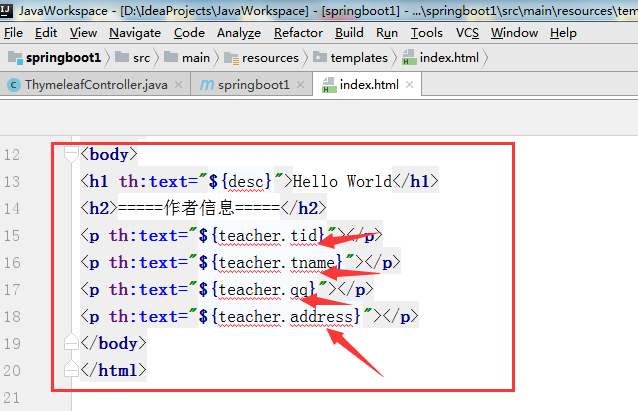
停一下,在你的机器上看到的是报错的情况,如下图所示,但是页面却可以展示数据,这个我们稍加配置就可以解决错误问题
我们在idea中设置一下就ok
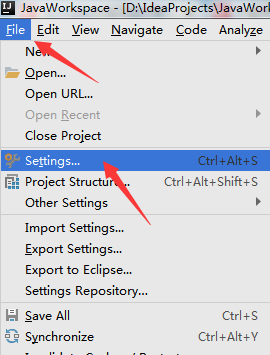
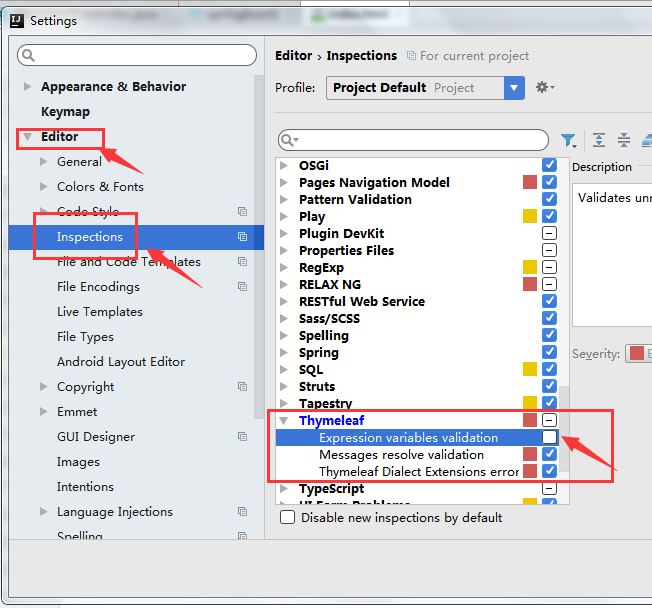

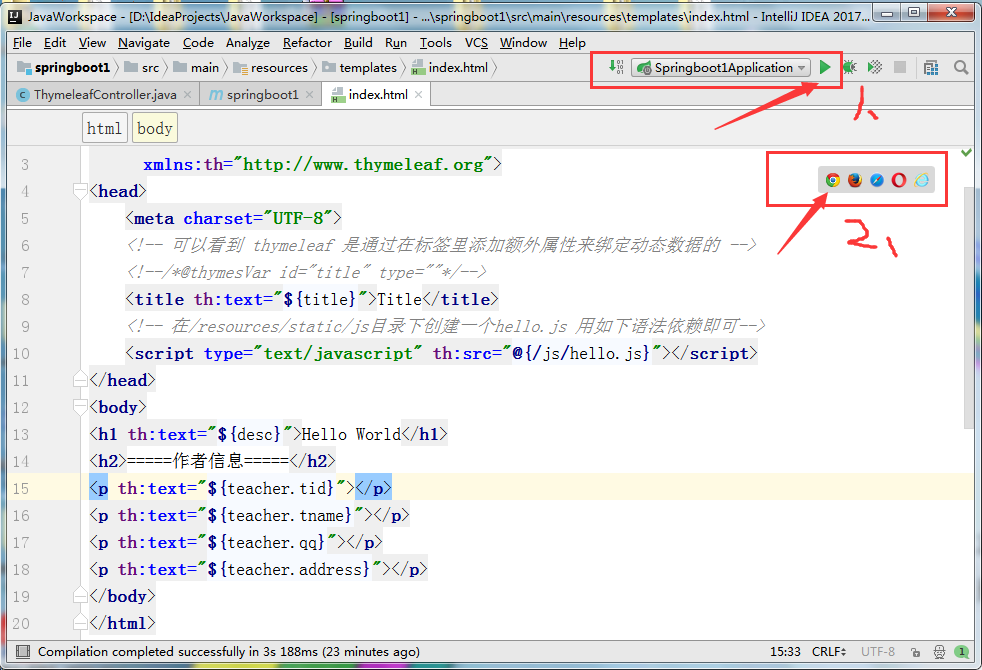
3.5 静态效果: 运行index.html既可以看到如下的静态效果


3.5 动态效果:
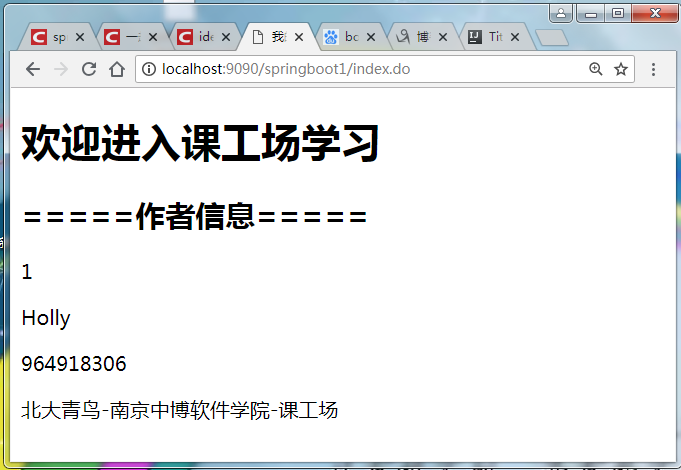
在浏览器输入:http://localhost:9090/springboot1/index.do可以看到渲染后的效果,真正意义上的动静分离了
总结:
Thymeleaf参考手册:https://blog.csdn.net/zrk1000/article/details/72667478
参考文章出处:
- 本文作者:唐亚峰
- 本文链接:http://blog.battcn.com/2018/04/28/springboot/v2-web-thymeleaf/
- 版权声明:本博客所有文章除特别声明外,均采用CC BY-NC-SA 3.0许可协议。转载请注明出处!
3.SpringBoot整合Thymeleaf模板的更多相关文章
- Springboot整合thymeleaf模板
Thymeleaf是个XML/XHTML/HTML5模板引擎,可以用于Web与非Web应用. Thymeleaf的主要目标在于提供一种可被浏览器正确显示的.格式良好的模板创建方式,因此也可以用作静态建 ...
- 【Springboot】Springboot整合Thymeleaf模板引擎
Thymeleaf Thymeleaf是跟Velocity.FreeMarker类似的模板引擎,它可以完全替代JSP,相较与其他的模板引擎,它主要有以下几个特点: 1. Thymeleaf在有网络和无 ...
- springboot整合Thymeleaf模板引擎
引入依赖 需要引入Spring Boot的Thymeleaf启动器依赖. <dependency> <groupId>org.springframework.boot</ ...
- SpringBoot:2.SpringBoot整合Thymeleaf模板引擎渲染web视图
在Web开发过程中,Spring Boot可以通过@RestController来返回json数据,那如何渲染Web页面?Spring Boot提供了多种默认渲染html的模板引擎,主要有以下几种: ...
- (二)springboot整合thymeleaf模板
在我们平时的开发中,用了很久的jsp作view显示层,但是标签库和JSP缺乏良好格式的一个副作用就是它很少能够与其产生的HTML类似.所以,在Web浏览器或HTML编辑器中查看未经渲染的JSP模板是非 ...
- springboot整合 Thymeleaf模板
首先引入maven jar依赖 <dependency> <groupId>org.springframework.boot</groupId> <artif ...
- SpringBoot 整合 Thymeleaf & 如何使用后台模板快速搭建项目
如果你和我一样,是一名 Java 道路上的编程男孩,其实我不太建议你花时间学 Thymeleaf,当然他的思想还是值得借鉴的.但是他的本质在我看来就是 Jsp 技术的翻版(Jsp 现在用的真的很少很少 ...
- springboot整合thymeleaf+tiles示例
网上关于此框架的配置实在不多,因此想记录下来以防忘记 因为公司框架基于上述(公司采用gradle构建项目,楼主采用的是maven),所以楼主能少走些弯路: 1.创建springboot-maven项目 ...
- 三、SpringBoot整合Thymeleaf视图
目录 3.1 Thymeleaf视图介绍 3.2 创建SpringBoot项目 3.2 配置Thymeleaf 3.3 编写Demo 3.4 小结 3.1 Thymeleaf视图介绍 先看下官网的介绍 ...
随机推荐
- 泛型和面向对象C++
1. 在类内部定义的函数默觉得inline,内联函数应该在头文件里定义,由于其定义对编译器必须是可见的,以便编译器可以在调用点内联展开该函数的代码. 此时,仅有函数原型是不够的. 2.assert 3 ...
- Android Calendar的运用
import java.text.DateFormat; import java.text.ParsePosition; import java.text.SimpleDateFormat; impo ...
- 【POJ 1475】 Pushing Boxes
[题目链接] http://poj.org/problem?id=1475 [算法] 双重BFS [代码] #include <algorithm> #include <bitset ...
- B1202 [HNOI2005]狡猾的商人 并查集
其实就是并查集的题.维护一个前缀和,然后用并查集维护前缀和,每次判断是否合理就行了. 题干: Description 刁姹接到一个任务,为税务部门调查一位商人的账本,看看账本是不是伪造的.账本上记录了 ...
- IJ-Error:常见错误
ylbtech-IJ-Error:常见错误 1.返回顶部 1. This application has no explicit mapping for /error, so you are seei ...
- JS代码放在哪里比较好!
在页面上加上<script></script>只有2个地方:head中,body体中 如果外部的JS文件,在head中加,写页面特效js放在body后面. <html&g ...
- LocalDateTime查找最近的五分钟点
/** * 最近的五分钟 * @param dateTime * @return */ public static LocalDateTime getNear5(LocalDateTime dateT ...
- C# 对象克隆,DataTable转LIST
public class ConvertHelper<T> where T : new() { private static string module = "ConvertHe ...
- MVC异步上传图片到本地/服务器
这两天朋友问我,有没有异步上传图片到本地/服务器这种demo,他有用, 我就想,好吧, 那刚好周末了,整理一套出来. 主要用到的是jquery uploadify 这个juqery的插件 ,可以无刷新 ...
- HTML学习(2018.1.18)
1, 转义字符 转义字符:用于表示网页中的特殊字符 XHTML不直接输入符号,建议使用转义字符.  ------空格: ©------版权: & ...