
Nginx 高级配置-压缩功能
Nginx高级配置-压缩功能
作者:尹正杰
版权声明:原创作品,谢绝转载!否则将追究法律责任。
一.Nginx压缩相关参数概述
1>.gzip on | off;
  Nginx支持对指定类型的文件进行压缩然后再传输给客户端,而且压缩还可以设置压缩比例,压缩后的文件大小将比源文件显著变小,这样有助于降低出口带宽的利用率,降低企业的IT支出,不过会占用相应的CPU资源。

  开源使用"gzip on;"参数来启用压缩,默认是关闭的。
2>.gzip_comp_level lenvel;
  压缩比例由低到高从1到9,默认为1。但需要注意的是压缩比设置的越高就会越消耗CPU的资源,因此在生产环境中我们会设置该参数的值在3~5之间,最好不要超过5,因为随着压缩比的增大的确会降低传输的带宽成本但发送数据前会占用更多的CPU时间分片。

  具体设置级别为多少,得咱们运维人员对CPU的利用率做一个监控,如果CPU利用率过低则不会使用,可以酌情将压缩级别参数调大,当然调大后依旧需要观察一段业务高峰期时间CPU的利用率,最终会找到一个适合你们公司业务的压缩比例。
3>.gzip_disable "MSIE [1-6]\.";
禁用IE6 gzip功能。
4>.gzip_min_length 1k;
gzip压缩的最小文件,小于设置值的文件将不会压缩
5>. gzip_http_version 1.0|1.1;
启用压缩功能时,协议的最小版本,默认HTTP/1.1
6>.gzip_buffers number size;
指定Nginx服务需要向服务器申请的缓存空间的个数*大小,默认32 4k|16 8k;
7>.gzip_types mine-type ...;
指明仅对哪些类型的资源执行压缩操作;默认为gzip_types text/html,不用显示指定,否则出错。
8>.gzip_vary on| off;
如果启用压缩,是否在响应报文首部插入“Vary: Accept-Encoding”,建议开启该参数,让用户知道咱们服务端是支持压缩的。
9>.Nginx对文件的压缩功能是依赖于模块ngx_http_gzip_module
博主推荐阅读:

    https://nginx.org/en/docs/http/ngx_http_gzip_module.html
二.未启用压缩时观察传输时文件大小
1>.编辑主配置文件
[root@node101.yinzhengjie.org.cn ~]# cat /yinzhengjie/softwares/nginx/conf/nginx.conf

worker_processes  ;

worker_cpu_affinity    ;

events {

   worker_connections  ;

   use epoll;

   accept_mutex on;

   multi_accept on;

}

   http {

     include       mime.types;

     default_type  text/html;

     charset utf-;

     log_format my_access_json '{"@timestamp":"$time_iso8601",' '"host":"$server_addr",' '"clientip":"$remote_addr",' '"size":$body_bytes_sent,' '"responsetime":$request_ti

me,' '"upstreamtime":"$upstream_response_time",' '"upstreamhost":"$upstream_addr",' '"http_host":"$host",' '"uri":"$uri",' '"domain":"$host",' '"xff":"$http_x_forwarded_for",' '"referer":"$http_referer",' '"tcp_xff":"$proxy_protocol_addr",' '"http_user_agent":"$http_user_agent",' '"status":"$status"}';

    access_log logs/access_json.log my_access_json;

    include /yinzhengjie/softwares/nginx/conf.d/*.conf;

}

[root@node101.yinzhengjie.org.cn ~]#

[root@node101.yinzhengjie.org.cn ~]# nginx -t

nginx: the configuration file /yinzhengjie/softwares/nginx/conf/nginx.conf syntax is ok

nginx: configuration file /yinzhengjie/softwares/nginx/conf/nginx.conf test is successful

[root@node101.yinzhengjie.org.cn ~]#

[root@node101.yinzhengjie.org.cn ~]#
2>.编辑子配置文件
[root@node101.yinzhengjie.org.cn ~]# cat /yinzhengjie/softwares/nginx/conf.d/share.conf

   server {

       listen 80;

       server_name node101.yinzhengjie.org.cn;

       location / {

           root /yinzhengjie/data/web/nginx/static;

           index index.html;

       }

       location /nginx_status {

           stub_status;

           allow 172.30.1.108;

       deny all;

       }

       location /main {

       index index.html;

       default_type text/html;

           set $name jason;

           set $nginx_name $server_name;

           echo "姓名: $name";

           echo "************";

           echo "Nginx服务器名称: $nginx_name";

       }

   }

[root@node101.yinzhengjie.org.cn ~]#

[root@node101.yinzhengjie.org.cn ~]# nginx -t

nginx: the configuration file /yinzhengjie/softwares/nginx/conf/nginx.conf syntax is ok

nginx: configuration file /yinzhengjie/softwares/nginx/conf/nginx.conf test is successful

[root@node101.yinzhengjie.org.cn ~]#

[root@node101.yinzhengjie.org.cn ~]#
3>.重新加载nginx配置文件
[root@node101.yinzhengjie.org.cn ~]# ps -ef | grep nginx | grep -v grep

root      9297     1  0 Dec17 ?        00:00:00 nginx: master process nginx

nginx    11890  9297  0 12:57 ?        00:00:00 nginx: worker process

nginx    11891  9297  0 12:57 ?        00:00:00 nginx: worker process

nginx    11892  9297  0 12:57 ?        00:00:00 nginx: worker process

nginx    11893  9297  0 12:57 ?        00:00:00 nginx: worker process

[root@node101.yinzhengjie.org.cn ~]#

[root@node101.yinzhengjie.org.cn ~]# nginx -s reload

[root@node101.yinzhengjie.org.cn ~]#

[root@node101.yinzhengjie.org.cn ~]# ps -ef | grep nginx | grep -v grep

root      9297     1  0 Dec17 ?        00:00:00 nginx: master process nginx

nginx    11946  9297  1 13:25 ?        00:00:00 nginx: worker process

nginx    11947  9297  1 13:25 ?        00:00:00 nginx: worker process

nginx    11948  9297  0 13:25 ?        00:00:00 nginx: worker process

nginx    11949  9297  1 13:25 ?        00:00:00 nginx: worker process

[root@node101.yinzhengjie.org.cn ~]#
4>.生成测试数据
[root@node101.yinzhengjie.org.cn ~]# ll /yinzhengjie/data/web/nginx/static/

total 8

-rw-r--r-- 1 root root 46 Dec 17 12:53 default.html

-rw-r--r-- 1 root root 73 Dec 17 12:54 index.html

[root@node101.yinzhengjie.org.cn ~]#

[root@node101.yinzhengjie.org.cn ~]# ll -h /var/log/messages

-rw-------. 1 root root 787K Dec 20 06:31 /var/log/messages

[root@node101.yinzhengjie.org.cn ~]#

[root@node101.yinzhengjie.org.cn ~]# tail -10 /var/log/messages > /yinzhengjie/data/web/nginx/static/test.html

[root@node101.yinzhengjie.org.cn ~]#

[root@node101.yinzhengjie.org.cn ~]# cp /var/log/messages /yinzhengjie/data/web/nginx/static/messages.html

[root@node101.yinzhengjie.org.cn ~]#

[root@node101.yinzhengjie.org.cn ~]# ll /yinzhengjie/data/web/nginx/static/

total 800

-rw-r--r-- 1 root root     46 Dec 17 12:53 default.html

-rw-r--r-- 1 root root     73 Dec 17 12:54 index.html

-rw------- 1 root root 805343 Dec 20 06:40 messages.html

-rw-r--r-- 1 root root    746 Dec 20 06:40 test.html

[root@node101.yinzhengjie.org.cn ~]#

[root@node101.yinzhengjie.org.cn ~]# chown -R nginx:nginx /yinzhengjie/data/web/nginx/static/

[root@node101.yinzhengjie.org.cn ~]#

[root@node101.yinzhengjie.org.cn ~]# chmod 644 /yinzhengjie/data/web/nginx/static/messages.html

[root@node101.yinzhengjie.org.cn ~]#

[root@node101.yinzhengjie.org.cn ~]# ll /yinzhengjie/data/web/nginx/static/

total 800

-rw-r--r-- 1 nginx nginx     46 Dec 17 12:53 default.html

-rw-r--r-- 1 nginx nginx     73 Dec 17 12:54 index.html

-rw-r--r-- 1 nginx nginx 805343 Dec 20 06:40 messages.html

-rw-r--r-- 1 nginx nginx    746 Dec 20 06:40 test.html

[root@node101.yinzhengjie.org.cn ~]#

[root@node101.yinzhengjie.org.cn ~]#
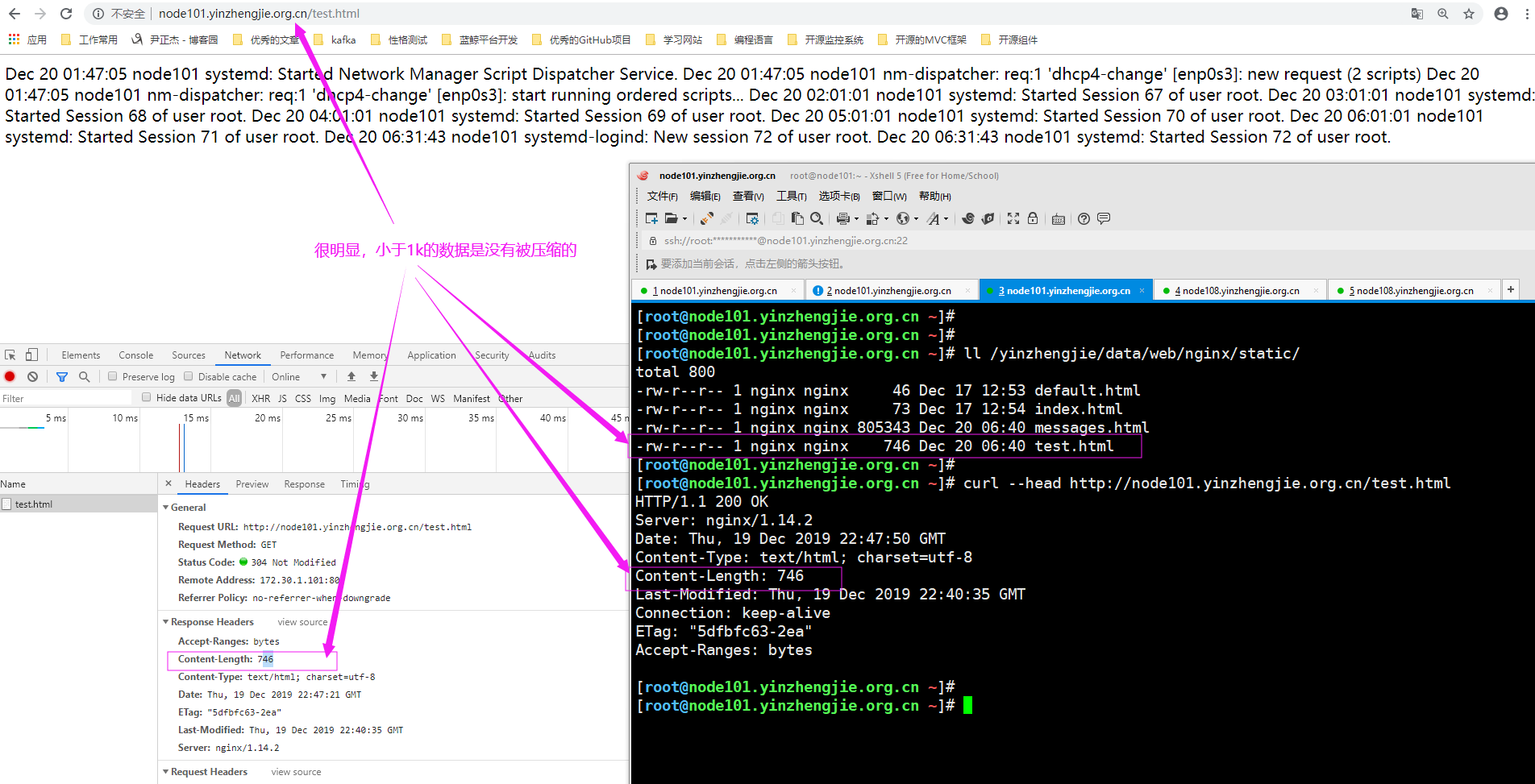
5>.浏览器访问(小于1k的文件)"http://node101.yinzhengjie.org.cn/test.html"并观察响应报文的“Content-Length”属性值,发现文件时没有被压缩的,如下图所示。
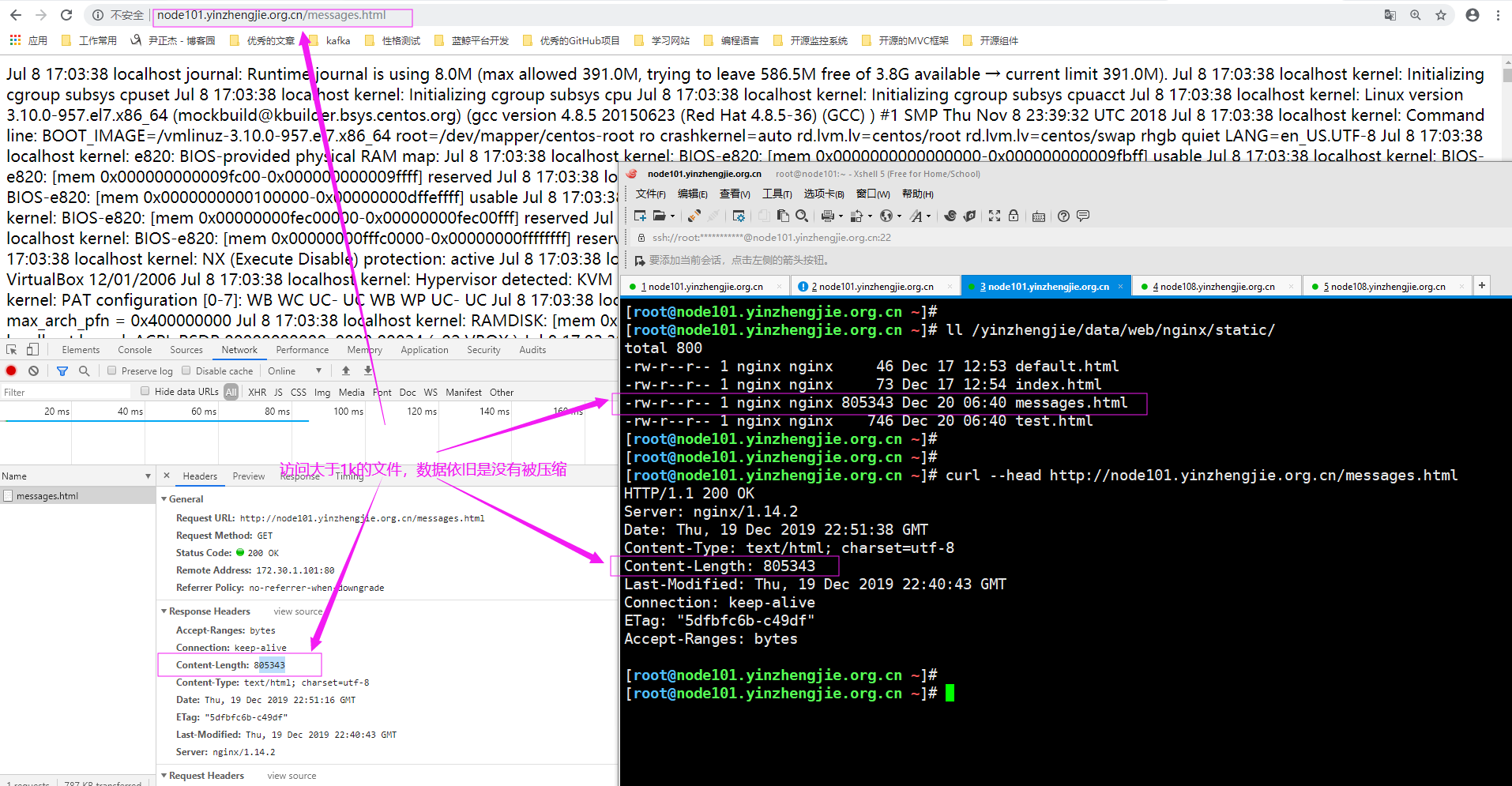
6>.浏览器访问(大于1k的文件)"http://node101.yinzhengjie.org.cn/messages.html"并观察响应报文的“Content-Length”属性值,发现文件时没有被压缩的,如下图所示。
三.启用压缩功能后观察传输文件大小
1>.编辑主配置文件
[root@node101.yinzhengjie.org.cn ~]# cat  -n /yinzhengjie/softwares/nginx/conf/nginx.conf

     1    worker_processes  4;

     2    worker_cpu_affinity 00000001 00000010 00000100 00001000;

     3

     4    events {

     5        worker_connections  100000;

     6        use epoll;

     7        accept_mutex on;

     8        multi_accept on;

     9    }

    10

    11    http {

    12        include       mime.types;

    13

    14        default_type  text/html;

    15

    16        charset utf-8;

    17

    18        log_format my_default_format '$remote_addr - $remote_user [$time_local] "$request"' '$status $body_bytes_sent "$http_referer"' '"$http_user_agent"' '"$http_x_fo

rwarded_    19    for"' '$server_name:$server_port';

    20        access_log logs/access.log my_default_format;

    21

    22        #配置压缩功能相关参数

    23        gzip on;

    24        gzip_comp_level 5;

    25        gzip_min_length 1k;

    26        gzip_types text/plain application/javascript application/x-javascript text/cssapplication/xml text/javascript application/x-httpd-php image/jpeg image/gif image

/png;    27        gzip_vary on;

    28

    29        include /yinzhengjie/softwares/nginx/conf.d/*.conf;

    30    }

[root@node101.yinzhengjie.org.cn ~]#

[root@node101.yinzhengjie.org.cn ~]# nginx -t

nginx: the configuration file /yinzhengjie/softwares/nginx/conf/nginx.conf syntax is ok

nginx: configuration file /yinzhengjie/softwares/nginx/conf/nginx.conf test is successful

[root@node101.yinzhengjie.org.cn ~]#

[root@node101.yinzhengjie.org.cn ~]#
2>.编辑子配置文件
[root@node101.yinzhengjie.org.cn ~]# cat /yinzhengjie/softwares/nginx/conf.d/share.conf

server {

    listen 80;

    server_name node101.yinzhengjie.org.cn;

    location / {

        root /yinzhengjie/data/web/nginx/static;

        index index.html;

    }

}

[root@node101.yinzhengjie.org.cn ~]#

[root@node101.yinzhengjie.org.cn ~]# nginx -t

nginx: the configuration file /yinzhengjie/softwares/nginx/conf/nginx.conf syntax is ok

nginx: configuration file /yinzhengjie/softwares/nginx/conf/nginx.conf test is successful

[root@node101.yinzhengjie.org.cn ~]#

[root@node101.yinzhengjie.org.cn ~]#
3>.重新加载nginx配置文件
[root@node101.yinzhengjie.org.cn ~]# ps -ef | grep nginx | grep -v grep

root      9297     1  0 Dec17 ?        00:00:00 nginx: master process nginx

nginx    11946  9297  0 Dec18 ?        00:00:11 nginx: worker process

nginx    11947  9297  0 Dec18 ?        00:00:00 nginx: worker process

nginx    11948  9297  0 Dec18 ?        00:00:10 nginx: worker process

nginx    11949  9297  0 Dec18 ?        00:00:11 nginx: worker process

[root@node101.yinzhengjie.org.cn ~]#

[root@node101.yinzhengjie.org.cn ~]# nginx -s reload

[root@node101.yinzhengjie.org.cn ~]#

[root@node101.yinzhengjie.org.cn ~]# ps -ef | grep nginx | grep -v grep

root      9297     1  0 Dec17 ?        00:00:00 nginx: master process nginx

nginx    13241  9297  0 06:56 ?        00:00:00 nginx: worker process

nginx    13242  9297  0 06:56 ?        00:00:00 nginx: worker process

nginx    13243  9297  1 06:56 ?        00:00:00 nginx: worker process

nginx    13244  9297  1 06:56 ?        00:00:00 nginx: worker process

[root@node101.yinzhengjie.org.cn ~]#

[root@node101.yinzhengjie.org.cn ~]#
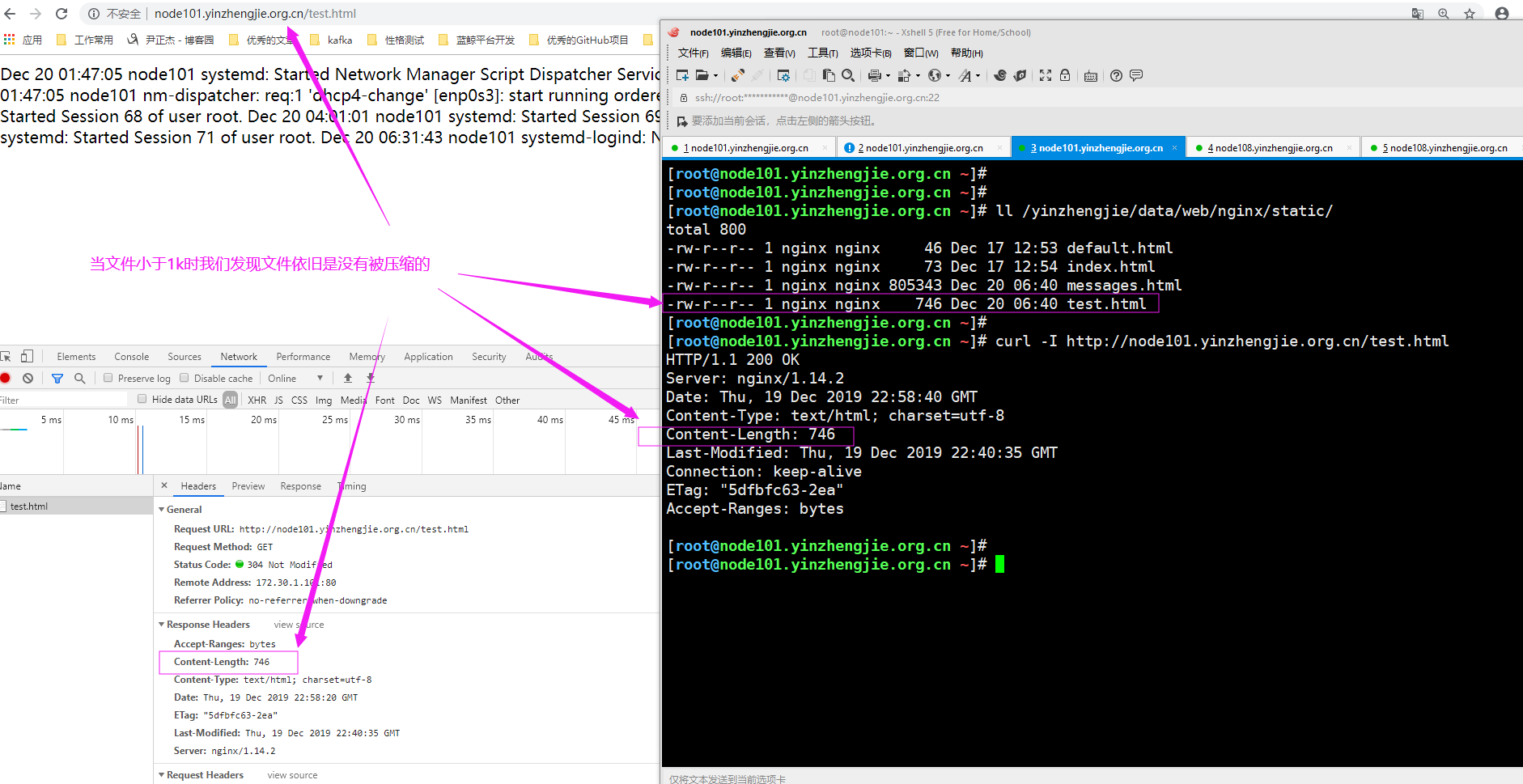
4>.浏览器访问(小于1k的文件)"http://node101.yinzhengjie.org.cn/test.html"并观察响应报文的“Content-Length”属性值,发现文件时没有被压缩的,如下图所示。
5>.浏览器访问(大于1k的文件)"http://node101.yinzhengjie.org.cn/messages.html"并观察响应报文的“Content-Length”属性值,发现文件时没有被压缩的,如下图所示。

点击"message.html"文件的响应信息,如下图所示。
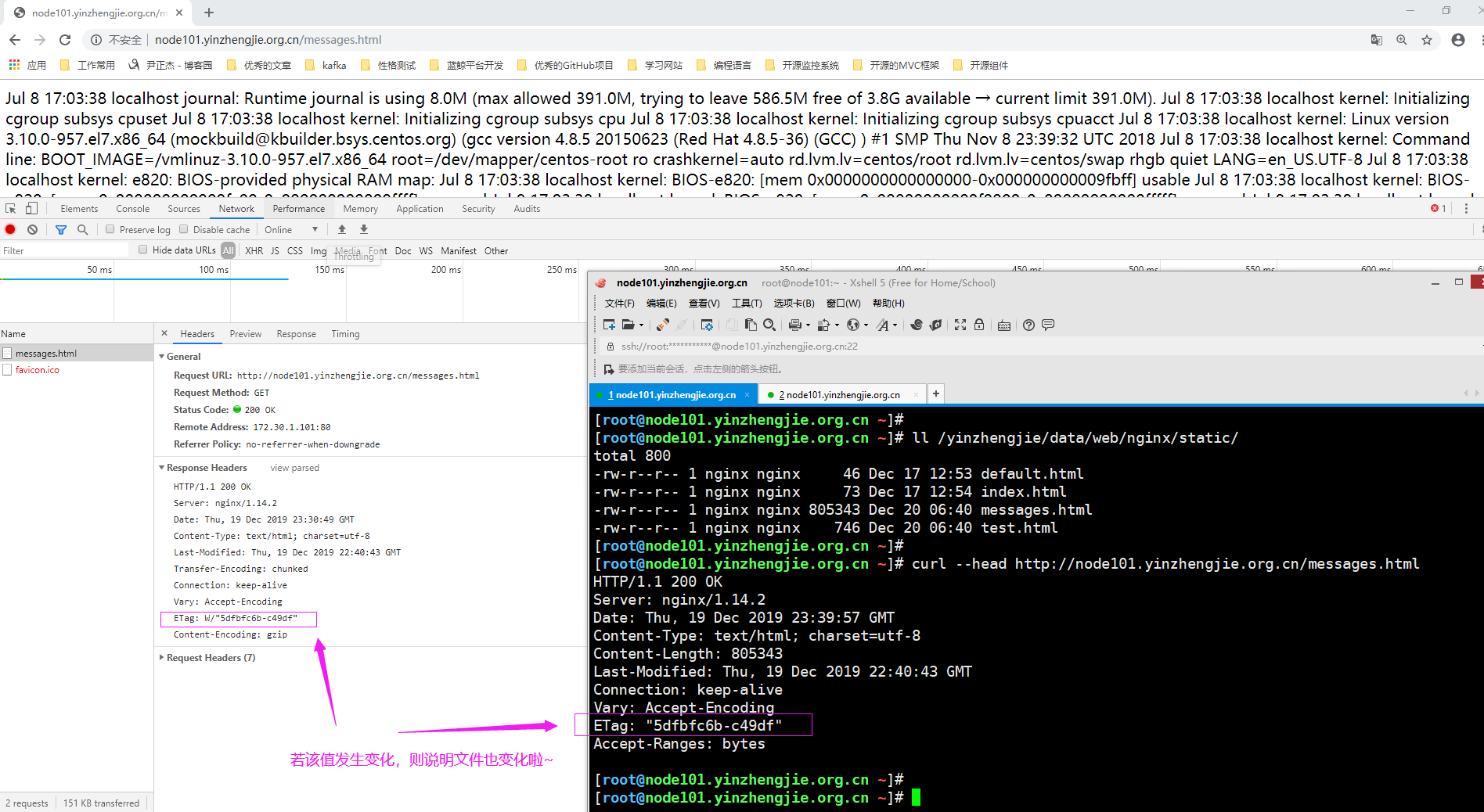
第二次访问"http://node101.yinzhengjie.org.cn/messages.html"时,可以看不到大小了,如下图所示。

关闭所有浏览器标签实例,重新打开浏览器访问,如下图所示。
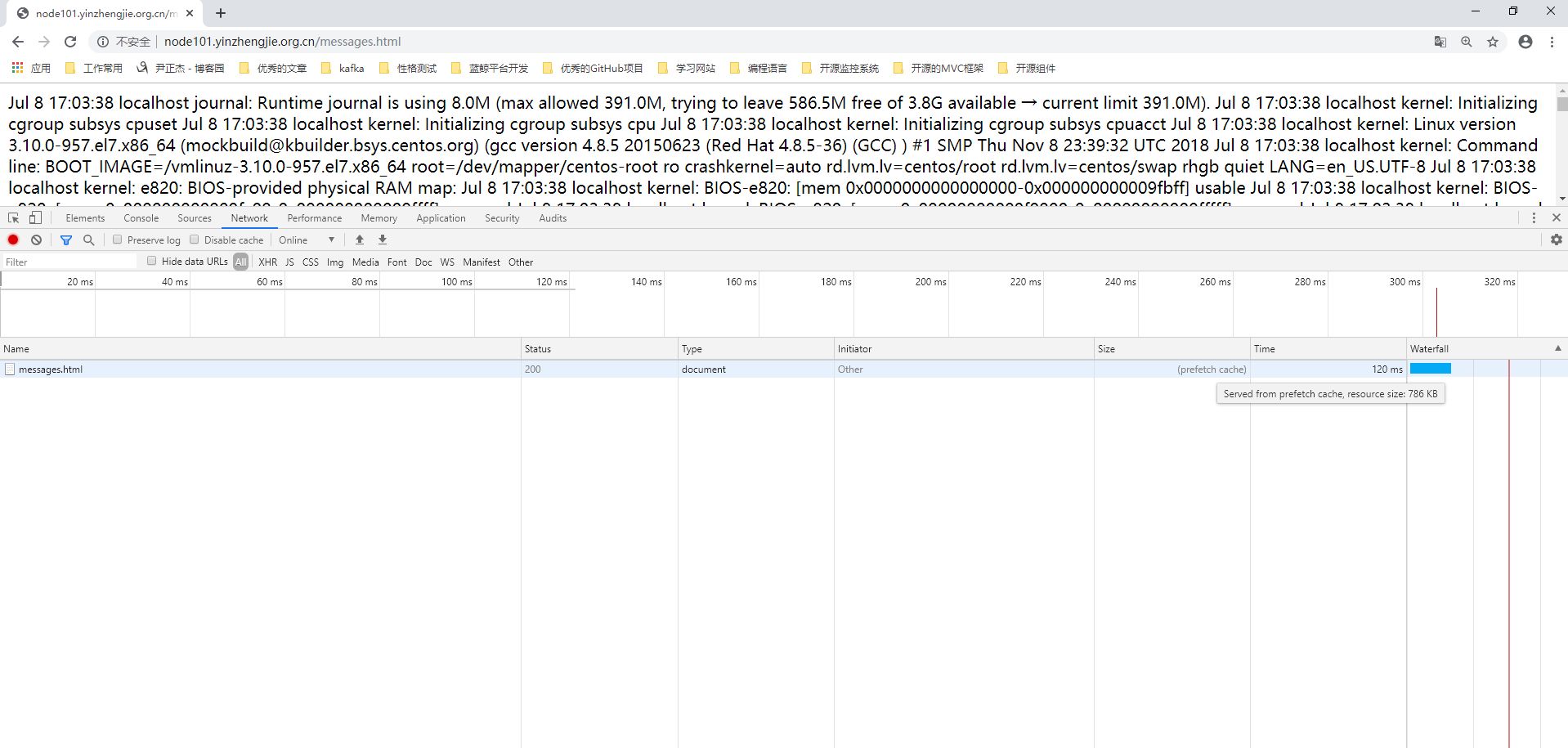
6>.开启压缩功能后,只要打开浏览器访问web服务器,发现物理机的CPU就开始飙升了(因为我的虚拟机是在笔记本中搭建的),如下图所示
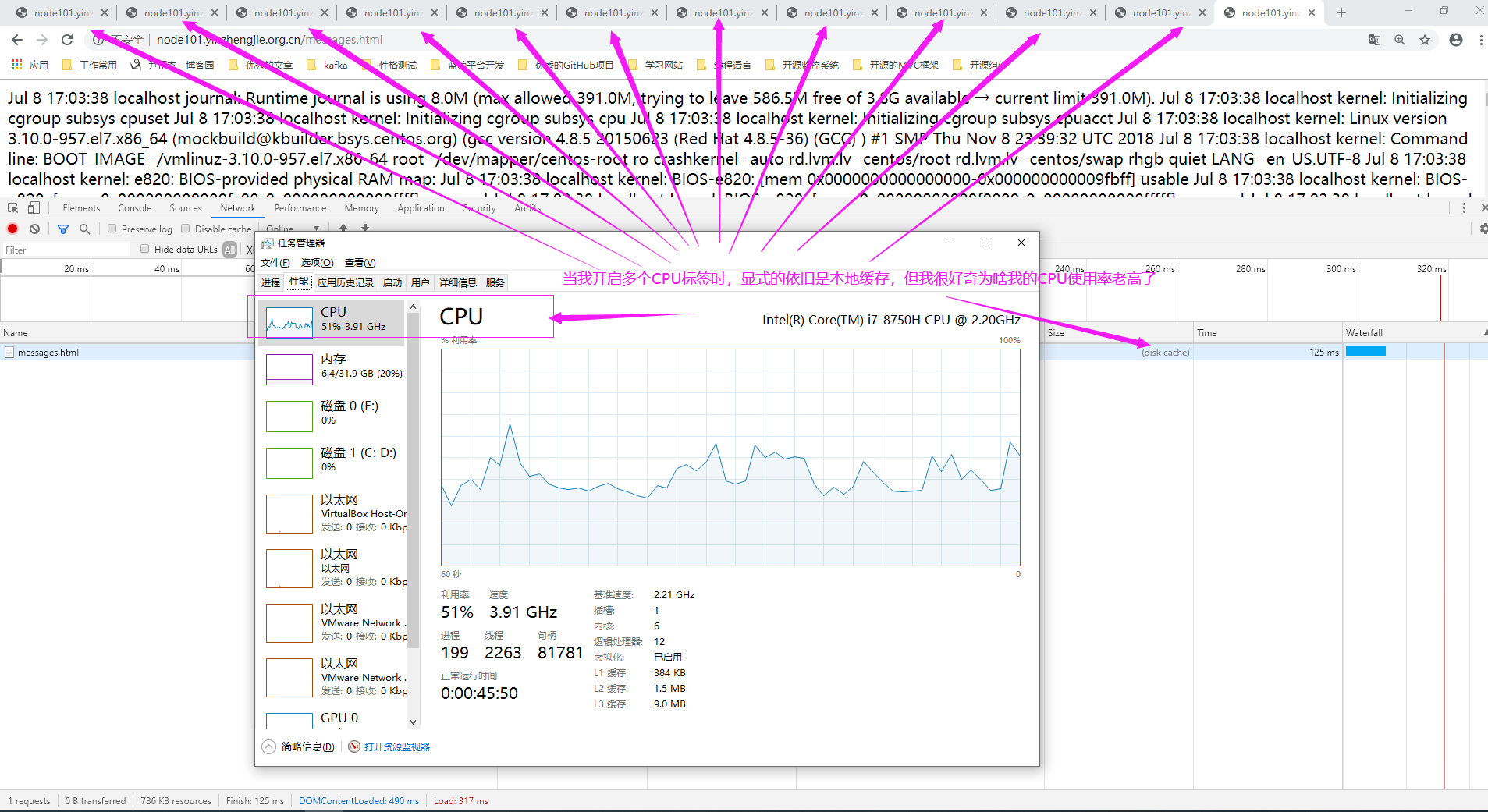
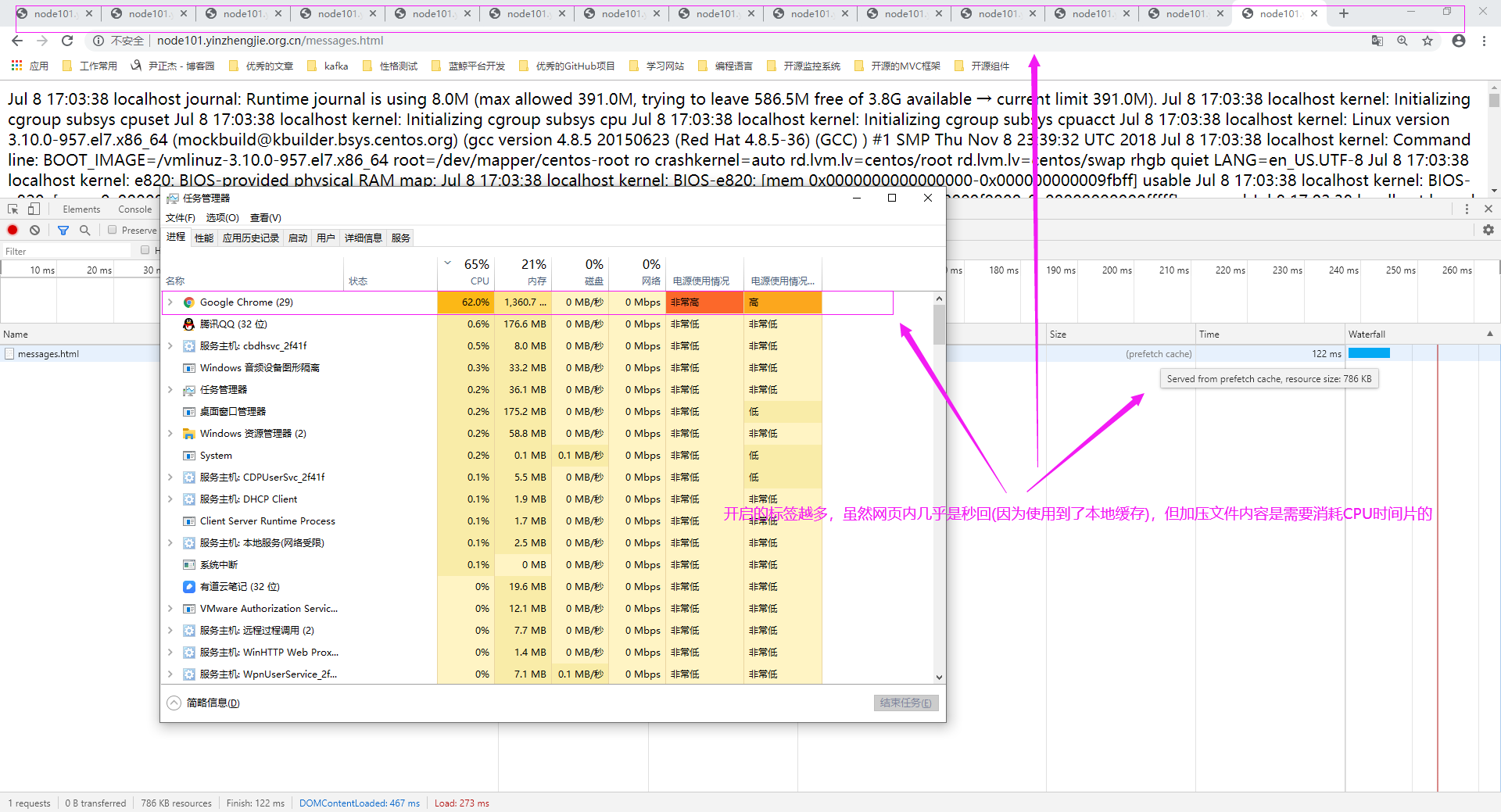
使用任务管理器的进程按照CPU使用率查看,的确是Google占用带宽了,我估计是谷歌浏览器在对压缩的数据进行解压操作,压缩和解压过程均需要占用CPU时间片。
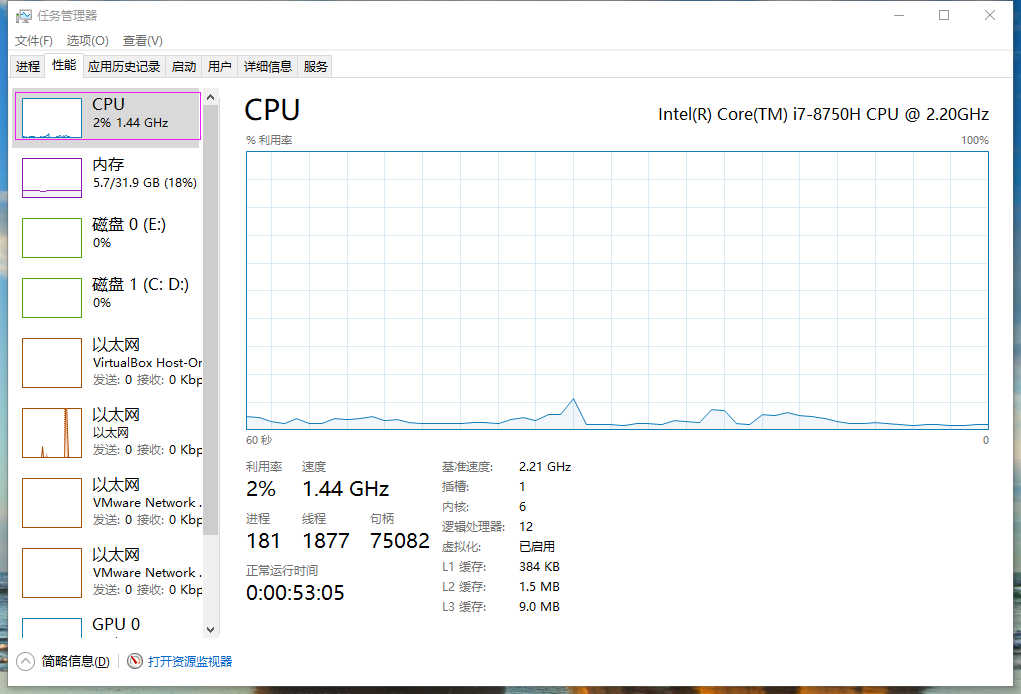
当关闭了所有浏览器标签后,一切回归了正常。CPU使用率始终位置在10%以下了
四.当文件被修改时Etag会发生变化
1>.服务端修改源文件内容
[root@node101.yinzhengjie.org.cn ~]# ll /yinzhengjie/data/web/nginx/static/

total 800

-rw-r--r-- 1 nginx nginx     46 Dec 17 12:53 default.html

-rw-r--r-- 1 nginx nginx     73 Dec 17 12:54 index.html

-rw-r--r-- 1 nginx nginx 805343 Dec 20 06:40 messages.html

-rw-r--r-- 1 nginx nginx    746 Dec 20 06:40 test.html

[root@node101.yinzhengjie.org.cn ~]#

[root@node101.yinzhengjie.org.cn ~]# curl -I http://node101.yinzhengjie.org.cn/messages.html

HTTP/1.1 200 OK

Server: nginx/1.14.2

Date: Fri, 20 Dec 2019 00:23:55 GMT

Content-Type: text/html; charset=utf-8

Content-Length: 805343

Last-Modified: Thu, 19 Dec 2019 22:40:43 GMT

Connection: keep-alive

Vary: Accept-Encoding

ETag: "5dfbfc6b-c49df"

Accept-Ranges: bytes

[root@node101.yinzhengjie.org.cn ~]#

[root@node101.yinzhengjie.org.cn ~]# tail -500 /var/log/messages > /yinzhengjie/data/web/nginx/static/messages.ht

[root@node101.yinzhengjie.org.cn ~]#

[root@node101.yinzhengjie.org.cn ~]# curl -I http://node101.yinzhengjie.org.cn/messages.html

HTTP/1.1 200 OK

Server: nginx/1.14.2

Date: Fri, 20 Dec 2019 00:24:43 GMT

Content-Type: text/html; charset=utf-8

Content-Length: 43543

Last-Modified: Fri, 20 Dec 2019 00:24:40 GMT

Connection: keep-alive

Vary: Accept-Encoding

ETag: "5dfc14c8-aa17"

Accept-Ranges: bytes

[root@node101.yinzhengjie.org.cn ~]#

[root@node101.yinzhengjie.org.cn ~]# ll /yinzhengjie/data/web/nginx/static/

total 56

-rw-r--r-- 1 nginx nginx    46 Dec 17 12:53 default.html

-rw-r--r-- 1 nginx nginx    73 Dec 17 12:54 index.html

-rw-r--r-- 1 nginx nginx 43543 Dec 20 08:24 messages.html

-rw-r--r-- 1 nginx nginx   746 Dec 20 06:40 test.html

[root@node101.yinzhengjie.org.cn ~]#

[root@node101.yinzhengjie.org.cn ~]#
2>.浏览器再次访问时并不会使用默认的本地缓存,这是为什么呢?(这需要咱们去看看该文件的响应报文头部)

3>.我们发现当ETag的值发生改变时,并不会使用本地缓存啦,而是会发送新的请求,获取文件的最新状态。

Nginx 高级配置-压缩功能的更多相关文章
- Nginx 高级配置-https 功能
Nginx 高级配置-https 功能 作者:尹正杰 版权声明:原创作品,谢绝转载!否则将追究法律责任. 一.HTTPS工作过程 1>.SSL/TLS SSL(Secure Socket Lay ...
- Nginx 高级配置-实现多域名HTTPS
Nginx 高级配置-实现多域名HTTPS 作者:尹正杰 版权声明:原创作品,谢绝转载!否则将追究法律责任. 一.Nginx支持基于单个IP实现多域名的功能 Nginx支持基于单个IP实现多域名的功能 ...
- Nginx 高级配置-变量使用
Nginx 高级配置-变量使用 作者:尹正杰 版权声明:原创作品,谢绝转载!否则将追究法律责任. nginx的变量可以在配置文件中引用,作为功能判断或者日志等场景使用,变量可以分为内置变量和自定义变 ...
- Nginx 高级配置-第三方模块编译
Nginx 高级配置-第三方模块编译 作者:尹正杰 版权声明:原创作品,谢绝转载!否则将追究法律责任. 第三模块是对nginx 的功能扩展,第三方模块需要在编译安装Nginx 的时候使用参数--add ...
- Nginx 高级配置-状态页配置
Nginx 高级配置-状态页配置 作者:尹正杰 版权声明:原创作品,谢绝转载!否则将追究法律责任. 建议将nginx的监控状态的值通过zabbix或者Open-Falcon之类的监控工具来监控状态,并 ...
- Nginx开启gzip压缩功能
在Nginx安装完成之后,我们可以开启Gzip压缩功能,这里Nginx默认只能对text/html类型的文件进行压缩.下面的指令为开启Gzip的指令: gzip on; gzip_http_versi ...
- Nginx 高级配置--关于favicon.ico
Nginx 高级配置--关于favicon.ico 作者:尹正杰 版权声明:原创作品,谢绝转载!否则将追究法律责任. 一.浏览器会默认帮咱们访问官网的图标 1>.浏览器访问网站"htt ...
- Nginx 高级配置-自定义json格式日志
Nginx 高级配置-自定义json格式日志 作者:尹正杰 版权声明:原创作品,谢绝转载!否则将追究法律责任. 在大数据运维工作中,我们经常会使用flume,filebeat相关日志收集工具取收集日志 ...
- Nginx 之四: Nginx服务器的压缩功能和缓存功能
在Nginx服务器配置文件中可以通过配置Gzip的使用,可以配置在http块,server 块或者location块中设置,Nginx服务器可以通过ngx_http_gzip_module模块.ngx ...
随机推荐
- 了解html标签
<title></title> 1.网页标题 2.当我们收藏网页时,默认标题就是网页标题 3.seo(搜索引擎优化) <h1></h1>~<h6& ...
- flask回顾
pip install flask from flask import Flask app = Flask(__name__) # 命令行启动,用manager,访问会变的非常慢 pip instal ...
- NLP之关键词提取(TF-IDF、Text-Rank)
1.文本关键词抽取的种类: 关键词提取方法分为有监督.半监督和无监督三种,有监督和半监督的关键词抽取方法需要浪费人力资源,所以现在使用的大多是无监督的关键词提取方法. 无监督的关键词提取方法又可以分为 ...
- 【转】spring的AOP原理,使用场景是什么?
什么是AOP AOP(Aspect-OrientedProgramming,面向方面编程),可以说是OOP(Object-Oriented Programing,面向对象编程)的补充和完善.OOP引入 ...
- [LeetCode] 208. Implement Trie (Prefix Tree) 实现字典树(前缀树)
Implement a trie with insert, search, and startsWith methods. Example: Trie trie = new Trie(); trie. ...
- 面试:Semaphore(信号量)的成长之路
2019最寒冷,面试跳槽不能等 马上就3月份了,所谓的金三银四招聘季.2019年也许是互联网最冷清的一年,很多知名的大型互联网公司都裁员过冬.当然也有一些公司还在持续招人的,比如阿里就宣称不裁员,反而 ...
- Comet OJ - Contest #7 C 临时翻出来的题(容斥+状压)
题意 https://www.cometoj.com/contest/52/problem/C?problem_id=2416 思路 这里提供一种容斥的写法(?好像网上没看到这种写法) 题目要求编号为 ...
- .NET Core3.0 Autofac注入
参考地址:https://docs.autofac.org/en/latest/examples/index.html 1. nuget :Autofac.Extensions.DependencyI ...
- ConcurrentHashMap竟然也有死循环问题?
前几天和朋友闲聊,说遇到了一个ConcurrentHashMap死循环问题,当时心里想这不科学呀?ConcurrentHashMap怎么还有死循环呢,毕竟它已经解决HashMap中rehash中死循环 ...
- 【2019年07月08日】A股最便宜的股票
查看更多A股最便宜的股票:androidinvest.com/CNValueTop/ 便宜指数 = PE + PB + 股息 + ROE,四因子等权,数值越大代表越低估. 本策略只是根据最新的数据来选 ...