
Nginx 高级配置--关于favicon.ico
Nginx高级配置-官网logo之favicon.ico
作者:尹正杰
版权声明:原创作品,谢绝转载!否则将追究法律责任。
一.浏览器会默认帮咱们访问官网的图标
1>.浏览器访问网站"http://node101.yinzhengjie.org.cn/"

2>.使用curl命令访问
[root@node108.yinzhengjie.org.cn ~]# curl http://node101.yinzhengjie.org.cn/

<!DOCTYPE html>

<html>

    <head>

        <meta charset="UTF-8">

        <title>字体的样式</title>

        <style>

            .hello{

                color: red;

                font-size: 30px;

                font-family: "curlz mt","华文彩云","arial", "微软雅黑";

            }

        </style>

    </head>

    <body>

        <p class="hello">2019尹正杰到此一游,在这里提前祝大家2020年新年快乐~</p>

    </body>

</html>

[root@node108.yinzhengjie.org.cn ~]#
3>.可以看到后台是有日志输出的
[root@node101.yinzhengjie.org.cn ~]# > /yinzhengjie/softwares/nginx/logs/access_json.log             #在访问之前,建议大家把日志清空,看的比较明显哈~当然,我说的是测试环境。

[root@node101.yinzhengjie.org.cn ~]#

[root@node101.yinzhengjie.org.cn ~]# tail  -10f /yinzhengjie/softwares/nginx/logs/access_json.log        #可以看到浏览器的访问记录被记录了404错误信息,而使用命令行curl访问的确是200正常访问。

{"@timestamp":"2019-12-22T11:10:40+08:00","host":"172.30.1.101","clientip":"172.30.1.254","size":571,"responsetime":0.000,"upstreamtime":"-","upstreamhost":"-","http_host":
"node101.yinzhengjie.org.cn","uri":"/favicon.ico","domain":"node101.yinzhengjie.org.cn","xff":"-","referer":"http://node101.yinzhengjie.org.cn/","tcp_xff":"",
"http_user_agent":"Mozilla/5.0 (Windows NT 10.0; Win64; x64) AppleWebKit/537.36 (KHTML, like Gecko) Chrome/78.0.3904.108 Safari/537.36","status":"404"}
{"@timestamp":"2019-12-22T11:47:35+08:00","host":"172.30.1.101","clientip":"172.30.1.101","size":362,"responsetime":0.000,"upstreamtime":"-","upstreamhost":"-","http_host":

"node101.yinzhengjie.org.cn","uri":"/index.html","domain":"node101.yinzhengjie.org.cn","xff":"-","referer":"-","tcp_xff":"","http_user_agent":"curl/7.29.0","status":"200"}
3>.访问虚拟主机"http://www.yinzhengjie.org.cn/",发现也出现类似的问题

4>.访问虚拟主机"http://mobile.yinzhengjie.org.cn/",发现也出现类似的问题

5>.访问"favicon.ico"依旧会出现问题
favicon.ico文件是浏览器收藏网址时显示的图标,当客户端使用浏览器问页面时,浏览器会自己主动发起请求获取页面的favicon.ico文件,但是当浏览器请求的favicon.ico文件不存在时,服务器会记录404日志,而且浏览器也会显示404报错。
二.关于favicon.ico的解决办法
既然知道favicon.ico是啥了,那就好办了,找一个公司logo放上去就ok啦。
1>.从互联网上下载一个logo咱们自己来用于模拟试验
[root@node101.yinzhengjie.org.cn ~]# ll

total 0

[root@node101.yinzhengjie.org.cn ~]#

[root@node101.yinzhengjie.org.cn ~]# wget https://www.jd.com/favicon.ico

--2019-12-22 12:05:35--  https://www.jd.com/favicon.ico

Resolving www.jd.com (www.jd.com)... 220.194.105.131, 2408:8710:20:1140:8000::3

Connecting to www.jd.com (www.jd.com)|220.194.105.131|:443... connected.

HTTP request sent, awaiting response... 200 OK

Length: 25214 (25K) [image/x-icon]

Saving to: ‘favicon.ico’

100%[==================================================================================================================================>] 25,214      --.-K/s   in 0.002s

2019-12-22 12:05:35 (10.0 MB/s) - ‘favicon.ico’ saved [25214/25214]

[root@node101.yinzhengjie.org.cn ~]#

[root@node101.yinzhengjie.org.cn ~]# ll

total 28

-rw-r--r-- 1 root root 25214 Mar 25  2016 favicon.ico

[root@node101.yinzhengjie.org.cn ~]#

[root@node101.yinzhengjie.org.cn ~]#
[root@node101.yinzhengjie.org.cn ~]# wget https://www.jd.com/favicon.ico #下载京东的logo
[root@node101.yinzhengjie.org.cn ~]# ll

total 28

-rw-r--r-- 1 root root 25214 Mar 25  2016 favicon.ico

[root@node101.yinzhengjie.org.cn ~]#

[root@node101.yinzhengjie.org.cn ~]#

[root@node101.yinzhengjie.org.cn ~]# wget https://img.alicdn.com/tps/i3/T1OjaVFl4dXXa.JOZB-114-114.png

--2019-12-22 12:07:01--  https://img.alicdn.com/tps/i3/T1OjaVFl4dXXa.JOZB-114-114.png

Resolving img.alicdn.com (img.alicdn.com)... 111.206.4.120, 111.206.4.115

Connecting to img.alicdn.com (img.alicdn.com)|111.206.4.120|:443... connected.

HTTP request sent, awaiting response... 200 OK

Length: 4540 (4.4K) [image/png]

Saving to: ‘T1OjaVFl4dXXa.JOZB-114-114.png’

100%[==================================================================================================================================>] 4,540       --.-K/s   in 0s

2019-12-22 12:07:01 (1.07 GB/s) - ‘T1OjaVFl4dXXa.JOZB-114-114.png’ saved [4540/4540]

[root@node101.yinzhengjie.org.cn ~]#

[root@node101.yinzhengjie.org.cn ~]# ll

total 36

-rw-r--r-- 1 root root 25214 Mar 25  2016 favicon.ico

-rw-r--r-- 1 root root  4540 May 29  2017 T1OjaVFl4dXXa.JOZB-114-114.png

[root@node101.yinzhengjie.org.cn ~]#

[root@node101.yinzhengjie.org.cn ~]#
[root@node101.yinzhengjie.org.cn ~]# wget https://img.alicdn.com/tps/i3/T1OjaVFl4dXXa.JOZB-114-114.png #下载淘宝的logo
2>.编辑子配置文件
[root@node101.yinzhengjie.org.cn ~]# cat /yinzhengjie/softwares/nginx/conf.d/https.conf               #我们把京东的logo放在虚拟主机为"www.yinzhengjie.org.cn"中

server {

    listen 80;

    listen 443 ssl;

    server_name www.yinzhengjie.org.cn;

    location / {

       root /yinzhengjie/data/web/nginx/static;

       index index.html;

    }

    location = /favicon.ico {

       root /yinzhengjie/data/web/nginx/images/jd;

    }

}

[root@node101.yinzhengjie.org.cn ~]#

[root@node101.yinzhengjie.org.cn ~]# nginx -t

nginx: the configuration file /yinzhengjie/softwares/nginx/conf/nginx.conf syntax is ok

nginx: configuration file /yinzhengjie/softwares/nginx/conf/nginx.conf test is successful

[root@node101.yinzhengjie.org.cn ~]#

[root@node101.yinzhengjie.org.cn ~]# cat /yinzhengjie/softwares/nginx/conf.d/mobile.conf               #我们将淘宝下载的logo放在虚拟主机为"mobile.yinzhengjie.org.cn"中

server {

    listen 80;

    listen 443 ssl;

    server_name mobile.yinzhengjie.org.cn;

    ssl_certificate /yinzhengjie/softwares/nginx/certs/mobile.yinzhengjie.org.cn.crt;

    ssl_certificate_key /yinzhengjie/softwares/nginx/certs/mobile.yinzhengjie.org.cn.key;

    ssl_session_cache shared:sslcache:20m;

    ssl_session_timeout 10m;

    location / {

       root /yinzhengjie/data/web/nginx/mobile;

       index index.html;

    }

    location /favicon.ico {

       root /yinzhengjie/data/web/nginx/images/taobao;

    }

}

[root@node101.yinzhengjie.org.cn ~]#

[root@node101.yinzhengjie.org.cn ~]# nginx -t

nginx: the configuration file /yinzhengjie/softwares/nginx/conf/nginx.conf syntax is ok

nginx: configuration file /yinzhengjie/softwares/nginx/conf/nginx.conf test is successful

[root@node101.yinzhengjie.org.cn ~]#
3>.将下载的图片放在指定路径中
[root@node101.yinzhengjie.org.cn ~]# mkdir -pv /yinzhengjie/data/web/nginx/images/{jd,taobao{

mkdir: created directory ‘/yinzhengjie/data/web/nginx/images’

mkdir: created directory ‘/yinzhengjie/data/web/nginx/images/jd’

mkdir: created directory ‘/yinzhengjie/data/web/nginx/images/taobao’

[root@node101.yinzhengjie.org.cn ~]#

[root@node101.yinzhengjie.org.cn ~]# ll

total 36

-rw-r--r-- 1 root root 25214 Mar 25  2016 favicon.ico

-rw-r--r-- 1 root root  4540 May 29  2017 T1OjaVFl4dXXa.JOZB-114-114.png

[root@node101.yinzhengjie.org.cn ~]#

[root@node101.yinzhengjie.org.cn ~]# mv favicon.ico /yinzhengjie/data/web/nginx/images/jd/

[root@node101.yinzhengjie.org.cn ~]#

[root@node101.yinzhengjie.org.cn ~]# mv T1OjaVFl4dXXa.JOZB-114-114.png /yinzhengjie/data/web/nginx/images/taobao/favicon.ico

[root@node101.yinzhengjie.org.cn ~]#

[root@node101.yinzhengjie.org.cn ~]# ll

total 0

[root@node101.yinzhengjie.org.cn ~]#

[root@node101.yinzhengjie.org.cn ~]# ll /yinzhengjie/data/web/nginx/images/ -R

/yinzhengjie/data/web/nginx/images/:

total 0

drwxr-xr-x 2 root root 25 Dec 22 12:46 jd

drwxr-xr-x 2 root root 25 Dec 22 12:47 taobao

/yinzhengjie/data/web/nginx/images/jd:

total 28

-rw-r--r-- 1 root root 25214 Mar 25  2016 favicon.ico

/yinzhengjie/data/web/nginx/images/taobao:

total 8

-rw-r--r-- 1 root root 4540 May 29  2017 favicon.ico

[root@node101.yinzhengjie.org.cn ~]#

[root@node101.yinzhengjie.org.cn ~]#
4>.重新加载nginx的配置文件
[root@node101.yinzhengjie.org.cn ~]# netstat -untalp | grep nginx

tcp               0.0.0.0:              0.0.0.0:*               LISTEN      /nginx: master

tcp               0.0.0.0:             0.0.0.0:*               LISTEN      /nginx: master

[root@node101.yinzhengjie.org.cn ~]#

[root@node101.yinzhengjie.org.cn ~]# ps -ef | grep nginx | grep -v grep

root             : ?        :: nginx: master process nginx

nginx        : ?        :: nginx: worker process

nginx        : ?        :: nginx: worker process

nginx        : ?        :: nginx: worker process

nginx        : ?        :: nginx: worker process

[root@node101.yinzhengjie.org.cn ~]#

[root@node101.yinzhengjie.org.cn ~]# nginx -s reload

[root@node101.yinzhengjie.org.cn ~]#

[root@node101.yinzhengjie.org.cn ~]# ps -ef | grep nginx | grep -v grep

root             : ?        :: nginx: master process nginx

nginx        : ?        :: nginx: worker process

nginx        : ?        :: nginx: worker process

nginx        : ?        :: nginx: worker process

nginx        : ?        :: nginx: worker process

[root@node101.yinzhengjie.org.cn ~]#

[root@node101.yinzhengjie.org.cn ~]# netstat -untalp | grep nginx

tcp               0.0.0.0:              0.0.0.0:*               LISTEN      /nginx: master

tcp               0.0.0.0:             0.0.0.0:*               LISTEN      /nginx: master

[root@node101.yinzhengjie.org.cn ~]#

[root@node101.yinzhengjie.org.cn ~]#
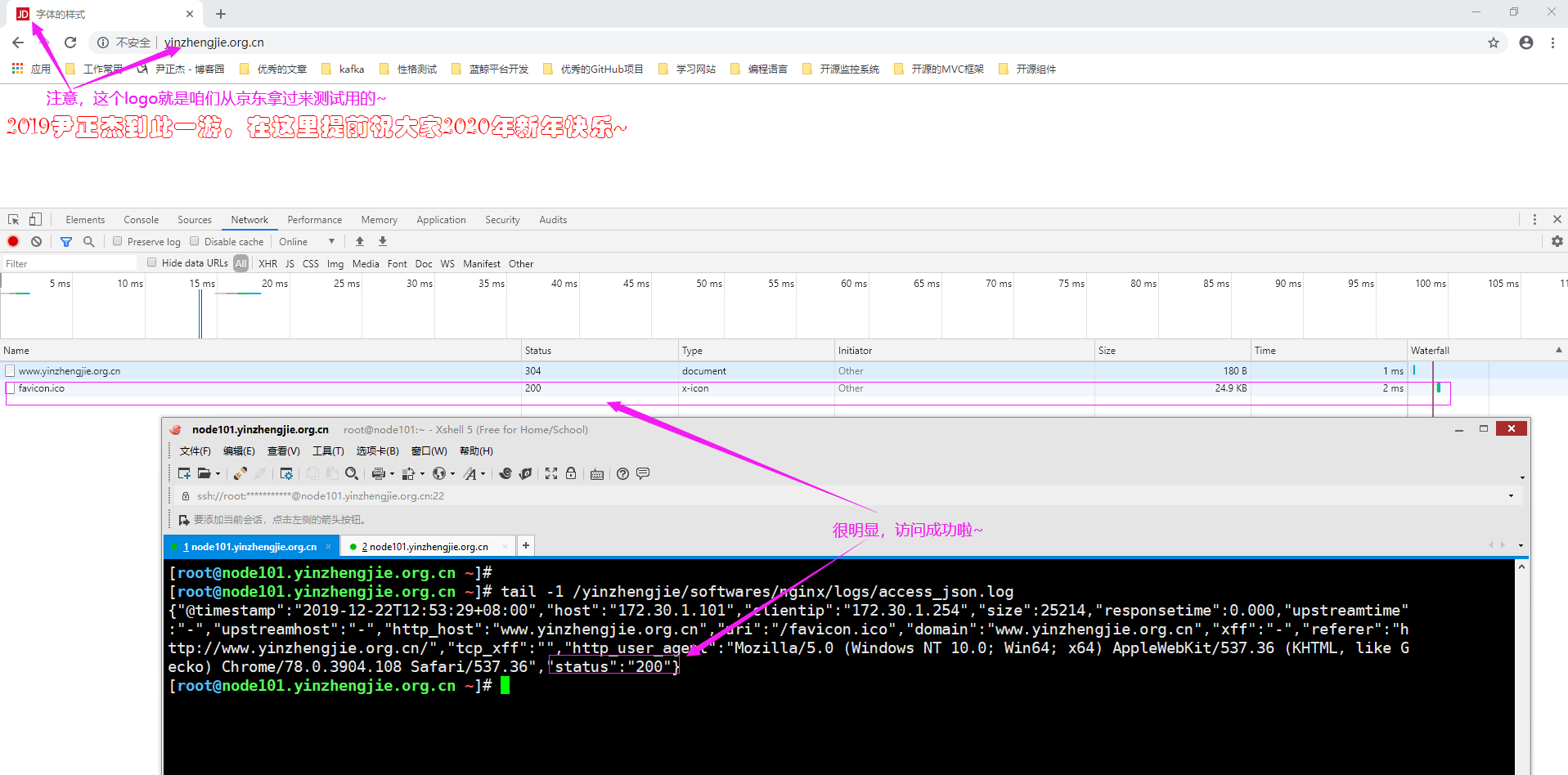
5>.访问虚拟主机"http://www.yinzhengjie.org.cn/",发现logo可以正常显示啦
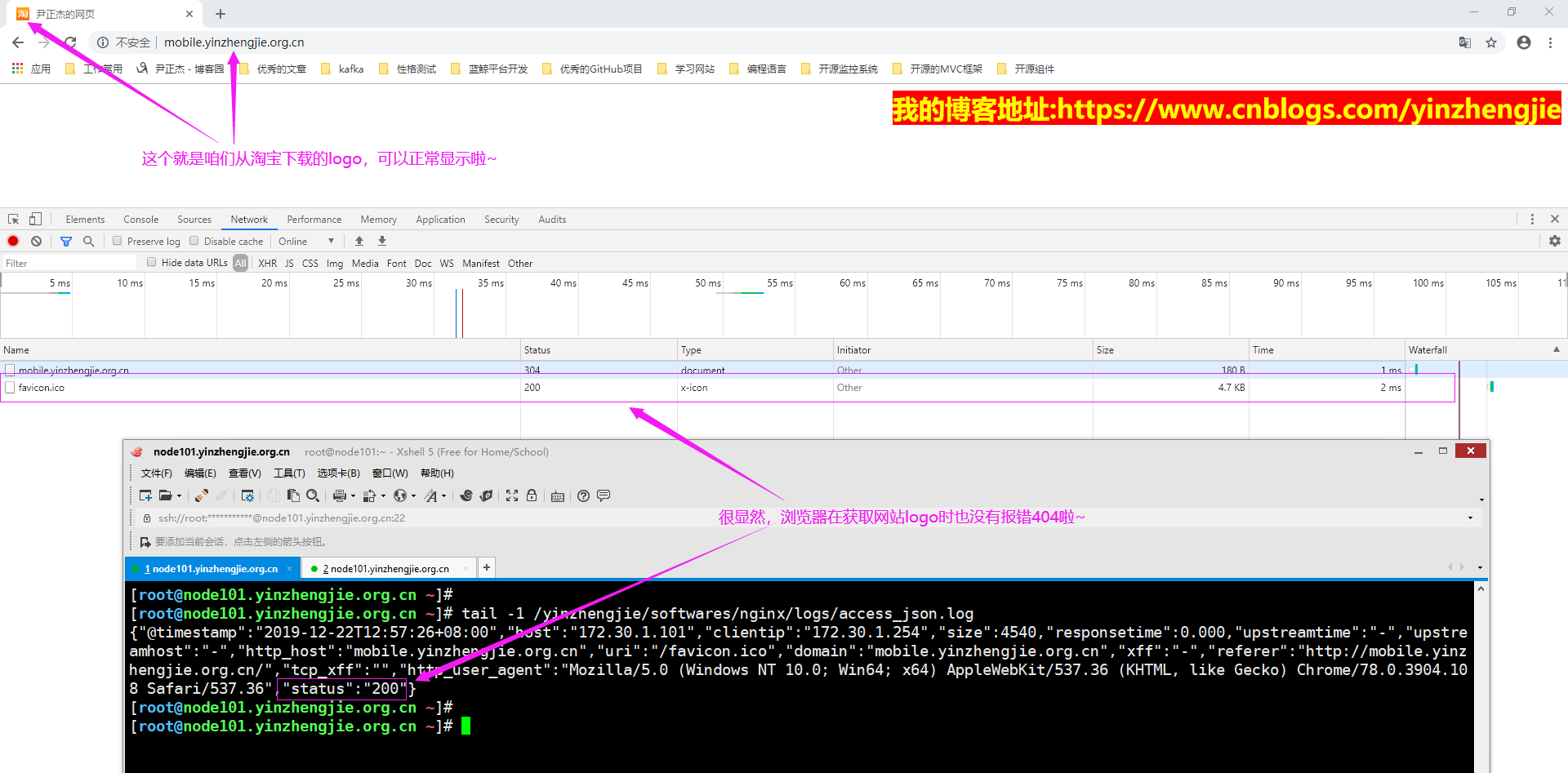
6>.访问虚拟主机"http://mobile.yinzhengjie.org.cn/",发现logo是可以正常显示啦
Nginx 高级配置--关于favicon.ico的更多相关文章
- Nginx 高级配置-实现多域名HTTPS
Nginx 高级配置-实现多域名HTTPS 作者:尹正杰 版权声明:原创作品,谢绝转载!否则将追究法律责任. 一.Nginx支持基于单个IP实现多域名的功能 Nginx支持基于单个IP实现多域名的功能 ...
- Nginx 高级配置-https 功能
Nginx 高级配置-https 功能 作者:尹正杰 版权声明:原创作品,谢绝转载!否则将追究法律责任. 一.HTTPS工作过程 1>.SSL/TLS SSL(Secure Socket Lay ...
- Nginx 高级配置-压缩功能
Nginx 高级配置-压缩功能 作者:尹正杰 版权声明:原创作品,谢绝转载!否则将追究法律责任. 一.Nginx压缩相关参数概述 1>.gzip on | off; Nginx支持对指定类型的文 ...
- Nginx 高级配置-自定义json格式日志
Nginx 高级配置-自定义json格式日志 作者:尹正杰 版权声明:原创作品,谢绝转载!否则将追究法律责任. 在大数据运维工作中,我们经常会使用flume,filebeat相关日志收集工具取收集日志 ...
- Nginx 高级配置-变量使用
Nginx 高级配置-变量使用 作者:尹正杰 版权声明:原创作品,谢绝转载!否则将追究法律责任. nginx的变量可以在配置文件中引用,作为功能判断或者日志等场景使用,变量可以分为内置变量和自定义变 ...
- Nginx 高级配置-第三方模块编译
Nginx 高级配置-第三方模块编译 作者:尹正杰 版权声明:原创作品,谢绝转载!否则将追究法律责任. 第三模块是对nginx 的功能扩展,第三方模块需要在编译安装Nginx 的时候使用参数--add ...
- Nginx 高级配置-状态页配置
Nginx 高级配置-状态页配置 作者:尹正杰 版权声明:原创作品,谢绝转载!否则将追究法律责任. 建议将nginx的监控状态的值通过zabbix或者Open-Falcon之类的监控工具来监控状态,并 ...
- nginx access.log 忽略favicon.ico訪问记录的方法
favicon.ico 文件是浏览器收藏网址时显示的图标,当第一次訪问页面时.浏览器会自己主动发起请求获取页面的favicon.ico文件.当/favicon.ico文件不存在时,服务器会记录404日 ...
- Nginx高级配置,同1台机器部署多个tomcat、配置多个域名,每个域名指向某一个tomcat下的项目,共用Nginx80端口访问;
需求说明: 只有一台服务器和一个公网IP,多个项目部署在这台机器上面,且每个项目使用一个单独的域名访问,域名访问时都通过Nginx的80端口访问.(如下图所示) 配置过程: 一.tomcat的serv ...
随机推荐
- elasticsearch 简单demo RestHighLevelClient LowLeveClient
参考: https://www.elastic.co/guide/en/elasticsearch/client/java-rest/6.7/java-rest-low.html www.elasti ...
- Spring Cloud微服务安全实战_3-7_API安全之授权
API安全之授权 访问控制: 1,ACL :Access Control Lists,直接给每个用户授权,他能访问什么.开发简单,但是用户多的话,给每个用户授权比较麻烦. 2,RBAC:Role Ba ...
- CF1188C Array Beauty(DP)
日常降智. 不过还是第一次和 2700 的题正解这么近呢-- 由于排序后不影响答案,而且直觉告诉我们排序后会更好做,不妨排个序. 直觉告诉我们,变成求最小差 \(\ge v\) 的方案数会比最小差 \ ...
- LOJ6686 Stupid GCD(数论,欧拉函数,杜教筛)
做题重心转移到 LOJ 了. 至于为什么,如果你知道“……”的密码,就去看吧. LOJ 上用户自创题大多数都不可做,今天看到个可做题(而且还是个水题),就来做了一发. 明显枚举立方根.(以下令 $m= ...
- Linux 使用squid3搭建代理服务器
在对接微信/支付宝等3方业务时,往往都有ip白名单的设置,由于内网往往都是动态ip,频繁配置白名单是件及其繁琐的事情. 使用代理转发就是最方便的做法. 下面就使用squid3配置一台代理服务器. sq ...
- python总结九
1.sql语句: ,; 解释:由hire_date进行排序,降序desc,最大的就是最晚进来的员工,limit 如果是只有一个参数的话,那么说明是除了前面多少个数据, 如果后面有两个参数的话,那么就 ...
- java web开发入门七(mybatis)基于intellig idea
mybatis 一. 入门开发步骤 1.导入相关jar包 mybatis3.4.2核心开发包 asm-5.1.jarcglib-3.2.4.jarcommons-logging-1.1.3.jarlo ...
- Golang(十二)TLS 相关知识(三)理解并模拟简单代理
0. 前言 前面的介绍我们理解了数字签名等知识,同时学习了 OpenSSL 生成私钥和证书并验证 之前提过我们基于 BitTorrent 协议开发了一个 docker 镜像分发加速插件 中间涉及到了配 ...
- Oracle逻辑结构学习笔记
数据库(Database)由若干表空间(Tablespace)组成,表空间(Tablespace)由若干段(Segment)组成,段(Segment)由若干区(Extent)组成,区(Extent)又 ...
- 使用Net Mail发送邮件
最近用到了发送邮件这个功能,简单记录一下案例.代码如下: using System; using System.Collections.Generic; using System.Linq; usin ...