
守望先锋app(2)
上次的功能完成了英雄名字、id、头像的下载并使用RecyclerView展示,
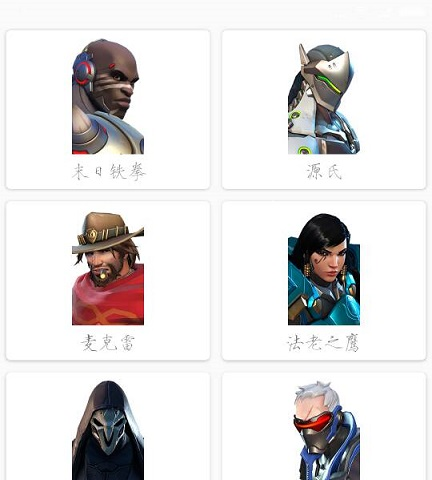
所以接下来就是点击每个英雄的caraview就能打开下一个活动进行英雄的介绍。先打开暴雪的官网查看有那些技能、故事、图片可供下载。首先是http://ow.blizzard.cn/heroes/

如果我想要看源氏的详细介绍,点击之后就打开了http://ow.blizzard.cn/heroes/genji,可以发现比上一个网站多了一个genji,genji就是源氏英文名也是上次获得的id。
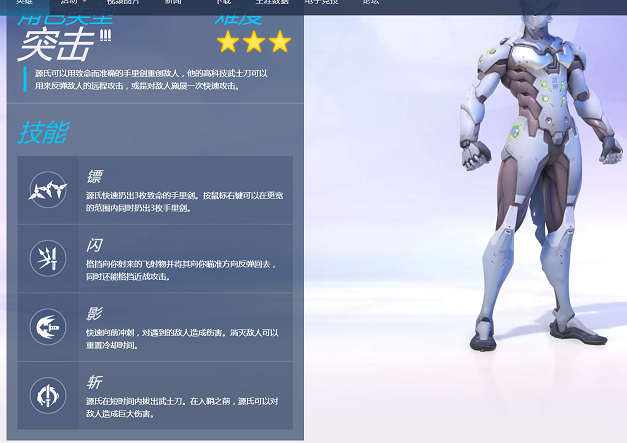
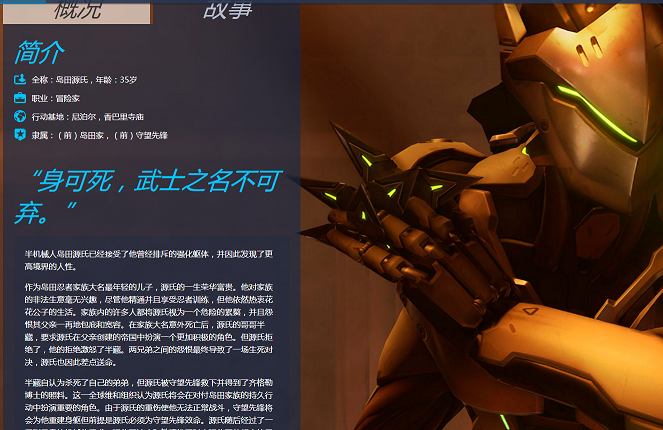
详细介绍中有:
概况:角色类型 技能 攻击简介
故事:英雄简介,台词,背景故事
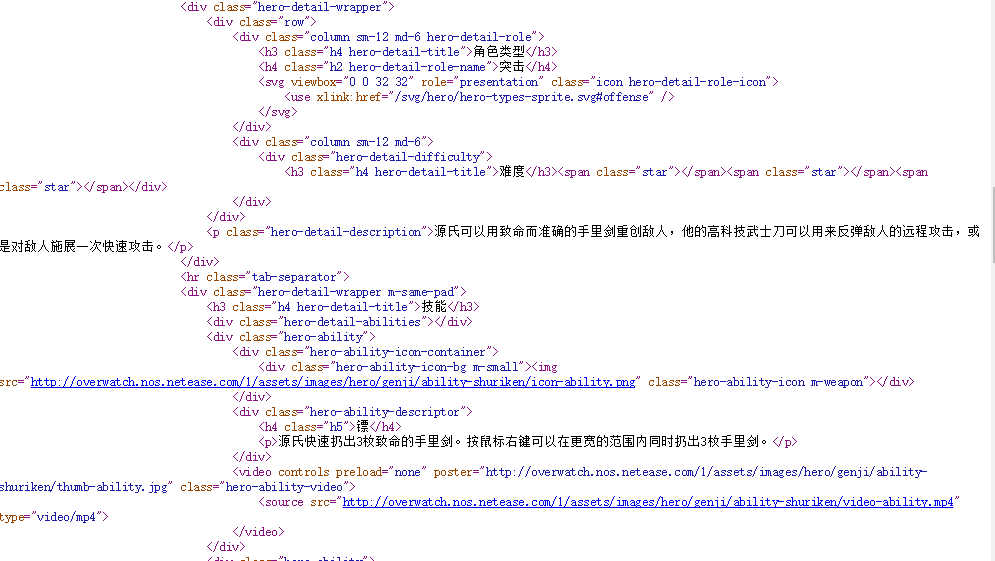
然后是html代码的分析了,大概想要的内容可分为三个部分:
1、英雄图片

这个src="http://overwatch.nos.netease.com/1/assets/images/hero/genji/full-portrait.png"可以得到英雄的全身照片.png

2、技能、角色类型
3、故事
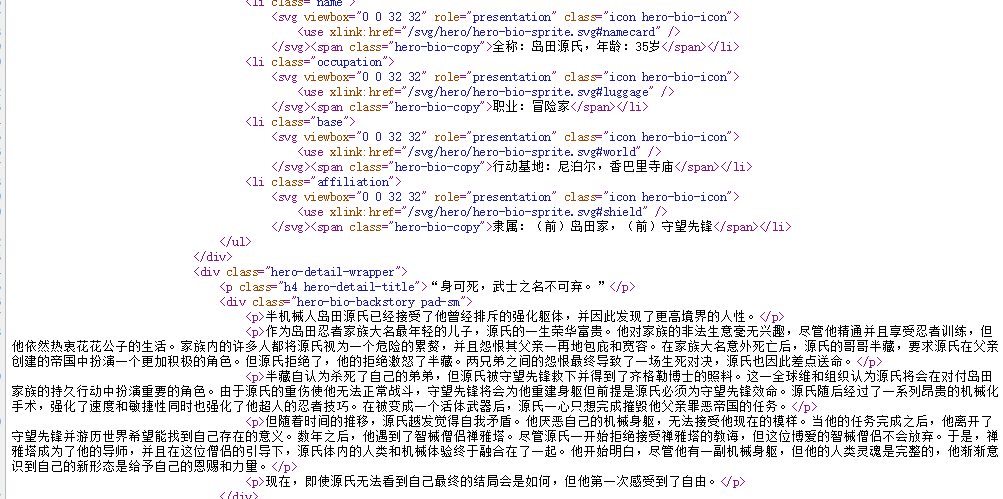
所以相应的代码就是:
    Elements elements1 = doc.select(".hero-image"); //读取图片url

    Elements elements2 = doc.select(".h2,.hero-detail-role-name"); //角色类型

    Elements elements3 = doc.select(".hero-ability"); //读取技能

    Elements elements4 = doc.select(".h5");//读取技能名字

    Elements elements5 = doc.select(".hero-ability-descriptor");//读取技能描述

    Elements elements6 = doc.select(".hero-detail-description");//读取英雄描述

    Elements elements7 = doc.select(".hero-bio-copy");//读取英雄简介

    Elements elements8 = doc.select(".h4,.hero-detail-title");//读取英雄台词

    Elements elements9 = doc.select(".hero-bio-backstory");//读取英雄故事
大概分析就结束了,然后就是活动布局的设定了,
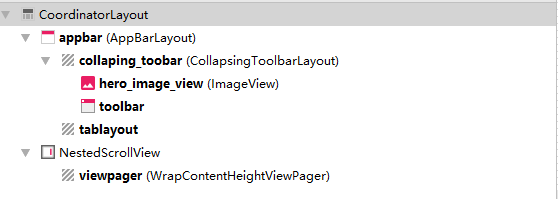
这部分的布局首先是一个可折叠的标题栏用于展示英雄图片,然后是一个可滑动切换的标签栏用于概况和故事的切换。
然后viewpager中将是两个Fragment分别展示概况和故事。
xml代码分别是:
活动的:
<?xml version="1.0" encoding="utf-8"?>

<android.support.design.widget.CoordinatorLayout xmlns:android="http://schemas.android.com/apk/res/android"

    xmlns:app="http://schemas.android.com/apk/res-auto"

    android:layout_width="match_parent"

    android:layout_height="match_parent"

    android:fitsSystemWindows="true">

    <android.support.design.widget.AppBarLayout

        android:id="@+id/appbar"

        android:layout_width="match_parent"

        android:layout_height="250dp"

        android:fitsSystemWindows="true"

        android:background="@drawable/timg2">

        <android.support.design.widget.CollapsingToolbarLayout

            android:id="@+id/collaping_toobar"

            android:layout_width="match_parent"

            android:layout_height="210dp"

            android:fitsSystemWindows="true"

            android:theme="@style/ThemeOverlay.AppCompat.Dark.ActionBar"

            app:contentScrim="@drawable/img2"

            app:layout_scrollFlags="scroll|exitUntilCollapsed">

            <ImageView

                android:id="@+id/hero_image_view"

                android:layout_width="match_parent"

                android:layout_height="match_parent"

                android:fitsSystemWindows="true"

                android:scaleType="centerInside"

                app:layout_collapseMode="parallax" />

            <android.support.v7.widget.Toolbar

                android:id="@+id/toolbar"

                android:layout_width="match_parent"

                android:layout_height="?attr/actionBarSize"

                app:layout_collapseMode="pin" />

        </android.support.design.widget.CollapsingToolbarLayout>

        <android.support.design.widget.TabLayout

            android:id="@+id/tablayout"

            android:layout_width="match_parent"

            android:layout_height="wrap_content"

            app:tabIndicatorColor="#00C3FF"

            app:layout_anchorGravity="bottom"

            app:tabBackground="@android:color/white"/>

    </android.support.design.widget.AppBarLayout>

    <android.support.v4.widget.NestedScrollView

        android:layout_width="match_parent"

        android:layout_height="wrap_content"

        app:layout_behavior="@string/appbar_scrolling_view_behavior">

        <xbt.exp22.WrapContentHeightViewPager

            android:id="@+id/viewpager"

            android:layout_width="match_parent"

            android:layout_height="0dp"

            android:layout_weight="1"

            android:background="@android:color/white"/>

    </android.support.v4.widget.NestedScrollView>

</android.support.design.widget.CoordinatorLayout>
概况:
<?xml version="1.0" encoding="utf-8"?>

<LinearLayout xmlns:android="http://schemas.android.com/apk/res/android"

    android:layout_width="match_parent"

    android:layout_height="match_parent"

    android:layout_marginBottom="15dp"

    android:orientation="vertical"

    android:background="#6B778E">

    <LinearLayout

        android:layout_width="match_parent"

        android:layout_height="wrap_content"

        android:orientation="vertical">

        <TextView

            android:layout_width="match_parent"

            android:layout_height="wrap_content"

            android:layout_marginTop="10dp"

            android:layout_marginLeft="15dp"

            android:text="角色类型"

            android:textSize="35sp"

            android:textColor="#00C3FF"

            android:textStyle="bold|italic" />

        <TextView

            android:id="@+id/hero_style"

            android:layout_width="match_parent"

            android:layout_height="wrap_content"

            android:layout_marginLeft="15dp"

            android:textSize="45sp"

            android:textColor="#F0EDF2"

            android:textStyle="bold|italic" />

        <LinearLayout

            android:layout_width="match_parent"

            android:layout_height="wrap_content"

            android:layout_marginTop="10dp"

            android:layout_marginLeft="20dp">

            <ImageView

                android:layout_width="5dp"

                android:layout_height="120dp"

                android:background="#00C3FF"/>

            <TextView

                android:id="@+id/heroSmileDescriptor"

                android:layout_width="wrap_content"

                android:layout_height="wrap_content"

                android:layout_marginTop="5dp"

                android:layout_marginLeft="10dp"

                android:textColor="#F0EDF2"/>

        </LinearLayout>

    </LinearLayout>

    <TextView

        android:layout_width="match_parent"

        android:layout_height="wrap_content"

        android:layout_marginTop="10dp"

        android:layout_marginLeft="15dp"

        android:text="技能"

        android:textSize="35sp"

        android:textColor="#00C3FF"

        android:textStyle="bold|italic" />

    <LinearLayout

        android:id="@+id/skill_layout"

        android:layout_width="match_parent"

        android:layout_height="match_parent"

        android:orientation="vertical">

    </LinearLayout>

</LinearLayout>
故事:
<?xml version="1.0" encoding="utf-8"?>

<LinearLayout xmlns:android="http://schemas.android.com/apk/res/android"

    android:layout_width="match_parent"

    android:layout_height="match_parent"

    android:orientation="vertical"

    android:background="#6B778E">

    <TextView

        android:layout_width="match_parent"

        android:layout_height="wrap_content"

        android:layout_marginTop="10dp"

        android:layout_marginLeft="15dp"

        android:text="简介"

        android:textSize="35sp"

        android:textColor="#00C3FF"

        android:textStyle="bold|italic" />

    <TextView

        android:id="@+id/hero1"

        android:layout_marginTop="10dp"

        android:layout_marginLeft="30dp"

        android:layout_width="match_parent"

        android:layout_height="wrap_content"

        android:textColor="#F0EDF2" />

    <TextView

        android:id="@+id/hero2"

        android:layout_marginTop="10dp"

        android:layout_marginLeft="30dp"

        android:layout_width="match_parent"

        android:layout_height="wrap_content"

        android:textColor="#F0EDF2" />

    <TextView

        android:id="@+id/hero3"

        android:layout_marginTop="10dp"

        android:layout_marginLeft="30dp"

        android:layout_width="match_parent"

        android:layout_height="wrap_content"

        android:textColor="#F0EDF2" />

    <TextView

        android:id="@+id/hero4"

        android:layout_marginTop="10dp"

        android:layout_marginLeft="30dp"

        android:layout_width="match_parent"

        android:layout_height="wrap_content"

        android:textColor="#F0EDF2" />

    <TextView

        android:id="@+id/hero5"

        android:layout_width="match_parent"

        android:layout_height="wrap_content"

        android:layout_marginTop="10dp"

        android:layout_marginLeft="50dp"

        android:textSize="30sp"

        android:textColor="#00C3FF"

        android:textStyle="bold|italic" />

    <TextView

        android:id="@+id/hero6"

        android:layout_marginLeft="35dp"

        android:layout_marginRight="10dp"

        android:layout_width="match_parent"

        android:layout_height="wrap_content"

        android:padding="20dp"

        android:background="#516080"

        android:textColor="#F0EDF2" />

</LinearLayout>
然后就是java代码的编写了,首先要解决布局中一个很严重的问题viewpager和NestedScrollView是有冲突的,所以新建了一个WrapContentHeightViewPager类继承自ViewPager重写了onMeasure方法(这段是网上人家的代码,但是现在我找不到来源了==),
public class WrapContentHeightViewPager extends ViewPager {

    public WrapContentHeightViewPager(Context context) {

        super(context);

    }

    public WrapContentHeightViewPager(Context context, AttributeSet attrs) {

        super(context, attrs);

    }

    @Override

    protected void onMeasure(int widthMeasureSpec, int heightMeasureSpec) {

        super.onMeasure(widthMeasureSpec, heightMeasureSpec);

        int height = 0;

        for (int i = 0; i < getChildCount(); i++) {

            View child = getChildAt(i);

            child.measure(widthMeasureSpec, MeasureSpec.makeMeasureSpec(0, MeasureSpec.UNSPECIFIED));

            int h = child.getMeasuredHeight();

            if (h > height) height = h;

        }

        heightMeasureSpec = MeasureSpec.makeMeasureSpec(height, MeasureSpec.EXACTLY);

        super.onMeasure(widthMeasureSpec, heightMeasureSpec);

    }

}
活动的java代码:
public class HeroDetails extends AppCompatActivity {

    public static final String Hero_NAME = "hero_name";

    public static final String Hero_ID = "hero_id";

    private Handler handler;

    String imgUrl;

    private List<HeroSkill> heroSkillList = new ArrayList<>();

    private List<String> list_title;
    private List<Fragment> list_fragment;

    private FragmentAdapter fAdapter;

    private SkillFragment nFragment;
    private Fragment2 sFragment;

    private TabLayout tab_title;
    private ViewPager vp_pager;

    @Override
    protected void onCreate(Bundle savedInstanceState) {
        super.onCreate(savedInstanceState);
        setContentView(R.layout.activity_hero_details);

        Intent intent = getIntent();
        final String heroName =intent.getStringExtra(Hero_NAME);
        String heroId =intent.getStringExtra(Hero_ID);
        String url = "http://ow.blizzard.cn/heroes/" + heroId;

        //标题栏设定
        Toolbar toolbar = (Toolbar) findViewById(R.id.toolbar);
        setSupportActionBar(toolbar);

        //设置标题栏标题
        CollapsingToolbarLayout collapsingToolbar = (CollapsingToolbarLayout) findViewById(R.id.collaping_toobar);
        collapsingToolbar.setTitle(heroName);
        collapsingToolbar.setExpandedTitleColor(Color.parseColor("#00C3FF") );
        collapsingToolbar.setCollapsedTitleTextColor(Color.parseColor("#00C3FF") );

        //让返回图标显示出来
        ActionBar actionBar = getSupportActionBar();
        if(actionBar != null){
            actionBar.setDisplayHomeAsUpEnabled(true);
        }

        initHeroes(url);
        handler = new Handler(){
            @Override
            public void handleMessage(Message msg) {
                if(msg.what == 1){
                    ImageView overWatchImageView = (ImageView) findViewById(R.id.hero_image_view);
                    Glide.with(HeroDetails.this).load(imgUrl).into(overWatchImageView);
                    tab_title = (TabLayout)findViewById(R.id.tablayout);
                    vp_pager = (ViewPager)findViewById(R.id.viewpager);
                    fragmentChange();
                }
            }
        };
    }

    //读取数据
    private void initHeroes(String Url){
        HttpUtil.sendOkHttpRequest(Url, new Callback() {
            @Override
            public void onResponse(Call call, Response response) throws IOException {
                final String responseText = response.body().string();
                new Thread(new Runnable() {
                    @Override
                    public void run() {
                        Document doc = Jsoup.parse(responseText);//将String类型的html转换为Document
                        Elements elements1 = doc.select(".hero-image"); //读取图片url
                        Elements elements2 = doc.select(".h2,.hero-detail-role-name"); //角色类型
                        Elements elements3 = doc.select(".hero-ability"); //读取技能
                        Elements elements4 = doc.select(".h5");//读取技能名字
                        Elements elements5 = doc.select(".hero-ability-descriptor");//读取技能描述
                        Elements elements6 = doc.select(".hero-detail-description");//读取英雄描述
                        Elements elements7 = doc.select(".hero-bio-copy");//读取英雄简介
                        Elements elements8 = doc.select(".h4,.hero-detail-title");//读取英雄台词
                        Elements elements9 = doc.select(".hero-bio-backstory");//读取英雄故事

                        Log.d("message", elements9.text());
                        List<String> heroBio = new ArrayList<String>();

                        for(int i= 0; i < elements7.size(); i++) {
                            heroBio.add(elements7.get(i).text());
                        }
                        heroBio.add(elements8.get(6).text());
                        heroBio.add(elements9.text());

                        imgUrl = elements1.attr("src");

                        for(int j = 0; j < elements4.size(); j++ ) {
                            String skillImgUrl = elements3.select("img").get(j).attr("src");
                            String skillName = elements4.get(j).text();
                            String skillDescriptor = elements5.get(j).select("p").text();
                            HeroSkill heroSkill = new HeroSkill(skillImgUrl,skillName,skillDescriptor,elements2.text(),elements6.text(),heroBio);
                            heroSkillList.add(heroSkill);
                        }
                        Message msg = new Message();
                        msg.what = 1;
                        handler.sendMessage(msg);
                    }
                }).start();
            }

            @Override
            public void onFailure(Call call, IOException e) {
                e.printStackTrace();
                runOnUiThread(new Runnable() {
                    @Override
                    public void run() {
                        Toast.makeText(HeroDetails.this, "数据获取失败", Toast.LENGTH_SHORT).show();
                    }
                });
            }
        });
    }

    //点击左上角的返回后退出活动
    public boolean onOptionsItemSelected(MenuItem item){
        switch (item.getItemId()){
            case android.R.id.home:
                finish();
                return true;
        }
        return super.onOptionsItemSelected(item);
    }

    //用于和Fragment的通信
    public List<HeroSkill> getHeroSkillList(){
        return heroSkillList;
    }

    private void fragmentChange()
    {
        list_fragment = new ArrayList<>();

        nFragment = new SkillFragment();
        sFragment = new Fragment2();

        list_fragment.add(nFragment);
        list_fragment.add(sFragment);

        list_title = new ArrayList<>();
        list_title.add("技能");
        list_title.add("概况");

        fAdapter = new FragmentAdapter(getSupportFragmentManager(),list_fragment,list_title);
        vp_pager.setAdapter(fAdapter);

        //将tabLayout与viewpager连起来
        tab_title.setupWithViewPager(vp_pager);
    }
}
这里新建的HeroSkill类:
public class HeroSkill {

    private String skillImg;

    private String skillName;

    private String skillDescriptor;

    private String heroStyle;

    private String heroSmileDescriptor;

    private List<String> heroBio;

    public HeroSkill(String skillImg, String skillName,String skillDescriptor,String heroStyle, String heroSmileDescriptor,List<String> heroBio ) {

        this.skillDescriptor = skillDescriptor;

        this.skillImg = skillImg;

        this.skillName = skillName;

        this.heroStyle = heroStyle;

        this.heroSmileDescriptor = heroSmileDescriptor;

        this.heroBio = heroBio;

    }

    public String getSkillImg() {

        return skillImg;

    }

    public void setSkillImg(String skillImg) {

        this.skillImg = skillImg;

    }

    public String getSkillName() {

        return skillName;

    }

    public void setSkillName(String skillName) {

        this.skillName = skillName;

    }

    public String getSkillDescriptor() {

        return skillDescriptor;

    }

    public void setSkillDescriptor(String skillDescriptor) {

        this.skillDescriptor = skillDescriptor;

    }

    public String getHeroStyle() {

        return heroStyle;

    }

    public void setHeroStyle(String heroStyle) {

        this.heroStyle = heroStyle;

    }

    public String getHeroSmileDescriptor() {

        return heroSmileDescriptor;

    }

    public void setHeroSmileDescriptor(String heroSmileDescriptor) {

        this.heroSmileDescriptor = heroSmileDescriptor;

    }

    public List<String> getHeroBio() {

        return heroBio;

    }

    public void setHeroBio(List<String> heroBio) {

        this.heroBio = heroBio;

    }

}
然后还有两个fragment的代码,还有连接fragment TabLayout ViewPager的FragmentAdapter继自FragmentPagerAdapter。就不贴了。。
全部的源代码在这https://github.com/xbtshady/Exp22
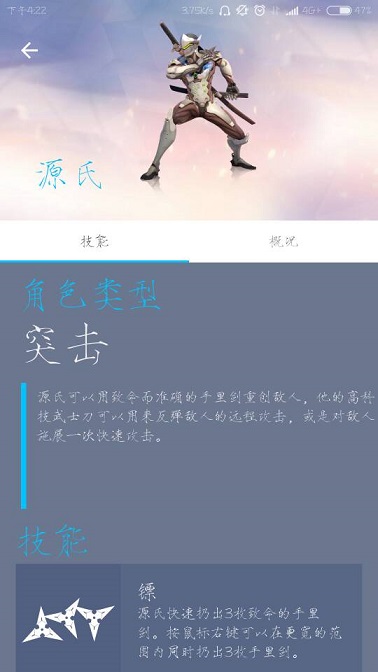
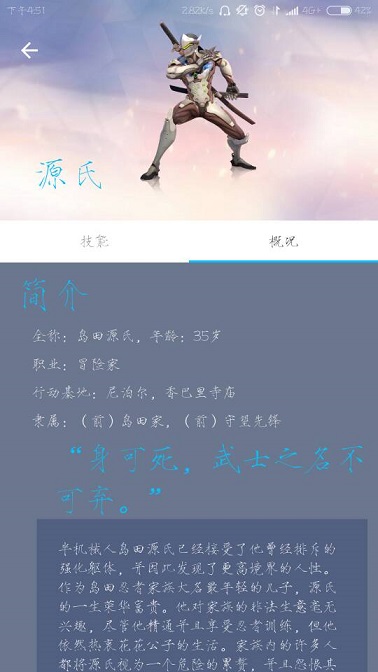
预览:
守望先锋app(2)的更多相关文章
- 守望先锋app(1)
这个app就是从守望先锋的官网下载相关的图片.文字.视频然后展示出来. 第一个功能是英雄介绍,所以先分析一波官网的数据.守望先锋的英雄数据的官方网站是http://ow.blizzard.cn/her ...
- 浅谈《守望先锋》中的 ECS 构架
https://blog.codingnow.com/2017/06/overwatch_ecs.html 今天读了一篇 <守望先锋>架构设计与网络同步 .这是根据 GDC 2017 上的 ...
- Android仿“守望先锋”加载动画
转载请注明本文出自大苞米的博客(http://blog.csdn.net/a396901990),谢谢支持! 效果图 实现思路 画一个小六边形 按效果图位置画七个小六边形 实现一个小六边形的显示与隐藏 ...
- 暴雪游戏-守望先锋-FPS
http://us.battle.net/overwatch/en/
- 守望先锋overwatch美服外服设置方法
打开:C:\Users\你的用户名\AppData\Roaming\Battle.net\Battle.net.config 替换为下方内容: { "Client": { &quo ...
- Python爬取CSDN博客文章
0 url :http://blog.csdn.net/youyou1543724847/article/details/52818339Redis一点基础的东西目录 1.基础底层数据结构 2.win ...
- VR应用向导,全球Top10 VR应用排行榜
2016年国际知名产商索尼.三星.HTC.Oculus.YouTube等等都推出了自己的VR设备,与此同时还有自有的VR应用平台,供各位玩家下载应用体验沉浸式VR,当然每个平台的VR应用下载量各不相同 ...
- Android开源项目库汇总
最近做了一个Android开源项目库汇总,里面集合了OpenDigg 上的优质的Android开源项目库,方便移动开发人员便捷的找到自己需要的项目工具等,感兴趣的可以到GitHub上给个star. 抽 ...
- 开源分享 Unity3d客户端与C#分布式服务端游戏框架
很久之前,在博客园写了一篇文章,<分布式网游server的一些想法语言和平台的选择>,当时就有了用C#做网游服务端的想法.写了个Unity3d客户端分布式服务端框架,最近发布了1.0版本, ...
随机推荐
- 性能测试-实例讲解VU、RPS、RT公式换算
概述 今天看到一篇文章讲解VU.RPS.RT,中间有一个公式如下图 并发数 = RPS * 响应时间 于是我在本地做了几次实验,试图验证一下公式的准确性 实验网站 www.baidu.com 第一次 ...
- 使用R语言预测产品销量
使用R语言预测产品销量 通过不同的广告投入,预测产品的销量.因为响应变量销量是一个连续的值,所以这个问题是一个回归问题.数据集共有200个观测值,每一组观测值对应一种市场情况. 数据特征 TV:对于一 ...
- ASP.NET--Repeater控件分页功能实现
这两天由于‘销售渠道’系统需要实现新功能,开发了三个页面,三个界面功能大致相同. 功能:分页显示特定sql查询结果,点击上一页下一页均可显示.单击某记录可以选定修改某特定字段<DropDownL ...
- 根据数据库帮助类采用事务插入图片到sql server数据库中
我们定义数据库为image类型,然后读取图片为字符流,再保存到数据库中,首先我们定义一个读取图片的公共类,此公共类以后会用到,所以可以建立相应的帮助类 public static byte[] Rea ...
- 洛谷P2880 [USACO07JAN]平衡的阵容Balanced Lineup 题解
题目链接: https://www.luogu.org/problemnew/show/P2880 分析: ST表实现即可,一个最大值数组和最小值数组同时维护 代码: #include<cstd ...
- HTML入门编写
今天给大家带来的是HTML初步讲解(即第一趴). 问题区: 1.什么是HTML? 先来个百度解说压阵. html,全称Hypertext Markup Language,也就是"超文本链接标 ...
- select模块(I/O多路复用)
0709自我总结 select模块 一.介绍 Python中的select模块专注于I/O多路复用,提供了select poll epoll三个方法(其中后两个在Linux中可用,windows仅支持 ...
- hdu6383 p1m2(二分答案)
p1m2 题目传送门 解题思路 因为x都是非负数,且每一次操作其实就是把总和减少了1,所以可以得出最后都可以到达稳定.最后稳定的数的下界是0,最大也不会超过其初始数的最大值,所以可以用二分答案来求解. ...
- Windows 设置自启动计划任务(非登录启动)
原因:服务器会不定期重启,且重启后无人看管,不会有人去登录系统.导致我们做的一些开机启动程序失效,进而系统瘫痪. 解决方法: 自己理解,想要达到目的有两种方式:系统服务 & 计划任务配置. 计 ...
- 算法-一步步教你如何用c语言实现堆排序(非递归)
看了左神的堆排序,觉得思路很清晰,比常见的递归的堆排序要更容易理解,所以自己整理了一下笔记,带大家一步步实现堆排序算法 首先介绍什么是大根堆:每一个子树的最大值都是子树的头结点,即根结点是所有结点的最 ...