
matplotlib 库的使用
1.问题描述:
在学习kaggle经典学习项目Titanic,进行数据可视化处理时,对于每个特征进行相关性分析(也就是绘制pearson correlation heatmap )热力相关性矩阵时, plt.show() 图形绘制出来,字体会重叠.导致无法观察
# Visualisations

"""将数据进行可视化"""

print(train.head(3))

# correlation heatmap   相关性热点矩阵

plt.figure(figsize=(14,12))

plt.title('Pearson Correlation of Features',y=1.05,size=15)

sns.heatmap(train.astype(float).corr(),linewidths=0.1,vmax=1.0,

            square=True,linecolor='white',annot=True)

plt.show()
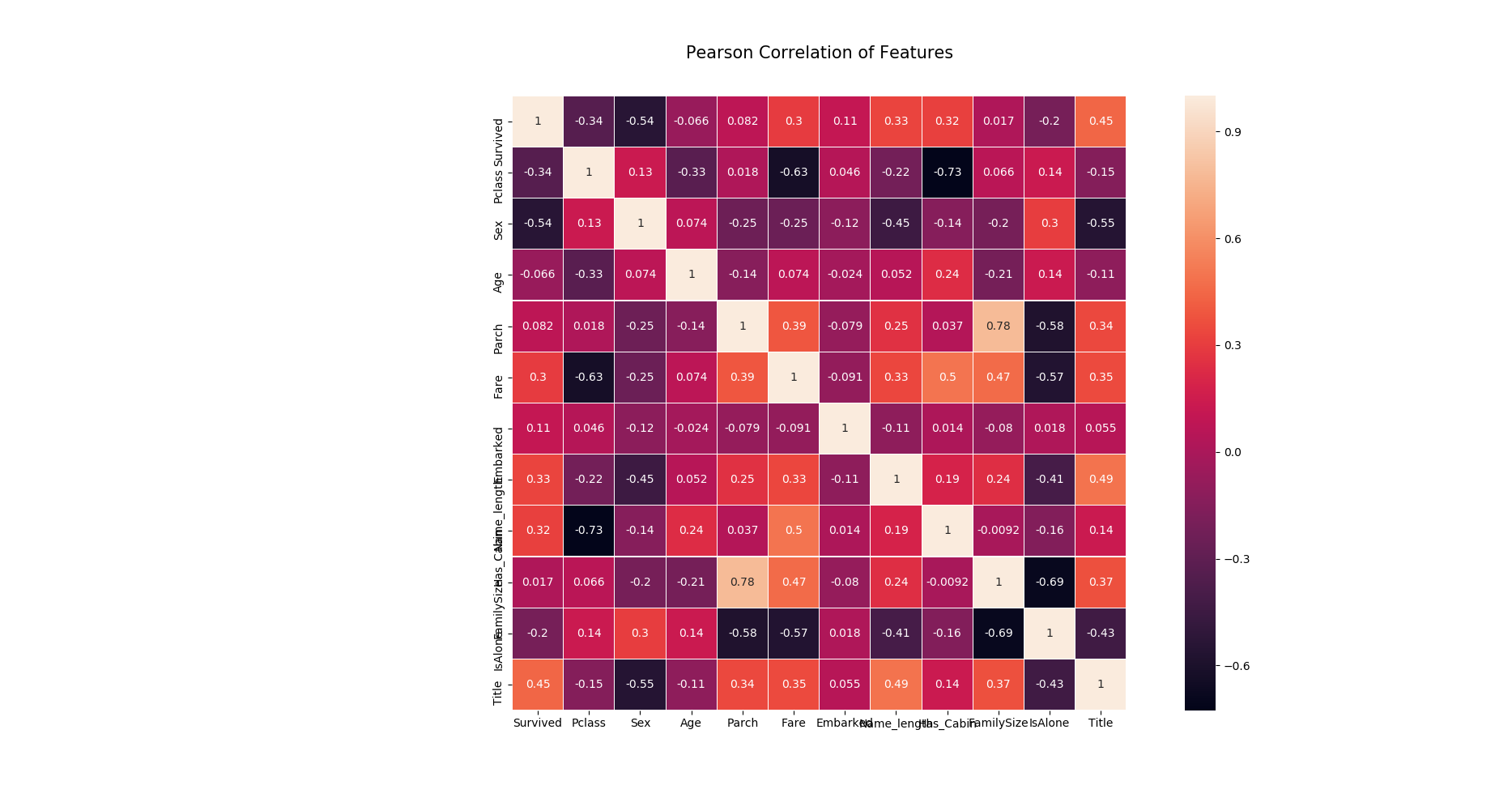
导致看不清坐标轴每个特征的含义
2.解决问题:
思路:只要找到plt所含有的命令,将X.Y坐标轴字体进行旋转即可
寻找python xlabel 的文档
Help on function xlabel in module matplotlib.pyplot:

xlabel(s, *args, **kwargs)

    Set the *x* axis label of the current axis.

    Default override is::

      override = {

          'fontsize'            : 'small',

          'verticalalignment'   : 'top',

          'horizontalalignment' : 'center'

          }

    .. seealso::

        :func:`~matplotlib.pyplot.text`

            For information on how override and the optional args work
发现没有关于xlabel进行旋转的参数,
寻找 python xticks 文档
Help on function xticks in module matplotlib.pyplot:

xticks(*args, **kwargs)

    Get or set the *x*-limits of the current tick locations and labels.

    ::

      # return locs, labels where locs is an array of tick locations and

      # labels is an array of tick labels.

      locs, labels = xticks()

      # set the locations of the xticks

      xticks( arange(6) )

      # set the locations and labels of the xticks

      xticks( arange(5), ('Tom', 'Dick', 'Harry', 'Sally', 'Sue') )

    The keyword args, if any, are :class:`~matplotlib.text.Text`

    properties. For example, to rotate long labels::

      xticks( arange(12), calendar.month_name[1:13], rotation=17 )
上面黑体下划线,rotate long label
找到参数 rotation
plt.figure(figsize=(14,12))

plt.title('Pearson Correlation of Features',y=1.05,size=15)

sns.heatmap(train.astype(float).corr(),linewidths=0.1,vmax=1.0,

            square=True,linecolor='white',annot=True)

plt.xticks(rotation=90)    # 将字体进行旋转

plt.yticks(rotation=360)

plt.show()
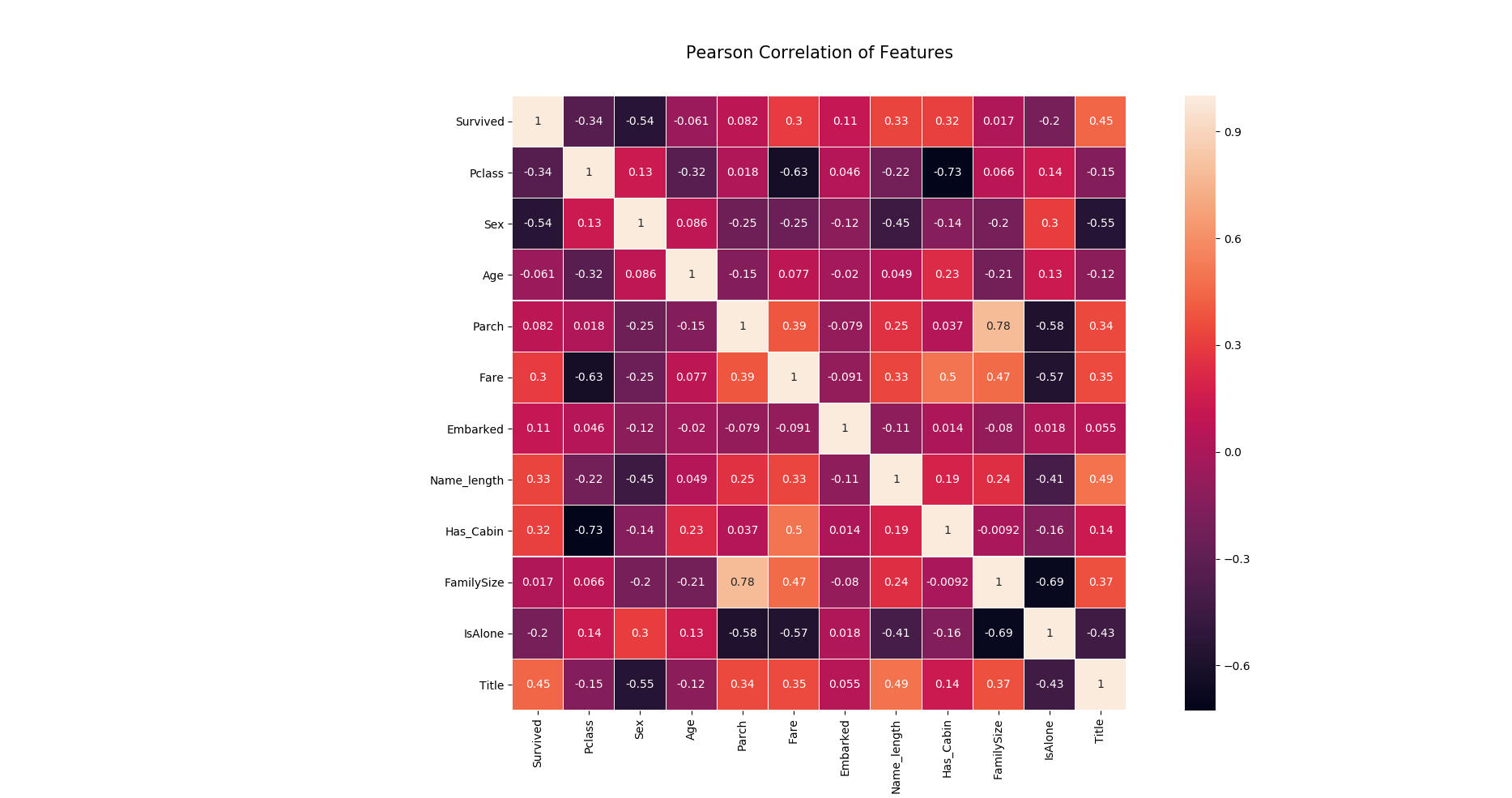
标签旋转,可清晰看到每个特征的含义
问题思考:
就是plt.show() 输出不了中文字体,这个问题还没有解决
matplotlib 库的使用的更多相关文章
- 在Ubuntu 14.04 64bit上安装numpy和matplotlib库
原文:http://blog.csdn.net/tao_627/article/details/44004541 按照这个成功安装! 机器学习是数据挖掘的一种实现形式,在学习<机器学习实战> ...
- 数据分析与展示——Matplotlib库入门
Matplotlib库入门 Matplotlib库介绍 Matliotlib库是Python优秀的数据可视化第三方库. Matliotlib库的效果见:http://matplotlib.org/ga ...
- matplotlib库的简单应用
matplotlib库 import matplotlib.pyplot as plt import matplotlib matplotlib.rcParams['font.family']='Si ...
- 对matplotlib库的运用
1.matplotlib库的运用效果图 绘制基本的三角函数 ...
- 第二周 数据分析之展示 Matplotlib库入门
Matplotlib库介绍:优秀的数据可视化第三方库 使用:Matplotlib库由各种可视化类构成,内部结构复杂,受Matlab启发,matplotlib.pyplot是绘制各类可视化图形的命令子库 ...
- numpy, matplotlib库学习笔记
Numpy库学习笔记: 1.array() 创建数组或者转化数组 例如,把列表转化为数组 >>>Np.array([1,2,3,4,5]) Array([1,2,3,4,5]) ...
- 利用matplotlib库和numpy库画数学图形
首先,电脑要安装到matplotlib库和numpy库,这可以通过到命令符那里输入“pip install matplotlib ”,两个操作一样 其次,参照下列代码: import numpy as ...
- Python的Matplotlib库简述
Matplotlib 库是 python 的数据可视化库import matplotlib.pyplot as plt 1.字符串转化为日期 unrate = pd.read_csv("un ...
- Python3.x(windows系统)安装matplotlib库
Python3.x(windows系统)安装matplotlib库 cmd命令: pip install matplotlib 执行结果:
- 机器学习 Matplotlib库入门
2017-07-21 15:22:05 Matplotlib库是一个优秀的python的数据可视化的第三方类库,其中的pyplot支持了类似matlab的图像输出操作.matplotlib.pyplo ...
随机推荐
- Drools规则引擎-如果判断某个对象中的集合是否包含指定的值
规则引擎集合相关处理 在实际生产过程中,有很多关于集合的处理场景,比如一个Fact对象中包含有一个集合,而需要判断该集合是否包含某个值.而Drools规则引擎也提供了多种处理方式,比如通过from.c ...
- Java基础之十五 泛型
第十五章 泛型 一般的类和方法,只能使用具体的类型:要么是基本类型,要么是自定义类型.如果要编写可以应用于多种类型的代码,这种刻板的限制对代码的束缚就会很大. 在面对对象编程语言中,多态算是一种泛化机 ...
- git_stats安装及使用
git_stats是仓库代码统计工具,今天我们要求用git_stats工具做项目的代码统计,也是一步一坑的找到了一些方法,在这里记录一下 一.安装 git_stats可以在windows和linux使 ...
- JAVA并发之阻塞队列浅析
背景 因为在工作中经常会用到阻塞队列,有的时候还要根据业务场景获取重写阻塞队列中的方法,所以学习一下阻塞队列的实现原理还是很有必要的.(PS:不深入了解的话,很容易使用出错,造成没有技术深度的样子) ...
- ceph 初始化函数解析
global_pre_init 预初始化函数,解析ceph.conf配置文件, 初始化定义global_context 和 config的全局变量. 全局预初始化函数 CINIT_FLAG_UNPRI ...
- Unity经典游戏教程之:贪吃蛇
版权声明: 本文原创发布于博客园"优梦创客"的博客空间(网址:http://www.cnblogs.com/raymondking123/)以及微信公众号"优梦创客&qu ...
- 用CSS来定义<p>标签,要求实现以下效果:字体颜色再IE6下为黑色,IE7下为红色,IE8下为绿色,其他浏览器下为黄色。
<!DOCTYPE html><html><head><meta charset="utf-8"><meta name=&qu ...
- 佳木斯集训Day6
T1还是个找规律啊,记下b的个数,然后直接*2%10000000009就好了 #include <bits/stdc++.h> #define mo 1000000007 using na ...
- react-navigation报错
用react-navigation配置路由时,出现如下报错或白屏. 我的代码原来是 import {AppRegistry} from 'react-native'; import App from ...
- HDU 4635 (完全图 和 有向图缩点)
题目链接:HDU 4635 题目大意: 给你一个有向图,加有向边,使得这个图是简单有向图.问你最多加多少条有向边. 简单有向图: 1.不存在有向重边. 2.不存在图循环.(注意是不存在 “图” 循环 ...