
(四十五)c#Winform自定义控件-水波图表
官网
前提
入行已经7,8年了,一直想做一套漂亮点的自定义控件,于是就有了本系列文章。
GitHub:https://github.com/kwwwvagaa/NetWinformControl
码云:https://gitee.com/kwwwvagaa/net_winform_custom_control.git
如果觉得写的还行,请点个 star 支持一下吧
欢迎前来交流探讨: 企鹅群568015492 
麻烦博客下方点个【推荐】,谢谢
NuGet
Install-Package HZH_Controls
目录
https://www.cnblogs.com/bfyx/p/11364884.html
用处及效果
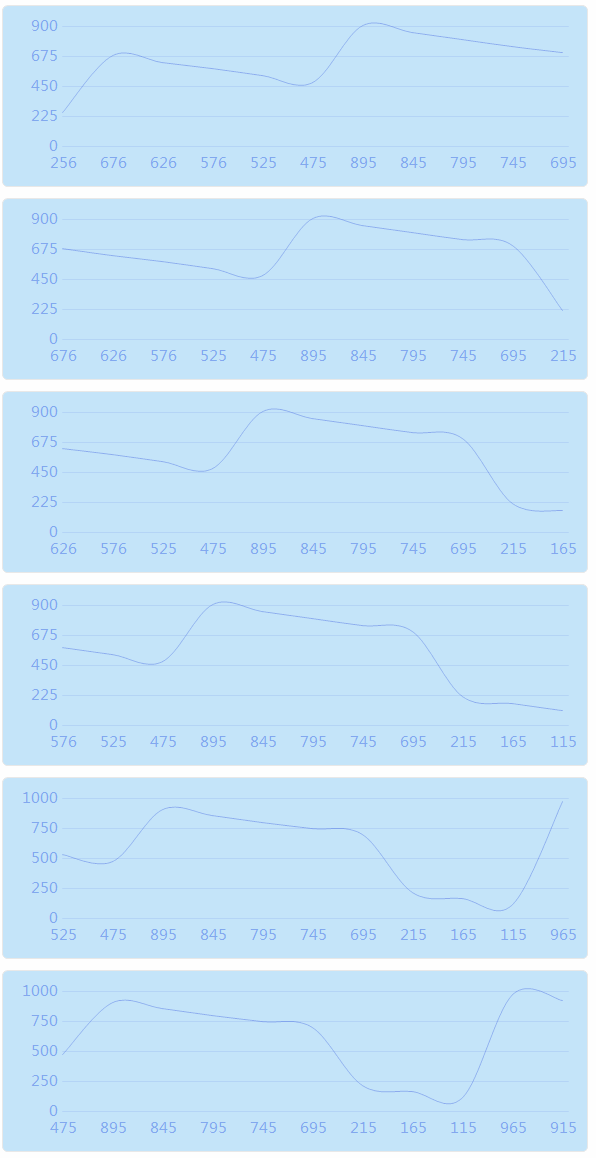
准备工作
这个用到GDI+画的,请先了解一下GDI+
还有用到了基类控件UCControlBase来控制圆角和背景色,如果还不了解请移步查看
开始
添加一个类UCWaveWithSource ,继承UCControlBase
添加属性
  private int m_waveActualWidth = ;

        private int m_waveWidth = ;

        [Description("波形宽度"), Category("自定义")]

        public int WaveWidth

        {

            get { return m_waveWidth; }

            set

            {

                if (value <= )

                    return;

                m_waveWidth = value;

                ResetWaveCount();

                Refresh();

            }

        }

        private int m_sleepTime = ;

        /// <summary>

        /// 波运行速度(运行时间间隔,毫秒)

        /// </summary>

        [Description("运行速度(运行时间间隔,毫秒)"), Category("自定义")]

        public int SleepTime

        {

            get { return m_sleepTime; }

            set

            {

                if (value <= )

                    return;

                m_sleepTime = value;

                if (timer != null)

                {

                    timer.Enabled = false;

                    timer.Interval = value;

                    timer.Enabled = true;

                }

            }

        }

        private float m_lineTension = 0.5f;

        /// <summary>

        /// 线弯曲程度

        /// </summary>

        [Description("线弯曲程度(0-1)"), Category("自定义")]

        public float LineTension

        {

            get { return m_lineTension; }

            set

            {

                if (!(value >=  && value <= ))

                {

                    return;

                }

                m_lineTension = value;

                Refresh();

            }

        }

        private Color m_lineColor = Color.FromArgb(, , , );

        [Description("曲线颜色"), Category("自定义")]

        public Color LineColor

        {

            get { return m_lineColor; }

            set

            {

                m_lineColor = value;

                Refresh();

            }

        }

        private Color m_gridLineColor = Color.FromArgb(, , , );

        [Description("网格线颜色"), Category("自定义")]

        public Color GridLineColor

        {

            get { return m_gridLineColor; }

            set

            {

                m_gridLineColor = value;

                Refresh();

            }

        }

        private Color m_gridLineTextColor = Color.FromArgb(, , , );

        [Description("网格文本颜色"), Category("自定义")]

        public Color GridLineTextColor

        {

            get { return m_gridLineTextColor; }

            set

            {

                m_gridLineTextColor = value;

                Refresh();

            }

        }

        public override Font Font

        {

            get

            {

                return base.Font;

            }

            set

            {

                base.Font = value;

            }

        }

        /// <summary>

        /// 数据源,用以缓存所有需要显示的数据

        /// </summary>

        List<KeyValuePair<string, double>> m_dataSource = new List<KeyValuePair<string, double>>();

        /// <summary>

        /// 当前需要显示的数据

        /// </summary>

        List<KeyValuePair<string, double>> m_currentSource = new List<KeyValuePair<string, double>>();

        Timer timer = new Timer();

        /// <summary>

        /// 画图区域

        /// </summary>

        Rectangle m_drawRect;

        int m_waveCount = ;
构造函数中初始化一下样式
         public UCWaveWithSource()

         {

             this.SetStyle(ControlStyles.AllPaintingInWmPaint, true);

             this.SetStyle(ControlStyles.DoubleBuffer, true);

             this.SetStyle(ControlStyles.ResizeRedraw, true);

             this.SetStyle(ControlStyles.Selectable, true);

             this.SetStyle(ControlStyles.SupportsTransparentBackColor, true);

             this.SetStyle(ControlStyles.UserPaint, true);

             this.SizeChanged += UCWaveWithSource_SizeChanged;

             this.IsShowRect = true;

             this.RectColor = Color.FromArgb(, , );

             this.FillColor = Color.FromArgb(, , );

             this.RectWidth = ;

             this.ConerRadius = ;

             this.IsRadius = true;

             this.Size = new Size(, );

             timer.Interval = m_sleepTime;

             timer.Tick += timer_Tick;

             this.VisibleChanged += UCWave_VisibleChanged;

         }
一个数据添加的函数
  /// <summary>

         /// 添加需要显示的数据

         /// </summary>

         /// <param name="key">名称</param>

         /// <param name="value">值</param>

         public void AddSource(string key, double value)

         {

             m_dataSource.Add(new KeyValuePair<string, double>(key, value));

         }
重绘
 protected override void OnPaint(PaintEventArgs e)

         {

             base.OnPaint(e);

             var g = e.Graphics;

             g.SetGDIHigh();

             int intLineSplit = m_drawRect.Height / ;

             for (int i = ; i <= ; i++)

             {

                 var pen = new Pen(new SolidBrush(m_gridLineColor), );

                 // pen.DashStyle = System.Drawing.Drawing2D.DashStyle.Dot;

                 g.DrawLine(pen, m_drawRect.Left, m_drawRect.Bottom -  - i * intLineSplit, m_drawRect.Right, m_drawRect.Bottom -  - i * intLineSplit);

             }

             if (m_currentSource == null || m_currentSource.Count <= )

             {

                 for (int i = ; i <= ; i++)

                 {

                     string strText = ( /  * i).ToString();

                     System.Drawing.SizeF _numSize = g.MeasureString(strText, this.Font);

                     g.DrawString(strText, Font, new SolidBrush(m_gridLineTextColor), m_drawRect.Left - _numSize.Width - , m_drawRect.Bottom -  - i * intLineSplit - (_numSize.Height / ));

                 }

                 return;

             }

             List<Point> lst1 = new List<Point>();

             double dblValue = m_currentSource.Max(p => p.Value);

             int intValue = (int)dblValue;

             int intDivisor = ("".PadRight(intValue.ToString().Length - , '')).ToInt();

             if (intDivisor < )

                 intDivisor = ;

             int intTop = intValue;

             if (intValue % intDivisor != )

             {

                 intTop = (intValue / intDivisor + ) * intDivisor;

             }

             if (intTop == )

                 intTop = ;

             for (int i = ; i <= ; i++)

             {

                 string strText = (intTop /  * i).ToString();

                 System.Drawing.SizeF _numSize = g.MeasureString(strText, this.Font);

                 g.DrawString(strText, Font, new SolidBrush(m_gridLineTextColor), m_drawRect.Left - _numSize.Width - , m_drawRect.Bottom -  - i * intLineSplit - (_numSize.Height / ));

             }

             int intEndX = ;

             int intEndY = ;

             for (int i = ; i < m_currentSource.Count; i++)

             {

                 intEndX = i * m_waveActualWidth + m_drawRect.X;

                 intEndY = m_drawRect.Bottom -  - (int)(m_currentSource[i].Value / intTop * m_drawRect.Height);

                 lst1.Add(new Point(intEndX, intEndY));

                 if (!string.IsNullOrEmpty(m_currentSource[i].Key))

                 {

                     System.Drawing.SizeF _numSize = g.MeasureString(m_currentSource[i].Key, this.Font);

                     int txtX = intEndX - (int)(_numSize.Width / ) + ;

                     g.DrawString(m_currentSource[i].Key, Font, new SolidBrush(m_gridLineTextColor), new PointF(txtX, m_drawRect.Bottom + ));

                 }

             }

             int intFirstY = m_drawRect.Bottom -  - (int)(m_currentSource[].Value / intTop * m_drawRect.Height);

             GraphicsPath path1 = new GraphicsPath();

             path1.AddCurve(lst1.ToArray(), m_lineTension);

             g.DrawPath(new Pen(new SolidBrush(m_lineColor), ), path1);

         }
辅助函数
 /// <summary>

         /// 得到当前需要画图的数据

         /// </summary>

         /// <returns></returns>

         private List<KeyValuePair<string, double>> GetCurrentList()

         {

             if (m_dataSource.Count < m_waveCount)

             {

                 int intCount = m_waveCount - m_dataSource.Count;

                 for (int i = ; i < intCount; i++)

                 {

                     m_dataSource.Add(new KeyValuePair<string, double>("", ));

                 }

             }

             var lst = m_dataSource.GetRange(, m_waveCount);

             if (lst.Count == )

                 lst.Insert(, new KeyValuePair<string, double>("", ));

             return lst;

         }

         /// <summary>

         /// 计算需要显示的个数

         /// </summary>

         private void ResetWaveCount()

         {

             m_waveCount = m_drawRect.Width / m_waveWidth;

             m_waveActualWidth = m_waveWidth + (m_drawRect.Width % m_waveWidth) / m_waveCount;

             m_waveCount++;

             if (m_dataSource.Count < m_waveCount)

             {

                 int intCount = m_waveCount - m_dataSource.Count;

                 for (int i = ; i < intCount; i++)

                 {

                     m_dataSource.Insert(, new KeyValuePair<string, double>("", ));

                 }

             }

         }
完整代码
 using System;

 using System.Collections.Generic;

 using System.ComponentModel;

 using System.Drawing;

 using System.Drawing.Drawing2D;

 using System.Linq;

 using System.Text;

 using System.Windows.Forms;

 namespace HZH_Controls.Controls

 {

     public class UCWaveWithSource : UCControlBase

     {

         private int m_waveActualWidth = ;

         private int m_waveWidth = ;

         [Description("波形宽度"), Category("自定义")]

         public int WaveWidth

         {

             get { return m_waveWidth; }

             set

             {

                 if (value <= )

                     return;

                 m_waveWidth = value;

                 ResetWaveCount();

                 Refresh();

             }

         }

         private int m_sleepTime = ;

         /// <summary>

         /// 波运行速度(运行时间间隔,毫秒)

         /// </summary>

         [Description("运行速度(运行时间间隔,毫秒)"), Category("自定义")]

         public int SleepTime

         {

             get { return m_sleepTime; }

             set

             {

                 if (value <= )

                     return;

                 m_sleepTime = value;

                 if (timer != null)

                 {

                     timer.Enabled = false;

                     timer.Interval = value;

                     timer.Enabled = true;

                 }

             }

         }

         private float m_lineTension = 0.5f;

         /// <summary>

         /// 线弯曲程度

         /// </summary>

         [Description("线弯曲程度(0-1)"), Category("自定义")]

         public float LineTension

         {

             get { return m_lineTension; }

             set

             {

                 if (!(value >=  && value <= ))

                 {

                     return;

                 }

                 m_lineTension = value;

                 Refresh();

             }

         }

         private Color m_lineColor = Color.FromArgb(, , , );

         [Description("曲线颜色"), Category("自定义")]

         public Color LineColor

         {

             get { return m_lineColor; }

             set

             {

                 m_lineColor = value;

                 Refresh();

             }

         }

         private Color m_gridLineColor = Color.FromArgb(, , , );

         [Description("网格线颜色"), Category("自定义")]

         public Color GridLineColor

         {

             get { return m_gridLineColor; }

             set

             {

                 m_gridLineColor = value;

                 Refresh();

             }

         }

         private Color m_gridLineTextColor = Color.FromArgb(, , , );

         [Description("网格文本颜色"), Category("自定义")]

         public Color GridLineTextColor

         {

             get { return m_gridLineTextColor; }

             set

             {

                 m_gridLineTextColor = value;

                 Refresh();

             }

         }

         public override Font Font

         {

             get

             {

                 return base.Font;

             }

             set

             {

                 base.Font = value;

             }

         }

         /// <summary>

         /// 数据源,用以缓存所有需要显示的数据

         /// </summary>

         List<KeyValuePair<string, double>> m_dataSource = new List<KeyValuePair<string, double>>();

         /// <summary>

         /// 当前需要显示的数据

         /// </summary>

         List<KeyValuePair<string, double>> m_currentSource = new List<KeyValuePair<string, double>>();

         Timer timer = new Timer();

         /// <summary>

         /// 画图区域

         /// </summary>

         Rectangle m_drawRect;

         int m_waveCount = ;

         public UCWaveWithSource()

         {

             this.SetStyle(ControlStyles.AllPaintingInWmPaint, true);

             this.SetStyle(ControlStyles.DoubleBuffer, true);

             this.SetStyle(ControlStyles.ResizeRedraw, true);

             this.SetStyle(ControlStyles.Selectable, true);

             this.SetStyle(ControlStyles.SupportsTransparentBackColor, true);

             this.SetStyle(ControlStyles.UserPaint, true);

             this.SizeChanged += UCWaveWithSource_SizeChanged;

             this.IsShowRect = true;

             this.RectColor = Color.FromArgb(, , );

             this.FillColor = Color.FromArgb(, , );

             this.RectWidth = ;

             this.ConerRadius = ;

             this.IsRadius = true;

             this.Size = new Size(, );

             timer.Interval = m_sleepTime;

             timer.Tick += timer_Tick;

             this.VisibleChanged += UCWave_VisibleChanged;

         }

         /// <summary>

         /// 添加需要显示的数据

         /// </summary>

         /// <param name="key">名称</param>

         /// <param name="value">值</param>

         public void AddSource(string key, double value)

         {

             m_dataSource.Add(new KeyValuePair<string, double>(key, value));

         }

         void UCWave_VisibleChanged(object sender, EventArgs e)

         {

             if (!DesignMode)

             {

                 timer.Enabled = this.Visible;

             }

         }

         void timer_Tick(object sender, EventArgs e)

         {

             m_currentSource = GetCurrentList();

             m_dataSource.RemoveAt();

             this.Refresh();

         }

         void UCWaveWithSource_SizeChanged(object sender, EventArgs e)

         {

             m_drawRect = new Rectangle(, , this.Width - , this.Height - );

             ResetWaveCount();

         }

         protected override void OnPaint(PaintEventArgs e)

         {

             base.OnPaint(e);

             var g = e.Graphics;

             g.SetGDIHigh();

             int intLineSplit = m_drawRect.Height / ;

             for (int i = ; i <= ; i++)

             {

                 var pen = new Pen(new SolidBrush(m_gridLineColor), );

                 // pen.DashStyle = System.Drawing.Drawing2D.DashStyle.Dot;

                 g.DrawLine(pen, m_drawRect.Left, m_drawRect.Bottom -  - i * intLineSplit, m_drawRect.Right, m_drawRect.Bottom -  - i * intLineSplit);

             }

             if (m_currentSource == null || m_currentSource.Count <= )

             {

                 for (int i = ; i <= ; i++)

                 {

                     string strText = ( /  * i).ToString();

                     System.Drawing.SizeF _numSize = g.MeasureString(strText, this.Font);

                     g.DrawString(strText, Font, new SolidBrush(m_gridLineTextColor), m_drawRect.Left - _numSize.Width - , m_drawRect.Bottom -  - i * intLineSplit - (_numSize.Height / ));

                 }

                 return;

             }

             List<Point> lst1 = new List<Point>();

             double dblValue = m_currentSource.Max(p => p.Value);

             int intValue = (int)dblValue;

             int intDivisor = ("".PadRight(intValue.ToString().Length - , '')).ToInt();

             if (intDivisor < )

                 intDivisor = ;

             int intTop = intValue;

             if (intValue % intDivisor != )

             {

                 intTop = (intValue / intDivisor + ) * intDivisor;

             }

             if (intTop == )

                 intTop = ;

             for (int i = ; i <= ; i++)

             {

                 string strText = (intTop /  * i).ToString();

                 System.Drawing.SizeF _numSize = g.MeasureString(strText, this.Font);

                 g.DrawString(strText, Font, new SolidBrush(m_gridLineTextColor), m_drawRect.Left - _numSize.Width - , m_drawRect.Bottom -  - i * intLineSplit - (_numSize.Height / ));

             }

             int intEndX = ;

             int intEndY = ;

             for (int i = ; i < m_currentSource.Count; i++)

             {

                 intEndX = i * m_waveActualWidth + m_drawRect.X;

                 intEndY = m_drawRect.Bottom -  - (int)(m_currentSource[i].Value / intTop * m_drawRect.Height);

                 lst1.Add(new Point(intEndX, intEndY));

                 if (!string.IsNullOrEmpty(m_currentSource[i].Key))

                 {

                     System.Drawing.SizeF _numSize = g.MeasureString(m_currentSource[i].Key, this.Font);

                     int txtX = intEndX - (int)(_numSize.Width / ) + ;

                     g.DrawString(m_currentSource[i].Key, Font, new SolidBrush(m_gridLineTextColor), new PointF(txtX, m_drawRect.Bottom + ));

                 }

             }

             int intFirstY = m_drawRect.Bottom -  - (int)(m_currentSource[].Value / intTop * m_drawRect.Height);

             GraphicsPath path1 = new GraphicsPath();

             path1.AddCurve(lst1.ToArray(), m_lineTension);

             g.DrawPath(new Pen(new SolidBrush(m_lineColor), ), path1);

         }

         /// <summary>

         /// 得到当前需要画图的数据

         /// </summary>

         /// <returns></returns>

         private List<KeyValuePair<string, double>> GetCurrentList()

         {

             if (m_dataSource.Count < m_waveCount)

             {

                 int intCount = m_waveCount - m_dataSource.Count;

                 for (int i = ; i < intCount; i++)

                 {

                     m_dataSource.Add(new KeyValuePair<string, double>("", ));

                 }

             }

             var lst = m_dataSource.GetRange(, m_waveCount);

             if (lst.Count == )

                 lst.Insert(, new KeyValuePair<string, double>("", ));

             return lst;

         }

         /// <summary>

         /// 计算需要显示的个数

         /// </summary>

         private void ResetWaveCount()

         {

             m_waveCount = m_drawRect.Width / m_waveWidth;

             m_waveActualWidth = m_waveWidth + (m_drawRect.Width % m_waveWidth) / m_waveCount;

             m_waveCount++;

             if (m_dataSource.Count < m_waveCount)

             {

                 int intCount = m_waveCount - m_dataSource.Count;

                 for (int i = ; i < intCount; i++)

                 {

                     m_dataSource.Insert(, new KeyValuePair<string, double>("", ));

                 }

             }

         }

     }

 }
最后的话
如果你喜欢的话,请到 https://gitee.com/kwwwvagaa/net_winform_custom_control 点个星星吧
(四十五)c#Winform自定义控件-水波图表的更多相关文章
- (四十)c#Winform自定义控件-开关-HZHControls
官网 http://www.hzhcontrols.com 前提 入行已经7,8年了,一直想做一套漂亮点的自定义控件,于是就有了本系列文章. GitHub:https://github.com/kww ...
- (四十六)c#Winform自定义控件-水波进度条-HZHControls
官网 http://www.hzhcontrols.com 前提 入行已经7,8年了,一直想做一套漂亮点的自定义控件,于是就有了本系列文章. GitHub:https://github.com/kww ...
- NeHe OpenGL教程 第四十五课:顶点缓存
转自[翻译]NeHe OpenGL 教程 前言 声明,此 NeHe OpenGL教程系列文章由51博客yarin翻译(2010-08-19),本博客为转载并稍加整理与修改.对NeHe的OpenGL管线 ...
- Gradle 1.12用户指南翻译——第四十五章. 应用程序插件
本文由CSDN博客貌似掉线翻译,其他章节的翻译请参见: http://blog.csdn.net/column/details/gradle-translation.html 翻译项目请关注Githu ...
- SQL注入之Sqli-labs系列第四十一关(基于堆叠注入的盲注)和四十二关四十三关四十四关四十五关
0x1普通测试方式 (1)输入and1=1和and1=2测试,返回错误,证明存在注入 (2)union select联合查询 (3)查询表名 (4)其他 payload: ,( ,( 0x2 堆叠注入 ...
- “全栈2019”Java第四十五章:super关键字
难度 初级 学习时间 10分钟 适合人群 零基础 开发语言 Java 开发环境 JDK v11 IntelliJ IDEA v2018.3 文章原文链接 "全栈2019"Java第 ...
- 孤荷凌寒自学python第四十五天Python初学基础基本结束的下阶段预安装准备
孤荷凌寒自学python第四十五天Python初学基础基本结束的下阶段预安装准备 (完整学习过程屏幕记录视频地址在文末,手写笔记在文末) 今天本来应当继续学习Python的数据库操作,但根据过去我自 ...
- (十四--十五)数据库查询优化Part I
(十四--十五)数据库查询优化Part I 如果理解的有问题.欢迎大家指出.这也是我在看课记得笔记..可能会有很多问题 查询优化的重要性 请记住用户只会告诉DMBS他们想要什么样的结果,而不会告诉他们 ...
- 《手把手教你》系列技巧篇(四十五)-java+ selenium自动化测试-web页面定位toast-上篇(详解教程)
1.简介 在使用appium写app自动化的时候介绍toast的相关元素的定位,在Web UI测试过程中,也经常遇到一些toast,那么这个toast我们这边如何进行测试呢?今天宏哥就分两篇介绍一下. ...
随机推荐
- Preface Numbering序言页码
题面 (preface.pas/c/cpp) 一类书的序言是以罗马数字标页码的.传统罗马数字用单个字母表示特定的数值,以下是标准数字表: I 1 V 5 X 10 L 50 C 100 D 500 M ...
- SP1805 HISTOGRA - Largest Rectangle in a Histogram 题解
题目链接:https://www.luogu.org/problemnew/show/SP1805 分析: 我们可以用一个单调栈由低到高来存储它的高度,并用数组对每个高度记录一下它前面(包括它自己)一 ...
- LeetCode第2题
// 给出两个 非空 的链表用来表示两个非负的整数.其中,它们各自的位数是按照 逆序 的方式存储的,并且它们的每个节点只能存储 一位 数字.//// 如果,我们将这两个数相加起来,则会返回一个新的链表 ...
- MYSQL数据库约束类型
07.14自我总结 MYSQL数据库约束类型 一.主键约束(primary key) 主键约束要求主键列的数据唯一,并且不能为空.主键分为两种类型:单字段主键和多字段联合主键. 1.单字段主键 写法 ...
- 编写Django项目并使用uwsgi和nginx部署在Linux平台
内容转载自:我自己的博客地址 这是花费了一个月的时间摸索整理出来的一份总结.分享出来一方面是给新人一个借鉴,另一方面对自己也算是个备份. --- *** 整个Django项目: ├── example ...
- vs2013类模板的修改
很多人一起写程序,往往都有规定的代码模板,比如要求每个类都有注释,说明开发者是谁,类的功能以及其他信息.如果每次建一个类,手工去复制这些信息很麻烦,也很容易遗漏.我们可以直接修改VS2013创建类的时 ...
- lr录制选项设置代理
解决录制时浏览器打不开录制时录不到脚本等浏览器兼容问题一.lr录制选项设置代理1.点击Options 2.点击Port Mapping→Newentrv 3.lr代理设置 ·Socket Servic ...
- django第四次(转自刘江)
我们都知道对于ManyToMany字段,Django采用的是第三张中间表的方式.通过这第三张表,来关联ManyToMany的双方.下面我们根据一个具体的例子,详细解说中间表的使用. 一.默认中间表 首 ...
- Oracle 统计信息介绍
统计信息自动执行需要以下条件满足: dba_autotask_task 字段status值ENABLED dba_autotask_client 字段status值ENABLED dba_auto ...
- codeforces 327 A Ciel and Dancing
题目链接 给你一串只有0和1的数字,然后对某一区间的数翻转1次(0变1 1变0),只翻转一次而且不能不翻转,然后让你计算最多可能出现多少个1. 这里要注意很多细节 比如全为1,要求必须翻转,这时候我们 ...