
Word Count
Word Count
一.个人Gitee地址:https://gitee.com/godcoder979/(该项目完整代码在这里)
二.项目简介:
该项目是一个统计文件字符、单词、行数等数目的应用程序,通过输入命令来执行你想要的操作。所用语言:java
命令格式:
wc.exe [para] <filename> [para] <filename> ... -o <filename>
功能:
-a:统计文件中的代码行、空行、注释行;
-c:统计文件中的字符数,不包括换行符;
-w:统计文件中的单词数;
-l:统计文件的行数;
-s:统计一个文件夹中符合要求的文件;
-o:指定输出文件;
三.PSP表格:
| PSP2.1 | PSP阶段 | 预估耗时(分钟) | 实际耗时(分钟) |
|---|---|---|---|
| Planning | 计划 | 20 | 10 |
| · Estimate | · 估计这个任务需要多少时间 | 5 | 5 |
| Development | 开发 | 500 | 600 |
| · Analysis | · 需求分析(包括学习新技术) | 20 | 30 |
| · Design Spec | · 生成设计文档 | 30 | 30 |
| · Design Review | · 设计复审(和同事审核设计文档) | 10 | 15 |
| · Coding Standard | · 代码规范(为目前的开发制定合适的规范) | 5 | 5 |
| · Design | · 具体设计 | 15 | 20 |
| · Coding | · 具体编码 | 200 | 400 |
| · Code Review | · 代码复审 | 40 | 30 |
| · Test | · 测试(自我测试,修改代码,提交修改) | 20 | 30 |
| Reporting | 报告 | 60 | 50 |
| · Test Report | · 测试报告 | 20 | 15 |
| · Size Measurement | · 计算工作量 | 10 | 5 |
| · Postmortem & Process improvement Plan | · 事后总结,并提出过程改进计划 | 30 | 30 |
| 合计 | 580 | 660 |
四.解题思路:
整个项目比较简单,用户输入需要进行的操作和基本的文件信息就可以保存结果到一个文件里。所以可以这样分析:
1)识别用户输入的选项和文件名,分析需要进行的操作
2)实现每一种功能,根据分析执行相应的操作
3)将结果保存到一个文件里
代码模块划分:
1)主函数:
通过用户输入的指令进行相应的逻辑处理
2)功能调用模块:
这个模块被主函数调用,根据分析执行相应操作
3)判断模块:
根据用户输入的指令得出需要执行那些功能,这是功能调用模块执行的依据
4)功能实现模块:
这个模块就是实现以上统计字符、单词等功能了
五.关键代码展示:
1.judge方法(分析用户要实现的功能,当flag为true是代表将要实现)
 private static void judge(String str) {

         // TODO Auto-generated method stub

         if(str.equals("-s")&&s_flag==false){

             s_flag=true;

         }

         else if(str.equals("-*")&&star_flag==false){

             star_flag=true;

             c_flag=true;

             w_flag=true;

             l_flag=true;

             a_flag=true;

         }

         else if(str.equals("-a")&&a_flag==false){

             a_flag=true;

         }

         else if(str.equals("-c")&&c_flag==false){

             c_flag=true;

         }

         else if(str.equals("-w")&&w_flag==false){

             w_flag=true;

         }

         else if(str.equals("-l")&&l_flag==false){

             l_flag=true;

         }

         else if(file_flag==false)//还没有指定输入文件

         {

             if(s_flag==false){//如果输入的不是路径

                 file_name=str;

                 txt_name=str;

             }

             file_flag=true;

         }

         else if(str.equals("-o")&&o_flag==false){

             o_flag=true;

         }

         else if(o_flag==true&&file_flag==true){//已经有输入文件且o_flag为真但是没有指定输出文件

             output_name+=str;

             all_flag=true;

         }

         else{

             System.out.println("指令判断完成");

         }

     }
2.字符统计:
 private static int num_of_char(String filename) {

         // TODO Auto-generated method stub

         System.out.println(filename);

         File file=new File(filename);

         Reader readfile=null;

         int c_num=0;

         try{

             readfile = new InputStreamReader(new FileInputStream(file));

             int tempchar;

             while ((tempchar=readfile.read()) != -1) {

                 if((char)tempchar!='\r'&&(char)tempchar!='\n'){

                     c_num++;

                 }

             }

             readfile.close();

         }

         catch(Exception e){

             e.printStackTrace();

             System.out.println("指定输入文件不存在");

         }

         return c_num;

     }
3.单词统计:(这里面我用IsLetter来判断字母的大小写)
 private static int num_of_word(String filename){

         File file=new File(filename);

         Reader readfile=null;

         boolean letter_flag=false;

         int w_num=0;

         try{

             readfile = new InputStreamReader(new FileInputStream(file));

             int tempchar;

             while ((tempchar=readfile.read()) != -1) {

                 if(IsLetter((char)tempchar)){

                     letter_flag=true;

                 }

                 else if(letter_flag==true){

                     letter_flag=false;

                     w_num++;

                 }

             }

             readfile.close();

         }

         catch(Exception e){

             System.out.println("指定输入文件不存在");

         }

         return w_num;

     }
4.行数统计:(遇到换行符就加一。Windows中的换行符为“\r\n”,这里只使用"\n"。)
 private static int num_of_line(String filename) {

         // TODO Auto-generated method stub

         File file=new File(filename);

         Reader readfile=null;

         int l_num=1;

         try{

             readfile = new InputStreamReader(new FileInputStream(file));

             int tempchar;

             while ((tempchar=readfile.read()) != -1) {

                 if((char)tempchar=='\n'){

                     l_num++;

                 }

             }

             readfile.close();

         }

         catch(Exception e){

             System.out.println("指定输入文件不存在");

         }

         return l_num;

     }
5.空行、代码行、注释行统计:(按行读文件,去除每一行的换行符和空格,获得的string长度为0就代表空行;一行中如果只有“{/*”、“{//”、“//”、“/*”代表注释行(这些就是注释的开头),直到统计到注释的末尾;其余的均为代码行。)
 private static int [] code_ana(String filename){

         File file=new File(filename);

         int nothing=0;

         int line=0;

         int note=0;

         int code_line=0;

         boolean note_flag=false;

         BufferedReader readfile = null;

         try{

             readfile = new BufferedReader(new FileReader(file));

             String tempString = null;

             while ((tempString = readfile.readLine()) != null) {

                 line++;

                 tempString=tempString.replaceAll("\r\n"," ");//去掉所有换行符和空格

                 if(note_flag==true){

                     note++;

                     if(tempString.endsWith("*/")){

                         note_flag=false;//代表注释内容在本行结束

                     }

                 }

                 if(tempString.equals(" ")||tempString.equals("{")||tempString.equals("}")){

                     nothing++;

                 }

                 if(tempString.startsWith("//")||tempString.startsWith("{//")){

                     note++;

                 }

                 if(tempString.startsWith("/*")||tempString.startsWith("{/*")){

                     if(tempString.endsWith("*/")){

                         note++;

                     }

                     else{

                         note++;

                         note_flag=true;//代表注释的内容在本行还没结束

                     }

                 }

                 code_line=line-note-nothing;

             }

             readfile.close();

         }

         catch(Exception e){

             System.out.println("指定输入文件不存在");

         }

         int []num =new int[3];

         num[0]=code_line;

         num[1]=nothing;

         num[2]=note;

         return num;

     }
7.功能调用模块(这里通过judge得到的功能需求,然后调用功能模块执行相应的操作):
 private static void work() {

         // TODO Auto-generated method stub

         if(o_flag==true){

             if(all_flag==false)

                 System.out.println("命令格式不正确:有输出指令但是没有指定输出文件");

         }

         if(a_flag==true){

             String Command="代码行/空行/注释行";

             int []num=code_ana(file_name);

             System.out.print(txt_name+","+Command+":"+num[0]+"/"+num[1]+"/"+num[2]+"\r\n");

         }

         if(c_flag==true){

             String Command="字符数";

             System.out.print(txt_name+","+Command+":"+num_of_char(file_name)+"\r\n");

         }

         if(l_flag==true){

             String Command="行数";

             System.out.print(txt_name+","+Command+":"+num_of_line(file_name)+"\r\n");

         }

         if(all_flag==true){

             if(a_flag==true){

                 String Command="代码行/空行/注释行";

                 code_output(output_name,Command,code_ana(file_name));

             }

             if(c_flag==true){

                 String Command="字符数";

                 output(output_name,Command,num_of_char(file_name));

             }

             if(w_flag==true){

                 String Command="单词数";

                 output(output_name,Command,num_of_word(file_name));

             }

             if(l_flag==true){

                 String Command="行数";

                 output(output_name,Command,num_of_line(file_name));

             }

             System.out.println("运行并且输出内容保存成功");

         }

         else {

             System.out.println("本指令没有指定输出文件,所以输出内容没有保存");

         }

     }
8.读取文件夹(当我们输入的是一个绝对路径时,在这里向下递归查找符合要求的文件):
 private static void files_output(String path_name){

         String []path=path_name.split("\\*");

         File file=new File(path[0]);

         if(file.exists()){

             File[]files=file.listFiles();

             if(files!=null){

                 for(File f:files){

                     if(f.getName().endsWith(path[1])){

                         txt_name=f.getName();

                         file_name=f.getAbsolutePath();

                         work();

                     }

                 }

             }

             else{

                 System.out.println("文件夹内容为空");

             }

         }

         else{

             System.out.println(path[0]+":指定路径或文件不存在");

         }

     }
六.测试用例:
这里我们用的是idea:直接通过传入参数的不同来测试每一种功能以及他们的组合:
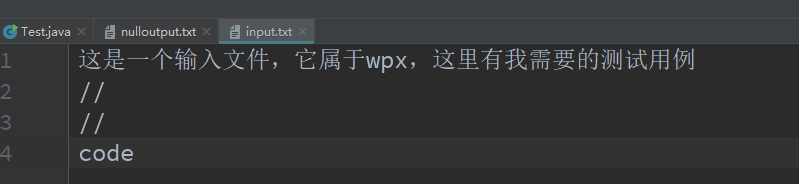
下面是我用的输入文件:
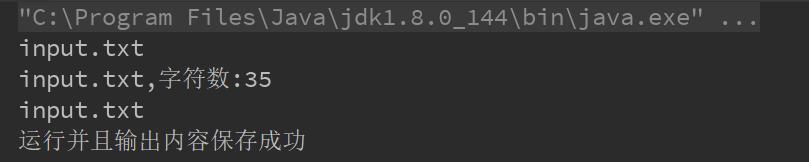
1)-c input.txt -o output.txt:
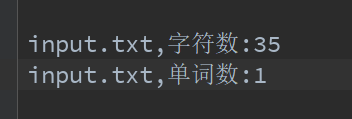
2)-w input.txt -o output.txt:
3)-l input.txt -o output.txt:

4)-a input.txt -o output.txt:
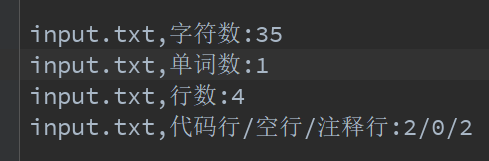
5)-a -w -l -c input.txt -o output.txt:
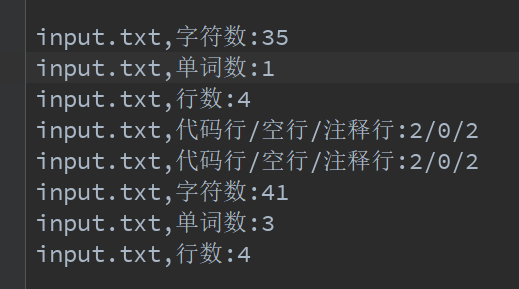
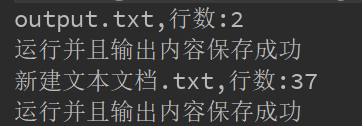
6) -s -w -l D:/test/*.txt -o output.txt:这里我们是在一个文件夹里向下递归查找符合要求的txt文件:
七.参考文献
《构建之法--现代软件工程》 --邹欣 [第三版]
PS:(本次项目还有一些功能没有实现)未完待续......
Word Count的更多相关文章
- Hive Word count
--https://github.com/slimandslam/pig-hive-wordcount/blob/master/wordcount.hql DROP TABLE myinput; DR ...
- mac上eclipse上运行word count
1.打开eclipse之后,建立wordcount项目 package wordcount; import java.io.IOException; import java.util.StringTo ...
- MapReduce工作机制——Word Count实例(一)
MapReduce工作机制--Word Count实例(一) MapReduce的思想是分布式计算,也就是分而治之,并行计算提高速度. 编程思想 首先,要将数据抽象为键值对的形式,map函数输入键值对 ...
- Word Count作业
Word Count作业 一.个人Gitee地址:https://gitee.com/Changyu-Guo 二.项目简介 该项目主要是模拟Linux上面的wc命令,基本要求如下: 命令格式: wc. ...
- [Hive_add_6] Hive 实现 Word Count
0. 说明 Hive 通过 explode()函数 和 split()函数 实现 WordConut 1. Hive 实现 Word Count 方式一 1.1 思路 将每一行文本变为 Array 数 ...
- Mac下hadoop运行word count的坑
Mac下hadoop运行word count的坑 Word count体现了Map Reduce的经典思想,是分布式计算中中的hello world.然而博主很幸运地遇到了Mac下特有的问题Mkdir ...
- [MapReduce_1] 运行 Word Count 示例程序
0. 说明 MapReduce 实现 Word Count 示意图 && Word Count 代码编写 1. MapReduce 实现 Word Count 示意图 1. Map:预 ...
- 【2016.3.22】作业 Word count 小程序
今天更下word count程序的设计思路及实现方法. 我的程序贴在coding里,这里就先不贴出来了, 我的coding地址:https://coding.net/u/holy_angel/p/wo ...
- 软件工程第三个程序:“WC项目” —— 文件信息统计(Word Count ) 命令行程序
软件工程第三个程序:“WC项目” —— 文件信息统计(Word Count ) 命令行程序 格式:wc.exe [parameter][filename] 在[parameter]中,用户通过输入参数 ...
随机推荐
- 微信小程序请求API接口PHPSESSID变化的解决方式
微信小程序开发,请求服务器API的方法使用的是微信官方提供的wx.request()方法.在开发中发现,每一个请求都会生成一个独立的PHPSESSID,如下图示: 搜索后得知,这是由于wx.reque ...
- Underscore.js 源码学习笔记(上)
版本 Underscore.js 1.9.1 一共 1693 行.注释我就删了,太长了… 整体是一个 (function() {...}()); 这样的东西,我们应该知道这是一个 IIFE(立即执行 ...
- 通过LRU实现通用高效的超时连接探测
编写网络通讯都要面对一个问题,就是要把很久不存活的死连接清除,如果不这样做那死连接最终会占用大量内存影响服务运作!在实现过程中一般都会使用ping,pong原理,通过ping,pong来更新连接的时效 ...
- 带着萌新看springboot源码8(spring ioc源码下)
继续接着上一节,到了第六步(温馨提醒,内容有点小多,不过看完ioc原理就差不多了) 6.注册Bean后置处理器(registerBeanPostProcessors(beanFactory)) 最后一 ...
- mysqldump备份表中有大字段失败的排错过程
几天前收到某个业务项目,MySQL数据库逻辑备份mysqldump备份失败的邮件,本是在休假,但本着工作认真负责,7*24小时不间断运维的高尚职业情操,开始了DBA的排错之路(一开始数据库的备份都是成 ...
- DocX开源WORD操作组件的学习系列一
DocX学习系列 DocX开源WORD操作组件的学习系列一 : http://www.cnblogs.com/zhaojiedi1992/p/zhaojiedi_sharp_001_docx1.htm ...
- Zabbix监控原理及架构
什么是Zabbix? Zabbix是一个用于网络,操作系统和应用程序的开源监控软件,它旨在监视和跟踪各种网络服务,服务器和其他网络硬件的状态. 为什么需要对各类系统进行监控? 在系统构建时的正常流程中 ...
- webpack4.0各个击破(9)—— karma篇
webpack作为前端最火的构建工具,是前端自动化工具链最重要的部分,使用门槛较高.本系列是笔者自己的学习记录,比较基础,希望通过问题 + 解决方式的模式,以前端构建中遇到的具体需求为出发点,学习we ...
- Java开发笔记(六十)匿名内部类的优势
前面依次介绍了简单接口和扩展接口,给出的范例都是自定义的接口代码,其实Java系统本身就自带了若干行为接口,为了更好地理解系统接口的详细用法,接下来还是从一个基础的例子出发,抽丝剥茧地逐步说明接口的几 ...
- SpringBoot项目部署到服务器上,tomcat不启动该项目
今天lz把项目重新传到服务器上后,重启tomcat遇到个问题,就是这个tomcat怎么都不启动这个项目,别的项目都没事,一番查找后发现问题所在. 我们先建个SpringBoot工程,重现一下问题: 写 ...