
Word Count
Word Count
一.个人Gitee地址:https://gitee.com/godcoder979/(该项目完整代码在这里)
二.项目简介:
该项目是一个统计文件字符、单词、行数等数目的应用程序,通过输入命令来执行你想要的操作。所用语言:java
命令格式:
wc.exe [para] <filename> [para] <filename> ... -o <filename>
功能:
-a:统计文件中的代码行、空行、注释行;
-c:统计文件中的字符数,不包括换行符;
-w:统计文件中的单词数;
-l:统计文件的行数;
-s:统计一个文件夹中符合要求的文件;
-o:指定输出文件;
三.PSP表格:
| PSP2.1 | PSP阶段 | 预估耗时(分钟) | 实际耗时(分钟) |
|---|---|---|---|
| Planning | 计划 | 20 | 10 |
| · Estimate | · 估计这个任务需要多少时间 | 5 | 5 |
| Development | 开发 | 500 | 600 |
| · Analysis | · 需求分析(包括学习新技术) | 20 | 30 |
| · Design Spec | · 生成设计文档 | 30 | 30 |
| · Design Review | · 设计复审(和同事审核设计文档) | 10 | 15 |
| · Coding Standard | · 代码规范(为目前的开发制定合适的规范) | 5 | 5 |
| · Design | · 具体设计 | 15 | 20 |
| · Coding | · 具体编码 | 200 | 400 |
| · Code Review | · 代码复审 | 40 | 30 |
| · Test | · 测试(自我测试,修改代码,提交修改) | 20 | 30 |
| Reporting | 报告 | 60 | 50 |
| · Test Report | · 测试报告 | 20 | 15 |
| · Size Measurement | · 计算工作量 | 10 | 5 |
| · Postmortem & Process improvement Plan | · 事后总结,并提出过程改进计划 | 30 | 30 |
| 合计 | 580 | 660 |
四.解题思路:
整个项目比较简单,用户输入需要进行的操作和基本的文件信息就可以保存结果到一个文件里。所以可以这样分析:
1)识别用户输入的选项和文件名,分析需要进行的操作
2)实现每一种功能,根据分析执行相应的操作
3)将结果保存到一个文件里
代码模块划分:
1)主函数:
通过用户输入的指令进行相应的逻辑处理
2)功能调用模块:
这个模块被主函数调用,根据分析执行相应操作
3)判断模块:
根据用户输入的指令得出需要执行那些功能,这是功能调用模块执行的依据
4)功能实现模块:
这个模块就是实现以上统计字符、单词等功能了
五.关键代码展示:
1.judge方法(分析用户要实现的功能,当flag为true是代表将要实现)
 private static void judge(String str) {

         // TODO Auto-generated method stub

         if(str.equals("-s")&&s_flag==false){

             s_flag=true;

         }

         else if(str.equals("-*")&&star_flag==false){

             star_flag=true;

             c_flag=true;

             w_flag=true;

             l_flag=true;

             a_flag=true;

         }

         else if(str.equals("-a")&&a_flag==false){

             a_flag=true;

         }

         else if(str.equals("-c")&&c_flag==false){

             c_flag=true;

         }

         else if(str.equals("-w")&&w_flag==false){

             w_flag=true;

         }

         else if(str.equals("-l")&&l_flag==false){

             l_flag=true;

         }

         else if(file_flag==false)//还没有指定输入文件

         {

             if(s_flag==false){//如果输入的不是路径

                 file_name=str;

                 txt_name=str;

             }

             file_flag=true;

         }

         else if(str.equals("-o")&&o_flag==false){

             o_flag=true;

         }

         else if(o_flag==true&&file_flag==true){//已经有输入文件且o_flag为真但是没有指定输出文件

             output_name+=str;

             all_flag=true;

         }

         else{

             System.out.println("指令判断完成");

         }

     }
2.字符统计:
 private static int num_of_char(String filename) {

         // TODO Auto-generated method stub

         System.out.println(filename);

         File file=new File(filename);

         Reader readfile=null;

         int c_num=0;

         try{

             readfile = new InputStreamReader(new FileInputStream(file));

             int tempchar;

             while ((tempchar=readfile.read()) != -1) {

                 if((char)tempchar!='\r'&&(char)tempchar!='\n'){

                     c_num++;

                 }

             }

             readfile.close();

         }

         catch(Exception e){

             e.printStackTrace();

             System.out.println("指定输入文件不存在");

         }

         return c_num;

     }
3.单词统计:(这里面我用IsLetter来判断字母的大小写)
 private static int num_of_word(String filename){

         File file=new File(filename);

         Reader readfile=null;

         boolean letter_flag=false;

         int w_num=0;

         try{

             readfile = new InputStreamReader(new FileInputStream(file));

             int tempchar;

             while ((tempchar=readfile.read()) != -1) {

                 if(IsLetter((char)tempchar)){

                     letter_flag=true;

                 }

                 else if(letter_flag==true){

                     letter_flag=false;

                     w_num++;

                 }

             }

             readfile.close();

         }

         catch(Exception e){

             System.out.println("指定输入文件不存在");

         }

         return w_num;

     }
4.行数统计:(遇到换行符就加一。Windows中的换行符为“\r\n”,这里只使用"\n"。)
 private static int num_of_line(String filename) {

         // TODO Auto-generated method stub

         File file=new File(filename);

         Reader readfile=null;

         int l_num=1;

         try{

             readfile = new InputStreamReader(new FileInputStream(file));

             int tempchar;

             while ((tempchar=readfile.read()) != -1) {

                 if((char)tempchar=='\n'){

                     l_num++;

                 }

             }

             readfile.close();

         }

         catch(Exception e){

             System.out.println("指定输入文件不存在");

         }

         return l_num;

     }
5.空行、代码行、注释行统计:(按行读文件,去除每一行的换行符和空格,获得的string长度为0就代表空行;一行中如果只有“{/*”、“{//”、“//”、“/*”代表注释行(这些就是注释的开头),直到统计到注释的末尾;其余的均为代码行。)
 private static int [] code_ana(String filename){

         File file=new File(filename);

         int nothing=0;

         int line=0;

         int note=0;

         int code_line=0;

         boolean note_flag=false;

         BufferedReader readfile = null;

         try{

             readfile = new BufferedReader(new FileReader(file));

             String tempString = null;

             while ((tempString = readfile.readLine()) != null) {

                 line++;

                 tempString=tempString.replaceAll("\r\n"," ");//去掉所有换行符和空格

                 if(note_flag==true){

                     note++;

                     if(tempString.endsWith("*/")){

                         note_flag=false;//代表注释内容在本行结束

                     }

                 }

                 if(tempString.equals(" ")||tempString.equals("{")||tempString.equals("}")){

                     nothing++;

                 }

                 if(tempString.startsWith("//")||tempString.startsWith("{//")){

                     note++;

                 }

                 if(tempString.startsWith("/*")||tempString.startsWith("{/*")){

                     if(tempString.endsWith("*/")){

                         note++;

                     }

                     else{

                         note++;

                         note_flag=true;//代表注释的内容在本行还没结束

                     }

                 }

                 code_line=line-note-nothing;

             }

             readfile.close();

         }

         catch(Exception e){

             System.out.println("指定输入文件不存在");

         }

         int []num =new int[3];

         num[0]=code_line;

         num[1]=nothing;

         num[2]=note;

         return num;

     }
7.功能调用模块(这里通过judge得到的功能需求,然后调用功能模块执行相应的操作):
 private static void work() {

         // TODO Auto-generated method stub

         if(o_flag==true){

             if(all_flag==false)

                 System.out.println("命令格式不正确:有输出指令但是没有指定输出文件");

         }

         if(a_flag==true){

             String Command="代码行/空行/注释行";

             int []num=code_ana(file_name);

             System.out.print(txt_name+","+Command+":"+num[0]+"/"+num[1]+"/"+num[2]+"\r\n");

         }

         if(c_flag==true){

             String Command="字符数";

             System.out.print(txt_name+","+Command+":"+num_of_char(file_name)+"\r\n");

         }

         if(l_flag==true){

             String Command="行数";

             System.out.print(txt_name+","+Command+":"+num_of_line(file_name)+"\r\n");

         }

         if(all_flag==true){

             if(a_flag==true){

                 String Command="代码行/空行/注释行";

                 code_output(output_name,Command,code_ana(file_name));

             }

             if(c_flag==true){

                 String Command="字符数";

                 output(output_name,Command,num_of_char(file_name));

             }

             if(w_flag==true){

                 String Command="单词数";

                 output(output_name,Command,num_of_word(file_name));

             }

             if(l_flag==true){

                 String Command="行数";

                 output(output_name,Command,num_of_line(file_name));

             }

             System.out.println("运行并且输出内容保存成功");

         }

         else {

             System.out.println("本指令没有指定输出文件,所以输出内容没有保存");

         }

     }
8.读取文件夹(当我们输入的是一个绝对路径时,在这里向下递归查找符合要求的文件):
 private static void files_output(String path_name){

         String []path=path_name.split("\\*");

         File file=new File(path[0]);

         if(file.exists()){

             File[]files=file.listFiles();

             if(files!=null){

                 for(File f:files){

                     if(f.getName().endsWith(path[1])){

                         txt_name=f.getName();

                         file_name=f.getAbsolutePath();

                         work();

                     }

                 }

             }

             else{

                 System.out.println("文件夹内容为空");

             }

         }

         else{

             System.out.println(path[0]+":指定路径或文件不存在");

         }

     }
六.测试用例:
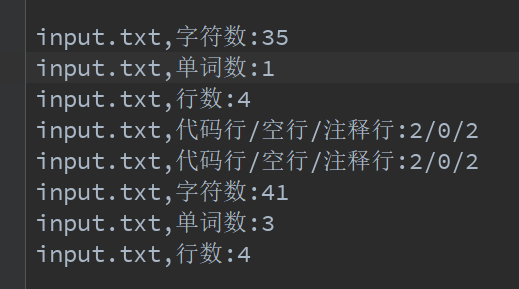
这里我们用的是idea:直接通过传入参数的不同来测试每一种功能以及他们的组合:
下面是我用的输入文件:
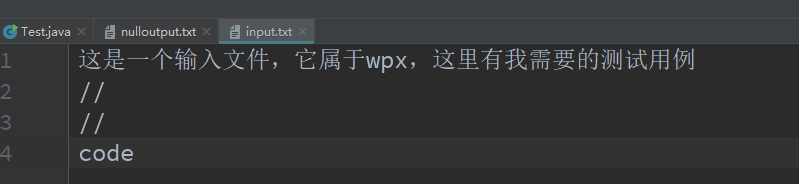
1)-c input.txt -o output.txt:
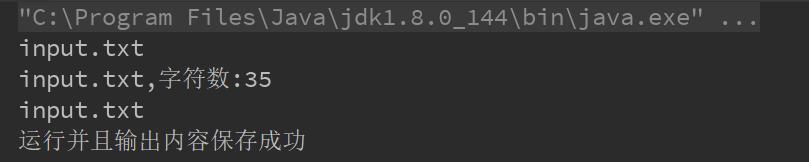
2)-w input.txt -o output.txt:
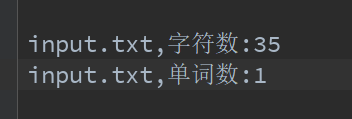
3)-l input.txt -o output.txt:

4)-a input.txt -o output.txt:
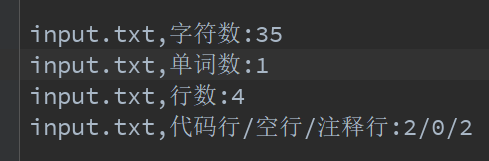
5)-a -w -l -c input.txt -o output.txt:
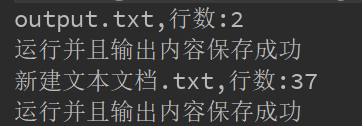
6) -s -w -l D:/test/*.txt -o output.txt:这里我们是在一个文件夹里向下递归查找符合要求的txt文件:
七.参考文献
《构建之法--现代软件工程》 --邹欣 [第三版]
PS:(本次项目还有一些功能没有实现)未完待续......
Word Count的更多相关文章
- Hive Word count
--https://github.com/slimandslam/pig-hive-wordcount/blob/master/wordcount.hql DROP TABLE myinput; DR ...
- mac上eclipse上运行word count
1.打开eclipse之后,建立wordcount项目 package wordcount; import java.io.IOException; import java.util.StringTo ...
- MapReduce工作机制——Word Count实例(一)
MapReduce工作机制--Word Count实例(一) MapReduce的思想是分布式计算,也就是分而治之,并行计算提高速度. 编程思想 首先,要将数据抽象为键值对的形式,map函数输入键值对 ...
- Word Count作业
Word Count作业 一.个人Gitee地址:https://gitee.com/Changyu-Guo 二.项目简介 该项目主要是模拟Linux上面的wc命令,基本要求如下: 命令格式: wc. ...
- [Hive_add_6] Hive 实现 Word Count
0. 说明 Hive 通过 explode()函数 和 split()函数 实现 WordConut 1. Hive 实现 Word Count 方式一 1.1 思路 将每一行文本变为 Array 数 ...
- Mac下hadoop运行word count的坑
Mac下hadoop运行word count的坑 Word count体现了Map Reduce的经典思想,是分布式计算中中的hello world.然而博主很幸运地遇到了Mac下特有的问题Mkdir ...
- [MapReduce_1] 运行 Word Count 示例程序
0. 说明 MapReduce 实现 Word Count 示意图 && Word Count 代码编写 1. MapReduce 实现 Word Count 示意图 1. Map:预 ...
- 【2016.3.22】作业 Word count 小程序
今天更下word count程序的设计思路及实现方法. 我的程序贴在coding里,这里就先不贴出来了, 我的coding地址:https://coding.net/u/holy_angel/p/wo ...
- 软件工程第三个程序:“WC项目” —— 文件信息统计(Word Count ) 命令行程序
软件工程第三个程序:“WC项目” —— 文件信息统计(Word Count ) 命令行程序 格式:wc.exe [parameter][filename] 在[parameter]中,用户通过输入参数 ...
随机推荐
- [Swift]LeetCode380. 常数时间插入、删除和获取随机元素 | Insert Delete GetRandom O(1)
Design a data structure that supports all following operations in averageO(1) time. insert(val): Ins ...
- Build Assimp library for Android
Build Assimp library for Android 首先各路教程中有推荐使用 NDK 或者 STANDALONE TOOLCHAIN 编译的,根据我的理解,这两种方式都是可以的,如果能直 ...
- JVM基础系列第13讲:JVM参数之追踪类信息
我们都知道 JVM 在启动的时候会去加载类信息,那么我们怎么得知他加载了哪些类,又卸载了哪些类呢?我们这一节就来介绍四个 JVM 参数,使用它们我们就可以清晰地知道 JVM 的类加载信息. 为了方便演 ...
- 『最大M子段和 线性DP』
最大M子段和(51nod 1052) Description N个整数组成的序列a[1],a[2],a[3],-,a[n],将这N个数划分为互不相交的M个子段,并且这M个子段的和是最大的.如果M &g ...
- kNN算法:K最近邻(kNN,k-NearestNeighbor)分类算法
一.KNN算法概述 邻近算法,或者说K最近邻(kNN,k-NearestNeighbor)分类算法是数据挖掘分类技术中最简单的方法之一.所谓K最近邻,就是k个最近的邻居的意思,说的是每个样本都可以用它 ...
- 爬虫入门(四)——Scrapy框架入门:使用Scrapy框架爬取全书网小说数据
为了入门scrapy框架,昨天写了一个爬取静态小说网站的小程序 下面我们尝试爬取全书网中网游动漫类小说的书籍信息. 一.准备阶段 明确一下爬虫页面分析的思路: 对于书籍列表页:我们需要知道打开单本书籍 ...
- synchronized学习
现代软件开发中并发已经成为一项基础能力,而Java精心设计的高效并发机制,正是构建大规模应用的基础之一.本文中我们将学习synchronized关键字的基本用法. synchronized是Java内 ...
- 你真的会PHP吗?
Note: 1) PHP中的数据类型 PHP一共支持八种数据类型, 4种标量类型,boolean(布尔型),integer(整形),float/double(浮点型)和string(字符串类型), 2 ...
- DocX开源WORD操作组件的学习系列一
DocX学习系列 DocX开源WORD操作组件的学习系列一 : http://www.cnblogs.com/zhaojiedi1992/p/zhaojiedi_sharp_001_docx1.htm ...
- QQ音乐的动效歌词是如何实践的?
本文由云+社区发表 作者:QQ音乐技术团队 一. 背景 1. 现状 歌词浏览已经成为音乐app的标配,展示和动画效果也基本上大同小异,主要是单行的逐字染色的卡拉OK效果和多行的滚动效果.当然,我们也不 ...