
Hand on Machine Learning第三章课后作业(2):其余小练习
-#!/usr/bin/env python
-# # # -- coding: utf-8 --
-# # # @Time : 2019.5.22 14:09
-# # # @Author : AndrewCHH
-# # # @File : after_class.py
1. 获取数据
- 使用MNIST数据集练习分类任务
from __future__ import print_function

import pandas as pd

# 导入后加入以下列,再显示时显示完全。

pd.set_option('display.max_rows', 500)

pd.set_option('display.max_columns', 500)

pd.set_option('display.width', 1000)

from sklearn.datasets import fetch_mldata

from scipy.io import loadmat

mnist = fetch_mldata('MNIST original', transpose_data=True, data_home='files')

print("mnist",mnist)

# *DESCR为description,即数据集的描述

# *CLO_NAMES为列名

# *target键,带有标记的数组

# *data键,每个实例为一行,每个特征为1列

# 共七万张图片,每张图片784个特征点

X, y = mnist["data"], mnist["target"]

print(X.shape, y.shape)

print(type(X))

# 显示图片

import matplotlib

import matplotlib.pyplot as plt

some_digit = X[36001]

some_digit_image = some_digit.reshape(28, 28)  # 将一维数组转化为28*28的数组

# cmap->颜色图谱(colormap)

# interpolation: 图像插值参数,图像插值就是利用已知邻近像素点的灰度值(或rgb图像中的三色值)来产生未知像素点的灰度值,以便由原始图像再生出具有更高分辨率的图像。

# * If interpolation is None, it defaults to the image.interpolation rc parameter.

# If the interpolation is 'none', then no interpolation is performed for the Agg, ps and pdf backends. Other backends will default to 'nearest'.

# For the Agg, ps and pdf backends, interpolation = 'none' works well when a big image is scaled down,

# while interpolation = 'nearest' works well when a small image is scaled up.

plt.imshow(some_digit_image, cmap=matplotlib.cm.binary,

           interpolation="nearest")

plt.axis("off")

plt.show()

print(y[36001])
D:\Anaconda3\lib\site-packages\sklearn\utils\deprecation.py:77: DeprecationWarning: Function fetch_mldata is deprecated; fetch_mldata was deprecated in version 0.20 and will be removed in version 0.22

  warnings.warn(msg, category=DeprecationWarning)

D:\Anaconda3\lib\site-packages\sklearn\utils\deprecation.py:77: DeprecationWarning: Function mldata_filename is deprecated; mldata_filename was deprecated in version 0.20 and will be removed in version 0.22

  warnings.warn(msg, category=DeprecationWarning)

mnist {'DESCR': 'mldata.org dataset: mnist-original', 'COL_NAMES': ['label', 'data'], 'target': array([0., 0., 0., ..., 9., 9., 9.]), 'data': array([[0, 0, 0, ..., 0, 0, 0],

       [0, 0, 0, ..., 0, 0, 0],

       [0, 0, 0, ..., 0, 0, 0],

       ...,

       [0, 0, 0, ..., 0, 0, 0],

       [0, 0, 0, ..., 0, 0, 0],

       [0, 0, 0, ..., 0, 0, 0]], dtype=uint8)}

(70000, 784) (70000,)

<class 'numpy.ndarray'>

<Figure size 640x480 with 1 Axes>

5.0
2. 创建测试集训练集
x_train, x_test, y_train, y_test = X[:60000], X[60000:], y[:60000], y[60000:]
2.1 数据洗牌(注意数据的顺序敏感性)
import numpy as np

# Randomly permute a sequence, or return a permuted range.

shuffle_index = np.random.permutation(60000)

x_train, y_train = x_train[shuffle_index], y_train[shuffle_index]

# # Q1:

# ## 1.1 创建KNN分类器

y_train_5 =(y_train==5)

from sklearn.neighbors import KNeighborsClassifier

# knn_clf = KNeighborsClassifier()

# knn_clf = KNeighborsClassifier(n_jobs=-1, weights='distance', n_neighbors=4)

# knn_clf.fit(x_train, y_train)

# array = knn_clf.predict(x_test)

# print("knnResult",array)

# # ## 1.2 对knn执行网格搜索

# from sklearn.model_selection import GridSearchCV

# para_grid = [

#     {'n_neighbors':[3,4,5,6],'weights':["uniform","distance",]}

# ]

# knn_clf = KNeighborsClassifier()

# grid_search = GridSearchCV(knn_clf,para_grid,cv=5,verbose=3,n_jobs=-1,scoring="neg_mean_squared_error")

# grid_search.fit(x_train,y_train)

# print(grid_search.best_params_)

# print(grid_search.best_estimator_)

# from sklearn.model_selection import GridSearchCV

#

# param_grid = [{'weights': ["uniform", "distance"], 'n_neighbors': [3, 4, 5]}]

#

# knn_clf = KNeighborsClassifier()

# grid_search = GridSearchCV(knn_clf, param_grid, cv=5, verbose=3, n_jobs=-1)

# grid_search.fit(x_train, y_train)

# print(grid_search.best_params_)

# print(grid_search.best_estimator_)

# ## 1.2 评估准确性

# y_knn_pred = knn_clf.predict(x_test)

# from sklearn.metrics import accuracy_score

# a = accuracy_score(y_test,y_knn_pred)

# print(a)

# # Q2:

# 使用shaift方法移动图片中的像素,注意,self传进来的X[1]是一维数组,要使用reshape变成28*28的数组。

# cval参数指的是移动图片后填补的像素值

from scipy.ndimage.interpolation import shift

def movePiexOfImage(self,dx,dy,new=0):

    return shift(self.reshape(28,28),[dx,dy],cval=new)

# 图片显示维度错误检测

def valid_imshow_data(data):

    data = np.asarray(data)

    if data.ndim == 2:

        return True

    elif data.ndim == 3:

        if 3 <= data.shape[2] <= 4:

            return True

        else:

            print('The "data" has 3 dimensions but the last dimension '

                  'must have a length of 3 (RGB) or 4 (RGBA), not "{}".'

                  ''.format(data.shape[2]))

            return False

    else:

        print('To visualize an image the data must be 2 dimensional or '

              '3 dimensional, not "{}".'

              ''.format(data.ndim))

        return False

print("image:",X[1])

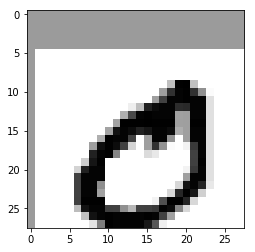
imageShift=movePiexOfImage(X[1],5,1,new=100)

imageShift = imageShift.reshape(28,28)

plt.imshow(imageShift,cmap=matplotlib.cm.binary)

plt.show()

print(len(x_train))

for i in range(len(x_train)):

    moveLeft  = movePiexOfImage(x_train[i],1,0,new=100)

    # moveDown  = movePiexOfImage(x_train[i],0,1,new=100)

    # moveRight = movePiexOfImage(x_train[i],-1,0,new=100)

    # moveUp    = movePiexOfImage(x_train[i],0,-1,new=100)

    # moveDown = moveDown.reshape(1,784)

    moveLeft = moveLeft.reshape(1,784)

    # moveRight = moveRight.reshape(1,784)

    # moveUp = moveUp.reshape(1,784)

    x_train = np.concatenate((x_train,moveLeft),axis=0)

print(len(x_train))
image: [  0   0   0   0   0   0   0   0   0   0   0   0   0   0   0   0   0   0

   0   0   0   0   0   0   0   0   0   0   0   0   0   0   0   0   0   0

   0   0   0   0   0   0   0   0   0   0   0   0   0   0   0   0   0   0

   0   0   0   0   0   0   0   0   0   0   0   0   0   0   0   0   0   0

   0   0   0   0   0   0   0   0   0   0   0   0   0   0   0   0   0   0

   0   0   0   0   0   0   0   0   0   0   0   0   0   0   0   0   0   0

   0   0   0   0   0   0   0   0   0   0   0   0   0   0   0   0   0   0

   0   0   0  64 253 255  63   0   0   0   0   0   0   0   0   0   0   0

   0   0   0   0   0   0   0   0   0   0   0   0  96 205 251 253 205 111

   4   0   0   0   0   0   0   0   0   0   0   0   0   0   0   0   0   0

   0   0   0  96 189 251 251 253 251 251  31   0   0   0   0   0   0   0

   0   0   0   0   0   0   0   0   0   0  16  64 223 244 251 251 211 213

 251 251  31   0   0   0   0   0   0   0   0   0   0   0   0   0   0   0

   0  80 181 251 253 251 251 251  94  96 251 251  31   0   0   0   0   0

   0   0   0   0   0   0   0   0   0   0  92 253 253 253 255 253 253 253

  95  96 253 253  31   0   0   0   0   0   0   0   0   0   0   0   0   0

   0  92 236 251 243 220 233 251 251 243  82  96 251 251  31   0   0   0

   0   0   0   0   0   0   0   0   0   0  80 253 251 251 188   0  96 251

 251 109   0  96 251 251  31   0   0   0   0   0   0   0   0   0   0   0

   0  96 240 253 243 188  42   0  96 204 109   4   0  12 197 251  31   0

   0   0   0   0   0   0   0   0   0   0   0 221 251 253 121   0   0   0

  36  23   0   0   0   0 190 251  31   0   0   0   0   0   0   0   0   0

   0   0  48 234 253   0   0   0   0   0   0   0   0   0   0   0 191 253

  31   0   0   0   0   0   0   0   0   0   0  44 221 251 251   0   0   0

   0   0   0   0   0   0   0  12 197 251  31   0   0   0   0   0   0   0

   0   0   0 190 251 251 251   0   0   0   0   0   0   0   0   0   0  96

 251 251  31   0   0   0   0   0   0   0   0   0   0 190 251 251 113   0

   0   0   0   0   0   0   0   0  40 234 251 219  23   0   0   0   0   0

   0   0   0   0   0 190 251 251  94   0   0   0   0   0   0   0   0  40

 217 253 231  47   0   0   0   0   0   0   0   0   0   0   0 191 253 253

 253   0   0   0   0   0   0  12 174 253 253 219  39   0   0   0   0   0

   0   0   0   0   0   0   0  67 236 251 251 191 190 111  72 190 191 197

 251 243 121  39   0   0   0   0   0   0   0   0   0   0   0   0   0   0

  63 236 251 253 251 251 251 251 253 251 188  94   0   0   0   0   0   0

   0   0   0   0   0   0   0   0   0   0   0  27 129 253 251 251 251 251

 229 168  15   0   0   0   0   0   0   0   0   0   0   0   0   0   0   0

   0   0   0   0   0  95 212 251 211  94  59   0   0   0   0   0   0   0

   0   0   0   0   0   0   0   0   0   0   0   0   0   0   0   0   0   0

   0   0   0   0   0   0   0   0   0   0   0   0   0   0   0   0   0   0

   0   0   0   0   0   0   0   0   0   0   0   0   0   0   0   0   0   0

   0   0   0   0   0   0   0   0   0   0   0   0   0   0   0   0   0   0

   0   0   0   0   0   0   0   0   0   0   0   0   0   0   0   0   0   0

   0   0   0   0   0   0   0   0   0   0   0   0   0   0   0   0   0   0

   0   0   0   0   0   0   0   0   0   0]
60000Hand on Machine Learning第三章课后作业(2):其余小练习的更多相关文章
- Hand on Machine Learning第三章课后作业(1):垃圾邮件分类
import os import email import email.policy 1. 读取邮件数据 SPAM_PATH = os.path.join( "E:\\3.Study\\机器 ...
- C++第三章课后作业答案及解析---指针的使用
今天继续完成上周没有完成的习题---C++第三章课后作业,本章题涉及指针的使用,有指向对象的指针做函数参数,对象的引用以及友元类的使用方法等 它们具体的使用方法在下面的题目中会有具体的解析(解析标注在 ...
- Hand on Machine Learning 第三章:分类器
1. 获取数据 使用MNIST数据集练习分类任务 from sklearn.datasets import fetch_mldata from scipy.io import loadmat mnis ...
- CSAPP深入理解计算机系统(第二版)第三章家庭作业答案
<深入理解计算机系统(第二版)>CSAPP 第三章 家庭作业 这一章介绍了AT&T的汇编指令 比较重要 本人完成了<深入理解计算机系统(第二版)>(以下简称CSAPP) ...
- 機器學習基石(Machine Learning Foundations) 机器学习基石 课后习题链接汇总
大家好,我是Mac Jiang,非常高兴您能在百忙之中阅读我的博客!这个专题我主要讲的是Coursera-台湾大学-機器學習基石(Machine Learning Foundations)的课后习题解 ...
- JAVA第三周课后作业
JAVA课后作业 一.枚举类型 代码: enum Size{SMALL,MEDIUM,LARGE}; public cl ass EnumTest { public static void main( ...
- 中级Perl 第三章课后习题
3. 10. 1. 练习1 [25 分钟] 读当前目录的文件列表并转换成全路径.不能用shell 命令或外部程序读当前目 录.Perl 的File::Spec 和Cwd 两个模块对这个程序有帮助.每个 ...
- Python核心编程2第三章课后练习
1. 标识符.为什么Python 中不需要变量名和变量类型声明? Python中的变量不需要声明,变量的赋值操作既是变量声明和定义的过程.每个变量在内存中创建,都包括变量的标识,名称和数据这些信息.每 ...
- Machine Learning 第三周
ML week3 逻辑回归 Logistic Function h_\theta(x)=g(\theta^Tx) g(t)=\frac{1}{1+e^{-z}} 当t大于0, 即下面公式成立时,y=1 ...
随机推荐
- php set_magic_quotes_runtime() 函数过时解决方法
PHP5.3中 bool set_magic_quotes_runtime ( bool $new_setting )函数过时.把函数: set_magic_quotes_runtime($newse ...
- python中对RSA的加密和解密
首先,生成一对密钥,并保存 def create_keys(): # 生成公钥和私钥 (pubkey, privkey) = rsa.newkeys(1024) pub = pubkey.save_p ...
- java高并发核心要点|系列4|CPU内存指令重排序(Memory Reordering)
今天,我们来学习另一个重要的概念. CPU内存指令重排序(Memory Reordering) 什么叫重排序? 重排序的背景 我们知道现代CPU的主频越来越高,与cache的交互次数也越来越多.当CP ...
- pyqt5-动画组QAnimationGroup
from PyQt5.QtWidgets import QApplication, QWidget,QPushButton,QLabel import sys from PyQt5.QtCore im ...
- PIXI兼容微信小游戏
首先导入官方的weapp-adapter,然后导入pixi.min.js,微信小程序使用ES6的module引用模块,具体参见ES6的Module. import './libs/weapp-adap ...
- tf.split( )和tf.unstack( )
import tensorflow as tf A = [[1, 2, 3], [4, 5, 6]] a0 = tf.split(A, num_or_size_splits=3, axis=1)#不改 ...
- nuget push 程序包到nuget服务器时报错 406 (Not Acceptable)
1.在window服务器上部署nuget服务器时,发布包时出现请求报错 406 (Not Acceptable) 验证用户名.密码正确的情况下,还是出现上面错误.后面跟踪服务器日志,发现window\ ...
- 技术干货:Python解析CSV
1. 什么是CSV CSV(Commma-Separated Value)是都好分隔符,其文件以纯文本形式存储表格数据(数字和文本). 案例: 2. 为什么要使用CSV 与专有的二进制文件格式截然不同 ...
- Python os模块方法
os模块提供了大量有用的方法来处理文件和目录.本章节中的代码实例是在 Ubuntu Linux系统上运行来演示. 大多数有用的方法都列在这里 - 编号 方法 描述/说明 1 os.access(pat ...
- Android中StatFs获取系统/sdcard存储(剩余空间)大小
1 2 3 4 5 6 7 8 9 10 11 12 13 14 15 16 17 18 19 20 21 22 23 24 25 26 27 28 29 30 31 32 33 34 35 36 3 ...