
Redis实现存取数据+数据存取
添加依赖:
<dependency>

    <groupId>com.fasterxml.jackson.core</groupId>

    <artifactId>jackson-databind</artifactId>

    <version>2.9.7</version>

</dependency>

 <!-- https://mvnrepository.com/artifact/org.springframework.data/spring-data-redis -->

        <dependency>

            <groupId>org.springframework.data</groupId>

            <artifactId>spring-data-redis</artifactId>

            <version>2.1.3.RELEASE</version>

 </de
Mapper接口:
package com.nf147.sim.mapper;

import com.nf147.sim.entity.News;

import java.util.List;

public interface NewsMapper {

    List<News> query();

    void add(News news);

}
映射文件:
<?xml version="1.0" encoding="UTF-8"?>

<!DOCTYPE mapper PUBLIC "-//mybatis.org//DTD Mapper 3.0//EN" "http://mybatis.org/dtd/mybatis-3-mapper.dtd">

<mapper namespace="com.nf147.sim.mapper.NewsMapper">

    <resultMap id="BaseResultMap" type="com.nf147.sim.entity.News">

        <id column="id" jdbcType="INTEGER" property="id" />

        <result column="title" jdbcType="VARCHAR" property="title" />

        <result column="body" jdbcType="VARCHAR" property="body" />

    </resultMap>

    <select id="query" resultType="com.nf147.sim.entity.News">

        select id ,title,body from news

    </select>

    <select id="selectAll" resultType="com.nf147.sim.entity.News">

          select id ,title,body from news

    </select>

    <insert id="add" keyProperty="id" useGeneratedKeys="true">

        insert into news (title,body) values (#{title},#{body})

    </insert>

</mapper>
服务接口:
package com.nf147.sim.service;

import com.nf147.sim.entity.News;

import redis.clients.jedis.Jedis;

import java.io.IOException;

import java.util.List;

public interface NewsService {

    List<News> selectAll() throws IOException;void add (News news);

}
实现:
package com.nf147.sim.service.impl;

import com.fasterxml.jackson.core.type.TypeReference;

import com.fasterxml.jackson.databind.ObjectMapper;

import com.nf147.sim.entity.News;

import com.nf147.sim.mapper.NewsMapper;

import com.nf147.sim.service.NewsService;

import org.springframework.beans.factory.annotation.Autowired;

import org.springframework.stereotype.Service;

import redis.clients.jedis.Jedis;

import java.io.IOException;

import java.util.List;

@Service

public class NewsServiceImpl implements NewsService {

    @Autowired

    private NewsMapper mapper;

    @Override

        public List<News> selectAll() throws IOException {

            Jedis jedis =new Jedis();

            String key = "listNews";

            ObjectMapper on = new ObjectMapper();  //josn

        if (jedis.exists(key)){                //判断缓存有没有存在key

            System.out.println("从缓存中取出数据...");

            return on.readValue(jedis.get(key),new TypeReference<List<News>>(){});  //如果有就从缓存里面取数据

        }

     //没有则从数据库去取

        List<News> news = mapper.query();

        jedis.set(key,on.writeValueAsString(news));  //然后设置键和数据

        return news;                                //返回

    }

    @Override

    public void add(News news) {  //每次添加时判短键是否存在,如果存在首先删除

        Jedis jedis = new Jedis();

        String key="listNews";

        if(jedis.exists(key))

            jedis.del(key);

        mapper.add(news);

    }

}
测试:
package com.nf147.sim.service.impl;

import com.fasterxml.jackson.core.JsonProcessingException;

import com.fasterxml.jackson.core.type.TypeReference;

import com.fasterxml.jackson.databind.ObjectMapper;

import com.google.gson.Gson;

import com.google.gson.reflect.TypeToken;

import com.nf147.sim.configuration.RootConfig;

import com.nf147.sim.entity.News;

import com.nf147.sim.mapper.NewsMapper;

import com.nf147.sim.service.NewsService;

import org.junit.Test;

import org.junit.runner.RunWith;

import org.springframework.beans.factory.annotation.Autowired;

import org.springframework.test.context.ContextConfiguration;

import org.springframework.test.context.junit4.SpringRunner;

import redis.clients.jedis.Jedis;

import java.io.*;

import java.lang.reflect.Type;

import java.util.ArrayList;

import java.util.Arrays;

import java.util.List;

@RunWith(SpringRunner.class)

@ContextConfiguration(classes = RootConfig.class)

public class NewsServiceImplTest {

    @Autowired

    private NewsServiceImpl NewsServiceImpl;

    @Test

    public void selectAll() throws IOException {

        List<News> news = NewsServiceImpl.selectAll();

        System.out.println(news);

    }

    }

}
结果: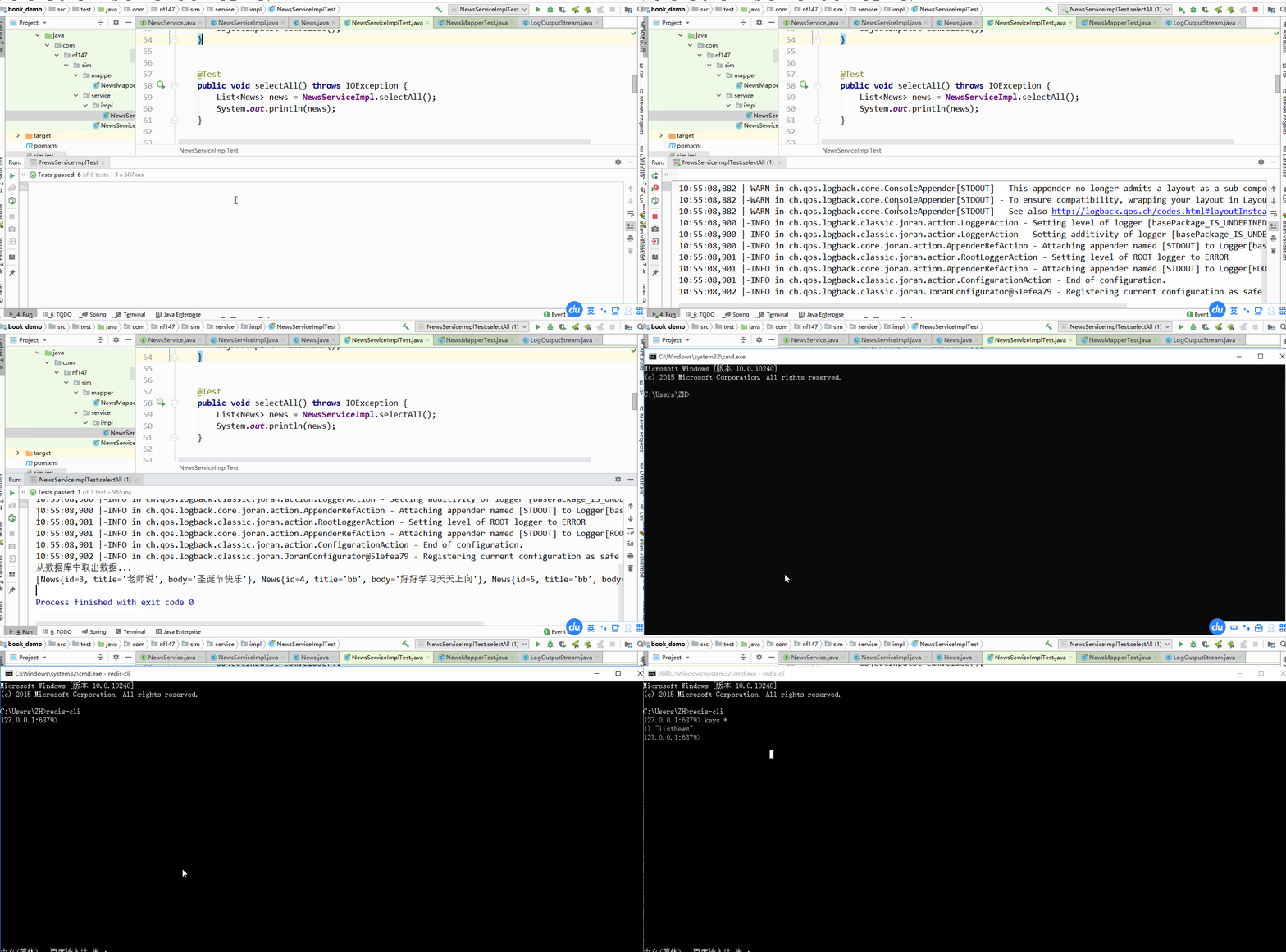
Redis实现存取数据+数据存取的更多相关文章
- sqlite3的图片的(二进制数据)存取操作
sqlite3的图片的(二进制数据)存取操作 前言 上篇介绍了sqlite3的一些常用插入操作方法和注意事项,在实际项目中遇到了图片缓存的问题,由于服务器不是很稳定,且受到外界环境的干扰(例如断电 ...
- 使用ADO实现BLOB数据的存取 -- ADO开发实践之二
使用ADO实现BLOB数据的存取 -- ADO开发实践之二 http://www.360doc.com/content/11/0113/16/4780948_86256633.shtml 一.前言 在 ...
- 用string存取二进制数据
STL的string很强大,用起来也感觉很舒服,这段时间在代码中涉及到了用string存取二进制数据的问题,这里记录一下,以供以后参考. 首先提一下STL中string的参考资料:http://www ...
- (三)初识NumPy(数据CSV文件存取和多维数据的存取)
本章主要介绍的是数据的CSV文件存取和多维数据的存取. 一.数据的CSV文件存取 1.CSV的写文件: np.savetxt(frame, array, fmt='%.18e', delimiter= ...
- [转]在nodejs使用Redis缓存和查询数据及Session持久化(Express)
本文转自:https://blog.csdn.net/wellway/article/details/76176760 在之前的这篇文章 在ExpressJS(NodeJS)中设置二级域名跨域共享Co ...
- redis实现mysql的数据缓存
环境设定base2 172.25.78.12 nginx+phpbase3 172.25.78.13 redis端base4 172.25.78.14 mysql端# 1.在base2(nginx+p ...
- Redis学习总结(1)——数据持久化
以前研究Redis的时候,很多东西都不太明白,理解得也不太深,现在有时间重新拾起来看看,将一些心得记录下来,希望和大家一起探讨. 一.简介 Redis是一个单线程高可用的Key-Value存储系统,和 ...
- Redis各种数据结构性能数据对比和性能优化实践
很对不起大家,又是一篇乱序的文章,但是满满的干货,来源于实践,相信大家会有所收获.里面穿插一些感悟和生活故事,可以忽略不看.不过听大家普遍的反馈说这是其中最喜欢看的部分,好吧,就当学习之后轻松一下. ...
- redis增删查改数据Util
目录 (1)需要导入的包 (2)redis配置文件 (3)RedisUtil类 (1)需要导入的包 <dependency> <groupId>org.springframew ...
- redis哈希缓存数据表
redis哈希缓存数据表 REDIS HASH可以用来缓存数据表的数据,以后可以从REDIS内存数据库中读取数据. 从内存中取数,无疑是很快的. var FRedis: IRedisClient; F ...
随机推荐
- Kubernetes组件及网络基础
在前面的部分了解了Pod的创建删除 ,查看信息等.那么我们怎么去管理Pod呢?我们可以通过 ReplicationController 去管理维护 Pod. Replication Controlle ...
- c++构造顺序
1. 静态成员最先构造,按照静态成员初始化顺序,不是类里面的声明顺序 2. 父类构造 3. 非静态成员构造,按照类成员声明顺序,不是逗号初始化成员顺序 4. 自身构造函数 Demo: class Te ...
- 实例学习——爬取豆瓣网TOP250数据
开发环境:(Windows)eclipse+pydev 网址:https://book.douban.com/top250?start=0 from lxml import etree #解析提取数据 ...
- Scrapy 教程(二)-操作流程
scrapy 是个爬虫框架,是由python编写的,用法类似 django 框架. 创建工程 在开始爬虫之前,先创建工程 scrapy startproject projectname 目录结构如下图 ...
- python学习第五十四天hashlib模块的使用
hash算法 hash也做散列,也称为哈希,主要用于信息安全领域中加密算法,hash就是找一种数据内容和数据存放地址直接的映射关系. md5算法 md5讯息算法,广泛使用密码函数 md5算法的特点 1 ...
- unsolved question's solution
因为很懒,没有时间,只会口胡等等原因,所以有些题目就不打code了 $luogu:$ P1973 [NOI2011]Noi嘉年华: 时间离散化,预处理一个区间$[l,r]$内的最多活动个数$in[l] ...
- Spark Streaming整合Flume + Kafka wordCount
flume配置文件 flume_to_kafka.conf a1.sources = r1 a1.sinks = k1 a1.channels = c1 a1.sources.r1.type = sp ...
- kafka复习(2)
一.简介 --------------------------------------- 1.kafka是一个分布式的.可分区的.可复制的消息系统.它提供了消息系统的功能,但是有自己独特的设计. 2. ...
- POI读取文件的最佳实践
POI是 Apache 旗下一款读写微软家文档声名显赫的类库.应该很多人在做报表的导出,或者创建 word 文档以及读取之类的都是用过 POI.POI 也的确对于这些操作带来很大的便利性.我最近做的一 ...
- JS解析URL参数为对象
曲不离口,拳不离手 JS小编程练习之一:解析URL参数为对象 url:http://www.baidu.com/we/index.html?id=098&aaa=123&ccc=456 ...