
spring cloud:config-eureka-refresh-bus-rabbitmq
config-server-eureka-bus-rabbitmq
1. File-->new spring starter project
2.add dependency
    <parent>

        <groupId>org.springframework.boot</groupId>

        <artifactId>spring-boot-starter-parent</artifactId>

        <version>2.1.5.RELEASE</version>

        <relativePath/> <!-- lookup parent from repository -->
<dependency>

            <groupId>org.springframework.cloud</groupId>

            <artifactId>spring-cloud-starter-bus-amqp</artifactId>

        </dependency>

        <dependency>

            <groupId>org.springframework.cloud</groupId>

            <artifactId>spring-cloud-config-server</artifactId>

        </dependency>

        <dependency>

            <groupId>org.springframework.cloud</groupId>

            <artifactId>spring-cloud-starter-netflix-eureka-client</artifactId>

        </dependency>

        <dependency>

            <groupId>org.springframework.boot</groupId>

            <artifactId>spring-boot-starter-actuator</artifactId>

        </dependency>
3.Edit application.yml
server:

  port:

#spring cloud config native

spring:

  profiles:

    active: native

  application:

    name: config-server-eureka

  cloud:

    config:

      server:

        native:

          search-locations: /home/smile/workspace-sts/config-repo

#spring cloud config git

#spring:

#  application:

#    name: config-server-eureka

#  cloud:

#    config:

#      server:

#        git:

#          uri: http://localhost:3380/root/smile.git

#          search-paths: config-repo

#          username: root

#          password: root123456

eureka:

  client:

    service-url:

      defaultZone: http://localhost:8761/eureka/

## actuator refresh

management:

#  server:

#    port:

  endpoint:

    refresh:

      enabled: true

  endpoints:

    web:

      exposure:

        include: '*'

#        - info

#        - health

#        - refresh

#       include: '*' 开启所有接口。包含用到的 /actuator/bus-refresh
pplication.properties
## 开启消息跟踪

spring.cloud.bus.trace.enabled=true

##rabbimq

spring.rabbitmq.host=localhost

spring.rabbitmq.port=

spring.rabbitmq.username=guest

spring.rabbitmq.password=guest

spring.devtools.add-properties=false
4.program
package com.smile;

import org.springframework.boot.SpringApplication;

import org.springframework.boot.autoconfigure.SpringBootApplication;

import org.springframework.cloud.config.server.EnableConfigServer;

import org.springframework.cloud.netflix.eureka.EnableEurekaClient;

@SpringBootApplication

@EnableEurekaClient

@EnableConfigServer

public class ConfigServerEurekaBusRabbitmqApplication {

    public static void main(String[] args) {

        SpringApplication.run(ConfigServerEurekaBusRabbitmqApplication.class, args);

    }

}
5.Run
visit: http://localhost:8000/smile/config-dev
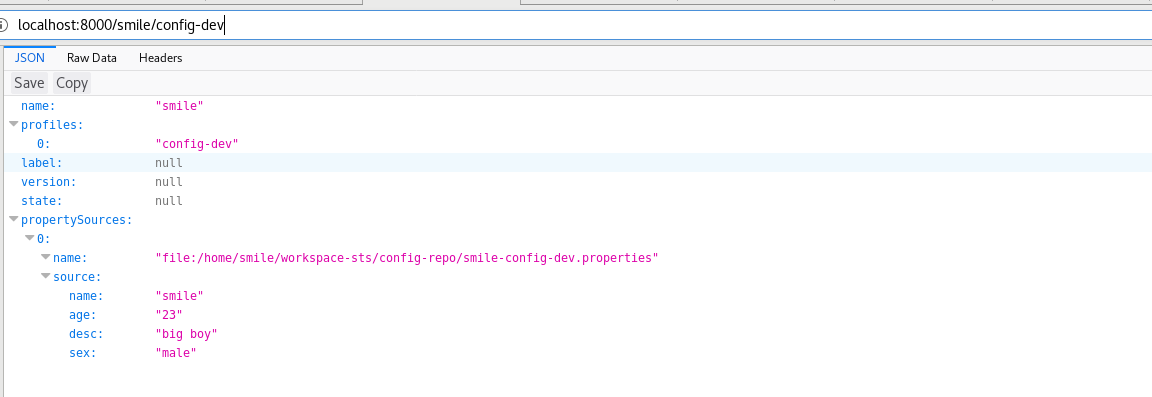

refresh :
post: localhost:8000/actuator/bus-refresh

config-client-eureka-bus-rabbitmq
1. File-->new spring project
2.add dependency
<parent>

        <groupId>org.springframework.boot</groupId>

        <artifactId>spring-boot-starter-parent</artifactId>

        <version>2.1.5.RELEASE</version>

        <relativePath/> <!-- lookup parent from repository -->

    </parent>
<dependency>

            <groupId>org.springframework.cloud</groupId>

            <artifactId>spring-cloud-starter-config</artifactId>

        </dependency>

        <dependency>

            <groupId>org.springframework.cloud</groupId>

            <artifactId>spring-cloud-starter-netflix-eureka-client</artifactId>

        </dependency>

        <dependency>

            <groupId>org.springframework.cloud</groupId>

            <artifactId>spring-cloud-starter-bus-amqp</artifactId>

        </dependency>

        <dependency>

            <groupId>org.springframework.boot</groupId>

            <artifactId>spring-boot-starter-web</artifactId>

        </dependency>
3.Edit bootstrap.yml
server:

  port:

spring:

  application:

    name: config-client-eureka

  cloud:

    config:

#      uri: http://localhost:8000/

      discovery:

        enabled: true

        service-id: config-server-eureka

      name: smile

      profile: config-dev

      # dev 开发环境配置文件 |  test 测试环境  |  pro 正式环境   smile-config-dev.properties {name}-{profile}.properties

    bus:

      trace:

        enabled: true

  rabbitmq:

    host: localhost

    port:

    username: guest

    password: guest

eureka:

  client:

#    registerWithEureka: false

#    fetchRegistry: false

    serviceUrl:

      defaultZone: http://localhost:8761/eureka/

management:

  endpoint:

    refresh:

      enabled: true

#  endpoints:

#    web:

#      exposure:

#        include: '*'

#此处不再需要手动刷新
4.program
package com.smile;

import org.springframework.boot.SpringApplication;

import org.springframework.boot.autoconfigure.SpringBootApplication;

import org.springframework.cloud.netflix.eureka.EnableEurekaClient;

@SpringBootApplication

@EnableEurekaClient

public class ConfigClientEurekaBusRabbitmqApplication {

    public static void main(String[] args) {

        SpringApplication.run(ConfigClientEurekaBusRabbitmqApplication.class, args);

    }

}
package com.smile.controller;

import org.springframework.beans.factory.annotation.Value;

import org.springframework.cloud.context.config.annotation.RefreshScope;

import org.springframework.web.bind.annotation.RequestMapping;

import org.springframework.web.bind.annotation.RestController;

@RestController

@RefreshScope

public class ConfigClientController {

    @Value("${name}")

    String name;

    @Value("${age}")

    String age;

    @RequestMapping("/hello")

    public String hello() {

        return "name:"+name+",age:"+age;

    }

}
5.Run

test
update smile-config-dev.properties age=23-->age=24
post http://localhost:8000/actuator/bus-refresh with firefox
visit http://localhost:8003/hello/ this age is 24

spring cloud:config-eureka-refresh-bus-rabbitmq的更多相关文章
- Spring Cloud Security&Eureka安全认证(Greenwich版本)
Spring Cloud Security&Eureka安全认证(Greenwich版本) 一·安全 Spring Cloud支持多种安全认证方式,比如OAuth等.而默认是可以直接添加spr ...
- spring Cloud 之 Eureka、Feign、Hystrix、Zuul、Config、Bus
一.服务发现——Netflix Eureka Eureka包含两个组件: Eureka Server和Eureka Client 1.创建Eureka Server服务端 (1).引入依赖 父工程po ...
- springboot+cloud 学习(五)统一配置中心 spring cloud config + cloud bus + WebHooks +RibbitMQ
前言 微服务要实现集中管理微服务配置.不同环境不同配置.运行期间也可动态调整.配置修改后可以自动更新的需求,Spring Cloud Config同时满足了以上要求.Spring Cloud Conf ...
- Greenwich.SR2版本的Spring Cloud Config+BUS实例
Spring Cloud Config统一的配置中心同注册中心Eureka一样,也分服务端和客户端.服务端用来保存配置信息,客户端用来读取.它的优势是基于Git仓库,支持多环境.多分支配置.动态刷新. ...
- 跟我学SpringCloud | 第七篇:Spring Cloud Config 配置中心高可用和refresh
SpringCloud系列教程 | 第七篇:Spring Cloud Config 配置中心高可用和refresh Springboot: 2.1.6.RELEASE SpringCloud: Gre ...
- 通过总线机制实现自动刷新客户端配置(Consul,Spring Cloud Config,Spring Cloud Bus)
通过总线机制实现自动刷新客户端配置 方案示意图 利用Git服务的webhook通知功能,在每次更新配置之后,Git服务器会用POST方式调用配置中心的/actuator/bus-refresh接口,配 ...
- spring cloud config与eureka配合使用
前面两篇介绍了Spring Cloud Config服务端和客户端的简单配置,本篇介绍Spring Cloud Config与Eureka配合使用 前言 默认情况下,配置客户端启动时,都是通过配置属性 ...
- spring cloud config搭建说明例子(二)-添加eureka
添加注册eureka 服务端 ConfigServer pom.xml <dependency> <groupId>org.springframework.cloud</ ...
- Spring Cloud(九)高可用的分布式配置中心 Spring Cloud Config 集成 Eureka 服务
上一篇文章,讲了SpringCloudConfig 集成Git仓库,这一篇我们讲一下SpringCloudConfig 配和 Eureka 注册中心一起使用 在分布式系统中,由于服务数量巨多,为了方便 ...
- .NET Core微服务之基于Steeltoe使用Spring Cloud Config统一管理配置
Tip: 此篇已加入.NET Core微服务基础系列文章索引 => Steeltoe目录快速导航: 1. 基于Steeltoe使用Spring Cloud Eureka 2. 基于Steelt ...
随机推荐
- 2017 ACM-ICPC 亚洲区(乌鲁木齐赛区)网络赛 H. Skiing
题意:在这个寒假中,鲍勃有计划在山区度假胜地滑雪.这个滑雪胜地有M个不同的滑雪道和N个不同的标志位于那些转弯处点.从第S标记到第T标志的第i路径具有长度L.每个路径必须遵循降低高度的原则,起点必须严格 ...
- mac系统homebrew安装mysql
homebrew 安装 mysql homebrew 是 macOS 缺失的软件包管理器,譬如可以下载 mysql.redis.wget 等等.操作系统:macOS High Sierra Versi ...
- PropertyUtilsBean 将bean转成map
public static Map<String,String> beanToMap(Object bean) { Map<String,String> params =Map ...
- LeetCode题目(python)
1.给定一个整数数组 nums 和一个目标值 target,请你在该数组中找出和为目标值的那 两个 整数,并返回他们的数组下标. 你可以假设每种输入只会对应一个答案.但是,你不能重复利用这个数组中同样 ...
- luogu P3210 [HNOI2010]取石头游戏
传送门 不会结论做个鬼系列 题意其实是在头尾(最多)两个栈以及中间一些双端队列依次取数,然后每个人都要最大化自己的价值 有一个结论,如果一段序列中,出现了三个相邻位置\(A,B,C\),满足\(A\l ...
- nginx的rewrite
nginx服务的rewrite nginx后端服务的指令 1)upstream指令 :设置后端服务器组的主要指令 Upstream name {} 2)server指令:用于设定组内的服务器 3)Ip ...
- 单调队列优化DP || [Poi2014]Little Bird || BZOJ 3831 || Luogu P3572
题面:[POI2014]PTA-Little Bird 题解: N<=1e6 Q<=25F[i]表示到达第i棵树时需要消耗的最小体力值F[i]=min(F[i],F[j]+(D[j]> ...
- NJU 操作系统实验三
实验描述: 代码实现: 链接:https://pan.baidu.com/s/1so3-XsvWBY9ZDbINob6qCw 提取码:8hhe
- LOJ-6279-数列分块入门3(分块, 二分)
链接: https://loj.ac/problem/6279 题意: 给出一个长为 的数列,以及 个操作,操作涉及区间加法,询问区间内小于某个值 的前驱(比其小的最大元素). 思路: 同样的分块加二 ...
- Docker(2)--Centos7 上安装部署
Centos7 上安装docker Docker从1.13版本之后采用时间线的方式作为版本号,分为社区版CE和企业版EE. 社区版是免费提供给个人开发者和小型团体使用的,企业版会提供额外的收费服务,比 ...