
吴裕雄--天生自然 pythonTensorFlow图形数据处理:输入数据处理框架
import tensorflow as tf

# 1. 创建文件列表,通过文件列表创建输入文件队列

files = tf.train.match_filenames_once("F:\\output.tfrecords")

filename_queue = tf.train.string_input_producer(files, shuffle=False)
#解析TFRecord文件里的数据。

# 读取文件。

reader = tf.TFRecordReader()

_,serialized_example = reader.read(filename_queue)

# 解析读取的样例。

features = tf.parse_single_example(serialized_example,features={'image_raw':tf.FixedLenFeature([],tf.string),'pixels':tf.FixedLenFeature([],tf.int64),'label':tf.FixedLenFeature([],tf.int64)})

decoded_images = tf.decode_raw(features['image_raw'],tf.uint8)

retyped_images = tf.cast(decoded_images, tf.float32)

labels = tf.cast(features['label'],tf.int32)

#pixels = tf.cast(features['pixels'],tf.int32)

images = tf.reshape(retyped_images, [784])
#将文件以100个为一组打包。

min_after_dequeue = 10000

batch_size = 100

capacity = min_after_dequeue + 3 * batch_size

image_batch, label_batch = tf.train.shuffle_batch([images, labels], batch_size=batch_size,capacity=capacity, min_after_dequeue=min_after_dequeue)
# 训练模型。

def inference(input_tensor, weights1, biases1, weights2, biases2):

    layer1 = tf.nn.relu(tf.matmul(input_tensor, weights1) + biases1)

    return tf.matmul(layer1, weights2) + biases2
# 模型相关的参数

INPUT_NODE = 784

OUTPUT_NODE = 10

LAYER1_NODE = 500

REGULARAZTION_RATE = 0.0001

TRAINING_STEPS = 5000

weights1 = tf.Variable(tf.truncated_normal([INPUT_NODE, LAYER1_NODE], stddev=0.1))

biases1 = tf.Variable(tf.constant(0.1, shape=[LAYER1_NODE]))

weights2 = tf.Variable(tf.truncated_normal([LAYER1_NODE, OUTPUT_NODE], stddev=0.1))

biases2 = tf.Variable(tf.constant(0.1, shape=[OUTPUT_NODE]))

y = inference(image_batch, weights1, biases1, weights2, biases2)

# 计算交叉熵及其平均值

cross_entropy = tf.nn.sparse_softmax_cross_entropy_with_logits(logits=y, labels=label_batch)

cross_entropy_mean = tf.reduce_mean(cross_entropy)

# 损失函数的计算

regularizer = tf.contrib.layers.l2_regularizer(REGULARAZTION_RATE)

regularaztion = regularizer(weights1) + regularizer(weights2)

loss = cross_entropy_mean + regularaztion

# 优化损失函数

train_step = tf.train.GradientDescentOptimizer(0.01).minimize(loss)

# 初始化会话,并开始训练过程。

with tf.Session() as sess:

    # tf.global_variables_initializer().run()

    sess.run((tf.global_variables_initializer(),tf.local_variables_initializer()))

    coord = tf.train.Coordinator()

    threads = tf.train.start_queue_runners(sess=sess, coord=coord)

    # 循环的训练神经网络。

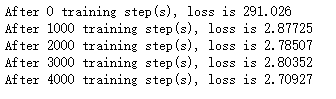
    for i in range(TRAINING_STEPS):

        if i % 1000 == 0:

            print("After %d training step(s), loss is %g " % (i, sess.run(loss)))

        sess.run(train_step)

    coord.request_stop()

    coord.join(threads)
吴裕雄--天生自然 pythonTensorFlow图形数据处理:输入数据处理框架的更多相关文章
- 吴裕雄--天生自然 pythonTensorFlow图形数据处理:循环神经网络预测正弦函数
import numpy as np import tensorflow as tf import matplotlib.pyplot as plt # 定义RNN的参数. HIDDEN_SIZE = ...
- 吴裕雄--天生自然 pythonTensorFlow图形数据处理:数据集高层操作
import tempfile import tensorflow as tf # 1. 列举输入文件. # 输入数据生成的训练和测试数据. train_files = tf.train.match_ ...
- 吴裕雄--天生自然 pythonTensorFlow图形数据处理:数据集基本使用方法
import tempfile import tensorflow as tf # 1. 从数组创建数据集. input_data = [1, 2, 3, 5, 8] dataset = tf.dat ...
- 吴裕雄--天生自然 pythonTensorFlow图形数据处理:图像预处理完整样例
import numpy as np import tensorflow as tf import matplotlib.pyplot as plt #随机调整图片的色彩,定义两种顺序. def di ...
- 吴裕雄--天生自然 pythonTensorFlow图形数据处理:TensorFlow图像处理函数
import numpy as np import tensorflow as tf import matplotlib.pyplot as plt #读取图片 image_raw_data = tf ...
- 吴裕雄--天生自然 pythonTensorFlow图形数据处理:windows操作系统删除tensorflow
输入:pip uninstall tensorflow Proceed(y/n):y
- 吴裕雄--天生自然 pythonTensorFlow图形数据处理:输入文件队列
import tensorflow as tf # 1. 生成文件存储样例数据. def _int64_feature(value): return tf.train.Feature(int64_li ...
- 吴裕雄--天生自然 pythonTensorFlow图形数据处理:多线程队列操作
import tensorflow as tf #1. 定义队列及其操作. queue = tf.FIFOQueue(100,"float") enqueue_op = queue ...
- 吴裕雄--天生自然 pythonTensorFlow图形数据处理:队列操作
import tensorflow as tf #1. 创建队列,并操作里面的元素. q = tf.FIFOQueue(2, "int32") init = q.enqueue_m ...
随机推荐
- 目标检测算法的总结(R-CNN、Fast R-CNN、Faster R-CNN、YOLO、SSD、FNP、ALEXnet、RetianNet、VGG Net-16)
目标检测解决的是计算机视觉任务的基本问题:即What objects are where?图像中有什么目标,在哪里?这意味着,我们不仅要用算法判断图片中是不是要检测的目标, 还要在图片中标记出它的位置 ...
- zset底层数据结构
redis zset底层数据结构 https://www.jianshu.com/p/fb7547369655 跳跃列表(Skip List)与其在Redis中的实现详解 https://www.ji ...
- 51nod 1421:最大MOD值
1421 最大MOD值 题目来源: CodeForces 基准时间限制:1 秒 空间限制:131072 KB 分值: 80 难度:5级算法题 有一个a数组,里面有n个整数.现在要从中找到两个数字(可以 ...
- 18 12 24 html 表单学习
html表单 表单用于搜集不同类型的用户输入,表单由不同类型的标签组成,相关标签及属性用法如下: 1.<form>标签 定义整体的表单区域 action属性 定义表单数据提交地址 meth ...
- golang实现单链表
package main import "fmt" type Object interface{} type Node struct { data Object next *Nod ...
- 直击JDD | 京东技术全景图首次展示 四大重磅智能技术驱动产业未来!
11月19日,主题为"突破与裂变"的2019京东全球科技探索者大会(JDDiscovery)在京盛大开幕,京东集团展示了完整的技术布局与先进而丰富的对外技术服务,对外明确诠释了&q ...
- zabbix添加主机步骤
创建主机 配置基本信息 配置好后点击添加即可: [root@localhost opt]# systemctl start zabbix-agent [root@localhost opt]# net ...
- mysql中各种复杂的增删改查
1.mysql查出数据表中连续出现三次或三次以上的数据 建一张表如下:表名为 number 1.1 要求找出num列连续出现三次或三次以上的数据: select * from number where ...
- Java--定时
TimerTask task = new TimerTask() { @Override public void run() { // TODO Auto-generated method stub ...
- shell中sparksql语句调试、执行方式
1.命令方式执行sparksql查询 SQL="use mydatatable;;select count(1) from tab_videousr_onlne where p_regiio ...