
吴裕雄--天生自然 pythonTensorFlow图形数据处理:TensorFlow图像处理函数
import numpy as np

import tensorflow as tf

import matplotlib.pyplot as plt

#读取图片

image_raw_data = tf.gfile.FastGFile("F:\\TensorFlowGoogle\\201806-github\\datasets\\cat.jpg",'rb').read()

with tf.Session() as sess:

    img_data = tf.image.decode_jpeg(image_raw_data)

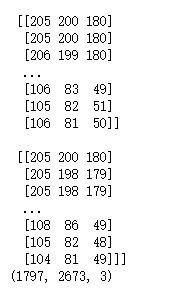
    # 输出解码之后的三维矩阵。

    print(img_data.eval())

    img_data.set_shape([1797, 2673, 3])

    print(img_data.get_shape())
#打印图片

with tf.Session() as sess:

    plt.imshow(img_data.eval())

    plt.show()

#重新调整图片大小

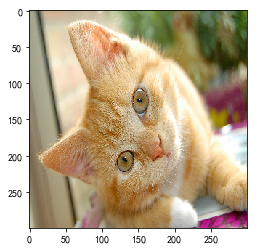
with tf.Session() as sess:

    # 如果直接以0-255范围的整数数据输入resize_images,那么输出将是0-255之间的实数,

    # 不利于后续处理。建议在调整图片大小前,先将图片转为0-1范围的实数。

    image_float = tf.image.convert_image_dtype(img_data, tf.float32)

    resized = tf.image.resize_images(image_float, [300, 300], method=0)

    plt.imshow(resized.eval())

    plt.show()
#裁剪和填充图片

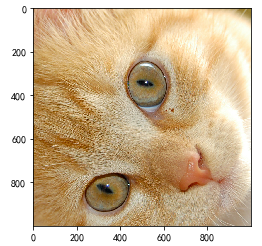
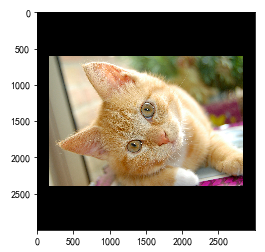
with tf.Session() as sess:

    croped = tf.image.resize_image_with_crop_or_pad(img_data, 1000, 1000)

    padded = tf.image.resize_image_with_crop_or_pad(img_data, 3000, 3000)

    plt.imshow(croped.eval())

    plt.show()

    plt.imshow(padded.eval())

    plt.show()
#截取中间50%的图片

with tf.Session() as sess:

    central_cropped = tf.image.central_crop(img_data, 0.5)

    plt.imshow(central_cropped.eval())

    plt.show()

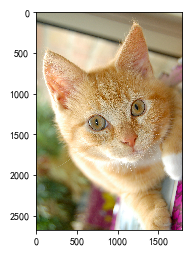
#翻转图片

with tf.Session() as sess:

    # 上下翻转

    #flipped1 = tf.image.flip_up_down(img_data)

    # 左右翻转

    #flipped2 = tf.image.flip_left_right(img_data)

    #对角线翻转

    transposed = tf.image.transpose_image(img_data)

    plt.imshow(transposed.eval())

    plt.show()

    # 以一定概率上下翻转图片。

    #flipped = tf.image.random_flip_up_down(img_data)

    # 以一定概率左右翻转图片。

    #flipped = tf.image.random_flip_left_right(img_data)
#图片色彩调整

with tf.Session() as sess:

    # 在进行一系列图片调整前,先将图片转换为实数形式,有利于保持计算精度。

    image_float = tf.image.convert_image_dtype(img_data, tf.float32)

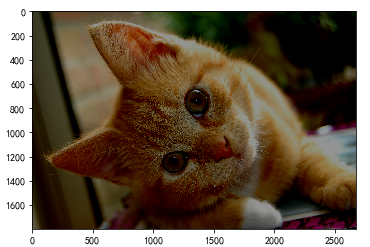
    # 将图片的亮度-0.5。

    #adjusted = tf.image.adjust_brightness(image_float, -0.5)

    # 将图片的亮度0.5

    #adjusted = tf.image.adjust_brightness(image_float, 0.5)

    # 在[-max_delta, max_delta)的范围随机调整图片的亮度。

    adjusted = tf.image.random_brightness(image_float, max_delta=0.5)

    # 将图片的对比度-5

    #adjusted = tf.image.adjust_contrast(image_float, -5)

    # 将图片的对比度+5

    #adjusted = tf.image.adjust_contrast(image_float, 5)

    # 在[lower, upper]的范围随机调整图的对比度。

    #adjusted = tf.image.random_contrast(image_float, lower, upper)

    # 在最终输出前,将实数取值截取到0-1范围内。

    adjusted = tf.clip_by_value(adjusted, 0.0, 1.0)

    plt.imshow(adjusted.eval())

    plt.show()
#添加色相和饱和度

with tf.Session() as sess:

    # 在进行一系列图片调整前,先将图片转换为实数形式,有利于保持计算精度。

    image_float = tf.image.convert_image_dtype(img_data, tf.float32)

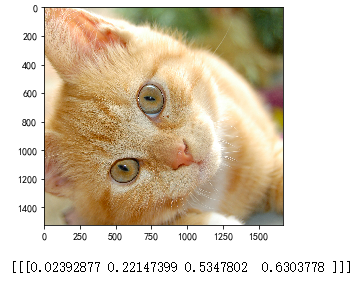
    adjusted = tf.image.adjust_hue(image_float, 0.1)

    #adjusted = tf.image.adjust_hue(image_float, 0.3)

    #adjusted = tf.image.adjust_hue(image_float, 0.6)

    #adjusted = tf.image.adjust_hue(image_float, 0.9)

    # 在[-max_delta, max_delta]的范围随机调整图片的色相。max_delta的取值在[0, 0.5]之间。

    #adjusted = tf.image.random_hue(image_float, max_delta)

    # 将图片的饱和度-5。

    #adjusted = tf.image.adjust_saturation(image_float, -5)

    # 将图片的饱和度+5。

    #adjusted = tf.image.adjust_saturation(image_float, 5)

    # 在[lower, upper]的范围随机调整图的饱和度。

    #adjusted = tf.image.random_saturation(image_float, lower, upper)

    # 将代表一张图片的三维矩阵中的数字均值变为0,方差变为1。

    #adjusted = tf.image.per_image_whitening(image_float)

    # 在最终输出前,将实数取值截取到0-1范围内。

    adjusted = tf.clip_by_value(adjusted, 0.0, 1.0)

    plt.imshow(adjusted.eval())

    plt.show()

#添加标注框并裁减。

with tf.Session() as sess:

    boxes = tf.constant([[[0.05, 0.05, 0.9, 0.7], [0.35, 0.47, 0.5, 0.56]]])

    # sample_distorted_bounding_box要求输入图片必须是实数类型。

    image_float = tf.image.convert_image_dtype(img_data, tf.float32)

    begin, size, bbox_for_draw = tf.image.sample_distorted_bounding_box(tf.shape(image_float), bounding_boxes=boxes, min_object_covered=0.4)

    # 截取后的图片

    distorted_image = tf.slice(image_float, begin, size)

    plt.imshow(distorted_image.eval())

    plt.show()

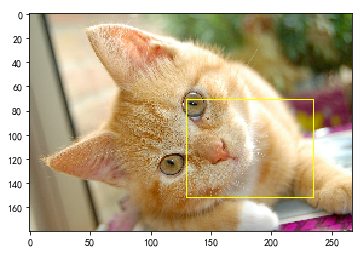
    # 在原图上用标注框画出截取的范围。由于原图的分辨率较大(2673x1797),生成的标注框

    # 在Jupyter Notebook上通常因边框过细而无法分辨,这里为了演示方便先缩小分辨率。

    image_small = tf.image.resize_images(image_float, [180, 267], method=0)

    batchced_img = tf.expand_dims(image_small, 0)

    image_with_box = tf.image.draw_bounding_boxes(batchced_img, bbox_for_draw)

    print(bbox_for_draw.eval())

    plt.imshow(image_with_box[0].eval())

    plt.show()
吴裕雄--天生自然 pythonTensorFlow图形数据处理:TensorFlow图像处理函数的更多相关文章
- 吴裕雄--天生自然 pythonTensorFlow图形数据处理:windows操作系统安装指定版本的tensorflow
pip install tensorflow==1.14.0
- 吴裕雄--天生自然 pythonTensorFlow图形数据处理:windows操作系统删除tensorflow
输入:pip uninstall tensorflow Proceed(y/n):y
- 吴裕雄--天生自然 pythonTensorFlow图形数据处理:解决module 'tensorflow' has no attribute 'Session'
原因:因为是tensorflow 2.0版本
- 吴裕雄--天生自然 pythonTensorFlow图形数据处理:循环神经网络预测正弦函数
import numpy as np import tensorflow as tf import matplotlib.pyplot as plt # 定义RNN的参数. HIDDEN_SIZE = ...
- 吴裕雄--天生自然 pythonTensorFlow图形数据处理:数据集高层操作
import tempfile import tensorflow as tf # 1. 列举输入文件. # 输入数据生成的训练和测试数据. train_files = tf.train.match_ ...
- 吴裕雄--天生自然 pythonTensorFlow图形数据处理:数据集基本使用方法
import tempfile import tensorflow as tf # 1. 从数组创建数据集. input_data = [1, 2, 3, 5, 8] dataset = tf.dat ...
- 吴裕雄--天生自然 pythonTensorFlow图形数据处理:输入数据处理框架
import tensorflow as tf # 1. 创建文件列表,通过文件列表创建输入文件队列 files = tf.train.match_filenames_once("F:\\o ...
- 吴裕雄--天生自然 pythonTensorFlow图形数据处理:输入文件队列
import tensorflow as tf # 1. 生成文件存储样例数据. def _int64_feature(value): return tf.train.Feature(int64_li ...
- 吴裕雄--天生自然 pythonTensorFlow图形数据处理:多线程队列操作
import tensorflow as tf #1. 定义队列及其操作. queue = tf.FIFOQueue(100,"float") enqueue_op = queue ...
随机推荐
- multi-layer perceptrons, MLP)模型,CvANN_MLP。
#include <opencv2/core/core.hpp> #include <opencv2/highgui/highgui.hpp> #include <ope ...
- MongoDB三-高级操作
复制来自:http://www.cnblogs.com/huangxincheng/archive/2012/02/21/2361205.html 今天跟大家分享一下mongodb中比较好玩的知识,主 ...
- [WesternCTF2018]shrine
0x00 知识点 SSTI模板注入: 模板注入涉及的是服务端Web应用使用模板引擎渲染用户请求的过程 服务端把用户输入的内容渲染成模板就可能造成SSTI(Server-Side Template In ...
- CCCC 正整数A+B
题意: 本题的目标很简单,就是求两个正整数A和B的和,其中A和B都在区间[1,1000].稍微有点麻烦的是,输入并不保证是两个正整数. 输入格式: 输入在一行给出A和B,其间以空格分开.问题是A和B不 ...
- 查询内核符号链接的信息的API
NtOpenSymbolicLinkObject和NtQuerySymbolicLinkObject获取指定符号链接的信息 版权声明:本文为博主原创文章,未经博主允许不得转载.
- XML--XML概览
参考 https://www.cnblogs.com/fangjian0423/p/xml-namespace.html http://www.w3school.com.cn/x.asp xmlns ...
- input只允许输入数字,并且小数点后保留4位
<input type="text" value="" name="should_send_num" id="should_ ...
- PHP SeasLog实现高性能日志记录
https://www.jianshu.com/p/b5c01eb49df0 windows 安装 注意查看上面的信息 我标注了几个关键点 然后下载自己对应的 https://windows.php ...
- Iterator迭代器,获取集合元素
* Object next() :返回下一个元素 * boolean hasNext():判断时是否有元素可以获取 public static void main(String[] args ...
- 二十三种设计模式 python实现
设计模式是什么? 设计模式是经过总结.优化的,对我们经常会碰到的一些编程问题的可重用解决方案.一个设计模式并不像一个类或一个库那样能够直接作用于我们的代码.反之,设计模式更为高级,它是一种必须在特定情 ...