
PhoenixFD插件流体模拟——UI布局【Resimulation】详解
Liquid Resimulation
流体再(重)渲染
本文主要讲解Resimulation折叠栏中的内容
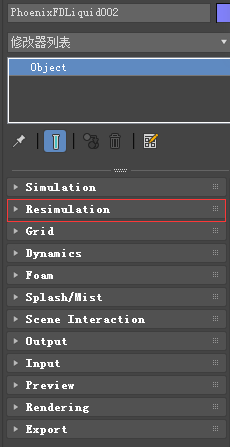
主要内容
- Overview 综述
- Parameters 参数
综述
Liquid Resimulation uses an already simulated cache sequence and allows you to add, delete or modify the Splash, Mist, Foam or Wetmap particle systems.
Liquid Resimulation使用一个已经仿真好的缓存序列,让你可以添加、删除和修改泼溅、薄雾、泡沫和wetmap粒子系统。
It will preserve the Liquid and the particle systems you are happy with.它可以保存你喜欢的液体和粒子系统。
The particle resimulation will affect only the particle systems which are checked in this rollout. 粒子重新模拟将只影响在此折叠栏中检查的粒子系统。
If a particle system is not checked, it will remain unchanged.如果某个粒子系统未选中,则其保持不变。
The Liquid always remains unchanged. 流体保持不变。
While the Fire/Smoke Resimulation creates new cache files during the simulation process, the Liquid Resimulation overwrites the existing cache files.
Fire/Smoke Resimulation在仿真中产生的新数据将覆盖已有的缓存。
Using Resimulation to just modify a particle system is practical only in case you have a large number of secondary particles such as Foam, Splash, etc in relation to the number of Liquid particles. 当相对于液体粒子数量有大量的二次粒子,如泡沫,飞溅等,仅仅使用再模拟是非常实用的。
If you have mostly Liquid particles and very few other particles, it will be faster to just simulate again.而当流体粒子很多时,再次渲染就会快很多。
!The Affect Liquid parameter on the Splash and Mist rollout will be ignored when resimulating Splash, because the liquid is already simulated and cannot be changed without a full simulation.
在Splash和Mist折叠栏中,影响流体参数将会被自动忽略,因为流体粒子通道在再仿真时是不变的。
!You can resimulate over the resimulated caches and so on - it's not necessarily just 2 passes at most. 你可以一直再渲染,但是推荐最多不超过两次。
1 Workflow for modifying an existing particle system 修改一个已存在粒子系统的步骤


2 Workflow for adding a particle system that did not exist prior to resimulating 添加一个新的粒子系统的步骤

3 Working for deleting an existing particle system 删除一个粒子系统的步骤

UI Path: ||Select Liquid Simulator | LiquidSim object|| > Modify panel > Resimulation rollout
参数

Enable Particle Resimulation | resim_resimulate_particles – Enables the resimulation.
Splash and mist | resim _splash – Specifies that the splash and mist will be recalculated.
The Affect Liquid parameter on the Splash and Mist roll-out will be ignored when resimulating Splash, because the liquid is already simulated and cannot be changed without a full simulation.
Foam | resim _foam – Specifies that the foam will be recalculated.
Wetting | resim _wet – Specifies that a WetMap will be recalculated.
The Sticky Effect setting for Wetting in the Liquid rollout will be ignored when resimulating wetting. This is because the liquid is already simulated and cannot be changed without a full simulation.
? – Opens up the help documents for the Liquid Resimulation process.
PhoenixFD插件流体模拟——UI布局【Resimulation】详解的更多相关文章
- PhoenixFD插件流体模拟——UI布局【Output】详解
Liquid Output 流体输出 本文主要讲解Output折叠栏中的内容.原文地址:https://docs.chaosgroup.com/display/PHX3MAX/Liquid+Outp ...
- PhoenixFD插件流体模拟——UI布局【Simulation】详解
前言 之前使用RealFlow做流体模拟,但是总得和3ds导来导去,略显麻烦,特意学习PhoenixFD插件,直接在3ds中进行流体模拟.若读者有更好的流体模拟方法,欢迎在评论区交流. 原文地址:ht ...
- PhoenixFD插件流体模拟——UI布局【Rendering】详解
Liquid Rendering 流体渲染 本文主要讲解Rendering折叠栏中的内容.原文地址:https://docs.chaosgroup.com/display/PHX3MAX/Liqui ...
- PhoenixFD插件流体模拟——UI布局【Input】详解
Liquid Input 流体输入 本文主要讲解Input折叠栏中的内容.原文地址:https://docs.chaosgroup.com/display/PHX3MAX/Liquid+Input 主 ...
- PhoenixFD插件流体模拟——UI布局【Splash | Mist】详解
液体飞溅 | 水雾 本文主要讲解Splash | Mist折叠栏中的内容.原文地址:https://docs.chaosgroup.com/display/PHX3MAX/Liquid+Splash+ ...
- PhoenixFD插件流体模拟——UI布局【Foam】详解
流体泡沫 本文主要讲解Foam折叠栏中的内容.原文地址:https://docs.chaosgroup.com/display/PHX3MAX/Liquid+Foam 主要内容 Overview 综述 ...
- PhoenixFD插件流体模拟——UI布局【Export】详解
Liquid Export 流体导出 本文主要讲解Export折叠栏中的内容.原文地址:https://docs.chaosgroup.com/display/PHX3MAX/Liquid+Expor ...
- PhoenixFD插件流体模拟——UI布局【Preview】详解
Liquid Preview 流体预览 本文主要讲解Preview折叠栏中的内容.原文地址:https://docs.chaosgroup.com/display/PHX3MAX/Liquid+Pr ...
- PhoenixFD插件流体模拟——UI布局【Dynamics】详解
流体动力学 本文主要讲解Dynamics折叠栏中的内容.原文地址:https://docs.chaosgroup.com/display/PHX3MAX/Liquid+Dynamics 主要内容 Ov ...
随机推荐
- MySQL 烂笔头 备份和还原
备份 mysqldump -u root -p testdb > d:/backupfile.sql 还原 mysql -u root -p testdb2 <d:/backupfile. ...
- icomoon:生成字体图标的方法并应用
字体图标任意缩放不会失真,也大大减少请求数量,非常好用. 在线生成工具:https://icomoon.io/app/#/select 在线SVG图库(阿里), 用于导入:http://www.ic ...
- 正点原子stm32f103mini版串口下载BOOT0引脚与与CH340G芯片引脚RTS、DTR、的关系原理
在做串口实验时,一直搞不明白一键下载是怎么回事,于是自己就去捉摸CH340G这块芯片,那么这里我将详细的讲解一下这块芯片怎么与stm32配合使用的. 1.由CH340G芯片资料可以知道这两个引脚的功能 ...
- nginx的启动与停止
参考 :http://www.cnblogs.com/codingcloud/p/5095066.html 启动: /usr/local/nginx/sbin/nginx -c /usr/local/ ...
- 【OpenStack】network相关知识学习
network 类型 local:通信不跨主机,必须同一网段,主要做单机测试使用: flat:统计可以跨主机,但是需要在同一网段: 每个 flat network 都会独占一个物理网卡 计算节点上 b ...
- python configparser使用
.ini文件由若干section(部分)组成, 而每一个section又由若干键值对组成. 以 example.ini为例: [DEFAULT] ServerAliveInterval = 45 Co ...
- git之sourceTree操作流程
1x.sourceTree的使用流程 12.Git管理工具对比(GitBash.EGit.SourceTree) 11.SourceTree使用SSH克隆码云项目 ====== 1x.source ...
- 知识点:Mysql 基本用法之视图
视图 视图是一个虚拟表(非真实存在),其本质是[根据SQL语句获取动态的数据集,并为其命名],用户使用时只需使用[名称]即可获取结果集,可以将该结果集当做表来使用. 使用视图我们可以把查询过程中的临时 ...
- [转]IIS 日志记录时间和实际时间 不一样
今天偶然发现 2003 系统IIS 日志记录时间和实际时间总是差了8个小时,也就是慢了8个小时.苦苦找了半天才发现如下办法能解决 ,特发来分享下 解决1:如果 IIS日志记录默认使用的是W3C扩展日志 ...
- Docker系列07:Docker-compose
1 什么是Docker-Compose Compose项目来源于之前的fig项目,使用python语言编写,与docker/swarm配合度很高. Compose 是 Docker 容器进行编排的工 ...