
[原]Failed connect to mirrors.cloud.aliyuncs.com:80; Connection refused
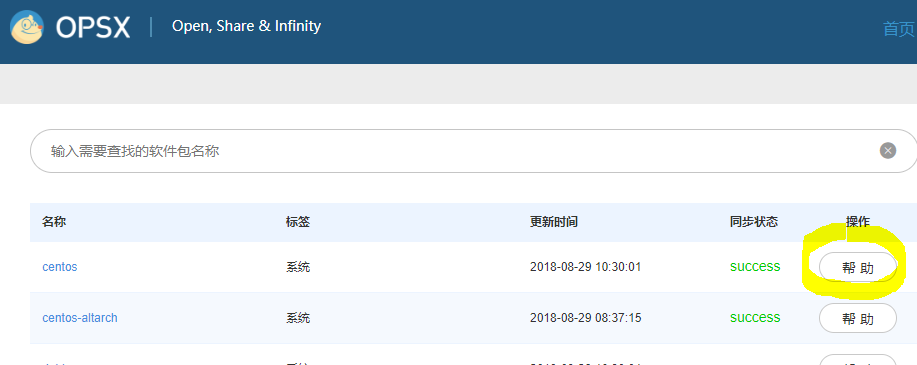
web site : https://opsx.alibaba.com/mirror
运行后出现下面的Error:
base//x86_64/other_db         FAILED

http://mirrors.aliyun.com/centos/7/os/x86_64/repodata/4a963ccbdeb4a9246170341539b5f4816d8a55cc59b65e972ce161da4812b78a-other.sqlite.bz2: [Errno 14] HTTP Error 404 - Not Found

Trying other mirror.

base//x86_64/filelists_db     FAILED

http://mirrors.aliyuncs.com/centos/7/os/x86_64/repodata/dd9bfa9712cb74c7b6698776da1050bc20c71f0dc2a5d9e5a34e292cb739045c-filelists.sqlite.bz2: [Errno 14] curl#7 - "Failed connect to mirrors.aliyuncs.com:80; Connection refused"

Trying other mirror.

base//x86_64/other_db         FAILED

http://mirrors.cloud.aliyuncs.com/centos/7/os/x86_64/repodata/4a963ccbdeb4a9246170341539b5f4816d8a55cc59b65e972ce161da4812b78a-other.sqlite.bz2: [Errno 14] curl#7 - "Failed connect to mirrors.cloud.aliyuncs.com:80; Connection refused"

Trying other mirror.
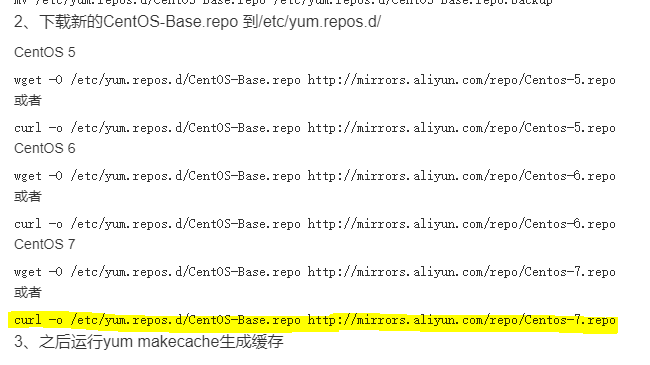
解决方法:
step 1)
[root@controller yum.repos.d]# yum clean all

Loaded plugins: fastestmirror, langpacks

Cleaning repos: base extras updates

Cleaning up everything

Maybe you want: rm -rf /var/cache/yum, to also free up space taken by orphaned data from disabled or removed repos

Cleaning up list of fastest mirrors

[root@controller yum.repos.d]# yum makecache

Loaded plugins: fastestmirror, langpacks

Determining fastest mirrors

 * base: mirrors.aliyun.com

 * extras: mirrors.aliyun.com

 * updates: mirrors.aliyun.com

base                                                                   | 3.6 kB  ::

extras                                                                 | 3.4 kB  ::

updates                                                                | 3.4 kB  ::

(/): base/x86_64/group_gz                                           |  kB  ::

(/): base/x86_64/filelists_db                                       | 6.9 MB  ::

(/): extras/x86_64/filelists_db                                     |  kB  ::

(/): extras/x86_64/prestodelta                                      |   kB  ::

(/): extras/x86_64/primary_db                                       |  kB  ::

(/): extras/x86_64/other_db                                         |  kB  ::

(/): updates/x86_64/prestodelta                                     |  kB  ::

(/): updates/x86_64/filelists_db                                    | 2.9 MB  ::

(/): base/x86_64/primary_db                                         | 5.9 MB  ::

(/): base/x86_64/other_db                                          | 2.5 MB  ::

(/): updates/x86_64/primary_db                                     | 5.2 MB  ::

(/): updates/x86_64/other_db                                       |  kB  ::

Metadata Cache Created
[原]Failed connect to mirrors.cloud.aliyuncs.com:80; Connection refused的更多相关文章
- Failed connect to mirrors.cloud.aliyuncs.com:80
在yum insatall 安装是报错 Failed connect to mirrors.cloud.aliyuncs.com:80; Connection refused 解决方法: cd /et ...
- 阿里云apt-get安装包时Err:2 http://mirrors.cloud.aliyuncs.com/ubuntu xenial-security/main amd64 git amd64 1:2.7.4-0ubuntu1.2 404 Not Found
新部署的云服务器出现如下错误: root@iZj6cbjalvhsw0fhndmm5xZ:~# apt-get install git Reading package lists... Done Bu ...
- centos 7 IP不能访问nginx Failed connect to 185.239.226.111:80; No route to host解决办法
服务器环境 centos 7.4 问题描述 1.可以ping通IP ,用IP访问nginx 不能访问,在服务器上curl localhost curl 185.239.226.111可以获得 [ro ...
- Failed to connect to raw.githubusercontent.com port 443: Connection refused
问题:macOS安装Homebrew时总是报错(Failed to connect to raw.githubusercontent.com port 443: Connection refused) ...
- Linux下安装vim-plug报错:Failed to connect to raw.githubusercontent.com port 443: Connection refused
安装vim-plug时,输入以下命令: curl -fLo ~/.vim/autoload/plug.vim --create-dirs https://raw.githubusercontent.c ...
- ssh: connect to host github.com port 22: Connection refused
假设git例如,下面的问题时,远程推送: [fulinux@ubuntu learngit]$ git push -u origin master ssh: connect to host githu ...
- centos解决bash: telnet: command not found...&& telnet: connect to address 127.0.0.1: Connection refused拒绝连接
检查telnet是否已安装: [root@hostuser src]# rpm -q telnet-serverpackage telnet-server is not installed[root@ ...
- [原]openstack-kilo--issue(十一)Failed connect to 169.254.169.254:80; No route to host
本博客已经添加"打赏"功能,"打赏"位置位于右边栏红色框中,感谢您赞助的咖啡. # curl http://169.254.169.254/latest/use ...
- openstack-kilo--issue(十一)Failed connect to 169.254.169.254:80; No route to host
# curl http://169.254.169.254/latest/user-data curl: () Failed connect to ; No route to host 解决方案: c ...
随机推荐
- Groovy 反射字符串常量方法
Keywords: Groovy, Reflection, 反射 The Reflection of Groovy String constant style method. Groovy支持以下的方 ...
- 【组合数】微信群 @upcexam6016
时间限制: 1 Sec 内存限制: 128 MB 题目描述 众所周知,一个有着6个人的宿舍可以有7个微信群(^_^,别问我我也不知道为什么),然而事实上这个数字可以更大,因为每3个或者是更多的人都可以 ...
- GMA Round 1 YGGDRASIL
传送门 YGGDRASIL 在YGGDRASIL世界,一年有213天. Demiurge推广种植了一种植物,姑且称之为“黄金果”,它第一期生长需要140天,此后第i期生长需要的天数$a_i$满足$a_ ...
- Codeforces899C Dividing the numbers(数论)
http://codeforces.com/problemset/problem/899/C tot为奇数时,绝对差为1:tot为偶数时,绝对差为0. 难点在于如何输出. #include<io ...
- jQuery 学习04——遍历:定义、向上、向下、同级、过滤
Query 遍历,意为"移动",用于根据其相对于其他元素的关系来"查找"(或选取)HTML 元素. 以某项选择开始,并沿着这个选择移动,直到抵达您期望的元素为止 ...
- JSP解决:Attempt to clear a buffer that's already been flushed错误(jsp:forward标签跳转空白)
[摘要:本日正在开辟过程当中发明一个题目:正在页里中应用了jsp:forward扔错Attempt to clear a buffer that's already been flushed!! 百思 ...
- 关闭windows10更新
除了能够禁用Windows自动更新外,还能一键禁用Windows安全中心.Windows Defender.Windows防火墙. 下载地址 https://files.cnblogs.com/fil ...
- 使用sshfs将远程目录挂载到本地
使用sshfs将远程目录挂载到本地 转自:http://blog.sina.com.cn/s/blog_6561ca8c0102vc2u.html 在Linux下我们通常使用ssh命令来登录远程Lin ...
- 超过 130 个你需要了解的 vim 命令
从 1970 年开始,vi 和 vim 就成为了程序员最喜爱的文本编辑器之一.5年前,我写了一个问自己名为 “每个程序员都应该知道的 100 个 vim 命令” 这次算是之前那篇文章的改进版,希望你会 ...
- Avizo/Amira应用 - 如何计算面孔率
对于在Avizo或Amira中如何计算孔隙率,这个太简单,完成孔隙和整体材料的识别,再利用Volume Fraction计算即可获得,这里说的是每一层的面孔率如何计算? 数据导入,选取一个简单的过滤处 ...