
iOS - UISwitch
前言
	NS_CLASS_AVAILABLE_IOS(2_0) __TVOS_PROHIBITED @interface UISwitch : UIControl <NSCoding>

	@available(iOS 2.0, *)						   public class UISwitch : UIControl, NSCoding
1、Switch 的创建
Objective-C
	// 实例化 switch 对象,switch 的大小是由系统固定的

	UISwitch *switch1 = [[UISwitch alloc] init];

	// 将 sw 添加到 view

	[self.view addSubview:switch1];
Swift
	// 实例化 switch 对象,switch 的大小是由系统固定的

	let switch1:UISwitch = UISwitch()

	// 将 sw 添加到 view

	self.view.addSubview(switch1)
2、Switch 的设置
Objective-C
	// 设置位置

	switch1.center = self.view.center;

	// 设置 tag 值

	switch1.tag = 100;

	// 设置外边框颜色

	switch1.tintColor = [UIColor redColor];

	// 设置滑块的颜色

	switch1.thumbTintColor = [UIColor blueColor];

	// 设置 on 时的颜色

	/*

		默认为绿色

	*/

	switch1.onTintColor = [UIColor orangeColor];

	// 设置当前的开关状态

	switch1.on = YES;

	// 获取当前的开关状态

	BOOL isOn = switch1.isOn;

	// 添加点击触发事件

	[switch1 addTarget:self action:@selector(switchClick:) forControlEvents:UIControlEventValueChanged];
Swift
	// 设置位置

	switch1.center = self.view.center

	// 设置 tag 值

	switch1.tag = 100

	// 设置外边框颜色

	switch1.tintColor = UIColor.redColor()

	// 设置滑块的颜色

	switch1.thumbTintColor = UIColor.blueColor()

	// 设置 on 时的颜色

	/*

		默认为绿色

	*/

	switch1.onTintColor = UIColor.orangeColor()

	// 设置当前的开关状态

	switch1.on = true

	// 获取当前的开关状态

	let isOn:Bool = switch1.on

	// 添加点击触发事件

	switch1.addTarget(self, action: #selector(UiSwitch.switchClick(_:)), forControlEvents: .ValueChanged)
3、Storyboard 中设置
在 Storyboard 场景中设置
Switch 设置
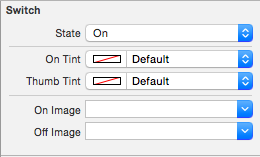
State 开关状态 |
On Tint | 开关开时的颜色
Thumb Tint | 开关滑块的颜色
|
On Image | 开关开时的图片
Off Image | 开关关时的图片Control 设置
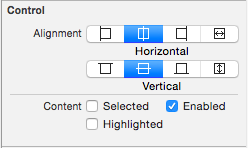
Alignment 文字对齐方式 |
Content |
-- Selected | 选中
-- Enable | 可用
-- Highlighted | 高亮
iOS - UISwitch的更多相关文章
- IOS UISwitch控件的基本使用
* UISwitch继承自UIControl,因此也能像UIButton一样监听一些事件,比如状态改变事件* UISwitch可以通过拖线监听状态改变* UISwitch可以通过addTarget:. ...
- IOS UISwitch 控件
转自:http://my.oschina.net/wolx/blog/396680 一 UISwitch 简介 二 UISwitch 创建 三设置选中状态 四 添加监听 五 测试代码 5.1 代码 5 ...
- IOS 7 开发范例 - UISwitch的使用
Creating and Using Switches with UISwitch You would like to give your users the ability to turn an o ...
- iOS自定义的UISwitch按钮
UISwitch开关控件 开关代替了点选框.开关是到目前为止用起来最简单的控件,不过仍然可以作一定程度的定制化. 一.创建 UISwitch* mySwitch = [[ UISwitchalloc] ...
- IOS开发UI基础UISwitch属性
UISwitch属性1. onTintColor 处于on时switch 的颜色 switchImage.onTintColor = [UIColor grayColor];2.tintC ...
- iOS开发——UI篇Swift篇&UISwitch/UIStepper
UISwitch/UIStepper override func viewDidLoad() { super.viewDidLoad() titleLabel.text = titleString / ...
- iOS - UI - UISwitch
UISwitch //开关 不用设置宽高 有默认宽高 UISwitch * sw = [[UISwitch alloc] initWithFrame:CGRectMake(100, 100, ...
- UISwitch + UIimage - 初识IOS
这里解释一个小例子,希望对你有点帮助,利用UISwitch控制UIimage的动画效果 先定义一个数组,用来存放照片,现在定义数组有一个特别简单的方法: NSArray *image1 = @[]; ...
- IOS开发之XCode学习011:UISwitch控件
此文学习来源为:http://study.163.com/course/introduction/1002858003.htm 此工程文件实现功能: 1.定义UIswitch控件,添加UIswitc ...
随机推荐
- 【Pro ASP.NET MVC 3 Framework】.学习笔记.1.主要语言特性
C# 是一个富有特性的语言,并不是所有的程序员都熟悉本书依赖的所有特性.在本章,我们看看作为一个好的MVC程序员需要知道的C#特性. 1 C#主要特性 } 1.1 使用扩展方法 扩展方法 在你不能拥有 ...
- oralce创建用户
oralce创建用户: sqlplus /nolog回车 -->conn esun/esun@esuntech; -->create user xlh identified by pass ...
- ThinkPHP跳转与重定向的区别在哪里
跳转: 浏览器认为 : 当前 URL 请求成功 , 重新请求新的 URL . 浏览器会记录当前的 URL 和新的 URL 在请求历史记录中. 回退, 是可以回退到 , 当前的 URL 上的 . ( 无 ...
- 深入浅出Windows Phone 8应用开发
刚刚拿到<深入浅出Windows Phone 8应用开发>这本书,开始捣鼓我的Nokia Lumia 925T,已经有开发一个属于自己的App的想法了,计划先不公布了,等我这个App上线了 ...
- mongodb 2.6 window 安装启动服务
安装目录:C:\Program Files\MongoDB 2.6 Standard\ 创建目录:D:\mongodb\data 通过cmd,执行如下命令: cd C:\Program Files ...
- C#:简单线程样例
1.定义线程类及内部事件 using System; using System.Collections.Generic; using System.Text; using System.Threadi ...
- 《深度探索C++对象模型》2
第四章: function语意学 非静态成员函数: 名称的特殊处理: 静态成员函数由于缺乏this指针,因此差不多等于非成员函数: virtual table布局(单一继承): 单一继承下函数调用: ...
- linux 时钟源初步分析linux kernel 时钟框架详细介绍
初步概念: 看datasheet的关于时钟与定时器的部分, FCLK供给cpu, HCLK供给AHB总线设备(存储器控制器,中断控制器.LCD控制器.DMA.USB主机控制器等), PCLK供给APB ...
- js笔记---封装一般运动
<!DOCTYPE html PUBLIC "-//W3C//DTD XHTML 1.0 Transitional//EN" "http://www.w3.org/ ...
- DataRow数组转换DataTable
public DataTable ToDataTable(DataRow[] rows) { if (rows == null || rows.Length == 0) return null; Da ...