
iOS - UISwitch
前言
	NS_CLASS_AVAILABLE_IOS(2_0) __TVOS_PROHIBITED @interface UISwitch : UIControl <NSCoding>

	@available(iOS 2.0, *)						   public class UISwitch : UIControl, NSCoding
1、Switch 的创建
Objective-C
	// 实例化 switch 对象,switch 的大小是由系统固定的

	UISwitch *switch1 = [[UISwitch alloc] init];

	// 将 sw 添加到 view

	[self.view addSubview:switch1];
Swift
	// 实例化 switch 对象,switch 的大小是由系统固定的

	let switch1:UISwitch = UISwitch()

	// 将 sw 添加到 view

	self.view.addSubview(switch1)
2、Switch 的设置
Objective-C
	// 设置位置

	switch1.center = self.view.center;

	// 设置 tag 值

	switch1.tag = 100;

	// 设置外边框颜色

	switch1.tintColor = [UIColor redColor];

	// 设置滑块的颜色

	switch1.thumbTintColor = [UIColor blueColor];

	// 设置 on 时的颜色

	/*

		默认为绿色

	*/

	switch1.onTintColor = [UIColor orangeColor];

	// 设置当前的开关状态

	switch1.on = YES;

	// 获取当前的开关状态

	BOOL isOn = switch1.isOn;

	// 添加点击触发事件

	[switch1 addTarget:self action:@selector(switchClick:) forControlEvents:UIControlEventValueChanged];
Swift
	// 设置位置

	switch1.center = self.view.center

	// 设置 tag 值

	switch1.tag = 100

	// 设置外边框颜色

	switch1.tintColor = UIColor.redColor()

	// 设置滑块的颜色

	switch1.thumbTintColor = UIColor.blueColor()

	// 设置 on 时的颜色

	/*

		默认为绿色

	*/

	switch1.onTintColor = UIColor.orangeColor()

	// 设置当前的开关状态

	switch1.on = true

	// 获取当前的开关状态

	let isOn:Bool = switch1.on

	// 添加点击触发事件

	switch1.addTarget(self, action: #selector(UiSwitch.switchClick(_:)), forControlEvents: .ValueChanged)
3、Storyboard 中设置
在 Storyboard 场景中设置
Switch 设置
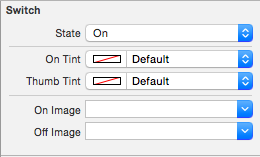
State 开关状态 |
On Tint | 开关开时的颜色
Thumb Tint | 开关滑块的颜色
|
On Image | 开关开时的图片
Off Image | 开关关时的图片Control 设置
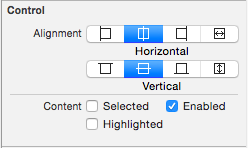
Alignment 文字对齐方式 |
Content |
-- Selected | 选中
-- Enable | 可用
-- Highlighted | 高亮
iOS - UISwitch的更多相关文章
- IOS UISwitch控件的基本使用
* UISwitch继承自UIControl,因此也能像UIButton一样监听一些事件,比如状态改变事件* UISwitch可以通过拖线监听状态改变* UISwitch可以通过addTarget:. ...
- IOS UISwitch 控件
转自:http://my.oschina.net/wolx/blog/396680 一 UISwitch 简介 二 UISwitch 创建 三设置选中状态 四 添加监听 五 测试代码 5.1 代码 5 ...
- IOS 7 开发范例 - UISwitch的使用
Creating and Using Switches with UISwitch You would like to give your users the ability to turn an o ...
- iOS自定义的UISwitch按钮
UISwitch开关控件 开关代替了点选框.开关是到目前为止用起来最简单的控件,不过仍然可以作一定程度的定制化. 一.创建 UISwitch* mySwitch = [[ UISwitchalloc] ...
- IOS开发UI基础UISwitch属性
UISwitch属性1. onTintColor 处于on时switch 的颜色 switchImage.onTintColor = [UIColor grayColor];2.tintC ...
- iOS开发——UI篇Swift篇&UISwitch/UIStepper
UISwitch/UIStepper override func viewDidLoad() { super.viewDidLoad() titleLabel.text = titleString / ...
- iOS - UI - UISwitch
UISwitch //开关 不用设置宽高 有默认宽高 UISwitch * sw = [[UISwitch alloc] initWithFrame:CGRectMake(100, 100, ...
- UISwitch + UIimage - 初识IOS
这里解释一个小例子,希望对你有点帮助,利用UISwitch控制UIimage的动画效果 先定义一个数组,用来存放照片,现在定义数组有一个特别简单的方法: NSArray *image1 = @[]; ...
- IOS开发之XCode学习011:UISwitch控件
此文学习来源为:http://study.163.com/course/introduction/1002858003.htm 此工程文件实现功能: 1.定义UIswitch控件,添加UIswitc ...
随机推荐
- PANIC : Error configuring AvalonLogSystem :
ll /tpsys/weblogic/user_projects/domains/mall/velocity.log 有1.7版本的的,不用这个1.4的.1.4会有这个问题: PANIC : Erro ...
- oracle 导出表结构和数据,使用plsql
比如说需要把A数据库里面的数据,导入到B数据库 准备工作:在B数据库中创建B数据库同名的的用户名和表空间,注意大小写必须一样. 1,导出表结构.A数据库里点击工具栏里的tools--Export Us ...
- sdp内容解析
sdp解释 http://datatracker.ietf.org/doc/draft-nandakumar-rtcweb-sdp/?include_text=1
- Oracle truncate和delete的区别
首先truncate是DDL语句,而delete是DML语句. truncate的删除比delete快很多,尤其是表数据量大的时候,原因是truncate执行过程中不产生undo,所以truncate ...
- Android App 开发常用的xUtils框架
最近搜了一些框架供初学者学习,比较了一下XUtils是目前git上比较活跃 功能比较完善的一个框架,是基于afinal开发的,比afinal稳定性提高了不少,下面是介绍: 鉴于大家的热情,我又写了 ...
- UVa 10047,独轮车
题目链接:https://uva.onlinejudge.org/external/100/10047.pdf 题目链接:http://vjudge.net/contest/132239#proble ...
- 用C#钩子写一个改键外挂
我的微信群——软件开发测试工程师交流群,欢迎扫码: 改键是一种习惯,比如在玩儿lol或者dota的时候.理论上玩儿什么游戏都可以改键. 做一个窗体(点击Install——应用改键,点击Uninstal ...
- 2016年10月29日 星期六 --出埃及记 Exodus 19:14
2016年10月29日 星期六 --出埃及记 Exodus 19:14 After Moses had gone down the mountain to the people, he consecr ...
- Repeater的Command操作
Repeater的Command操作 1.ItemCommand事件 :在Repeater中所有能触发事件的控件,都会来触发这一个事件 后台创建:在Page_Load中 Repeater1.ItemC ...
- Duilib中Webbrowser事件完善使其支持判断页面加载完毕
在多iframe的页面中,需要结合DISPID_DOCUMENTCOMPLETE和DISPID_NAVIGATECOMPLETE2两个事件判断页面是否加载完毕,而duilib中没有提供对DISPID_ ...