
C# 编写Windows Service(windows服务程序)【转载】
【转】http://www.cnblogs.com/bluestorm/p/3510398.html
- Windows Service简介:
一个Windows服务程序是在Windows操作系统下能完成特定功能的可执行的应用程序。Windows服务程序虽然是可执行的,但是它不像一般的可执行文件通过双击就能开始运行了,它必须有特定的启动方式。这些启动方式包括了自动启动和手动启动两种。对于自动启动的Windows服务程序,它们在Windows启动或是重启之后用户登录之前就开始执行了。只要你将相应的Windows服务程序注册到服务控制管理器(Service Control Manager)中,并将其启动类别设为自动启动就行了。而对于手动启动的Windows服务程序,你可以通过命令行工具的NET START 命令来启动它,或是通过控制面板中管理工具下的服务一项来启动相应的Windows服务程序。
同样,一个Windows服务程序也不能像一般的应用程序那样被终止。因为Windows服务程序一般是没有用户界面的,所以你也要通过命令行工具或是下面图中的工具来停止它,或是在系统关闭时使得Windows服务程序自动停止。因为Windows服务程序没有用户界面,所以基于用户界面的API函数对其是没有多大的意义。为了能使一个Windows服务程序能够正常并有效的在系统环境下工作,程序员必须实现一系列的方法来完成其服务功能。Windows服务程序的应用范围很广,典型的Windows服务程序包含了硬件控制、应用程序监视、系统级应用、诊断、报告、Web和文件系统服务等功能。
和Windows服务程序相关的命名空间涉及到以下两个:System.ServiceProcess 和System.Diagnostics。
- 用C#创建Windows服务的步骤:
1.创建Windows Service项目
从Visual C# 工程中选取 Windows 服务(Windows Service)选项,给工程一个新文件名,然后点击 确定。
2.向服务中函数功能实现
OnStart函数在启动服务时执行,OnStop函数在停止服务时执行。在这里,当启动和停止服务时,向一个文本文件中写入一些文字信息,代码如下:

using System;

using System.Collections.Generic;

using System.ComponentModel;

using System.Data;

using System.Diagnostics;

using System.IO;

using System.Linq;

using System.ServiceProcess;

using System.Text;

using System.Threading.Tasks;

namespace MyService

{

    public partial class Service1 : ServiceBase

    {

        public Service1()

        {

            InitializeComponent();

        }

        protected override void OnStart(string[] args)

        {

            FileStream fs = new FileStream(@"d:\xx.txt", FileMode.OpenOrCreate, FileAccess.Write);

            StreamWriter sw = new StreamWriter(fs);

            sw.BaseStream.Seek(0, SeekOrigin.End);

            sw.WriteLine("WindowsService: Service Started" + DateTime.Now.ToString() + "\n");

            sw.Flush();

            sw.Close();

            fs.Close();

        }

        //protected override void OnContinue()

        //{

        //    base.OnContinue();

        //}

        //protected override void OnPause()

        //{

        //    base.OnPause(); // father class method inherit

        //}

        //protected override void OnShutdown()

        //{

        //    base.OnShutdown();

        //}

        protected override void OnStop()

        {

            FileStream fs = new FileStream(@"d:\xx.txt", FileMode.OpenOrCreate, FileAccess.Write);

            StreamWriter sw = new StreamWriter(fs);

            sw.BaseStream.Seek(0, SeekOrigin.End);

            sw.WriteLine("WindowsService: Service Stopped" + DateTime.Now.ToString() + "\n");

            sw.Flush();

            sw.Close();

            fs.Close();

        }

    }

}
4.回到设计窗口点右键选择-添加安装程序 -生成serviceInstaller1和 serviceProcessInstaller1两个组件
把serviceInstaller1的属性ServiceName改写为你的服务程序名,并把启动模 式设置为AUTOMATIC
把serviceProcessInstaller1的属性account改写为 LocalSystem
5.编译链接生成服务程序
通过从生成菜单中选择生成来生成项目。
6.安装服务
用.net framework工具INSTALLUTIL安装服务程序即可。
用项目的输出作为参数,从命令行运行 InstallUtil.exe。在命令行中输入下列代码:
installutil yourproject.exe
Hint: a windows service must first be installed using installutil.exe and then started with the serviceExplorer, windows Services Administrative tool or the NET START command.
7.卸载服务
用项目的输出作为参数,从命令行运行 InstallUtil.exe。
installutil /u yourproject.exe
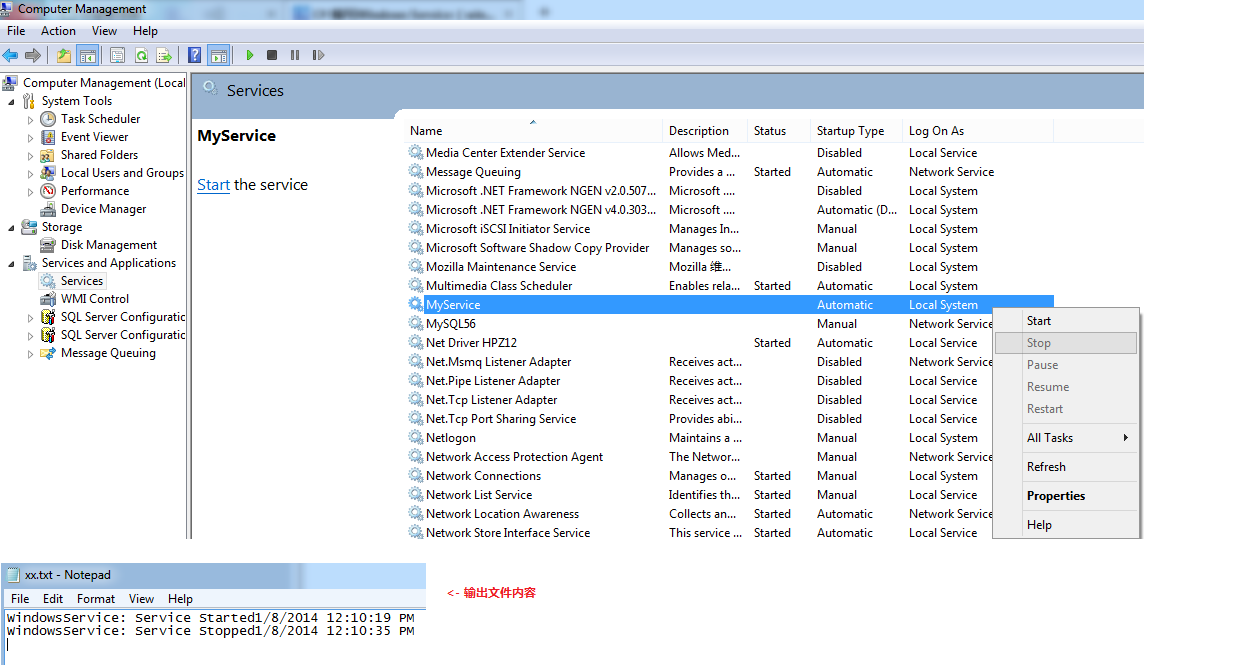
如上服务程序运行结果截图:
- 补充:
1.Service启动属性:
Manual 服务安装后,必须手动启动。
Automatic 每次计算机重新启动时,服务都会自动启动。
Disabled 服务无法启动。
2.新建的Service项目,其中各属性的含义(设计视图->右键属性):
Autolog 是否自动写入系统的日志文件
CanHandlePowerEvent 服务时候接受电源事件
CanPauseAndContinue 服务是否接受暂停或继续运行的请求
CanShutdown 服务是否在运行它的计算机关闭时收到通知,以便能够调用 OnShutDown 过程
CanStop 服务是否接受停止运行的请求
ServiceName 服务名
3. 也可以在系统服务管理器中,设置相应Service的属性或启动方式等
计算机管理 -> 服务和应用程序 -> 服务 -> ...
C# 编写Windows Service(windows服务程序)【转载】的更多相关文章
- 分别在.NET Framework 与 .NET Core 框架下 编写Windows Service(windows服务程序)
前言,为什么会分别在两个框架下编写Windows Service,是因为最近在做区块链这块,使用的是NEO(小蚁区块链)的相关技术,NEO使用的是.net core 2.1,业务上需要写两个程序,一个 ...
- C#写Windows Service(windows服务程序)
背景: 要学习使用一个新东西,我们必须知道他是个什么东西.对于我们此次研究的windows服务来说,他又是个什么东西,其实也没有什么高深的了. windows service概述: 一个 ...
- C#创建、安装、卸载、调试Windows Service(Windows 服务)的简单教程
前言:Microsoft Windows 服务能够创建在它们自己的 Windows 会话中可长时间运行的可执行应用程序.这些服务可以在计算机启动时自动启动,可以暂停和重新启动而且不显示任何用户界面.这 ...
- C#创建Windows Service(Windows 服务)基础教程
Windows Service这一块并不复杂,但是注意事项太多了,网上资料也很凌乱,偶尔自己写也会丢三落四的.所以本文也就产生了,本文不会写复杂的东西,完全以基础应用的需求来写,所以不会对Window ...
- windows service创建使用整合
C#创建Windows Service(Windows 服务)基础教程 C#winform windows服务程序创建与安装 C#实现WinForm随WINDOWS服务一起启动
- C# 编写Windows Service(windows服务程序)
C# 编写Windows Service(windows服务程序) Windows Service简介: 一个Windows服务程序是在Windows操作系统下能完成特定功能的可执行的应用程序.W ...
- C#Windows Service服务程序的安装/卸载、启动/停止 桌面客户端管理程序设计
C#Windows Service服务程序的安装/卸载.启动/停止 桌面客户端管理程序设计 关于Windows Service程序的安装与卸载如果每次使用命令行操作,那简直要奔溃了,太麻烦而且还容易出 ...
- 使用Python写Windows Service服务程序
1.背景 如果你想用Python开发Windows程序,并让其开机启动等,就必须写成windows的服务程序Windows Service,用Python来做这个事情必须要借助第三方模块pywin32 ...
- 让自己的C++程序(非服务程序)运行为一个windows service
因为项目的一些变化和原因,需要把数据处理的一个后台程序创建为一个windows服务,运行以下命令能创建成功: sc create "MyApp Service Name" binP ...
随机推荐
- 深入浅出ES6(十三):类 Class
作者 Jason Orendorff github主页 https://github.com/jorendorff 你可能觉得之前讲解的内容略显复杂,今天我们就讲解一些相对简单的内容,不再是生成器 ...
- 学习android的博客
http://www.cnblogs.com/hll2008/http://svn.apache.org/repos/asf/http://blog.csdn.net/chenzheng_javaht ...
- Heroku 与 ASP.NET 5
一. Heroku 简单来讲,Heroku是一个支持多种语言.极易部署.多价位可免费的 Pass 平台,通过 Buildpack 搭建语言运行环境, 默认内建的大部分是 Web 开发中较为常见的语言, ...
- 转载——有感于三个50岁的美国程序员的生活状态与IT职业杂想
明天就是国庆节了,今天也不想干活干的太累了!写一篇以前去美国出差的杂想,对比于美国50多岁的程序员和大多数50多岁国内父母的生活状态有感而发. 前几年正好有一个项目的机会出差去了一次美国,地点是美国中 ...
- 如何学好oracle?(准备)
循序渐进 多练习 http://www.tudou.com/listplay/ScoGxMJZGQc/Nw9HE62XiGo.html
- lintcode:将二叉查找树转换成双链表
题目 将一个二叉查找树按照中序遍历转换成双向链表 给定一个二叉查找树: 4 / \ 2 5 / \ 1 3 返回 1<->2<->3<->4<->5. ...
- mysql使用过程中碰到的问题
start job failed to start mysql ubuntu 原因时我将var整个目录的组权限设置为www-data了, 试了网上的办法都不行(有个妥协方法是重新安装, 但很不好), ...
- 【原创】Eclipse中为SVN设置快捷键
SVN是深受开发者喜爱的版本控制工具,其较CVS有更好的控制策略.在Android开发中,我也选择SVN作为版本控制工具.Eclipse的SVN插件名叫Subclipse,可以到htt ...
- FastDFS之java客户端使用
为了方便应用程序的访问FastDFS,官网提供了fastdfs-client-java,以便更好的与应用程序结合使用. 下载fastdfs-client-java源码添加到项目工程里面,添加配置文件: ...
- iOS:核心动画之关键帧动画CAKeyframeAnimation
CAKeyframeAnimation——关键帧动画 关键帧动画,也是CAPropertyAnimation的子类,与CABasicAnimation的区别是: –CABasicAnimation只能 ...