
Qt Quick快速入门之qml布局
Qml里面布局主要有两种,锚点布局、Grid布局。
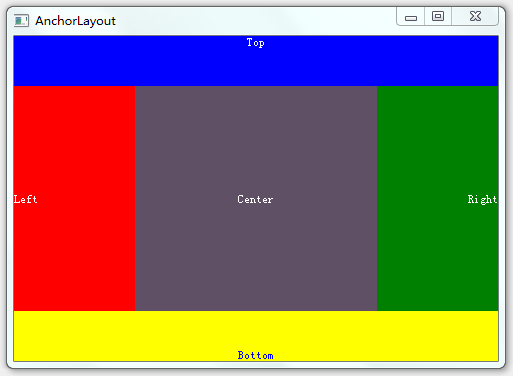
锚点布局使用anchors附件属性将一个元素的边定位到另一个元素的边,从而确定元素的位置和大小。下面是示例
 import QtQuick 2.3

 import QtQuick.Window 2.0

 Window {

     id:anchorLayoutWindow;

     width:;

     height:;

     title: "AnchorLayout";

     Rectangle{

         id:rect1;

         width: parent.width;

         height:;

         color:"blue";

         anchors.top: parent.top;

         Text{ text: "Top"; anchors.horizontalCenter: parent.horizontalCenter;anchors.top:parent.top; color:"white"; }

     }

     Rectangle{

         id:rect2;

         width: parent.width/4;

         color: "red";

         anchors.top:rect1.bottom;

         anchors.bottom: rect4.top

         anchors.left: parent.left;

         Text{ text: "Left"; anchors.verticalCenter: parent.verticalCenter; anchors.left: parent.left;color:"white"; }

     }

     Rectangle{

         id:rect3;

         color: "green";

         width:rect2.width;

         anchors.top:rect1.bottom;

         anchors.bottom: rect4.top;

         anchors.right:parent.right;

         Text{ text: "Right";anchors.right: parent.right;anchors.verticalCenter: parent.verticalCenter;color:"white"; }

     }

     Rectangle{

         id:rect4;

         width: parent.width;

         height:;

         color:"yellow";

         anchors.bottom: parent.bottom;

         Text{ text: "Bottom"; anchors.horizontalCenter: parent.horizontalCenter;anchors.bottom: parent.bottom;color:"blue";}

     }

     Rectangle{

         id:rect5;

         color:"#FF605066";

         anchors.top:rect1.bottom;

         anchors.bottom: rect4.top;

         anchors.left: rect2.right;

         anchors.right: rect3.left;

         Text{ text: "Center";anchors.centerIn: parent; color:"white";}

     }

 }
效果如下图
Grid布局有GridLayout、ColumnLayout、RowLayout、Column、Row,其中ColumnLayout、RowLayout只是GridLayout的一种特例,ColumnLayout表示只有一列,RowLayout表示只有一行。
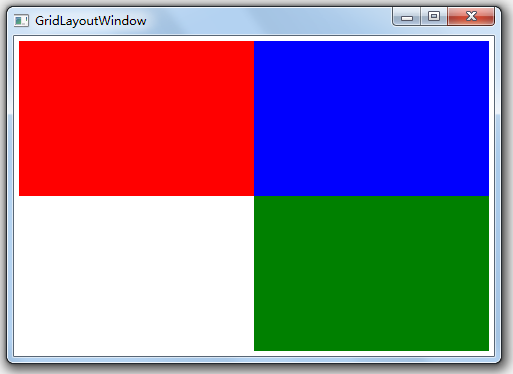
GridLayout使用columns、rows属性将空间分成若干单元格,使用columnSpacing、rowSpacing确立单元格之间的间隔。而GridLayout内部元素的大小由Layout.fillWidth、Layout.fillHeight以及Layout.preferredWidth、Layout.preferredHeight来确定,如Layout.fillWidth:true表示宽度填充整个单元格,Layout.preferredWidth则指定一个建议宽度。Layout.row、Layout.column确定内部元素处于哪个单元格。注意,不要将内部元素的宽度、高度、x、y与GridLayout进行绑定,容易导致绑定循环。
Column、Row类似于html中的float或是wpf中的StackPanel,会直接将元素一个个挨在一起,元素间的间隔使用spacing控制
下面是GridLayout布局的一个示例
 import QtQuick 2.3

 import QtQuick.Window 2.0

 import QtQuick.Layouts 1.1

 Window {

     id:gridLayoutWindow;

     title:"GridLayoutWindow";

     width:;

     height:;

     GridLayout{

         id: gridLayout1

         columns: 2;

         rows:;

         anchors.fill: parent;

         anchors.margins:;

         columnSpacing:;

         rowSpacing:;

         Rectangle{

             id:rect00;

             color: "red";

             Layout.fillWidth: true;

             Layout.fillHeight: true;

         }

         Rectangle{

             id:rect01;

             color: "blue";

             Layout.fillWidth: true;

             Layout.fillHeight: true;

         }

         Rectangle{

             id:rect10;

             color: "green";

             Layout.fillWidth: true;

             Layout.fillHeight: true;

             Layout.row:;

             Layout.column:;

         }

     }

 }
效果如下所图
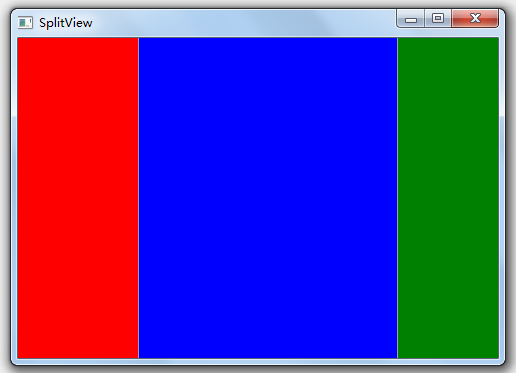
SplitView用于提供带切分条的布局,下面是示例
import QtQuick 2.3

import QtQuick.Window 2.0

import QtQuick.Layouts 1.1

import QtQuick.Controls 1.2

Window {

    width:;

    height:;

    title: "SplitView";

    SplitView{

        anchors.fill:parent;

        orientation: Qt.Horizontal;

        Rectangle{

            id:rect1;

            width:;

            color:"red";

        }

        Rectangle{

            id:rect2;

            Layout.fillWidth: true;

            Layout.minimumWidth:;

            color:"blue";

        }

        Rectangle{

            id:rect3;

            width:;

            color:"green";

        }

    }

}
下面是效果图,注意实际情况可以拖拉切分条
OK,有了以上几种布局方式,通过一定的组合相信可以应对大部分布局需求了
Qt Quick快速入门之qml布局的更多相关文章
- Qt Quick快速入门之qml与C++交互
C++中使用qml对象,直接使用findChild获取qml对象,然后调用setProperty方法设置属性,当然必须在加载qml之后才能使用,不然findChild找不到对象,用法如下. engin ...
- Qt Quick快速入门之线程基础
首先必须明确的是,Qt中的线程使用是相对复杂的,并不像C#中那么随意,特别是结合串口.网络编程等,使用时稍有不慎就会出问题,然后Qt里面经常出了问题就直接崩溃(这个真是谁用谁知道),所以如果在功能上用 ...
- Qt Quick快速入门之信号、槽
信号和槽主要用于组件之间的通信,类似于.net和java中的委托. 使用QObject::connect方法将信号与槽关联起来,然后信号的发起者发出信号,接受者中的槽函数就会执行. 比如connect ...
- [Qt Creator 快速入门] 第5章 应用程序主窗口
对于日常见到的应用程序而言,许多都是基于主窗口的,主窗口中包含了菜单栏.工具栏.状态栏和中心区域等.这一章会详细介绍主窗口的每一个部分,还会涉及资源管理.富文本处理.拖放操作和文档打印等相关内容.重点 ...
- [Qt Creator 快速入门] 第1章 Qt Creator简介
Qt Creator 是一个跨平台的.完整的 Qt 集成开发环境,其中包括了高级C++代码编辑器.项目和生成管理工具.集成的上下文相关的帮助系统.图形化调试器.代码管理和浏览工具等.这一章先对 Qt ...
- [Qt Creator 快速入门] 第2章 Qt程序编译和源码详解
一.编写 Hello World Gui程序 Hello World程序就是让应用程序显示"Hello World"字符串.这是最简单的应用,但却包含了一个应用程序的基本要素,所以 ...
- [Qt Creator 快速入门] 第0篇 开始学习Qt 与Qt Creator
Qt官方信息 Qt官网:http://qt.digia.com/ Qt开源官网:http://qt-project.org/ Qt最新版本下载:http://qt-project.org/downlo ...
- 从头学Qt Quick(2)-- QML语法从一个简单的例子说起
在上一篇文章中,我们对QtQuick做了简单的介绍,体验了使用QML语言构建一个UI的便捷.这里我们简要介绍一下QML的语法. QML将界面分成一些更小的元素,这些元素可以组成一个组件,QML语言描述 ...
- Qt 动画快速入门(一)
Qt-4.6动画Animation快速入门三字决 Qt-4.6新增了Animation Framework(动画框架),让我们能够方便的写一些生动的程序.不必像以前的版本一样,所有的控件都枯燥的呆在伟 ...
随机推荐
- 33、Map简介
Map接口概述 除了Collection之外,常用的集合还有Map接口,里面常用的实现类图如下: map中的元素是以键-值的方式存在的,通过键可以获取到值,键是不可以重复的,跟地图比较像,通过一个坐标 ...
- $("节点名").html("字符串")和$("节点名").text("字符串")区别
1. 经过html方法: $(".js_info").html("~!`@#$%^& ";'<>\=/-!·#¥%…&*()—+|` ...
- 判断最小生成树是否为一(krustra)
题目链接:https://vjudge.net/contest/66965#problem/K 具体思路: 首先跑一遍最短路算法,然后将使用到的边标记一下,同时使用一个数组记录每一个权值出现的次数,如 ...
- Chrome 清除某个特定网站下的缓存
打开开发者工具(F12),选择 Network--Disable cache 即可.需要清除某网站缓存时 F12 打开开发者工具就会自动清除这个网站的缓存,而不必清除所有网站的缓存了.
- UNIX环境高级编程 第4章 文件和目录
第三章说明了关于文件I/O的基本函数,主要是针对普通regular类型文件.本章描述文件的属性,除了regular文件还有其他类型的文件. 函数stat.fstat.fstatat和lstat sta ...
- Strusts2笔记7--国际化
国际化: 国际化是指,使程序在不做任何修改的情况下,就可以使用在不同的语言环境中.国际化在一般性项目中是不常用的.在编程中简称 i18n. 国际化是通过读取资源文件的形式实现的.资源文件的定义与注册, ...
- Linux内核Ramdisk(initrd)机制【转】
转自:http://www.cnblogs.com/armlinux/archive/2011/03/30/2396827.html 摘要:对于Linux用户来说,Ramdisk并不陌生,可是为什么需 ...
- 孤的Scrapy官文阅读进程
上月底开始学习Scrapy爬虫框架,看了一些中文文档,讲应用.讲基础的,对其有一些了解了.终于在28日打开Scrapy的官网,并制作了其文档的思维导图,进而开启了其文档的阅读之旅. 本文展示了从6月2 ...
- React 学习一 运行
最近项目准备使用React作为前端,主要第一比较火,第二比较小.抽空先来学习一下. 首先下载资源文件:压缩后不到50KB,是挺小的哦. 其中:react.js 是 React 的核心库,react-d ...
- 洛谷P2002消息扩散
传送门啦 这个题就是tarjan强连通分量与入度的例题了. 思路: 利用缩点的思想,先预处理一下所有的强连通分量,然后把每个强连通分量内的所有节点看做一个节点,然后处理一张新图,然后检查每个点的入度, ...