
sharc dsp 学习记录1---2014-07-30
从今天开始记录学习sharc dsp过程中的点点滴滴吧。
DPI:Digital Peripheral Interface
DAI:Digital Audio Interface
SHARC SIMD Core
SIMD 单指令多数据
ADSP-2148x包含两个用作单指令、多数据(SIMD)引擎的计算处理器元件,分别称为PEX和PEY,各元件均由ALU、乘法器、移位器和寄存器文件组成。
PEX始终有效,PEY可通过将MODE1寄存器的PEYEN模式位设为1来使能。SIMD模式允许处理器在两个处理元件中执行同一指令,但各处理元件处理不
同的数据。这种架构对于执行计算密集型DSP算法非常有效
SIMD Enabled:
When any computation or data access is executed, it will be performed automatically in both processing elements
F0 = F1 + F2; explicitly defined in source code Will execute in PEx
S0 = S1 + S2; implicit operation not defined in source code Will be automatically executed in PEy in the same instruction cycle
SIMD Disabled (SISD Mode):
Only the explicit instruction will be executed in PEx
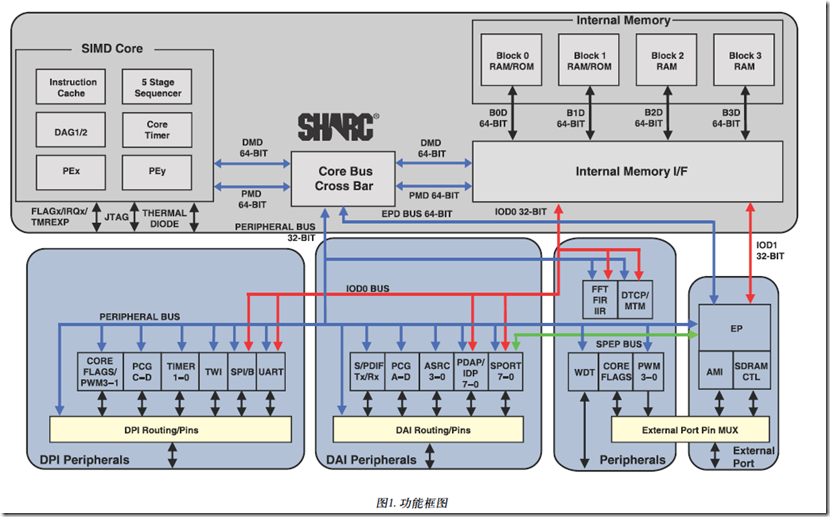
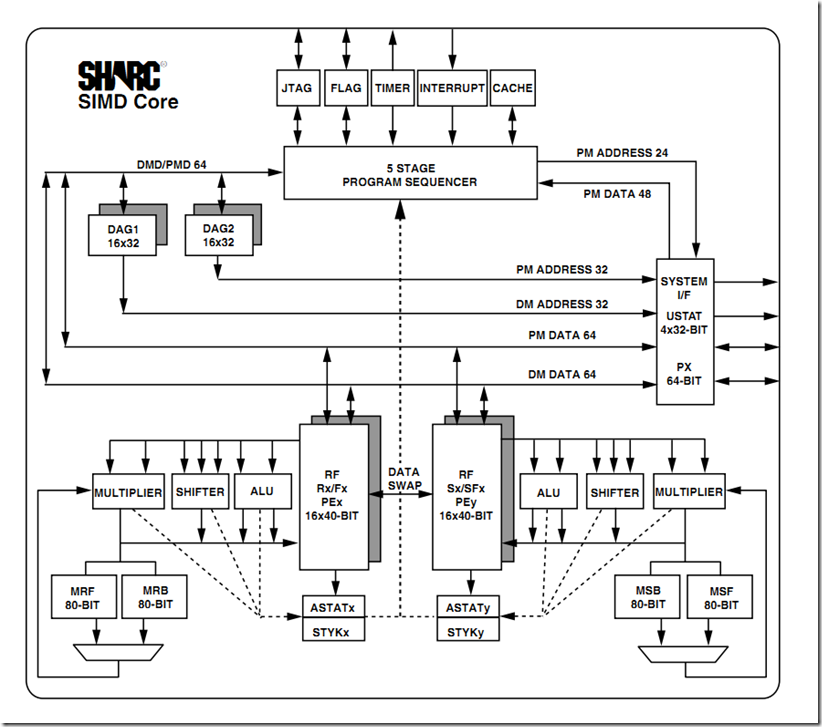
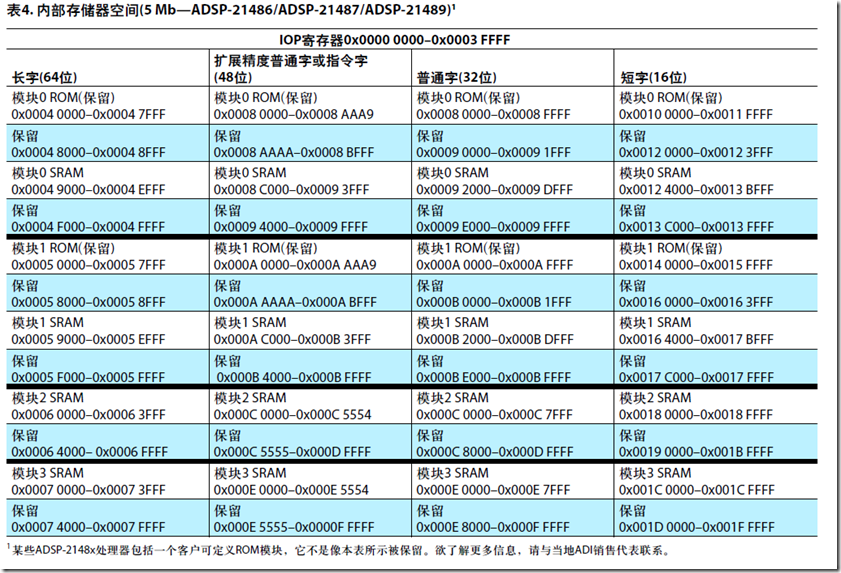
PM地址总线的宽度 = 24bits 。可最多访问16Mbit的程序/数据。
PM数据总线的宽度 = 48bits。 用以存取48 位字长的指令,当用来存放数据时,32 位单精度浮点数或32位定点数将位于48 位的高32 位中
48位指令字支持各种并行操作,可实现简练编程。例如,处理器可以有条件地在两个处理元件中执行乘法、加法和减法,同时进行分支并从存储
器获取最多4个32位数据值,所有这些只需一个指令。
汇编程序分析(FIR)
#include "def21364.h" /* Symbol Definition File */
#define TAPS 64 /* length of filter */
#define N 128 /* number of samples */.extern ss_fir;
/* DM data */
.section/dm seg_dmda; /* Segments are declared in the .ldf file*/
.ALIGN 2; /* Set alignment to long-word boundary for next variable */
.var dline[TAPS+1]; /* delay line compensate for circ buffer, see comments in SS_FIR.asm */
.ALIGN 2;
.var input[N] = "input.dat"; /* array of samples *//* PM data */
.section/dm seg_pmda;
.ALIGN 2;
.var coeffs[TAPS] = "ssfcoeffs.dat"; /* Filter coefficients */
.ALIGN 2;
.var output[N]; /* Output array *//* PM interrupt vector code */
.section/pm seg_rth;
Reserved_1: rti; nop; nop; nop;
Chip_Reset: idle; jump start; nop; nop;/* program memory code */
.segment/pm seg_pmco;start:
/*--------------------- Setup modify registers for arrays --------------------*/
m1 = 1;
m2 = -1;
m3 = 2;m9 = 2;
m10= 1;
/*----------------------------------------------------------------------------*/
/*--------------------- Initialization delay line ----------------------------*/
b0 = dline;
l0 = @dline-1;f8=0.0;
lcntr = TAPS, do clear_fir until lce;
clear_fir: dm(i0,m1) = f8;i0 = dline;
/*----------------------------------------------------------------------------*/
/*-------------- Setup DAGs for input/output/coeffs and call ss_fir ----------*/
r3 = TAPS;
r3 = lshift r3 by -1; /* r3 = taps/2 due to SIMD mode */
r0 = 3; /* 3 macs outside of fir mac loop */
r3 = r3 - r0; /* r3 = taps/2 - 3 for fir mac loop counter */
b1 = input;
l1 = 0;b9 = output;
l9 = 0;b8 = coeffs;
l8 = @coeffs;
lcntr = N, do fir_loop until lce;
call ss_fir (db); /* Call fir */
f0 = dm(i1,m1); /* Read one sample */
nop; /* Call can't be in last three locations of a loop */
fir_loop: pm(i9,m10)=f8; /* Write result to output */
/*----------------------------------------------------------------------------*/
/* Terminate and wait */
wait1: idle;
jump wait1;
#include "def21364.h" /* Symbol Definition File */
.global ss_fir;
/* program memory code */
.section/pm seg_pmco;ss_fir:
bit set MODE1 CBUFEN; /* Circular Buffer Enable, one cycle effect latency */
nop; /* Circular Buffering not in effect until next cycle */
s0 = dm(i0, m1); /* move pointer to delay[1] */
bit set MODE1 PEYEN; /* SIMD Mode Enable, one cycle effect latency */
s0 = dm(i0, m2); /* load s0 with the value of delay[1] for SIMD store, move pointer to delay[0] */
dm(i0,m3)=f0, f4 = pm(i8,m9); /* transfer sample to delayline, done in SIMD to load end of buffer + 1 */
/* to compensate for circular buffer issue described above, read 2 coeffs */f8=f0*f4, f0=dm(i0,m3), f4=pm(i8,m9); /* samples * coeffs, read 2 samples, read 2 coeffs */
f12=f0*f4, f0=dm(i0,m3), f4=pm(i8,m9); /* samples * coeffs, read 2 samples, read 2 coeffs */
lcntr=r3, do macs until lce; /* FIR loop */
macs:f12=f0*f4, f8=f8+f12, f0=dm(i0,m3), f4=pm(i8,m9); /* samples * coeffs, accum, read 2 samples, read 2 coeffs */
f12=f0*f4, f8=f8+f12, s0=dm(i0,m2); /* samples * coeffs, accum, dummy read to move pointer to oldest sample */
f8=f8+f12; /* final SIMD accum */
r12=s8; /* move PEy total into PEx register file */
rts (db);
bit clr MODE1 CBUFEN | PEYEN; /* Circular Buffer Disable, SIMD Mode Disable */
f8=f8+f12; /* last accum */
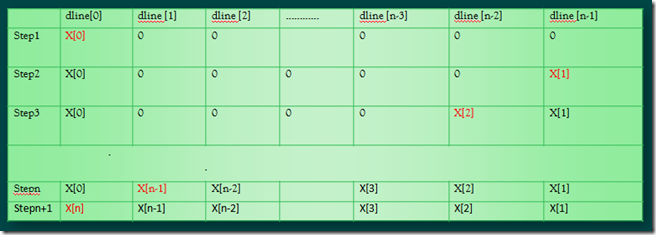
dline的读写
红色表示进入macs 循环前 i0指针指向的位置。
该程序使用了循环寻址的方式
Bx、Lx、Ix 三个寄存器的序号x 必须一致,而Mx 寄存器可以在同一个DAG 组中任意选取
R3 = lshift R3 by -1; //右移1bit
sharc dsp 学习记录1---2014-07-30的更多相关文章
- C语言学习记录_2019.02.07
C99开始,可以用变量来定义数组的大小:例如,利用键盘输入的变量来定义数组大小: 赋值号左边的值叫做左值: 关于数组:编译器和运行环境不会检查数组下标是否越界,无论读还是写. 越界数组可能造成的问题提 ...
- [转]Oracle学习记录 九 Prc C学习
经过前面的了解,现在想用C语言来编程了,搜索了很多东西,后来决定先用Pro C来进行学习 在安装完Oracle数据库后就可以进行编程了,里面有一个命令proc就是对程序进行预编译的. 在这记一下,这是 ...
- Python学习记录day6
title: Python学习记录day6 tags: python author: Chinge Yang date: 2016-12-03 --- Python学习记录day6 @(学习)[pyt ...
- Python学习记录day5
title: Python学习记录day5 tags: python author: Chinge Yang date: 2016-11-26 --- 1.多层装饰器 多层装饰器的原理是,装饰器装饰函 ...
- Matlab 进阶学习记录
最近在看 Faster RCNN的Matlab code,发现很多matlab技巧,在此记录: 1. conf_proposal = proposal_config('image_means', ...
- Git学习记录
一.简要说明 Git是分布式版本控制系统,而非集中式版本控制系统.其优势如下: 自由和开放源码 速度快,体积小 隐式备份(每台用户机上都有一个备份) 安全 不需要强大的硬件 更简单的分支 二.基本概念 ...
- Uboot 2014.07 makefile分析 - 其他Cortex系列
uboot的官网可以通过谷歌搜索得到,显示结果第一个链接就是. 官网:: http://www.denx.de/wiki/U-Boot ftp下载: ftp://ftp.denx.de/pub/u-b ...
- 【转】BLE 学习记录
原文网址:http://m.blog.csdn.net/blog/chiooo/43985401 BLE 学习记录 ANROID BLE 开发,基于 bluetoothlegatt 分析 mBluet ...
- 强化学习读书笔记 - 06~07 - 时序差分学习(Temporal-Difference Learning)
强化学习读书笔记 - 06~07 - 时序差分学习(Temporal-Difference Learning) 学习笔记: Reinforcement Learning: An Introductio ...
随机推荐
- HNOI2018游记
第一次参加本省省选,结果又是一次划水 Day 0 喝了一个小时鸡汤 大家看看人家钱学森(sheng) 竞赛生要多发展些爱好 不要一考完就fake,那种下考说"大佬AC辣!太强啦!月莫月莫月莫 ...
- POJ 1811 Prime Test (Rabin-Miller强伪素数测试 和Pollard-rho 因数分解)
题目链接 Description Given a big integer number, you are required to find out whether it's a prime numbe ...
- [HAOI2018]奇怪的背包 (DP,数论)
[HAOI2018]奇怪的背包 \(solution:\) 首先,这一道题目的描述很像完全背包,但它所说的背包总重量是在模P意义下的,所以肯定会用到数论.我们先分析一下,每一个物品可以放无数次,可以达 ...
- if语句与switch语句
if语句可以替代switch语句,但是switch语句不能完全替代if语句.比如下面这种就是不对的 switch (len) { case (len <= 4): domLen = 4; bre ...
- android的五个进程优先级,内存不足时被清理的顺序
Android操作系统尝试尽可能长时间的保持应用的进程,但当可用内存很低时最终要移走一部分进程.怎样确定那些程序可以运行,那些要被销毁,Android让每一个进程在一个重要级的基础上运行,重要级低的进 ...
- Spring 注解<context:annotation-config> 和 <context:component-scan>的作用与区别
<context:annotation-config> 是用于激活那些已经在spring容器里注册过的bean(无论是通过xml的方式还是通过packagesanning的方式)上面的注解 ...
- RabbitMQ运行机制
AMQP中消息的路由过程和Java开发者熟悉的JMS存在一些差别,AMQP中增加了Exchange和Binding的角色,生产者把消息发布到Exchange上,Binding决定发布到Exchange ...
- SciPy模块应用
1.图像模糊 图像的高斯模糊是非常经典的图像卷积例子.本质上,图像模糊就是将(灰度)图像I 和一个高斯核进行卷积操作:,其中是标准差为σ的二维高斯核.高斯模糊通常是其他图像处理操作的一部分,比如图像 ...
- kafka系列六、java管理kafka Topic
package com.example.demo.topic; import kafka.admin.AdminUtils; import kafka.admin.RackAwareMode; imp ...
- 转载:Java高并发,如何解决,什么方式解决
原文:https://www.cnblogs.com/lr393993507/p/5909804.html 对于我们开发的网站,如果网站的访问量非常大的话,那么我们就需要考虑相关的并发访问问题了.而并 ...