
Android开发 ---基本UI组件3:单选按钮、多选按钮、下拉列表、提交按钮、重置按钮、取消按钮
Android开发 ---基本UI组件2
1、activity_main.xml
描述:
定义一个用户注册按钮
<?xml version="1.0" encoding="utf-8"?>

<LinearLayout xmlns:android="http://schemas.android.com/apk/res/android"

    android:id="@+id/activity_main"

    android:orientation="vertical"

    android:layout_width="match_parent"

    android:layout_height="match_parent">

    <Button

        android:layout_width="match_parent"

        android:layout_height="wrap_content"

        android:text="用户注册"

        android:onClick="test_3"/>

</LinearLayout>
2、MainActivity.java
描述:
页面跳转
package com.example.android_ui;

import android.app.Activity;

import android.content.Intent;

import android.os.Bundle;

import android.view.View;

public class MainActivity extends Activity {

    @Override

    protected void onCreate(Bundle savedInstanceState) {

        super.onCreate(savedInstanceState);

        setContentView(R.layout.activity_main);

    }public void test_3(View view){

        Intent intent=new Intent(this,UserRegisterActivity.class);

        startActivity(intent);

    }

}
3、activity_button.xml
资源文件中的资源:
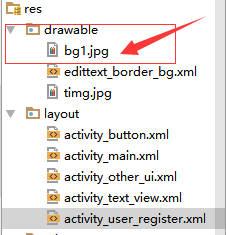

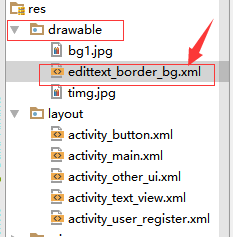
edittext_border_bg.xml
<?xml version="1.0" encoding="utf-8"?>

<shape xmlns:android="http://schemas.android.com/apk/res/android">

    <stroke

        android:width="2dp"

        android:color="@color/colorPrimary"

        />

</shape>
描述:
1、一张背景图像
2、android:maxLength="12" 设置文本输入框中能够输入的最大长度
3、定义了一组单选按钮
4、定义了一组多选按钮
5、定义了一个下拉列表 ---Spinner
6、分别定义了一个提交、重置、取消按钮
<?xml version="1.0" encoding="utf-8"?>

<LinearLayout xmlns:android="http://schemas.android.com/apk/res/android"

    android:id="@+id/activity_user_register"

    android:layout_width="match_parent"

    android:layout_height="match_parent"

    android:layout_marginLeft="5dp"

    android:layout_marginRight="5dp"

    android:orientation="vertical">

    <ImageView

        android:layout_width="match_parent"

        android:src="@drawable/bg1"

        android:scaleType="fitXY"

        android:layout_height="80dp" />

    <TextView

        android:layout_width="match_parent"

        android:text="用户注册"

        android:gravity="center"

        android:textSize="30sp"

        android:layout_marginTop="3dp"

        android:layout_height="wrap_content" />

    <LinearLayout

        android:layout_width="match_parent"

        android:orientation="horizontal"

        android:layout_height="40dp">

        <TextView

            android:layout_width="wrap_content"

            android:layout_height="wrap_content"

            android:text="用户名:"

            android:textSize="22sp"

            android:gravity="bottom"

            />

        <EditText

            android:id="@+id/uname"

            android:layout_width="match_parent"

            android:layout_height="wrap_content"

            android:hint="请输入用户名"

            android:maxLength="12"

            android:textSize="22sp"

            android:background="@drawable/edittext_border_bg"

            />

    </LinearLayout>

    <LinearLayout

        android:layout_width="match_parent"

        android:orientation="horizontal"

        android:layout_height="40dp">

        <TextView

            android:layout_width="wrap_content"

            android:layout_height="wrap_content"

            android:text="密    码:"

            android:textSize="22sp"

            android:gravity="bottom"

            />

        <EditText

            android:id="@+id/upwd"

            android:layout_width="match_parent"

            android:layout_height="wrap_content"

            android:hint="请输入密码"

            android:inputType="textPassword"

            android:maxLength="12"

            android:textSize="22sp"

            android:background="@drawable/edittext_border_bg"

            />

    </LinearLayout>

    <LinearLayout

        android:layout_width="match_parent"

        android:orientation="horizontal"

        android:layout_height="40dp">

        <TextView

            android:layout_width="wrap_content"

            android:layout_height="wrap_content"

            android:text="性    别:"

            android:textSize="22sp"

            android:gravity="bottom"

            />

        <RadioGroup

            android:id="@+id/usexGroup"

            android:orientation="horizontal"

            android:layout_width="match_parent"

            android:layout_height="wrap_content">

            <RadioButton

                android:id="@+id/usex1"

                android:text="男"

                android:checked="true"

                android:layout_width="wrap_content"

                android:layout_height="wrap_content" />

            <RadioButton

                android:id="@+id/usex2"

                android:text="女"

                android:layout_width="wrap_content"

                android:layout_height="wrap_content" />

        </RadioGroup>

    </LinearLayout>

    <LinearLayout

        android:layout_width="match_parent"

        android:orientation="horizontal"

        android:layout_height="40dp">

        <TextView

            android:layout_width="wrap_content"

            android:layout_height="wrap_content"

            android:text="爱    好:"

            android:textSize="22sp"

            android:gravity="bottom"

            />

        <LinearLayout

            android:layout_width="match_parent"

            android:layout_height="wrap_content"

            android:orientation="horizontal">

            <CheckBox

                android:id="@+id/uhobby1"

                android:text="体育"

                android:layout_width="wrap_content"

                android:layout_height="wrap_content" />

            <CheckBox

                android:id="@+id/uhobby2"

                android:text="音乐"

                android:layout_width="wrap_content"

                android:layout_height="wrap_content" />

            <CheckBox

                android:id="@+id/uhobby3"

                android:text="美术"

                android:layout_width="wrap_content"

                android:layout_height="wrap_content" />

        </LinearLayout>

    </LinearLayout>

    <LinearLayout

        android:layout_width="match_parent"

        android:orientation="horizontal"

        android:layout_height="wrap_content">

        <TextView

            android:layout_width="wrap_content"

            android:layout_height="wrap_content"

            android:text="职    业:"

            android:textSize="22sp"

            android:gravity="bottom"

            />

        <Spinner

            android:id="@+id/hjob"

            android:entries="@array/jobs"

            android:spinnerMode="dropdown"

            android:layout_width="match_parent"

            android:layout_height="wrap_content">

        </Spinner>

    </LinearLayout>

    <LinearLayout

        android:layout_width="match_parent"

        android:orientation="horizontal"

        android:layout_height="wrap_content">

        <Button

            android:layout_width="match_parent"

            android:layout_weight="1"

            android:text="提交"

            android:onClick="doSubmit"

            android:layout_height="wrap_content" />

        <Button

            android:layout_width="match_parent"

            android:layout_weight="1"

            android:text="重置"

            android:onClick="doReset"

            android:layout_height="wrap_content" />

        <Button

            android:layout_width="match_parent"

            android:layout_weight="1"

            android:text="取消"

            android:onClick="doBack"

            android:layout_height="wrap_content" />

    </LinearLayout>

</LinearLayout>
4、ButtonActivity.java
描述:
package com.example.android_ui;

import android.app.Activity;

import android.os.Bundle;

import android.view.View;

import android.widget.CheckBox;

import android.widget.EditText;

import android.widget.RadioButton;

import android.widget.RadioGroup;

import android.widget.Spinner;

import android.widget.Toast;

public class UserRegisterActivity extends Activity {

  //获取文本输入框的用户名和密码

    private EditText uname,upwd;
  //获取单选按钮组

    private RadioGroup rgsex;
  //获取多选按钮

    private CheckBox ck1,ck2,ck3;
  //获取下拉列表

    private Spinner spinner;
   //性别默认设置为男

    String sex="男";

    @Override

    protected void onCreate(Bundle savedInstanceState) {

        super.onCreate(savedInstanceState);

        setContentView(R.layout.activity_user_register);
     //分别将所有元素获取到

        uname=(EditText) findViewById(R.id.uname);

        upwd=(EditText) findViewById(R.id.upwd);

        rgsex=(RadioGroup) findViewById(R.id.usexGroup);

        ck1=(CheckBox)findViewById(R.id.uhobby1);

        ck2=(CheckBox)findViewById(R.id.uhobby2);

        ck3=(CheckBox)findViewById(R.id.uhobby3);

        spinner=(Spinner)findViewById(R.id.hjob);

     //给单选按钮组设置选择改变监听事件

        rgsex.setOnCheckedChangeListener(new RadioGroup.OnCheckedChangeListener() {

            @Override

            public void onCheckedChanged(RadioGroup radioGroup, int i) {

                if(i==R.id.usex1){

                    sex="男";

                }else{

                    sex="女";

                }

            }

        });

    }

   //定义一个提交按钮事件

    public void doSubmit(View view){
     //当点击提交按钮时,获取用户名文本框中的文本内容,并转化为字符串保存在name变量上

        String name=uname.getText().toString();
     //同上

        String pwd=upwd.getText().toString();
     //多选按钮的操作

        String hobby="";
     //判断如果ck1被选中

        if(ck1.isChecked()){
       //则 获取到ck1中的文本内容

            hobby=hobby+ck1.getText().toString()+",";

        }
     //同上

        if(ck2.isChecked()){

            hobby=hobby+ck2.getText().toString()+",";

        }
     //同上

        if(ck3.isChecked()){

            hobby=hobby+ck3.getText().toString()+",";

        }
     //如果有一个或一个以上被选中

        if(hobby.length()>0){
       //则hobby调用substring()方法返回一个新字符串,这个字符串从指定的0开始,一直索引到hobby.length()-1为止

            hobby=hobby.substring(0,hobby.length()-1);

        }
     //下拉列表的操作
     //获取当前选中项的值

        String job=spinner.getSelectedItem().toString();

        String message="用户名:"+name+"\n\r";

        message+="密码:"+pwd+"\n\r";

        message+="性别:"+sex+"\n\r";

        message+="爱好:"+hobby+"\n\r";

        message+="职业:"+job+"\n\r";
     //弹出内容

        Toast.makeText(this,message,Toast.LENGTH_LONG).show();

    }
   //定义一个重置按钮

    public void doReset(View view){
     //将用户名文本框设置为空

        uname.setText("");
     //将密码文本框设置为空

        upwd.setText("");
     //将选中的按钮设置为未选中

        ck1.setChecked(false);

        ck2.setChecked(false);

        ck3.setChecked(false);

    }
  //定义一个取消按钮

    public void doBack(View view){

        this.finish();

    }

}
Android开发 ---基本UI组件3:单选按钮、多选按钮、下拉列表、提交按钮、重置按钮、取消按钮的更多相关文章
- Android开发 ---基本UI组件2:图像按钮、单选按钮监听、多选按钮监听、开关
Android开发 ---基本UI组件2 1.activity_main.xml 描述: 定义一个按钮 <?xml version="1.0" encoding=" ...
- Android开发 ---基本UI组件4:拖动事件、评分进度条、圆圈式进度条、进度条控制
Android开发 ---基本UI组件4 1.activity_main.xml 描述: 定义了一个按钮 <?xml version="1.0" encoding=" ...
- Android开发 ---基本UI组件6 :只定义一个listView组件,然后通过BaseAdapter适配器根据数据的多少自行添加多个ListView显示数据
效果图: 1.activity_main.xml 描述: 定义了一个按钮 <?xml version="1.0" encoding="utf-8"?> ...
- Android开发 ---基本UI组件7 :分页功能、适配器、滚动条监听事件
效果图: 1.activity_main.xml 描述: 定义了一个按钮 <?xml version="1.0" encoding="utf-8"?> ...
- Android开发---基本UI组件1:自动拨电话,自动上网,输入框不换行、只输数字、只输文本、只输密码
1.activity_main.xml 描述:构建一个按钮 <?xml version="1.0" encoding="utf-8"?> <L ...
- Android开发 ---基本UI组件8:九宫格布局、setOnItemClickListener()项被选中监听事件
效果图: 1.activity_main.xml 描述: 定义了一个按钮 <?xml version="1.0" encoding="utf-8"?> ...
- Android开发 ---基本UI组件5:监听下拉选项,动态绑定下拉选项、全选/反选,取多选按钮的值,长按事件,长按删除,适配器的使用,提示查询数据,activity控制多按钮
效果图: 效果描述: 1.当点击 1 按钮后,进入选择城市的页面,会监听到你选中的城市名称:动态为Spinner绑定数据 2.当点击 2 按钮后,进入自动查询数据页面,只要输入首字母,就会动态查找以该 ...
- 安卓开发:UI组件-RadioButton和复选框CheckBox
2.5RadioButton 为用户提供由两个及以上互斥的选项组成的选项集. 2.5.1精简代码 在按钮变多之后,多次重复书写点击事件有些繁琐,我们在这里创建一个事件OnClick,每次点击时调用该事 ...
- android开发之自定义组件
android开发之自定义组件 一:自定义组件: 我认为,自定义组件就是android给我们提供的的一个空白的可以编辑的图片,它帮助我们实现的我们想要的界面,也就是通过自定义组件我们可以把我们要登入的 ...
随机推荐
- 上传RNA-seq数据到NCBI GEO数据库
SRA - NCBI example - NCBI 要发文章了,审稿时编辑肯定会要求你上传NGS测序数据. 一般数据都是放在集群,不可能放在个人电脑上,因为有的数据大的吓人(几个T). 所以我们就建一 ...
- English trip M1 - AC6 How to make salad? Teacher:Patrick
In this lesson you will learn to give instructions. 在本课中,您将学习如何提供说明. 课上内容(Lesson) How to make a sal ...
- p1530 Fractions to Decimals
将余数记录下来,如果余数相同,那么商的下一位也相同. #include <iostream> #include <cstdio> #include <cmath> ...
- 圆的变化(自定义动画,及自定义UI)
之前在面试的时候被问到过一个问题,如何实现一个圆沿着一条线由大到小 当时回答的含糊不清,现在已经明白怎么去实现 关键点:Paint,path,canvas 一种方法 在activity中去控制圆的x, ...
- 【洛谷 P1216】【IOI1994】【USACO1.5】数字三角形 Number Triangles
(如此多的标签qaq) 数字三角形 Number Triangles[传送门] 本来打算当DP练的,没想到写着写着成递推了(汗) 好的没有时间了,我们附个ac代码(改天不写): #include< ...
- 数组的typedef 和函数的typedef
#include<stdio.h> #include<string.h> #include<stdlib.h> // 数组指针 语法 梳理 // //int a[1 ...
- python-day97--git协同开发
1.协同开发流程 - 在dev的基础上创建三个开发的分支 -每个人都在自己的分支中进行开发 -第一个人开发完成之后把review分支从云端版本库中拉下来 -将个人的分支与review分支合并(确保re ...
- jquery 表单提交不用action
1.今天我做完事去看了一下别人的代码,不用我们很常规的写法.我想让我们来学习一下吧! <form class="form-inline form-mess">//内容在 ...
- 剑指offer-栈的压入与弹出
题目描述 输入两个整数序列,第一个序列表示栈的压入顺序,请判断第二个序列是否为该栈的弹出顺序.假设压入栈的所有数字均不相等.例如序列1,2,3,4,5是某栈的压入顺序,序列4,5,3,2,1是该压栈序 ...
- 从零搭建和配置OSX开发环境
对于每一名开发者来说,更换系统或者更换电脑的时候,都免不了花上不短的时间去折腾开 发环境的问题.我本人也是三番两次,深知这个过程的繁琐.所有,根据我自己以往的经验, 以及参考一下他人的意见,整理一下关 ...