
【SpringCloud 】第八篇: 消息总线(Spring Cloud Bus)
前言:
必需学会SpringBoot基础知识
简介:
spring cloud 为开发人员提供了快速构建分布式系统的一些工具,包括配置管理、服务发现、断路器、路由、微代理、事件总线、全局锁、决策竞选、分布式会话等等。它运行环境简单,可以在开发人员的电脑上跑。
工具:
JDK8
apache-maven-3.5.2
IntelliJ IDEA 2018.1 x64
Spring Cloud Bus 将分布式的节点用轻量的消息代理连接起来。它可以用于广播配置文件的更改或者服务之间的通讯,也可以用于监控。本文要讲述的是用Spring Cloud Bus实现通知微服务架构的配置文件的更改。
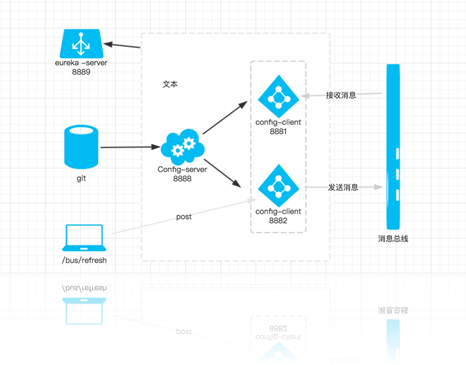
分析: 当git文件更改的时候,通过Postman –> Post 向端口为8882的eureka-config-client发送请求/bus/refresh/;此时8882端口会发送一个消息,由消息总线向其他服务传递,从而使整个微服务集群都达到更新配置文件。
一、准备工作
首先, 需要安装 rabbitMq 点击rabbitmq下载, (如果不会安装的查看我写的教程: CentOS下安装RabbitMQ教程)
二、改造 eureka-config-client –> pom.xml –> spring-cloud-starter-bus-amqp
<?xml version="1.0" encoding="UTF-8"?>

<project xmlns="http://maven.apache.org/POM/4.0.0" xmlns:xsi="http://www.w3.org/2001/XMLSchema-instance"

         xsi:schemaLocation="http://maven.apache.org/POM/4.0.0 http://maven.apache.org/xsd/maven-4.0.0.xsd">

    <modelVersion>4.0.0</modelVersion>

    <groupId>com.lwc</groupId>

    <artifactId>eureka-config-client</artifactId>

    <version>0.0.1-SNAPSHOT</version>

    <packaging>jar</packaging>

    <name>eureka-config-client</name>

    <description>Demo project for Spring Boot</description>

    <parent>

        <groupId>org.springframework.boot</groupId>

        <artifactId>spring-boot-starter-parent</artifactId>

        <version>1.5.10.RELEASE</version>

        <relativePath/> <!-- lookup parent from repository -->

    </parent>

    <properties>

        <project.build.sourceEncoding>UTF-8</project.build.sourceEncoding>

        <project.reporting.outputEncoding>UTF-8</project.reporting.outputEncoding>

        <java.version>1.8</java.version>

        <spring-cloud.version>Edgware.SR3</spring-cloud.version>

    </properties>

    <dependencies>

        <dependency>

            <groupId>org.springframework.retry</groupId>

            <artifactId>spring-retry</artifactId>

        </dependency>

        <dependency>

            <groupId>org.springframework.cloud</groupId>

            <artifactId>spring-cloud-starter-config</artifactId>

        </dependency>

        <dependency>

            <groupId>org.springframework.boot</groupId>

            <artifactId>spring-boot-starter-web</artifactId>

        </dependency>

        <dependency>

            <groupId>org.springframework.boot</groupId>

            <artifactId>spring-boot-starter-aop</artifactId>

        </dependency>

        <dependency>

            <groupId>org.springframework.cloud</groupId>

            <artifactId>spring-cloud-starter-eureka</artifactId>

        </dependency>

        <dependency>

            <groupId>org.springframework.boot</groupId>

            <artifactId>spring-boot-starter-test</artifactId>

            <scope>test</scope>

        </dependency>

        <dependency>

            <groupId>org.springframework.cloud</groupId>

            <artifactId>spring-cloud-starter-bus-amqp</artifactId>

        </dependency>

        <dependency>

            <groupId>org.springframework.boot</groupId>

            <artifactId>spring-boot-starter-actuator</artifactId>

        </dependency>

    </dependencies>

    <dependencyManagement>

        <dependencies>

            <dependency>

                <groupId>org.springframework.cloud</groupId>

                <artifactId>spring-cloud-dependencies</artifactId>

                <version>${spring-cloud.version}</version>

                <type>pom</type>

                <scope>import</scope>

            </dependency>

        </dependencies>

    </dependencyManagement>

    <build>

        <plugins>

            <plugin>

                <groupId>org.springframework.boot</groupId>

                <artifactId>spring-boot-maven-plugin</artifactId>

            </plugin>

        </plugins>

    </build>

    <repositories>

        <repository>

            <id>spring-milestones</id>

            <name>Spring Milestones</name>

            <url>https://repo.spring.io/milestone</url>

            <snapshots>

                <enabled>false</enabled>

            </snapshots>

        </repository>

    </repositories>

</project>
在配置文件bootstrap-dev.yml中加上RabbitMq的配置,包括RabbitMq的地址、端口,用户名、密码,代码如下:
server:

  port: 8882

eureka:

  client:

    serviceUrl:

      defaultZone: http://localhost:8889/eureka/

spring:

  cloud:

    config:

      label: master

      profile: local

      discovery:

        serviceId: eureka-config-server

        enabled: true

  rabbitmq:

    username: your username

    password: your password

    host: your host

    port: 5672

management:

  security:

    enabled: false
如果rabbitmq有用户名密码,输入即可。
依次启动eureka-config-server-cluster、eureka-config-server,启动两个eureka-config-client,端口为:8881、8882。
访问http://localhost:8881/url 或者 http://localhost:8882/url 浏览器显示:
http://www.cnblogs.com/EddieBlog/
重要环节: 正常情况下在代码仓库修改了数值, 是需要重启服务才能达到配置文件更新, 如何解决这种尴尬的情况呢?
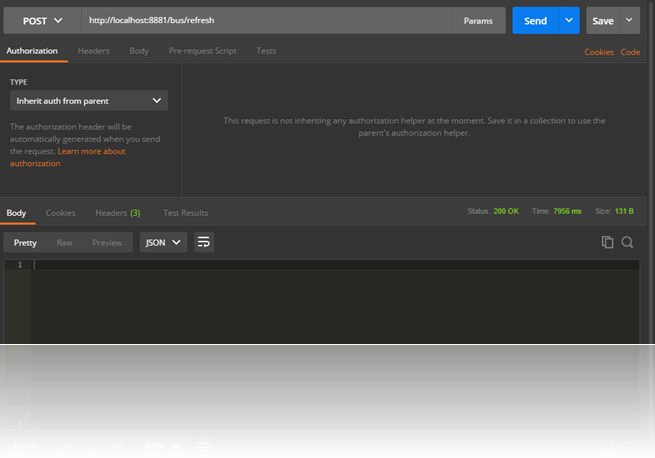
只需要发送 POST 请求:http://localhost:8881/bus/refresh 就会重新加载:
这时我们再访问http://localhost:8881/url 或者http://localhost:8882/url 浏览器显示:
http://www.cnblogs.com/EddieBlog/p/8724912.html
提示:
/bus/refresh接口可以指定服务,即使用”destination”参数,比如 “/bus/refresh?destination=customers:**” 即刷新服务名为customers的所有服务,不管 IP Addr
还有一种方式: eureka-config-server, N个eureka-config-client
1. 在 eureka-config-server 添加依赖 2. 在 eureka-config-server 写入 rabbitmq 配置 3. client 端不需要做什么修改, 如果真的需要的话,加上 management.security.enabled=false ,防止不能够刷新。 4. POSTMAN TEST
三、源码下载:
标签 8-1
https://github.com/eddie-code/SpringCloudDemo
【SpringCloud 】第八篇: 消息总线(Spring Cloud Bus)的更多相关文章
- 原 史上最简单的SpringCloud教程 | 第八篇: 消息总线(Spring Cloud Bus)(Finchley版本)
转载请标明出处: 原文首发于:https://www.fangzhipeng.com/springcloud/2018/08/30/sc-f8-bus/ 本文出自方志朋的博客 转载请标明出处: Spr ...
- 史上最简单的SpringCloud教程 | 第八篇: 消息总线(Spring Cloud Bus)
转载请标明出处: 原文首发于:https://www.fangzhipeng.com/springcloud/2017/07/12/sc08-bus/ 本文出自方志朋的博客 最新Finchley版本请 ...
- SpringCloud教程 | 第八篇: 消息总线(Spring Cloud Bus)
一.安装rabbitmq 二.pom父文件 <?xml version="1.0" encoding="UTF-8"?> <project x ...
- SpringCloud学习(八)消息总线(Spring Cloud Bus)(Finchley版本)
Spring Cloud Bus 将分布式的节点用轻量的消息代理连接起来.它可以用于广播配置文件的更改或者服务之间的通讯,也可以用于监控.本文要讲述的是用Spring Cloud Bus实现通知微服务 ...
- 第七篇: 消息总线(Spring Cloud Bus)
Spring Cloud Bus 将分布式的节点用轻量的消息代理连接起来.它可以用于广播配置文件的更改或者服务之间的通讯,也可以用于监控.本文要讲述的是用Spring Cloud Bus实现通知微服务 ...
- springCloud学习-消息总线(Spring Cloud Bus)
1.简介 Spring Cloud Bus 将分布式的节点用轻量的消息代理连接起来.它可以用于广播配置文件的更改或者服务之间的通讯,也可以用于监控.本文要讲述的是用Spring Cloud Bus实现 ...
- SpringCloud 教程 (一) 消息总线(Spring Cloud Bus)
Spring Cloud Bus 将分布式的节点用轻量的消息代理连接起来.它可以用于广播配置文件的更改或者服务之间的通讯,也可以用于监控.本文要讲述的是用Spring Cloud Bus实现通知微服务 ...
- 通过消息总线Spring Cloud Bus实现配置文件刷新(使用Kafka或RocketMQ)
如果需要客户端获取到最新的配置信息需要执行refresh,我们可以利用webhook的机制每次提交代码发送请求来刷新客户端,当客户端越来越多的时候,需要每个客户端都执行一遍,这种方案就不太适合了.使用 ...
- 一起来学Spring Cloud | 第八章:消息总线(Spring Cloud Bus)
上一章节,我们讲解了分布式配置中心spring cloud config,我们把配置项存放在git或者本地,当我们修改配置时,需要重新启动服务才能生效.但是在生产上,一个服务部署了多台机器,重新启动比 ...
随机推荐
- HDFS Federation(转HDFS Federation(HDFS 联盟)介绍 CSDN)
转载地址:http://blog.csdn.net/strongerbit/article/details/7013221 HDFS Federation(HDFS 联盟)介绍 1. 当前HDFS架构 ...
- CSS-自定义变量
使用背景: 一些常见的例子: 为风格统一而使用颜色变量 一致的组件属性(布局,定位等) 避免代码冗余 *更方便的从CSS向JS传递数据(例如媒体断点) 为什么使用: 以下几点是未来CSS属性的简短说明 ...
- Nlog日志出坑合集
.net core框架下nlog不记录: 1.安装NLog.Web.AspNetCore 2.在Startup.cs文件的方法public void Configure(IApplicationBui ...
- 一点一点看JDK源码(六)java.util.LinkedList前篇之链表概要
一点一点看JDK源码(六)java.util.LinkedList前篇之链表概要 liuyuhang原创,未经允许禁止转载 本文举例使用的是JDK8的API 目录:一点一点看JDK源码(〇) 1.什么 ...
- php-预定义
php预定义异常 Exception是所有异常的基类 属性 message:异常消息内容 code:异常代码 file:抛出异常的文件名 line:抛出异常在该文件的行号 ErrorException ...
- 【js】中的小技巧
本文主要介绍一些JS中用到的小技巧 1. 类型强制转换 1.1 string强制转换为数字 可以用*1来转化为数字(实际上是调用.valueOf方法) 然后使用Number.isNaN来判断是否为 ...
- 利用MFC Picture Control控件 加载bmp,png
1.在资源视图,选择PictureControl,并且在属性中把Type设置为Bitmap. 2.加载PNG CStatic* pWnd = (CStatic*)GetDlgItem(IDC_PIC) ...
- MySQL学习【SQL语句上】
1.连接服务端命令 1.mysql -uroot -p123 -h127.0.0.1 2.mysql -uroot -p123 -S /tmp/mysql.sock 3.mysql -uroot -p ...
- redhat6 快速部署percona
1.首先得能访问外网 2.yum install http://www.percona.com/downloads/percona-release/redhat/0.1-4/percona-relea ...
- Eclipse切换字体颜色
打开window-preferences