
一起来学Spring Cloud | 第八章:消息总线(Spring Cloud Bus)
上一章节,我们讲解了分布式配置中心spring cloud config,我们把配置项存放在git或者本地,当我们修改配置时,需要重新启动服务才能生效。但是在生产上,一个服务部署了多台机器,重新启动比较麻烦且会短暂影响用户体验。spring cloud生态在发展,肯定有对应的解决之法,接下来将要讲解的Spring Cloud Bus就是为了解决这一难题而存在的。
Spring Cloud Bus(消息总线)通过一个轻量级的消息中间件可以连接分布式系统中的各个节点。使用该总线来广播某些状态的改变(比如配置信息发生变更)或其他管理指令。可以说,消息总线是spring boot应用扩展“道路”上的推进器,而且也把它用来作应用间相互通信的消息管道。
一、项目搭建:
1. 环境准备
本章还是基于上一章来实现的,上一章讲解了git和本地配置两种方式,配置刷新原理都是一样的,这次我们只讲git配置修改后进行刷新。
上一章节内容可以参考:一起来学Spring Cloud | 第七章:分布式配置中心(Spring Cloud Config)
<?xml version="1.0" encoding="UTF-8"?>

<project xmlns="http://maven.apache.org/POM/4.0.0" xmlns:xsi="http://www.w3.org/2001/XMLSchema-instance"

	xsi:schemaLocation="http://maven.apache.org/POM/4.0.0 http://maven.apache.org/xsd/maven-4.0.0.xsd">

	<modelVersion>4.0.0</modelVersion>

	<parent>

		<groupId>com.haly</groupId>

		<artifactId>springcloud</artifactId>

		<version>0.0.1-SNAPSHOT</version>

	</parent>

	<groupId>com.haly</groupId>

	<artifactId>springcloud-feign-client</artifactId>

	<version>0.0.1-SNAPSHOT</version>

	<name>springcloud-ribbon-client</name>

	<description>新建一个springcloud项目</description>

	<dependencies>

		<dependency>

            <groupId>org.springframework.cloud</groupId>

            <artifactId>spring-cloud-starter-netflix-eureka-client</artifactId>

        </dependency>

        <dependency>

            <groupId>org.springframework.boot</groupId>

            <artifactId>spring-boot-starter-web</artifactId>

        </dependency>

           <dependency>

            <groupId>org.springframework.cloud</groupId>

            <artifactId>spring-cloud-starter-openfeign</artifactId>

        </dependency>

        <dependency>

            <groupId>com.haly</groupId>

            <artifactId>springcloud-config</artifactId>

            <version>0.0.1-SNAPSHOT</version>

        </dependency>

        <dependency>

			<groupId>org.springframework.cloud</groupId>

			<artifactId>spring-cloud-starter-config</artifactId>

		</dependency>

		<dependency>

			<groupId>org.springframework.cloud</groupId>

			<artifactId>spring-cloud-starter-bus-amqp</artifactId>

		</dependency>

		<dependency>

	     <groupId>org.springframework.boot</groupId>

	     <artifactId>spring-boot-starter-actuator</artifactId>

	   </dependency>

	</dependencies>

	<build>

		<plugins>

			<plugin>

				<groupId>org.springframework.boot</groupId>

				<artifactId>spring-boot-maven-plugin</artifactId>

			</plugin>

		</plugins>

	</build>

</project>
3. 在springcloud-feign-client模块的application.properties中加上RabbitMq的配置,包括RabbitMq的地址、端口,用户名、密码。并加上spring.cloud.bus的三个配置:
spring.rabbitmq.host=localhost

spring.rabbitmq.port=5672

spring.rabbitmq.username=young

spring.rabbitmq.password=young

spring.cloud.bus.enabled=true

spring.cloud.bus.trace.enabled=true

management.endpoints.web.exposure.include=bus-refresh
4. springcloud-feign-client模块的启动类上加上注解:@RefreshScope
package com.haly;

import org.springframework.boot.SpringApplication;

import org.springframework.boot.autoconfigure.SpringBootApplication;

import org.springframework.cloud.client.discovery.EnableDiscoveryClient;

import org.springframework.cloud.context.config.annotation.RefreshScope;

import org.springframework.cloud.openfeign.EnableFeignClients;

@SpringBootApplication

@EnableFeignClients

@EnableDiscoveryClient

@RefreshScope

public class SpringcloudFeignClientApplication {

	public static void main(String[] args) {

		SpringApplication.run(SpringcloudFeignClientApplication.class, args);

	}

}
5. springcloud-feign-client模块的测试类FeignController,测试上一章节的/testconfig方法,具体内容可以参考:一起来学Spring Cloud | 第七章:分布式配置中心(Spring Cloud Config)
package com.haly.controller;

import org.springframework.beans.factory.annotation.Autowired;

import org.springframework.beans.factory.annotation.Value;

import org.springframework.web.bind.annotation.GetMapping;

import org.springframework.web.bind.annotation.RequestParam;

import org.springframework.web.bind.annotation.RestController;

import com.haly.romote.FeignRemoteService;

@RestController

public class FeignController {

    @Autowired

    FeignRemoteService feignRemoteService;

    @Value("${configword}")

    String configword;

    @GetMapping(value = "/getHello")

    public String getHello(@RequestParam String name) {

        return feignRemoteService.hello(name);

    }

    @GetMapping(value = "/testzuul")

    public String testzuul(@RequestParam String name) {

        return name +",这是springcloud-feign-client的服务接口";

    }

    @GetMapping(value = "/testconfig")

    public String testconfig(@RequestParam String name) {

        return name +",git配置值:" + configword ;

    }

}
6. 运行项目
启动springcloud-eureka-server,启动springcloud-config-server,启动springcloud-config,最后启动springcloud-feign-client模块
为了测试配置修改,多个服务实例都能更新,就启动两个 springcloud-feign-client 实例,端口分别是9600,9601,sts启动两个实例(端口为9600时启动项目,然后将端口改成9601,再启动项目)。
浏览器输入:http://localhost:9600/testconfig?name=young码农 或者输入 http://localhost:9601/testconfig?name=young码农
页面展示结果:young码农,git配置值:NewConfig !
7. 修改git配置,重新运行项目
这时我们去代码仓库将configword的值改为“update config”,即改变配置文件configword的值。如果是传统的做法,需要重启服务,才能达到配置文件的更新。
现在,我们只需要发送post请求:http://localhost:8881/actuator/bus-refresh,你会发现springcloud-feign-client会重新读取配置文件,接着我们查看页面运行结果。
浏览器输入:http://localhost:9600/testconfig?name=young码农 或者输入 http://localhost:9601/testconfig?name=young码农
页面展示结果:young码农,git配置值:update config !
二、总结:
使用"destination"参数,/actuator/bus-refresh接口可以指定服务,例如 “/actuator/bus-refresh?destination=client:**”, 即刷新服务名为client的所有服务。
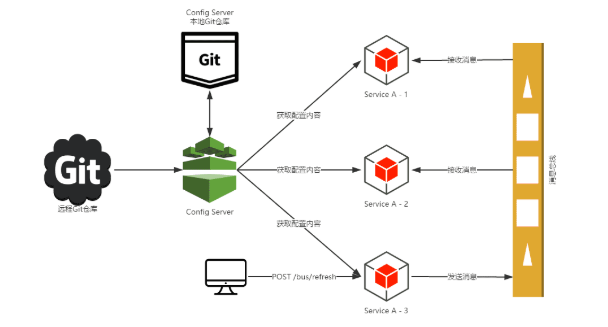
通过上面的测试,我们可以知道当git文件更改的时候,用post 向端口为8882的config-client发送请求/bus/refresh/;此时8882端口会发送一个消息,由消息总线向其他服务传递,从而使整个微服务集群都达到更新配置文件。
引入程序猿DD 画的一张图片,简单理解一下刷新原理:
最后项目目录结构:

一起来学Spring Cloud | 第八章:消息总线(Spring Cloud Bus)的更多相关文章
- 第七篇: 消息总线(Spring Cloud Bus)
Spring Cloud Bus 将分布式的节点用轻量的消息代理连接起来.它可以用于广播配置文件的更改或者服务之间的通讯,也可以用于监控.本文要讲述的是用Spring Cloud Bus实现通知微服务 ...
- 【SpringCloud 】第八篇: 消息总线(Spring Cloud Bus)
前言: 必需学会SpringBoot基础知识 简介: spring cloud 为开发人员提供了快速构建分布式系统的一些工具,包括配置管理.服务发现.断路器.路由.微代理.事件总线.全局锁.决策竞选. ...
- 原 史上最简单的SpringCloud教程 | 第八篇: 消息总线(Spring Cloud Bus)(Finchley版本)
转载请标明出处: 原文首发于:https://www.fangzhipeng.com/springcloud/2018/08/30/sc-f8-bus/ 本文出自方志朋的博客 转载请标明出处: Spr ...
- 史上最简单的SpringCloud教程 | 第八篇: 消息总线(Spring Cloud Bus)
转载请标明出处: 原文首发于:https://www.fangzhipeng.com/springcloud/2017/07/12/sc08-bus/ 本文出自方志朋的博客 最新Finchley版本请 ...
- 通过消息总线Spring Cloud Bus实现配置文件刷新(使用Kafka或RocketMQ)
如果需要客户端获取到最新的配置信息需要执行refresh,我们可以利用webhook的机制每次提交代码发送请求来刷新客户端,当客户端越来越多的时候,需要每个客户端都执行一遍,这种方案就不太适合了.使用 ...
- SpringCloud学习(八)消息总线(Spring Cloud Bus)(Finchley版本)
Spring Cloud Bus 将分布式的节点用轻量的消息代理连接起来.它可以用于广播配置文件的更改或者服务之间的通讯,也可以用于监控.本文要讲述的是用Spring Cloud Bus实现通知微服务 ...
- SpringCloud 教程 (一) 消息总线(Spring Cloud Bus)
Spring Cloud Bus 将分布式的节点用轻量的消息代理连接起来.它可以用于广播配置文件的更改或者服务之间的通讯,也可以用于监控.本文要讲述的是用Spring Cloud Bus实现通知微服务 ...
- SpringCloud教程 | 第八篇: 消息总线(Spring Cloud Bus)
一.安装rabbitmq 二.pom父文件 <?xml version="1.0" encoding="UTF-8"?> <project x ...
- Spring Cloud 入门教程(十):和RabbitMQ的整合 -- 消息总线Spring Cloud Netflix Bus
在本教程第三讲Spring Cloud 入门教程(三): 配置自动刷新中,通过POST方式向客户端发送/refresh请求, 可以让客户端获取到配置的最新变化.但试想一下, 在分布式系统中,如果存在很 ...
随机推荐
- Spark 缓存机制
Spark中的缓存机制:避免spark每次都重算RDD以及它的所有依赖,cache().persist(). checkpoint(). 1.cache():会被重复使用,但是不能太大的RDD,将其c ...
- learning scala someElements
The Scala collections library provides specialised implementations for Sets of fewer than 5 values ( ...
- WinDbg常用命令系列---单步执行p*
p (Step) p命令执行单个指令或源代码行,并可选地显示所有寄存器和标志的结果值.当子例程调用或中断发生时,它们被视为单个步骤. 用户模式: [~Thread] p[r] [= StartAddr ...
- HTML5 Geolocation(地理定位)
一.背景 在HTML规范中,增加了获取用户地理信息的API,这样使得可以基于用户位置开发互联网应用,即基于位置服务 鉴于该特性可能侵犯用户的隐私,除非用户同意,否则用户位置信息是不可用的. Inter ...
- QML学习(二)——<QML语法>
一.Qml类型 QML类型分为三类:基本类型.QML对象类型以及JavaScript类型 1 基本类型 我们可以再qt帮助文档中搜索基本类型查看 基本类型的概念是相对于QML对象类型而言的,QML 对 ...
- 微信小程序 Flex局部元素被挤压问题
关于Flex布局不在此处赘述,需要了解的可以查阅官方文档:基本的布局方法——Flex布局 当使用Flex布局,想实现如下图1的效果时,代码编写如下: 图1: <!-- wxml文件 --> ...
- js注册表单中实现地区选择效果
<!DOCTYPE html> <html lang="en"> <head> <meta charset="UTF-8&quo ...
- jquery数组倒序
倒叙前:var mem = [1, 2, 3]: 倒序后:var men1=[3,2,1]: <script type="text/javascript"> $(fun ...
- Java_jdbc 基础笔记之十 数据库连接 (ResultSetMetaData 类)
ResultSetMetaData 类 调用ResultSet 的getMetaData()方法得到ResultSetMetaData 类对象: 可用于获取关于 ResultSet 对象中列的类型和属 ...
- 子页面赋值给父页面:window.opener.document.getElementById
window.opener 返回的是创建当前窗口的那个父窗口的引用,比如点击了a.htm上的一个链接而打开了b.htm,然后我们打算在b.htm上输入一个值然后赋予a.htm上的一个id为“name” ...