
使用Promethues和Grafana监控Flink
之前使用Influxdb储存Metrics经常会出现数据写不进去的问题,当Influxdb重启之后又能写进去,遂将数据存储部分换成Promethues,因为Flink采用PutGateway的方式,需要先将PutGateway安装好
flink1.10.0使用prometheus版本是0.3.0,我们在这里使用0.9.1的版本,如果使用最新版1.2.0会出现不兼容的问题
第一步:安装PutGateway
cd /usr/local/
wget https://github.com/prometheus/pushgateway/releases/download/v0.9.1/pushgateway-0.9.1.linux-amd64.tar.gz
tar -zxvf pushgateway-0.9.1.linux-amd64.tar.gz
nohup ./pushgateway &
第二步:配置prometheus
vi /usr/local/prometheus-2.1.0.linux-amd64/prometheus.yml 增加以下配置
  - job_name: 'flink'

    scrape_interval: 10s

    scrape_timeout: 10s

    static_configs:

      - targets: ['localhost:9091']

        labels:

          instance: 'pushgateway'
第三步:配置Flink
nohup /usr/local/prometheus-2.1.0.linux-amd64/prometheus --config.file=/usr/local/prometheus-2.1.0.linux-amd64/prometheus.yml & 启动prometheus
metrics.reporter.promgateway.class: org.apache.flink.metrics.prometheus.PrometheusPushGatewayReporter

metrics.reporter.promgateway.host: xx.xx.xx.xx

metrics.reporter.promgateway.port: 9091

metrics.reporter.promgateway.jobName: flink

metrics.reporter.promgateway.randomJobNameSuffix: true

metrics.reporter.promgateway.deleteOnShutdown: true
cd flink
cp opt/flink-metrics-prometheus-1.10.0.jar lib/
第四步:配置Grafana
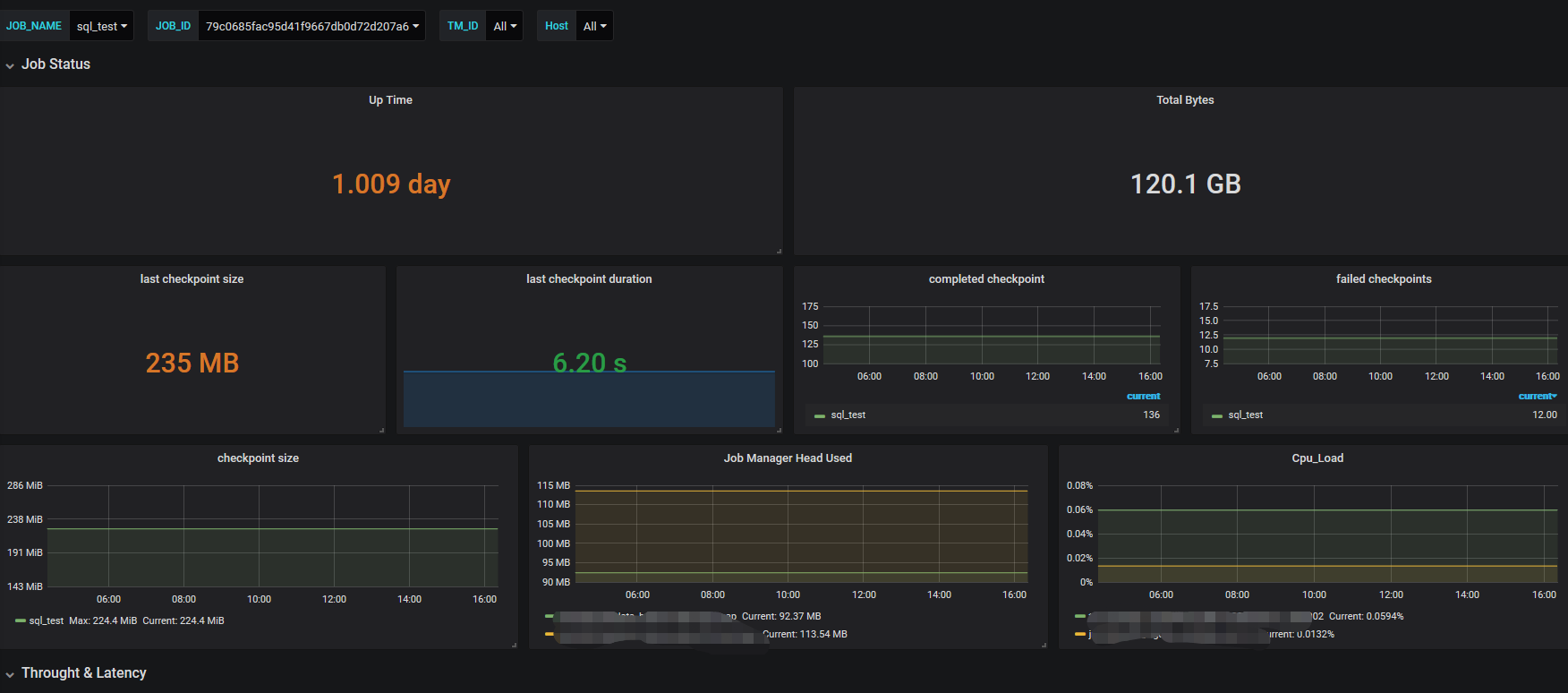
配置grafana过程比较痛苦,根据需要监控的指标进行配置,最后展示的页面和之前配置的一样
参考
https://ci.apache.org/projects/flink/flink-docs-release-1.8/monitoring/metrics.html#prometheus-orgapacheflinkmetricsprometheusprometheusreporter
https://github.com/prometheus/pushgateway/releases
https://www.cnblogs.com/huandada/p/10932953.html
使用Promethues和Grafana监控Flink的更多相关文章
- promethues exporter+ grafana 监控pg+mysql
这篇文章本来是打算使用pmm 进行数据库监控的,但是居然参考官方文档使用docker 运行起来有点问题,所以直接改用 exporter 进行处理,但是比pmm 弱好多 pmm 的参考架构 说明,以上图 ...
- 部署Prometheus+Grafana监控
Prometheus 1.不是很友好,各种配置都手写 2.对docker和k8s监控有成熟解决方案 Prometheus(普罗米修斯) 是一个最初在SoudCloud上构建的监控系统,开源项目,拥有非 ...
- Docker部署Zabbix+Grafana监控
Docker部署Zabbix+Grafana监控 环境 centos 7 ; Docker 17.12.0-ce ; docker-compose version 1.20.1 2018-4-1 当前 ...
- cAdvisor+Prometheus+Grafana监控docker
cAdvisor+Prometheus+Grafana监控docker 一.cAdvisor(需要监控的主机都要安装) 官方地址:https://github.com/google/cadvisor ...
- [转帖]Prometheus+Grafana监控Kubernetes
原博客的位置: https://blog.csdn.net/shenhonglei1234/article/details/80503353 感谢原作者 这里记录一下自己试验过程中遇到的问题: . 自 ...
- 使用Telegraf + Influxdb + Grafana 监控SQLserver服务器的运行状况
使用Telegraf + Influxdb + Grafana 监控SQLserver服务器的运行状况 前言 本文在Debian9下采用Docker的方式安装Telegraf + Influxdb + ...
- 快速接入业务监控体系,grafana监控的艺术
做一个系统,如果不做监控,是不完善的. 如果为做一个快速系统,花力气去做监控,是不值得的. 因为,我们有必要具备一个能够快速建立监控体系的能力.即使你只是一个普通开发人员! 个人觉得,做监控有三个核心 ...
- prometheus+grafana监控redis
prometheus+grafana监控redis redis安装配置 https://www.cnblogs.com/autohome7390/p/6433956.html redis_export ...
- prometheus+grafana监控mysql
prometheus+grafana监控mysql 1.安装配置MySQL官方的 Yum Repository(有mysql只需设置监控账号即可) [root@localhost ~]# wget - ...
- [转帖]安装prometheus+grafana监控mysql redis kubernetes等
安装prometheus+grafana监控mysql redis kubernetes等 https://www.cnblogs.com/sfnz/p/6566951.html plug 的模式进行 ...
随机推荐
- Springboot整合AOP和注解,实现丰富的切面功能
简介 我们在文章<Spring AOP与AspectJ的对比及应用>介绍了AOP的使用,这篇文章讲解一下AOP与注解的整合,通过注解来使用AOP,会非常方便.为了简便,我们还是来实现一个计 ...
- ASP.NET Core - 入口文件
1. 入口文件 一个应用程序总有一个入口文件,是应用启动代码开始执行的地方,这里往往也会涉及到应用的各种配置.当我们接触到一个新框架的时候,可以从入口文件入手,了解入口文件,能够帮助我们更好地理解 ...
- Vue33 使用nvm管理nodejs
1 nvm简介 NVM:Node Version Manage,即Node的版本管理工具.使用NVM,可以按照nodejs,可以进行版本切换,可以卸载nodejs等等. 由于项目开发当中,不同的项目可 ...
- spring-in-action-day04-配置属性 @ConfigurationProperties
1.Spring环境抽象的概念 2.怎么配置属性.在application.yml举例一些常用的配置 3.自定义配置属性@ConfigurationProperties(prefix = " ...
- Java前后端请求Content-Type与接受方式
1.Get Get方法没有请求体,所以加不加Content-Type没有意义. 参数通过拼接到Url来加入 url?key=value&key2=value2 SpringMVC后台如何获取参 ...
- vscode + vim 快捷键
多行编辑 按V选中行,按大写I即可进入编辑模式 撤销恢复 CTRL + z 撤销 CTRL + shift + z 恢复 代码自动对齐 Alt + shift + f
- 视觉十四讲:第六讲_g2o图优化
g2o是一个基于图优化的库,图优化是把优化问题表现为一种图的方式.一个图由若干个顶点和边组成. 顶点表示优化变量,边表示误差项. g2o的使用步骤: 1.定义顶点和边的类型: 2.构建图: 3.选择优 ...
- KMP字符串 AcWing 831
题目:https://www.acwing.com/problem/content/833/ 题意:求子串在母串中每次出现时的下标位置. 题解:哈哈哈,敲题时想到之前看到一个人叫 kmp 算法为 看毛 ...
- 花10几元买ESP32-C3,体验一下MicroPython (和CircuitPython)
ESP32是近年很火的国产低成本MCU系列. 买了芯片ESP32-C3的模组安信可 ESP-C3-32S的开发板安信可 NodeMCU ESP-C3-32S-Kit .开发板很小,没有任何多余的东西, ...
- Unity的超大开放世界解决方案
https://blog.csdn.net/u011105442/article/details/104614043