
[iOS基础控件 - 5.4] 广告分页代码(UIScrollView制作)
     // 总页数

     @property(nonatomic) NSInteger numberOfPages;          // default is 0

     // 当前页码

     @property(nonatomic) NSInteger currentPage;

     // 只有一页的时候隐藏页码

     @property(nonatomic) BOOL hidesForSinglePage;          // hide the the indicator if there is only one page. default is NO

     // 其他页码指示颜色

     @property(nonatomic,retain) UIColor *pageIndicatorTintColor;

     // 当前页码指示颜色

     @property(nonatomic,retain) UIColor *currentPageIndicatorTintColor;
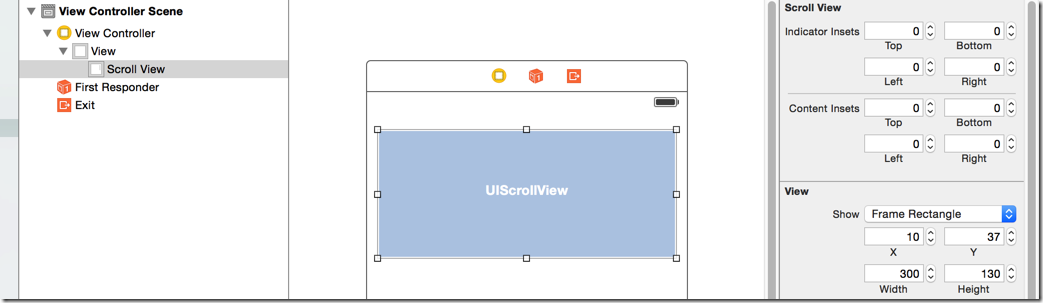
     CGFloat imageWidth = ;

     CGFloat imageHeight = ;

     CGFloat imageY = ;

     for (int i=; i<; i++) {

         CGFloat imageX = i * imageWidth;

         UIImageView *currentImageView = [[UIImageView alloc] initWithImage:[UIImage imageNamed:[NSString stringWithFormat:@"img_%02d", i+]]];

         currentImageView.frame = CGRectMake(imageX, imageY, imageWidth, imageHeight);

         [self.scrollView addSubview:currentImageView];

     }
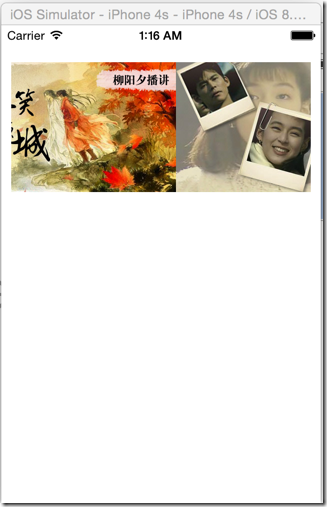
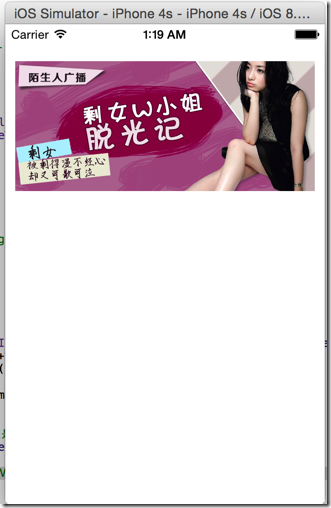
     // 设置可以拖曳的范围,只允许横向拖曳,而且范围是所有的图片宽度总和

     self.scrollView.contentSize = CGSizeMake( * imageWidth, );
     // 开启翻页模式,每次拖曳都会滑动一个UIScrollView宽度单位

     self.scrollView.pagingEnabled = YES;

     // 总页数

     @property(nonatomic) NSInteger numberOfPages;          // default is 0

     // 当前页码

     @property(nonatomic) NSInteger currentPage;

     // 只有一页的时候隐藏页码

     @property(nonatomic) BOOL hidesForSinglePage;          // hide the the indicator if there is only one page. default is NO

     // 其他页码指示颜色

     @property(nonatomic,retain) UIColor *pageIndicatorTintColor;

     // 当前页码指示颜色

     @property(nonatomic,retain) UIColor *currentPageIndicatorTintColor;
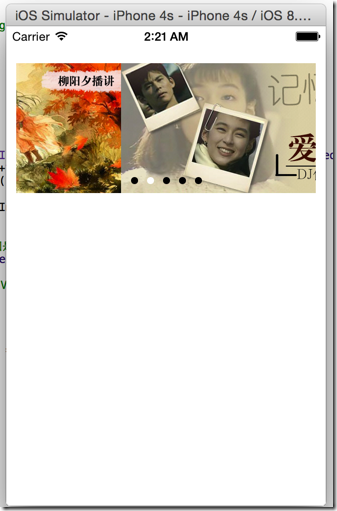
     // 设置pageControl

     self.pageControl.numberOfPages = ;

     self.pageControl.pageIndicatorTintColor = [UIColor blackColor];

     //设置delegate

     self.scrollView.delegate = self;
 /** 当scrollView滚动的时候调用 */

 - (void)scrollViewDidScroll:(UIScrollView *)scrollView {

     CGFloat scrollWidth = scrollView.frame.size.width;

     // 当一副图片拖曳超过一半的时候就重新计算页码

     int page = (scrollView.contentOffset.x + scrollWidth * 0.5) / scrollWidth;

     self.pageControl.currentPage = page;

 }
     // 创建定时器

     NSTimer *timer = [NSTimer scheduledTimerWithTimeInterval: target:self selector:@selector(nextImage) userInfo:nil repeats:YES];
 - (void) nextImage {

     // 1.增加pageControl的页码,这里不能直接操作currentPage,因为这样会和scrollViewDidScroll的页码计算冲突,应该是滚动画面,触发scrollViewDidScroll进行页码转换

     int pageNo = ;

     if (self.pageControl.currentPage == (IMAGE_COUNT - )) {

         pageNo = ;

     }

     else {

         pageNo = self.pageControl.currentPage + ;

     }

     // 2.计算scrollView的滑动位置

     CGFloat offsetX = pageNo * self.scrollView.frame.size.width;

     CGPoint offset = CGPointMake(offsetX, );

     // 移动一页,带动画效果

     [self.scrollView setContentOffset:offset  animated:YES];

 }
 // 开始手动拖曳的时候,销毁定时器

 - (void)scrollViewWillBeginDragging:(UIScrollView *)scrollView {

     [self.timer invalidate]; // 调用了invalidate之后再不可用了

     self.timer = nil;

 }

 // 结束手动拖曳,重新定义定时器

 - (void)scrollViewDidEndDragging:(UIScrollView *)scrollView willDecelerate:(BOOL)decelerate {

     [self addTimer];

 }

 // 添加定时器

 - (void) addTimer {

     self.timer = [NSTimer scheduledTimerWithTimeInterval: target:self selector:@selector(nextImage) userInfo:nil repeats:YES];

 }
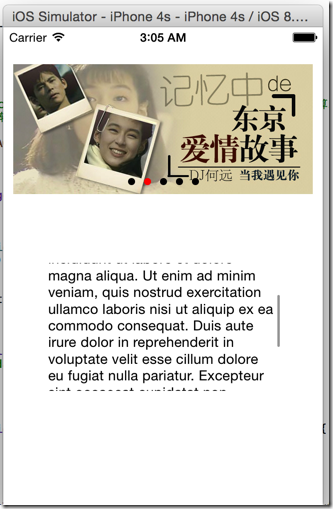
 // 添加定时器

 - (void) addTimer {

     self.timer = [NSTimer scheduledTimerWithTimeInterval: target:self selector:@selector(nextImage) userInfo:nil repeats:YES];

     // 获得主线程资源,防止另外的如可滚动控件的资源全占用

     [[NSRunLoop currentRunLoop] addTimer:self.timer forMode:NSRunLoopCommonModes];

 }
 //

 //  ViewController.m

 //  ScrollViewPage

 //

 //  Created by hellovoidworld on 14/11/28.

 //  Copyright (c) 2014年 hellovoidworld. All rights reserved.

 //

 #import "ViewController.h"

 #define IMAGE_COUNT 5

 @interface ViewController () <UIScrollViewDelegate>

 @property (weak, nonatomic) IBOutlet UIScrollView *scrollView; // 滚动控件

 @property (weak, nonatomic) IBOutlet UIPageControl *pageControl; // 页码控件

 @property(nonatomic, strong) NSTimer *timer; // 定时器

 @end

 @implementation ViewController

 - (void)viewDidLoad {

     [super viewDidLoad];

     // Do any additional setup after loading the view, typically from a nib.

     CGFloat imageWidth = ;

     CGFloat imageHeight = ;

     CGFloat imageY = ;

     for (int i=; i<IMAGE_COUNT; i++) {

         CGFloat imageX = i * imageWidth;

         UIImageView *currentImageView = [[UIImageView alloc] initWithImage:[UIImage imageNamed:[NSString stringWithFormat:@"img_%02d", i+]]];

         currentImageView.frame = CGRectMake(imageX, imageY, imageWidth, imageHeight);

         [self.scrollView addSubview:currentImageView];

     }

     // 设置可以拖曳的范围,只允许横向拖曳,而且范围是所有的图片宽度总和

     self.scrollView.contentSize = CGSizeMake(IMAGE_COUNT * imageWidth, );

     // 开启翻页模式,每次拖曳都会滑动一个UIScrollView宽度单位

     self.scrollView.pagingEnabled = YES;

     // 设置pageControl

     self.pageControl.numberOfPages = ;

     self.pageControl.pageIndicatorTintColor = [UIColor blackColor];

     self.pageControl.currentPageIndicatorTintColor = [UIColor redColor];

     // 设置delegate

     self.scrollView.delegate = self;

     // 创建定时器

     [self addTimer];

 }

 - (void)didReceiveMemoryWarning {

     [super didReceiveMemoryWarning];

     // Dispose of any resources that can be recreated.

 }

 /** 当scrollView滚动的时候调用 */

 - (void)scrollViewDidScroll:(UIScrollView *)scrollView {

     CGFloat scrollWidth = scrollView.frame.size.width;

     // 当一副图片拖曳超过一半的时候就重新计算页码

     int page = (scrollView.contentOffset.x + scrollWidth * 0.5) / scrollWidth;

     self.pageControl.currentPage = page;

 }

 - (void) nextImage {

     // 1.增加pageControl的页码,这里不能直接操作currentPage,因为这样会和scrollViewDidScroll的页码计算冲突,应该是滚动画面,触发scrollViewDidScroll进行页码转换

     int pageNo = ;

     if (self.pageControl.currentPage == (IMAGE_COUNT - )) {

         pageNo = ;

     }

     else {

         pageNo = self.pageControl.currentPage + ;

     }

     // 2.计算scrollView的滑动位置

     CGFloat offsetX = pageNo * self.scrollView.frame.size.width;

     CGPoint offset = CGPointMake(offsetX, );

     // 移动一页,带动画效果

     [self.scrollView setContentOffset:offset  animated:YES];

 }

 // 开始手动拖曳的时候,销毁定时器

 - (void)scrollViewWillBeginDragging:(UIScrollView *)scrollView {

     [self.timer invalidate]; // 调用了invalidate之后再不可用了

     self.timer = nil;

 }

 // 结束手动拖曳,重新定义定时器

 - (void)scrollViewDidEndDragging:(UIScrollView *)scrollView willDecelerate:(BOOL)decelerate {

     [self addTimer];

 }

 // 添加定时器

 - (void) addTimer {

     self.timer = [NSTimer scheduledTimerWithTimeInterval: target:self selector:@selector(nextImage) userInfo:nil repeats:YES];

     // 获得主线程资源,防止另外的如可滚动控件的资源全占用

     [[NSRunLoop currentRunLoop] addTimer:self.timer forMode:NSRunLoopCommonModes];

 }

 @end
[iOS基础控件 - 5.4] 广告分页代码(UIScrollView制作)的更多相关文章
- [iOS基础控件 - 5.5] 代理设计模式 (基于”APP列表"练习)
A.概述 在"[iOS基础控件 - 4.4] APP列表 进一步封装,初见MVC模式”上进一步改进,给“下载”按钮加上效果.功能 1.按钮点击后,显示为“已下载”,并且不 ...
- [iOS基础控件 - 6.6.1] 展示团购数据代码
1.主控制器: // // ViewController.m // GroupPurchase // // Created by hellovoidworld on 14/12/3. // Cop ...
- iOS 基础控件(下)
上篇介绍了UIButton.UILabel.UIImageView和UITextField,这篇就简短一点介绍UIScrollView和UIAlertView. UIScrollView 顾名思义也知 ...
- [iOS基础控件 - 7.0] UIWebView
A.基本使用 1.概念 iOS内置的浏览器控件 Safari浏览器就是通过UIWebView实现的 2.用途:制作简易浏览器 (1)基本请求 创建请求 加载请求 (2)代理监听webView加载, ...
- [iOS基础控件 - 6.11.3] 私人通讯录Demo 控制器的数据传递、存储
A.需求 1.搭建一个"私人通讯录"Demo 2.模拟登陆界面 账号 密码 记住密码开关 自动登陆开关 登陆按钮 3.退出注销 4.增删改查 5.恢复数据(取消修改) 这个代码 ...
- [iOS基础控件 - 6.10.2] PickerView 自定义row内容 国家选择Demo
A.需求 1.自定义一个UIView和xib,包含国家名和国旗显示 2.学习row的重用 B.实现步骤 1.准备plist文件和国旗图片 2.创建模型 // // Flag.h // Co ...
- [iOS基础控件 - 6.9] 聊天界面Demo
A.需求 做出一个类似于QQ.微信的聊天界面 1.每个cell包含发送时间.发送人(头像).发送信息 2.使用对方头像放在左边,我方头像在右边 3.对方信息使用白色背景对话框,我方信息使用蓝色背景对话 ...
- [iOS基础控件 - 6.7] 微博展示 使用代码自定义TableCell(动态尺寸)
A.需求 1.类似于微博内容的展示 2.头像 3.名字 4.会员标志 5.内容 6.分割线 7.配图(可选,可有可无) code source: https://github.com/hellov ...
- [iOS基础控件 - 6.6] 展示团购数据 自定义TableViewCell
A.需求 1.头部广告 2.自定义cell:含有图片.名称.购买数量.价格 3.使用xib设计自定义cell,自定义cell继承自UITableViewCell 4.尾部“加载更多按钮”,以及其被点击 ...
随机推荐
- 97. Interleaving String
题目: Given s1, s2, s3, find whether s3 is formed by the interleaving of s1 and s2. For example,Given: ...
- python 包管理工具pip安装与使用
pip是python的一个包管理工具,与之类似的工具还有easy_install.根据官网的说法 如果你的python版本在Python 2 >=2.7.9 or Python 3 >=3 ...
- 摄像头(3)调用系统拍照activity来拍照
import android.app.Activity; import android.content.Intent; import android.content.pm.PackageManager ...
- 【HDOJ】2242 考研路茫茫——空调教室
tarjan缩点,然后树形dp一下可解.重点是重边的处理. /* 2242 */ #include <iostream> #include <sstream> #include ...
- SQL列数据转换为字符串
行列转换,将列数据转换为字符串输出 ) SET @center_JZHW = ( SELECT DISTINCT STUFF( ( SELECT ',' + ce_code FROM ap_cente ...
- C#编程让Outlook乖乖交出帐户密码
许多人习惯于让Outlook记住密码,收邮件时便不必每次都输入邮箱密码,一切让Outlook代劳.但时间一长,马虎的人会把自己的邮箱密码忘记,这样就无法重新设置或者登录Web界面收取邮件了.Outlo ...
- vfp 操作excel
VFP全面控制EXCEL 收藏 VFP和Excel都可以用来进行处理数据库表格,如果巧妙地将二者的优点结合起来,将会大大方便我们的工作.比如我们可以利用VFP进行处理数据,而利用Excel的预览打印功 ...
- Zend Framework XML外部实体和安全绕过漏洞
漏洞版本: Zend Framework 1.x 漏洞描述: Bugtraq ID:66358 Zend Framework是一款开放源代码的PHP5开发框架实现. Zend Framework存在多 ...
- Treeview控件的Node节点延迟加载
Treeview控件是一个很常用的控件,用于展示资源或者组织结构的时候很方便,通常会在系统启动时进行资源的加载和节点目录的初始化,但在资源较多和层级较深的情况下,所有节点加载出来会耗费太多时间,影响体 ...
- SSH2中memcached作为hibernate二级缓存
一.安装memcached服务端 1. 下载memcached的windows稳定版,解压放某个盘下面,比如在c:\memcached2. 在CMD下输入 "c:\memcached\mem ...