
IOS 7 Study - UIDatePicker
Picking the Date and Time with UIDatePicker
effect:
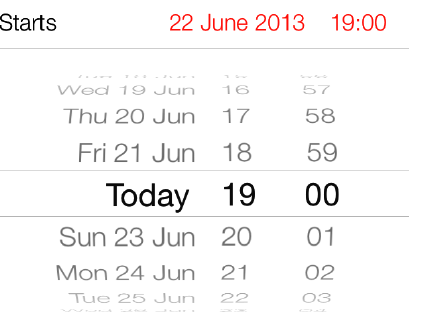
1. declaring a property of type UIDatePicker
#import "ViewController.h"

@interface ViewController ()

@property (nonatomic, strong) UIDatePicker *myDatePicker;

@end

@implementation ViewController

...
2. instantiate the date picker
- (void)viewDidLoad{

  [super viewDidLoad];

  self.myDatePicker = [[UIDatePicker alloc] init];

  self.myDatePicker.center = self.view.center;

  [self.view addSubview:self.myDatePicker];

}
3. add receiver target
Just like the UISwitch class, a date picker sends action messages to its targets whenever
the user has selected a different date. To respond to these messages, the receiver must
add itself as the target of the date picker, using the addTarget:action:forControlEvents
- (void)viewDidLoad{

  [super viewDidLoad];

  self.myDatePicker = [[UIDatePicker alloc] init];

  self.myDatePicker.center = self.view.center;

  [self.view addSubview:self.myDatePicker];

  [self.myDatePicker addTarget:self

     action:@selector(datePickerDateChanged:)

     forControlEvents:UIControlEventValueChanged];

}
4. accessing the date
// you can attempt to retrieve its currently selected date using its date property
NSDate *currentDate = self.myDatePicker.date;

NSLog(@"Date = %@", currentDate);
// every time the user changes the date, get a message from the date picker
- (void) datePickerDateChanged:(UIDatePicker *)paramDatePicker{

  if ([paramDatePicker isEqual:self.myDatePicker]){

    NSLog(@"Selected date = %@", paramDatePicker.date);

  }

}
A date picker also lets you set the minimum and the maximum dates that it can display.
For this, let’s first switch our date picker mode to UIDatePickerModeDate and then,
using the maximumDate and the minimumDate properties, adjust this range:
- (void)viewDidLoad{

  [super viewDidLoad];

  self.myDatePicker = [[UIDatePicker alloc] init];

  self.myDatePicker.center = self.view.center;

  self.myDatePicker.datePickerMode = UIDatePickerModeDate;

  [self.view addSubview:self.myDatePicker];

  NSTimeInterval oneYearTime =  *  *  * ;

  NSDate *todayDate = [NSDate date];

  NSDate *oneYearFromToday

    = [todayDate dateByAddingTimeInterval:oneYearTime];

  NSDate *twoYearsFromToday

    = [todayDate dateByAddingTimeInterval: * oneYearTime];

  self.myDatePicker.minimumDate = oneYearFromToday;

  self.myDatePicker.maximumDate = twoYearsFromToday;

}
If you want to use the date picker as a countdown timer, you must set your date picker
mode to UIDatePickerModeCountDownTimer and use the countDownDuration property
of the date picker to specify the default countdown duration.
- (void)viewDidLoad{

  [super viewDidLoad];

  self.myDatePicker = [[UIDatePicker alloc] init];

  self.myDatePicker.center = self.view.center;

  self.myDatePicker.datePickerMode = UIDatePickerModeCountDownTimer;

  [self.view addSubview:self.myDatePicker];

  NSTimeInterval twoMinutes =  * ;

  [self.myDatePicker setCountDownDuration:twoMinutes];

}
Run Result:

IOS 7 Study - UIDatePicker的更多相关文章
- iOS开发中UIDatePicker控件的使用方法简介
iOS上的选择时间日期的控件是这样的,左边是时间和日期混合,右边是单纯的日期模式. 您可以选择自己需要的模式,Time, Date,Date and Time , Count Down Timer四 ...
- IOS 7 Study - UIViewController
Presenting and Managing Views with UIViewController ProblemYou want to switch among different views ...
- iOS学习之UIDatePicker控件使用
iOS上的选择时间日期的控件是这样的,左边是时间和日期混合,右边是单纯的日期模式. , 您可以选择自己需要的模式,Time, Date,Date and Time , Count Down Ti ...
- IOS 7 Study - Displaying an Image on a Navigation Bar
ProblemYou want to display an image instead of text as the title of the current view controlleron th ...
- IOS 7 Study - Manipulating a Navigation Controller’s Array of View
ProblemYou would like to directly manipulate the array of view controllers associated with aspecific ...
- IOS 7 Study - Implementing Navigation with UINavigationController
ProblemYou would like to allow your users to move from one view controller to the other witha smooth ...
- IOS 7 Study - UIActivityViewController(Presenting Sharing Options)
You want to be able to allow your users to share content inside your apps with theirfriends, through ...
- IOS 7 Study - UISegmentedControl
You would like to present a few options to your users from which they can pick anoption, through a U ...
- 解析iOS开发中的FirstResponder第一响应对象
1. UIResonder 对于C#里所有的控件(例如TextBox),都继承于Control类.而Control类的继承关系如下: 代码如下: System.Object System.Marsha ...
随机推荐
- Linux中用stat命令查看文件时3个时间点解析
有些时候,我们需要在Linux中使用stat命令来查看文件的详细信息.另外联想下,ls -l命令显示的是什么时间,touch命令修改文件的时间戳,修改的又是什么时间?在这里我们一起来试验下. 首先,我 ...
- A+B for Matrices 及 C++ transform的用法
题目大意:给定两个矩阵,矩阵的最大大小是M*N(小于等于10),矩阵元素的值的绝对值小于等于100,求矩阵相加后全0的行以及列数. #include<iostream> using nam ...
- 【转】Linux下创建、销毁、使用 SWAP
转自:http://blog.csdn.net/wxqee/article/details/7970110 创建swap文件方法 1) 创建一个足够大的文件 dd if=/dev/zero of=/l ...
- Linux man命令数字含义
1,用户在shell环境中可以操作的命令或可执行文件 2,系统内核可调用的函数与工具等,即由内核提供的函数. 如open,write之类的(通过这个,可以很方便的查到调用这个函数时需要加什么头文件 ...
- 设计模式 策略-Strategy,装饰-Decorator,观察者-Observer
重温了Head First 3个设计模式.提炼一下思想,笔记如下. 策略-Strategy 当一个类或类族中重复实现某些同类的方法(behavior)时,考虑使用策略模式. 该模式是将Behavior ...
- 组建你自己的Theme,组件你的Style
Andorid-Style,组建你自己的Theme,组件你的Style 前言: 今天,尝试了一个新的Demo,也尝试深入学习,话不多说,看一下,这个Demo如何实现的自定义主题与组件Style是如何绑 ...
- MySQL 插入与自增主键值相等的字段 与 高并发下保证数据准确的实验
场景描述: 表t2 中 有 自增主键 id 和 字段v 当插入记录的时候 要求 v与id 的值相等(按理来说这样的字段是需要拆表的,但是业务场景是 只有某些行相等 ) 在网上搜的一种办法是 先获取 ...
- golang实现ios推送
生成pem文件 打开Keychain Access 导出推送证书和私钥 推送证书 cert.p12 私钥 key.p12 导出.pem文件 转换推送证书 openssl pkcs12 -clcerts ...
- 预定义宏_GNUC_ _MSC_VER
一.预定义__GNUC__宏 1 __GNUC__ 是gcc编译器编译代码时预定义的一个宏.需要针对gcc编写代码时, 可以使用该宏进行条件编译. 2 __GNUC__ 的值表示gcc的版本.需要针对 ...
- jQuery和js如何判断checkbox是否选中
jquery: <div id="divId" class="divTable"><div class="tableBody&quo ...