
《DSP using MATLAB》 Problem 3.19


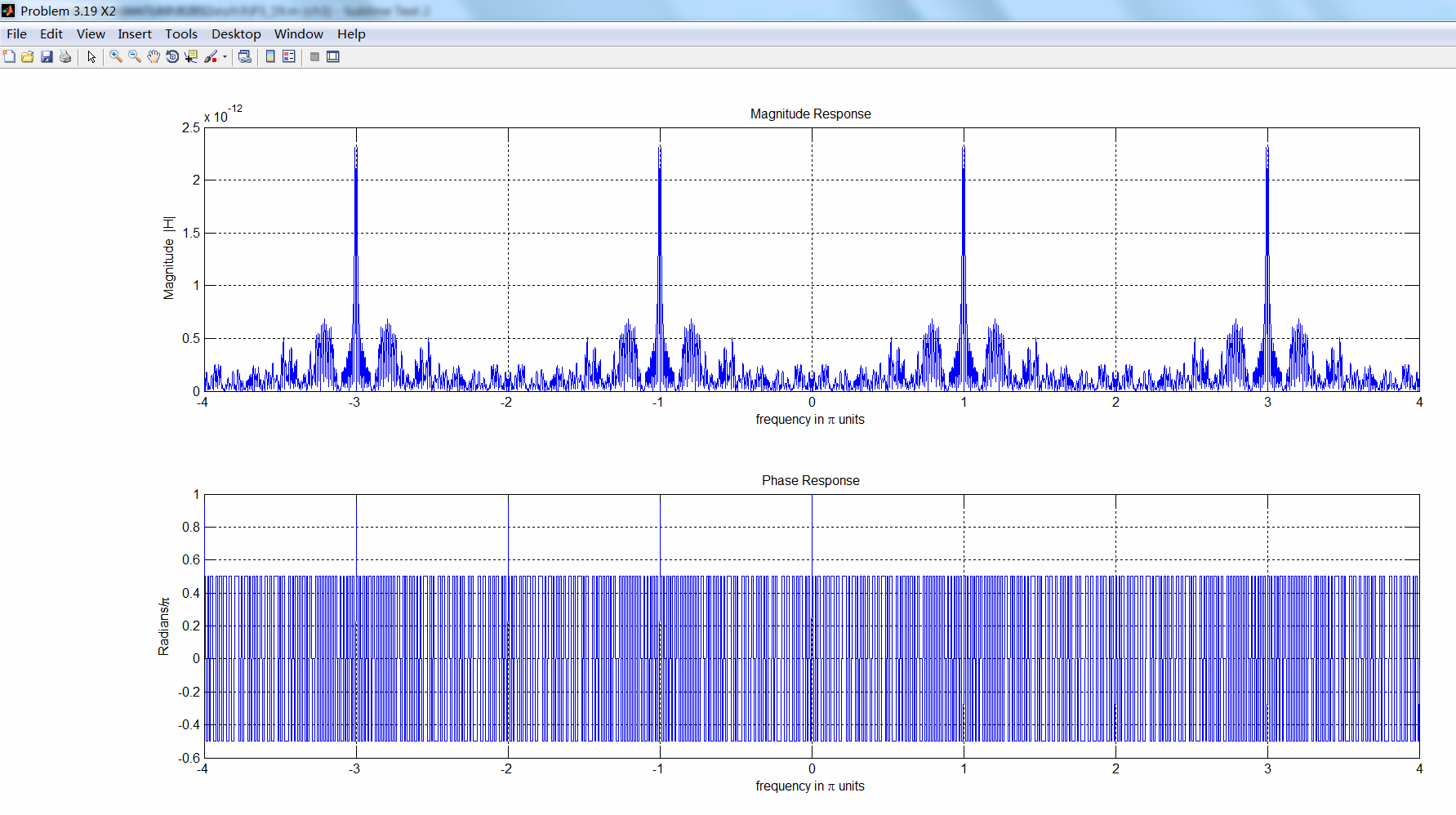
先求模拟信号经过采样后,对应的数字角频率:
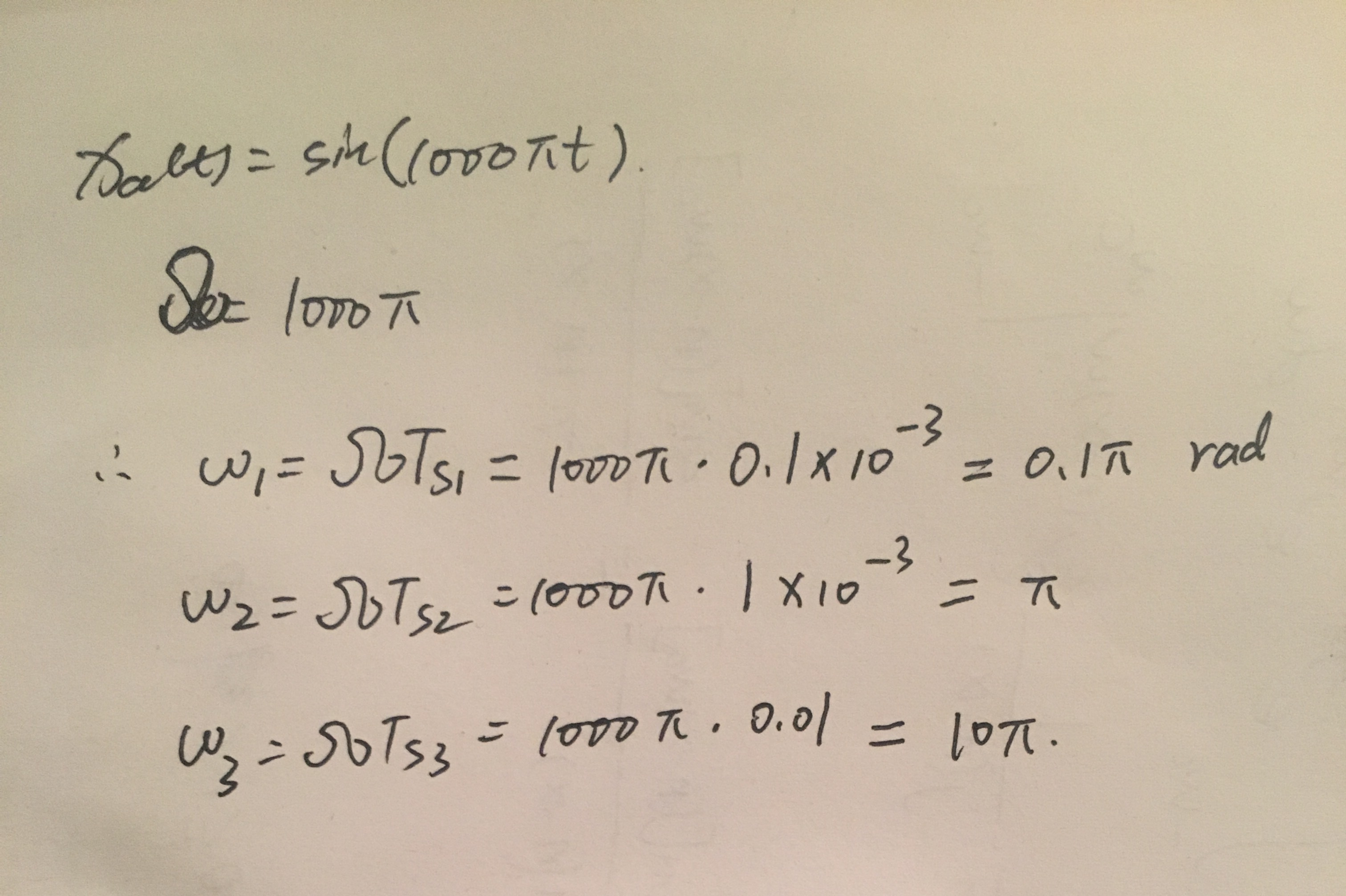
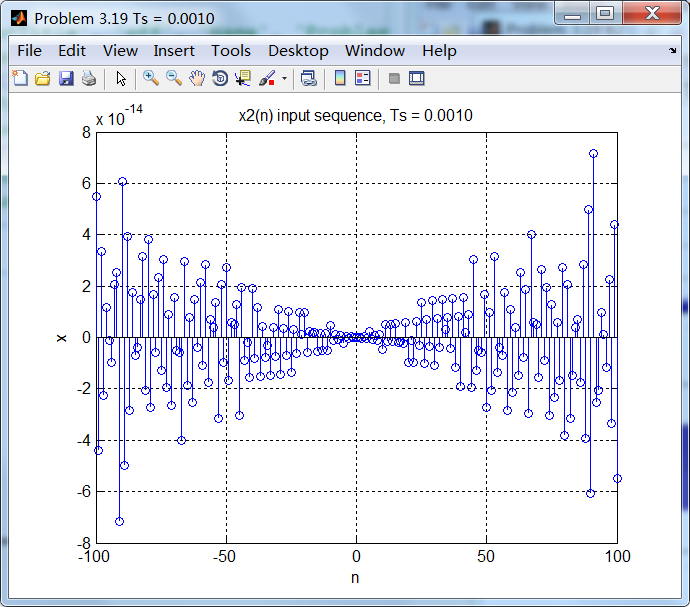
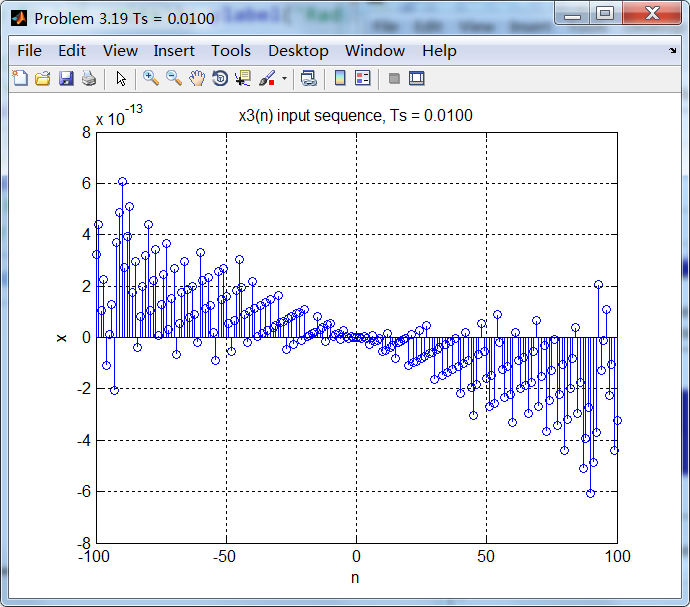
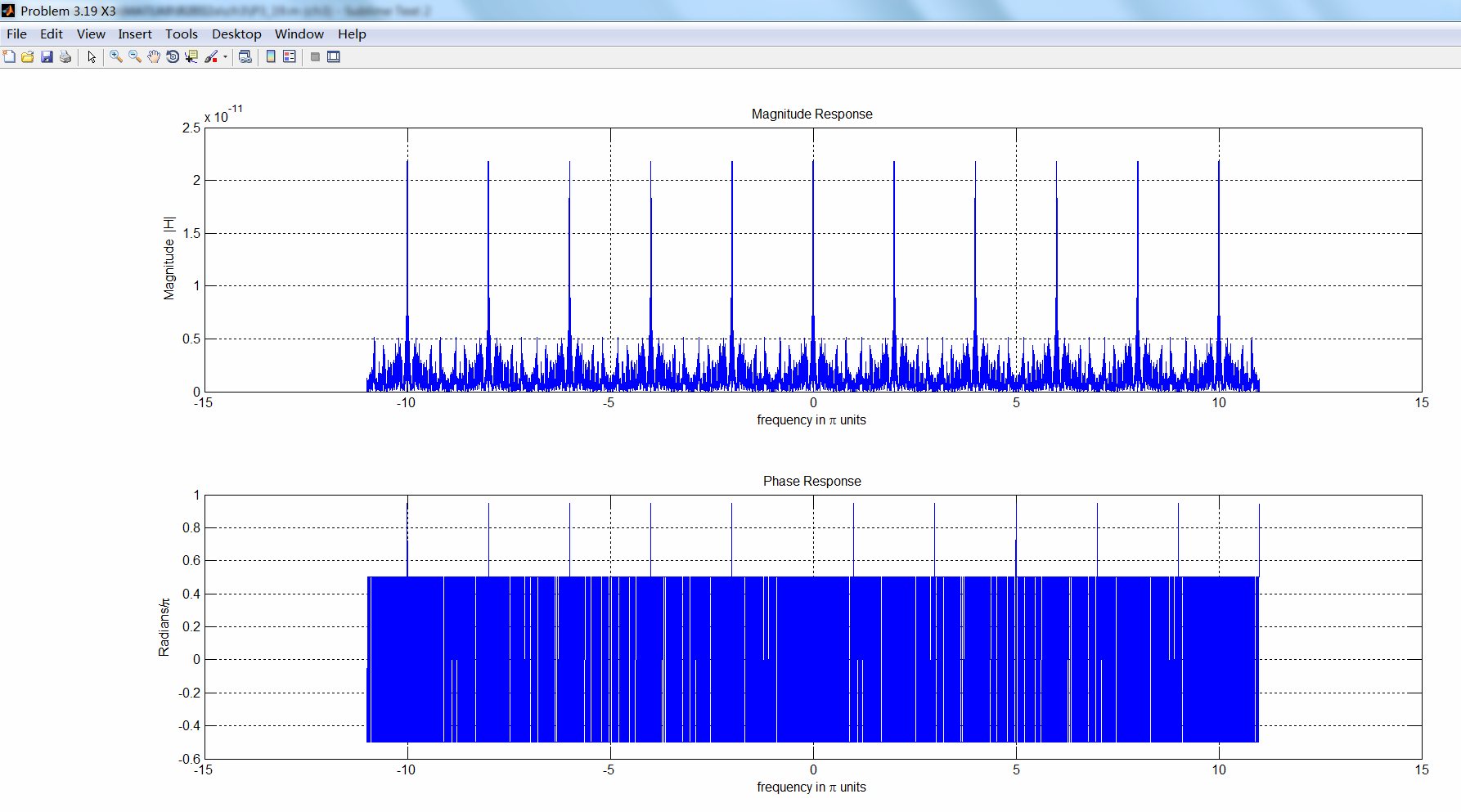
明显看出,第3种采样出现假频了。DTFT是以2π为周期的,所以假频出现在10π-2kπ=0处。
代码:
%% ------------------------------------------------------------------------

%%            Output Info about this m-file

fprintf('\n***********************************************************\n');

fprintf('        <DSP using MATLAB> Problem 3.19 \n\n');

banner();

%% ------------------------------------------------------------------------

%% -------------------------------------------------------------------

%%                     xa(t)=sin(1000pit)

%% -------------------------------------------------------------------

Ts = 0.0001;         % second unit

n1 = [-100:100];

x1 = sin(1000*pi*n1*Ts);

figure('NumberTitle', 'off', 'Name', sprintf('Problem 3.19 Ts = %.4f', Ts));

set(gcf,'Color','white');

%subplot(2,1,1);

stem(n1, x1);

xlabel('n'); ylabel('x');

title(sprintf('x1(n) input sequence, Ts = %.4f', Ts)); grid on;

M = 500;

[X1, w] = dtft1(x1, n1, M);

magX1  = abs(X1);  angX1  = angle(X1);  realX1  = real(X1);  imagX1  = imag(X1);

%% --------------------------------------------------------------------

%%              START X(w)'s  mag ang real imag

%% --------------------------------------------------------------------

figure('NumberTitle', 'off', 'Name', 'Problem 3.19 X1');

set(gcf,'Color','white');

subplot(2,1,1); plot(w/pi,magX1); grid on;  %axis([-1,1,0,1.05]);

title('Magnitude Response');

xlabel('frequency in \pi units'); ylabel('Magnitude  |H|');

subplot(2,1,2); plot(w/pi, angX1/pi); grid on;  %axis([-1,1,-1.05,1.05]);

title('Phase Response');

xlabel('frequency in \pi units'); ylabel('Radians/\pi');

figure('NumberTitle', 'off', 'Name', 'Problem 3.19 X1');

set(gcf,'Color','white');

subplot(2,1,1); plot(w/pi, realX1); grid on;

title('Real Part');

xlabel('frequency in \pi units'); ylabel('Real');

subplot(2,1,2); plot(w/pi, imagX1); grid on;

title('Imaginary Part');

xlabel('frequency in \pi units'); ylabel('Imaginary');

%% -------------------------------------------------------------------

%%             END X's  mag ang real imag

%% -------------------------------------------------------------------

% ----------------------------------------------------------

%                Ts=0.001s

% ----------------------------------------------------------

Ts = 0.001;         % second unit

n2 = [-100:100];

x2 = sin(1000*pi*n2*Ts);

figure('NumberTitle', 'off', 'Name', sprintf('Problem 3.19 Ts = %.4f', Ts));

set(gcf,'Color','white');

%subplot(2,1,1);

stem(n2, x2);

xlabel('n'); ylabel('x');

title(sprintf('x2(n) input sequence, Ts = %.4f', Ts)); grid on;

M = 500;

[X2, w] = dtft1(x2, n2, M);

magX2  = abs(X2);  angX2  = angle(X2);  realX2  = real(X2);  imagX2  = imag(X2);

%% --------------------------------------------------------------------

%%              START X(w)'s  mag ang real imag

%% --------------------------------------------------------------------

figure('NumberTitle', 'off', 'Name', 'Problem 3.19 X2');

set(gcf,'Color','white');

subplot(2,1,1); plot(w/pi,magX2); grid on;  %axis([-1,1,0,1.05]);

title('Magnitude Response');

xlabel('frequency in \pi units'); ylabel('Magnitude  |H|');

subplot(2,1,2); plot(w/pi, angX2/pi); grid on;  %axis([-1,1,-1.05,1.05]);

title('Phase Response');

xlabel('frequency in \pi units'); ylabel('Radians/\pi');

figure('NumberTitle', 'off', 'Name', 'Problem 3.19 X2');

set(gcf,'Color','white');

subplot(2,1,1); plot(w/pi, realX2); grid on;

title('Real Part');

xlabel('frequency in \pi units'); ylabel('Real');

subplot(2,1,2); plot(w/pi, imagX2); grid on;

title('Imaginary Part');

xlabel('frequency in \pi units'); ylabel('Imaginary');

%% -------------------------------------------------------------------

%%             END X's  mag ang real imag

%% -------------------------------------------------------------------

% ----------------------------------------------------------

%                Ts=0.01s

% ----------------------------------------------------------

Ts = 0.01;         % second unit

n3 = [-100:100];

x3 = sin(1000*pi*n3*Ts);

figure('NumberTitle', 'off', 'Name', sprintf('Problem 3.19 Ts = %.4f', Ts));

set(gcf,'Color','white');

%subplot(2,1,1);

stem(n3, x3);

xlabel('n'); ylabel('x');

title(sprintf('x3(n) input sequence, Ts = %.4f', Ts)); grid on;

M = 500;

[X3, w] = dtft1(x3, n3, M);

magX3  = abs(X3);  angX3  = angle(X3);  realX3  = real(X3);  imagX3  = imag(X3);

%% --------------------------------------------------------------------

%%              START X(w)'s  mag ang real imag

%% --------------------------------------------------------------------

figure('NumberTitle', 'off', 'Name', 'Problem 3.19 X3');

set(gcf,'Color','white');

subplot(2,1,1); plot(w/pi,magX3); grid on;  %axis([-1,1,0,1.05]);

title('Magnitude Response');

xlabel('frequency in \pi units'); ylabel('Magnitude  |H|');

subplot(2,1,2); plot(w/pi, angX3/pi); grid on;  %axis([-1,1,-1.05,1.05]);

title('Phase Response');

xlabel('frequency in \pi units'); ylabel('Radians/\pi');

figure('NumberTitle', 'off', 'Name', 'Problem 3.19 X3');

set(gcf,'Color','white');

subplot(2,1,1); plot(w/pi, realX3); grid on;

title('Real Part');

xlabel('frequency in \pi units'); ylabel('Real');

subplot(2,1,2); plot(w/pi, imagX3); grid on;

title('Imaginary Part');

xlabel('frequency in \pi units'); ylabel('Imaginary');

%% -------------------------------------------------------------------

%%             END X's  mag ang real imag

%% -------------------------------------------------------------------
运行结果:
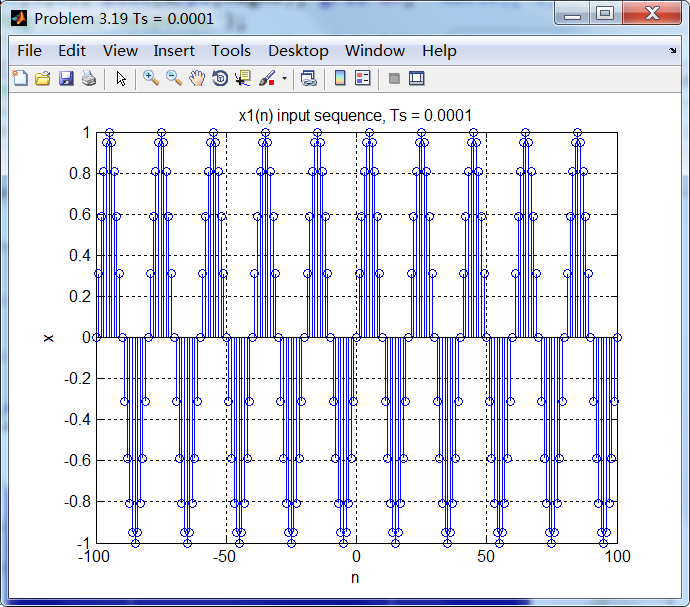
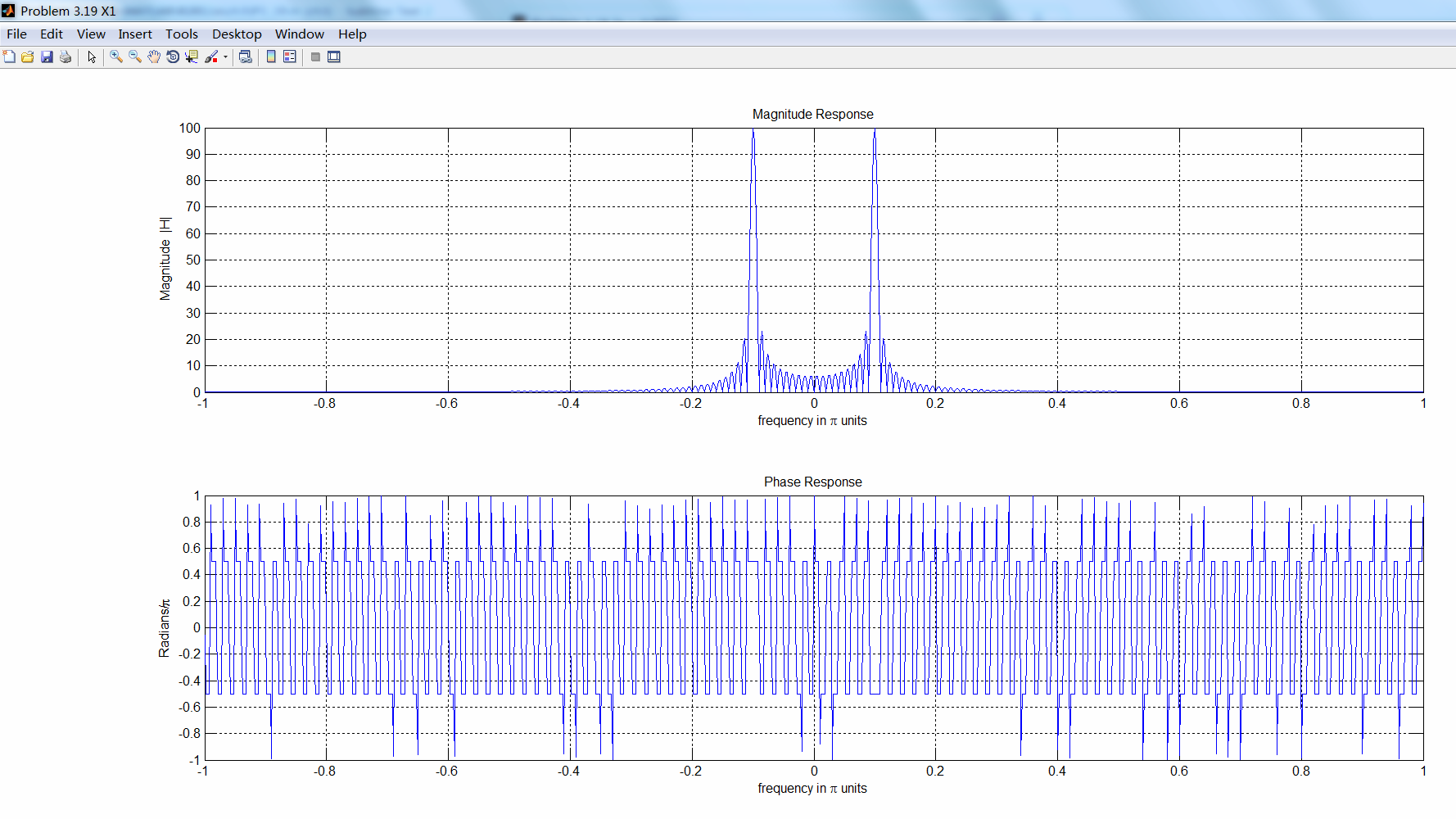
采样后的序列及其谱。
《DSP using MATLAB》 Problem 3.19的更多相关文章
- 《DSP using MATLAB》Problem 5.19
代码: function [X1k, X2k] = real2dft(x1, x2, N) %% --------------------------------------------------- ...
- 《DSP using MATLAB》Problem 2.19
代码: %% ------------------------------------------------------------------------ %% Output Info about ...
- 《DSP using MATLAB》Problem 8.19
代码: %% ------------------------------------------------------------------------ %% Output Info about ...
- 《DSP using MATLAB》Problem 7.16
使用一种固定窗函数法设计带通滤波器. 代码: %% ++++++++++++++++++++++++++++++++++++++++++++++++++++++++++++++++++++++++++ ...
- 《DSP using MATLAB》Problem 5.18
代码: %% ++++++++++++++++++++++++++++++++++++++++++++++++++++++++++++++++++++++++++++++++++++++++ %% O ...
- 《DSP using MATLAB》Problem 5.5
代码: %% ++++++++++++++++++++++++++++++++++++++++++++++++++++++++++++++++++++++++++++++++ %% Output In ...
- 《DSP using MATLAB》Problem 5.4
代码: %% ++++++++++++++++++++++++++++++++++++++++++++++++++++++++++++++++++++++++++++++++ %% Output In ...
- 《DSP using MATLAB》Problem 5.3
这段时间爬山去了,山中林密荆棘多,沟谷纵横,体力增强不少. 代码: %% +++++++++++++++++++++++++++++++++++++++++++++++++++++++++++++++ ...
- 《DSP using MATLAB》Problem 4.23
代码: %% ------------------------------------------------------------------------ %% Output Info about ...
随机推荐
- C#匹配中文
public static bool ContainsChinese(string text) { if (string.IsNullOrEmpty(text)) return false; stri ...
- Redis之列表类型命令
Redis 列表(List) Redis列表是简单的字符串列表,按照插入顺序排序.你可以添加一个元素到列表的头部(左边)或者尾部(右边) 一个列表最多可以包含 232 - 1 个元素 (4294967 ...
- 雷林鹏分享:C# 异常处理
C# 异常处理 异常是在程序执行期间出现的问题.C# 中的异常是对程序运行时出现的特殊情况的一种响应,比如尝试除以零. 异常提供了一种把程序控制权从某个部分转移到另一个部分的方式.C# 异常处理时建立 ...
- 安装 tensorflow 时遇到 OSError: [Errno 1] Operation not permitted 的解决办法
Installing collected packages: numpy, scipy, six, pyyaml, Keras, opencv-python, h5py, html5lib, blea ...
- Confluence 6 获得 Active Directory 服务器证书
上面的步骤说明了如何在你的 Microsoft Active Directory服务器上安装 certification authority (CA).这一步,你需要为你的 Microsoft Act ...
- [洛谷P1507]NASA的食物计划 以及 对背包问题的整理
P1507 NASA的食物计划 题面 每个物品有三个属性,"所含卡路里":价值\(v\),"体积":限制1\(m_1\),以及"质量":限制 ...
- ZOJ 2770 差分约束+SPFA
Burn the Linked Camp Time Limit: 2 Seconds Memory Limit: 65536 KB It is well known that, in the ...
- Largest Point (2015沈阳赛区网络赛水题)
Problem Description Given the sequence A with n integers t1,t2,⋯,tn. Given the integral coefficients ...
- Xshell如何设置,当连接断开时保留Session,保留原文字
Xshell [1] 是一个强大的安全终端模拟软件,它支持SSH1, SSH2, 以及Microsoft Windows 平台的TELNET 协议.Xshell 通过互联网到远程主机的安全连接以及它 ...
- java标号
标号用于控制循环执行流程: public static void main(String[] args) { mark: for(int i = 0; i < 3; i++) { System. ...