
vue学习之五生命周期
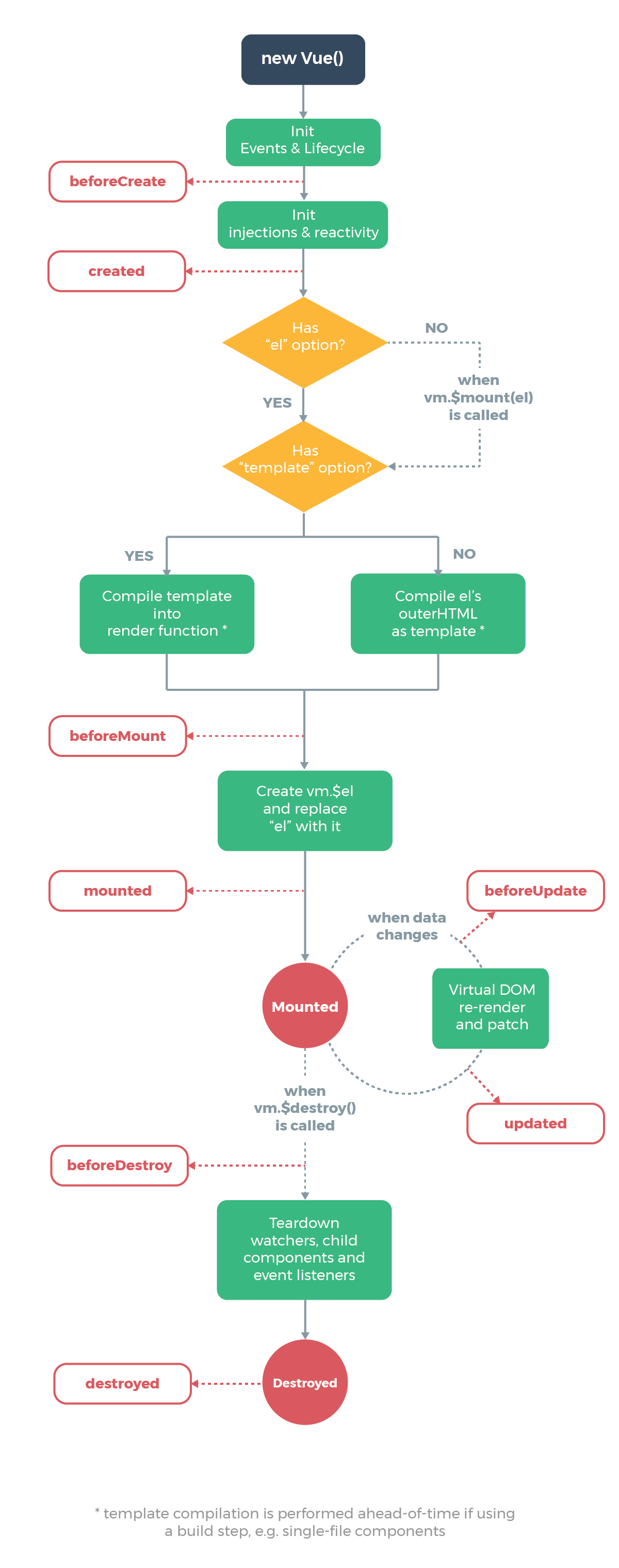
一、vue生命周期图解
下图展示了实例的生命周期。你不需要立马弄明白所有的东西,不过随着你的不断学习和使用,它的参考价值会越来越高。
二、vue钩子函数使用
2.1beforeCreate
在实例初始化之后,数据观测 (data observer) 和 event/watcher 事件配置之前被调用。
<!DOCTYPE html>

<html lang="en">

<head>

    <meta charset="UTF-8">

    <title>Title</title>

    <script src="../statics/vue.min.js"></script>

</head>

<body>

    <div id="app">

        {{ message }}

    </div>

    <script>

        new Vue({

            el: "#app",

            data: {

                message: "Hello Vue",

            },

            methods: {

                myInit: function () {

                    console.log(this.message);

                }

            },

            beforeCreate(){

                console.group('beforeCreate: ');

                console.log('el: ', this.$el);

                console.log('data: ', this.$data);

                console.log('myInit: ', this.myInit);

                console.log('message: ', this.message);

            }

        })

    </script>

</body>

</html>
2.2created
在实例创建完成后被立即调用。在这一步,实例已完成以下的配置:数据观测 (data observer),属性和方法的运算,watch/event 事件回调。然而,挂载阶段还没开始,$el 属性目前不可见。
!DOCTYPE html>

<html lang="en">

<head>

    <meta charset="UTF-8">

    <title>Title</title>

    <script src="../statics/vue.min.js"></script>

</head>

<body>

    <div id="app">

        {{ message }}

    </div>

    <script>

        new Vue({

            el: "#app",

            data: {

                message: "Hello Vue",

            },

            methods: {

                myInit: function () {

                    console.log(this.message);

                }

            },

            beforeCreate(){

                console.group('beforeCreate: ');

                console.log('el: ', this.$el);

                console.log('data: ', this.$data);

                console.log('myInit: ', this.myInit);

                console.log('message: ', this.message);

            },

            created(){

                console.group('created: ');

                console.log('el: ', this.$el);

                console.log('data: ', this.$data);

                console.log('myInit: ', this.myInit);

                console.log('message: ', this.message);

            }

        })

    </script>

</body>

</html>
2.3beforeMount
在挂载开始之前被调用:相关的 render 函数首次被调用。
<!DOCTYPE html>

<html lang="en">

<head>

    <meta charset="UTF-8">

    <title>Title</title>

    <script src="../statics/vue.min.js"></script>

</head>

<body>

    <div id="app">

        {{ message }}

    </div>

    <script>

        new Vue({

            el: "#app",

            data: {

                message: "Hello Vue",

            },

            methods: {

                myInit: function () {

                    console.log(this.message);

                }

            },

            beforeCreate(){

                console.group('beforeCreate: ');

                console.log('el: ', this.$el);

                console.log('data: ', this.$data);

                console.log('myInit: ', this.myInit);

                console.log('message: ', this.message);

            },

            created(){

                console.group('created: ');

                console.log('el: ', this.$el);

                console.log('data: ', this.$data);

                console.log('myInit: ', this.myInit);

                console.log('message: ', this.message);

            },

            beforeMount(){

                console.group('beforeMount: ');

                console.log('el: ', this.$el);

                console.log('data: ', this.$data);

                console.log('myInit: ', this.myInit);

                console.log('message: ', this.message);

            }

        })

    </script>

</body>

</html>
2.4mounted
el 被新创建的 vm.$el 替换,并挂载到实例上去之后调用该钩子。如果 root 实例挂载了一个文档内元素,当 mounted 被调用时 vm.$el 也在文档内。
<!DOCTYPE html>

<html lang="en">

<head>

    <meta charset="UTF-8">

    <title>Title</title>

    <script src="../statics/vue.min.js"></script>

</head>

<body>

    <div id="app">

        {{ message }}

    </div>

    <script>

        new Vue({

            el: "#app",

            data: {

                message: "Hello Vue",

            },

            methods: {

                myInit: function () {

                    console.log(this.message);

                }

            },

            beforeCreate(){

                console.group('beforeCreate: ');

                console.log('el: ', this.$el);

                console.log('data: ', this.$data);

                console.log('myInit: ', this.myInit);

                console.log('message: ', this.message);

            },

            created(){

                console.group('created: ');

                console.log('el: ', this.$el);

                console.log('data: ', this.$data);

                console.log('myInit: ', this.myInit);

                console.log('message: ', this.message);

            },

            beforeMount(){

                console.group('beforeMount: ');

                console.log('el: ', this.$el);

                console.log('data: ', this.$data);

                console.log('myInit: ', this.myInit);

                console.log('message: ', this.message);

            },

            mounted(){

                console.group('mounted: ');

                console.log('el: ', this.$el);

                console.log('data: ', this.$data);

                console.log('myInit: ', this.myInit);

                console.log('message: ', this.message);

            }

        })

    </script>

</body>

</html>
2.5beforeUpdate
数据更新时调用,发生在虚拟 DOM 打补丁之前。这里适合在更新之前访问现有的 DOM,比如手动移除已添加的事件监听器。
!DOCTYPE html>

<html lang="en">

<head>

    <meta charset="UTF-8">

    <title>Title</title>

    <script src="../statics/vue.min.js"></script>

</head>

<body>

    <div id="app">

        {{ message }}

        <button @click="myClick">点击修改欢迎语</button>

    </div>

    <script>

        new Vue({

            el: "#app",

            data: {

                message: "Hello Vue",

            },

            methods: {

                myInit: function () {

                    console.log(this.message);

                },

                myClick: function () {

                    this.message = "Hello World";

                }

            },

            beforeCreate(){

                console.group('beforeCreate: ');

                console.log('el: ', this.$el);

                console.log('data: ', this.$data);

                console.log('myInit: ', this.myInit);

                console.log('message: ', this.message);

            },

            created(){

                console.group('created: ');

                console.log('el: ', this.$el);

                console.log('data: ', this.$data);

                console.log('myInit: ', this.myInit);

                console.log('message: ', this.message);

            },

            beforeMount(){

                console.group('beforeMount: ');

                console.log('el: ', this.$el);

                console.log('data: ', this.$data);

                console.log('myInit: ', this.myInit);

                console.log('message: ', this.message);

            },

            mounted(){

                console.group('mounted: ');

                console.log('el: ', this.$el);

                console.log('data: ', this.$data);

                console.log('myInit: ', this.myInit);

                console.log('message: ', this.message);

            },

            beforeUpdate(){

                console.group('beforeUpdate: ');

                console.log('el: ', this.$el);

                console.log('data: ', this.$data);

                console.log('myInit: ', this.myInit);

                console.log('message: ', this.message);

                console.log("beforeData: ", document.getElementById("app").innerHTML);

            }

        })

    </script>

</body>

</html>
该钩子在服务器端渲染期间不被调用,因为只有初次渲染会在服务端进行
2.6updated
由于数据更改导致的虚拟 DOM 重新渲染和打补丁,在这之后会调用该钩子。
当这个钩子被调用时,组件 DOM 已经更新,所以你现在可以执行依赖于 DOM 的操作。然而在大多数情况下,你应该避免在此期间更改状态。如果要相应状态改变,通常最好使用计算属性或 watcher 取而代之。
<!DOCTYPE html>

<html lang="en">

<head>

    <meta charset="UTF-8">

    <title>Title</title>

    <script src="../statics/vue.min.js"></script>

</head>

<body>

    <div id="app">

        {{ message }}

        <button @click="myClick">点击修改欢迎语</button>

    </div>

    <script>

        new Vue({

            el: "#app",

            data: {

                message: "Hello Vue",

            },

            methods: {

                myInit: function () {

                    console.log(this.message);

                },

                myClick: function () {

                    this.message = "Hello World";

                }

            },

            beforeCreate(){

                console.group('beforeCreate: ');

                console.log('el: ', this.$el);

                console.log('data: ', this.$data);

                console.log('myInit: ', this.myInit);

                console.log('message: ', this.message);

            },

            created(){

                console.group('created: ');

                console.log('el: ', this.$el);

                console.log('data: ', this.$data);

                console.log('myInit: ', this.myInit);

                console.log('message: ', this.message);

            },

            beforeMount(){

                console.group('beforeMount: ');

                console.log('el: ', this.$el);

                console.log('data: ', this.$data);

                console.log('myInit: ', this.myInit);

                console.log('message: ', this.message);

            },

            mounted(){

                console.group('mounted: ');

                console.log('el: ', this.$el);

                console.log('data: ', this.$data);

                console.log('myInit: ', this.myInit);

                console.log('message: ', this.message);

            },

            beforeUpdate(){

                console.group('beforeUpdate: ');

                console.log('el: ', this.$el);

                console.log('data: ', this.$data);

                console.log('myInit: ', this.myInit);

                console.log('message: ', this.message);

                console.log("beforeData: ", document.getElementById("app").innerHTML);

            },

            updated(){

                console.group('updated: ');

                console.log('el: ', this.$el);

                console.log('data: ', this.$data);

                console.log('myInit: ', this.myInit);

                console.log('message: ', this.message);

                console.log("updated: ", document.getElementById("app").innerHTML);

            }

        })

    </script>

</body>

</html>
2.7activated
keep-alive 组件激活时调用。<keep-alive> 包裹动态组件时,会缓存不活动的组件实例,而不是销毁它们
该钩子在服务器端渲染期间不被调用。
<!DOCTYPE html>
<html lang="en">
<head>
    <meta charset="UTF-8">
    <title>Title</title>
    <script src="../statics/vue.min.js"></script>

</head>
<body>

    <div id="app">

    </div>

    <script>

        let MyLifeCycle = {
            template: `
                <div>
                    <span>这是beforeDestroy</span>
                </div>
            `,
            created(){
                console.log("created");
            },
            activated(){
                console.log("activated");
            },
            deactivated(){
                console.log("deactivated");
            },
            beforeDestroy(){
                console.log("beforeDestroy");
            },
            destroyed(){
                console.log("destroyed");
            }
        };

        let App = {
            template: `
                <div>
                    <keep-alive>
                        <my-lifecycle v-if="isShow"></my-lifecycle>
                    </keep-alive>
                    <button @click="myClick">点击创建消除beforeDestroy</button>
                </div>
            `,
            components: {
                'my-lifecycle': MyLifeCycle
            },
            data(){
                return {
                    isShow: true,
                }
            },
            methods: {
                myClick: function () {
                    this.isShow = !this.isShow;
                }
            }
        };

        new Vue({
            el: "#app",
            template: `<App></App>`,
            data: {
                message: "Hello Vue",
            },
            methods: {
                myInit: function () {
                    console.log(this.message);
                },
                myClick: function () {
                    this.message = "Hello World";
                }
            },
            components: {
                App
            }
        })
    </script>
</body>
</html>
2.8deactivated
keep-alive 组件停用时调用。
该钩子在服务器端渲染期间不被调用。
<!DOCTYPE html>
<html lang="en">
<head>
    <meta charset="UTF-8">
    <title>Title</title>
    <script src="../statics/vue.min.js"></script>

</head>
<body>

    <div id="app">

    </div>

    <script>

        let MyLifeCycle = {
            template: `
                <div>
                    <span>这是beforeDestroy</span>
                </div>
            `,
            created(){
                console.log("created");
            },
            activated(){
                console.log("activated");
            },
            deactivated(){
                console.log("deactivated");
            },
            beforeDestroy(){
                console.log("beforeDestroy");
            },
            destroyed(){
                console.log("destroyed");
            }
        };

        let App = {
            template: `
                <div>
                    <keep-alive>
                        <my-lifecycle v-if="isShow"></my-lifecycle>
                    </keep-alive>
                    <button @click="myClick">点击创建消除beforeDestroy</button>
                </div>
            `,
            components: {
                'my-lifecycle': MyLifeCycle
            },
            data(){
                return {
                    isShow: true,
                }
            },
            methods: {
                myClick: function () {
                    this.isShow = !this.isShow;
                }
            }
        };

        new Vue({
            el: "#app",
            template: `<App></App>`,
            data: {
                message: "Hello Vue",
            },
            methods: {
                myInit: function () {
                    console.log(this.message);
                },
                myClick: function () {
                    this.message = "Hello World";
                }
            },
            components: {
                App
            }
        })
    </script>
</body>
</html>
2.10destroyed
Vue 实例销毁后调用。调用后,Vue 实例指示的所有东西都会解绑定,所有的事件监听器会被移除,所有的子实例也会被销毁。
该钩子在服务器端渲染期间不被调用。
<!DOCTYPE html>

<html lang="en">

<head>

    <meta charset="UTF-8">

    <title>Title</title>

    <script src="../statics/vue.min.js"></script>

</head>

<body>

    <div id="app">

    </div>

    <script>

        let MyLifeCycle = {

            template: `

                <div>

                    <span>这是beforeDestroy</span>

                </div>

            `,

            created(){

                console.log("created");

            },

            beforeDestroy(){

                console.log("beforeDestroy");

            },

            destroyed(){

                console.log("destroyed");

            }

        };

        let App = {

            template: `

                <div>

                    <my-lifecycle v-if="isShow"></my-lifecycle>

                    <button @click="myClick">点击创建消除beforeDestroy</button>

                </div>

            `,

            components: {

                'my-lifecycle': MyLifeCycle

            },

            data(){

                return {

                    isShow: true,

                }

            },

            methods: {

                myClick: function () {

                    this.isShow = !this.isShow;

                }

            }

        };

        new Vue({

            el: "#app",

            template: `<App></App>`,

            data: {

                message: "Hello Vue",

            },

            methods: {

                myInit: function () {

                    console.log(this.message);

                },

                myClick: function () {

                    this.message = "Hello World";

                }

            },

            components: {

                App

            }

        })

    </script>

</body>

</html>
vue学习之五生命周期的更多相关文章
- vue学习之生命周期和钩子函数
参考文章:Vue2.0 探索之路——生命周期和钩子函数的一些理解 抛出问题: 我们有时候会在几个钩子函数里做一些事情,那么什么时候做,该在哪个函数里做? 生命周期简介 结合代码看el 和 data以及 ...
- vue学习三:生命周期钩子
生命周期钩子介绍: 每个 Vue 实例在被创建时都要经过一系列的初始化过程——例如,需要设置数据监听.编译模板.将实例挂载到 DOM 并在数据变化时更新 DOM 等.同时在这个过程中也会运行一些叫做生 ...
- Vue学习之生命周期钩子小结(四)
一.生命周期钩子(函数): 1.每个 Vue 实例在被创建时都要经过一系列的初始化过程——例如,需要设置数据监听.编译模板.将实例挂载到 DOM 并在数据变化时更新 DOM 等.同时在这个过程中也会运 ...
- Vue.js-07:第七章 - Vue 实例的生命周期
一.前言 在之前的 Vue 学习中,我们在使用 Vue 时,都会创建一个 Vue 的实例,而每个 Vue 实例在被创建时都要经过一系列的初始化过程.例如,需要设置数据监听.编译模板.将实例挂载到 D ...
- vue 项目实战 (生命周期钩子)
开篇先来一张图 下图是官方展示的生命周期图 Vue实例的生命周期钩子函数(8个) 1. beforeCreate 刚 new了一个组件,无法访问到数据和真实的do ...
- 从零开始学 Web 之 Vue.js(三)Vue实例的生命周期
大家好,这里是「 从零开始学 Web 系列教程 」,并在下列地址同步更新...... github:https://github.com/Daotin/Web 微信公众号:Web前端之巅 博客园:ht ...
- python 全栈开发,Day91(Vue实例的生命周期,组件间通信之中央事件总线bus,Vue Router,vue-cli 工具)
昨日内容回顾 0. 组件注意事项!!! data属性必须是一个函数! 1. 注册全局组件 Vue.component('组件名',{ template: `` }) var app = new Vue ...
- vue02 过滤器、计算和侦听属性、vue对象的生命周期、阻止事件冒泡和刷新页面
3. Vue对象提供的属性功能 3.1 过滤器 过滤器,就是vue允许开发者自定义的文本格式化函数,可以使用在两个地方:输出内容和操作数据中. 定义过滤器的方式有两种. 3.1.1 使用Vue.fil ...
- Vue js 的生命周期详解
Vue 实例的生命周期 Vue 实例有一个完整的生命周期,也就是从开始创建.初始化数据.编译模板.挂载Dom→渲染.更新→渲染.卸载等一系列 过程,我们称这是 Vue 的生命周期.通俗说就是 Vue ...
随机推荐
- 原创:超简单!windows配置NDK开发环境使用JNI
前段时间看android版的opencv的配置教程时,看到了它的NDK配置方法,感觉简单又不会出错!!! 1.下载NDK,设置NDK路径: 在windows的系统环境变量中添加NDK的路径,环境变量名 ...
- 多了解一下Chrome开发者控制台
多了解一下Chrome开发者控制台 2017年10月14日 • Tools, Web前端 • 1.0k views • 暂无评论 作为一名前端开发者,Chrome内置的控制台是必须了解的,它拥有非常丰 ...
- WP8.1学习系列(第二十五章)——控件样式
XAML 框架提供许多自定义应用外观的方法.通过样式可以设置控件属性,并重复使用这些设置,以便保持多个控件具有一致的外观. 路线图: 本主题与其他主题有何关联?请参阅: 使用 C# 或 Visua ...
- LeetCode-394. Decode String(DFS)
Given an encoded string, return it's decoded string. The encoding rule is: k[encoded_string], where ...
- 解决Win7启动时出现“windows未能启动。原因可能是最近更改了硬件或软件”的问题
昨天公司终于大发慈悲,统一更换电脑配置,终于要摆脱“手扶拖拉机”的时代了,赶上“动车时代”了.不过不想换硬盘,因为重新要安装太多东西,环境配置一大堆,所以就硬盘没有换,不过当我开机启动的时候,悲剧发生 ...
- sencha touch Container
Container控件是我们在实际开发中最常用的控件,大部分视图控件都是继承于Container控件,了解此控件能帮我们更好的了解sencha touch. layout是一个很重要的属性,能够帮助你 ...
- nginx+memcache实现页面缓存应用
一.前言 nginx的memcached_module模块可以直接从memcached服务器中读取内容后输出,后续的请求不再经过应用程序处理,如php-fpm.django,大大的提升动态页面的速度. ...
- 2527: [Poi2011]Meteors[整体二分]
2527: [Poi2011]Meteors Time Limit: 60 Sec Memory Limit: 128 MB Submit: 1528 Solved: 556 [Submit][S ...
- 一辈子只有1次成为BAT的机会,你如何把握?
本文转自:http://www.fmi.com.cn/index.php?m=content&c=index&a=show&catid=9&id=614308 感谢作者 ...
- 【CF700E】Cool Slogans 后缀自动机+线段树合并
[CF700E]Cool Slogans 题意:给你一个字符串S,求一个最长的字符串序列$s_1,s_2,...,s_k$,满足$\forall s_i$是S的子串,且$s_i$在$s_{i-1}$里 ...