
anyconnect connection attempt has failed
anyconnect connection attempt has failed
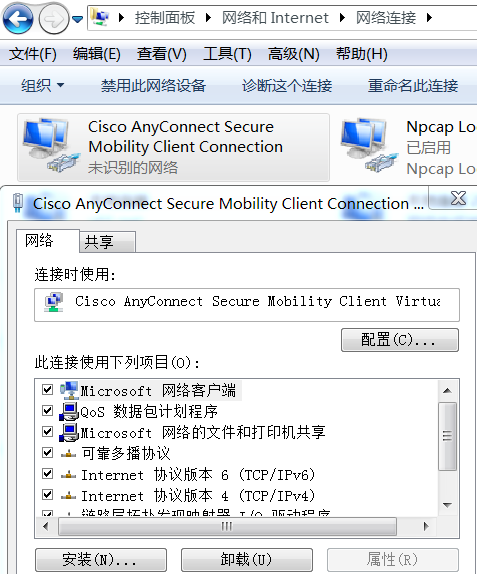
在控制面板-网络与Internet-网络连接,右键AnyConnect secure连接适配器,点击属性
在连接项目中在把多余的项目卸载掉(比如NpcapXXX),就可以连接上了。这只是一个临时办法,可能项目之间存在冲突。
10:24:57 Ready to connect.
10:25:19 Contacting 192.168.2.111.
10:25:29 User credentials entered.
10:25:29 Establishing VPN session...
10:25:29 The AnyConnect Downloader is performing update checks...
10:25:29 Checking for profile updates...
10:25:29 Checking for product updates...
10:25:29 Checking for customization updates...
10:25:29 Performing any required updates...
10:25:29 The AnyConnect Downloader updates have been completed.
10:25:34 Establishing VPN session...
10:25:34 Establishing VPN - Initiating connection...
10:25:35 Establishing VPN - Examining system...
10:25:35 Establishing VPN - Activating VPN adapter...
10:26:16 Establishing VPN - Repairing VPN adapter...
10:27:01 Disconnect in progress, please wait...
10:27:01 Connection attempt has failed.
10:27:01 Ready to connect.
10:36:04 Contacting 192.168.2.111.
10:36:10 User credentials entered.
10:36:11 Establishing VPN session...
10:36:11 The AnyConnect Downloader is performing update checks...
10:36:11 Checking for profile updates...
10:36:11 Checking for product updates...
10:36:11 Checking for customization updates...
10:36:11 Performing any required updates...
10:36:11 The AnyConnect Downloader updates have been completed.
10:36:20 Establishing VPN session...
10:36:20 Establishing VPN - Initiating connection...
10:36:21 Establishing VPN - Examining system...
10:36:21 Establishing VPN - Activating VPN adapter...
10:36:53 Establishing VPN - Repairing VPN adapter...
10:36:59 Disconnect in progress, please wait...
10:36:59 Connection attempt has failed.
10:36:59 Ready to connect.
10:42:08 Contacting 192.168.2.111.
10:42:17 User credentials entered.
10:42:18 Establishing VPN session...
10:42:18 The AnyConnect Downloader is performing update checks...
10:42:18 Checking for profile updates...
10:42:18 Checking for product updates...
10:42:18 Checking for customization updates...
10:42:18 Performing any required updates...
10:42:18 The AnyConnect Downloader updates have been completed.
10:42:23 Establishing VPN session...
10:42:23 Establishing VPN - Initiating connection...
10:42:23 Establishing VPN - Examining system...
10:42:23 Establishing VPN - Activating VPN adapter...
10:42:23 Establishing VPN - Attempting to repair VPN adapter...
10:43:07 Establishing VPN - Repairing VPN adapter...
10:43:53 Disconnect in progress, please wait...
10:43:53 Connection attempt has failed.
10:43:53 Ready to connect.
10:43:57 Contacting 192.168.2.111.
10:44:03 User credentials entered.
10:44:03 Establishing VPN session...
10:44:03 The AnyConnect Downloader is performing update checks...
10:44:03 Checking for profile updates...
10:44:03 Checking for product updates...
10:44:03 Checking for customization updates...
10:44:03 Performing any required updates...
10:44:03 The AnyConnect Downloader updates have been completed.
10:44:08 Establishing VPN session...
10:44:08 Establishing VPN - Initiating connection...
10:44:08 Establishing VPN - Examining system...
10:44:08 Establishing VPN - Activating VPN adapter...
10:44:50 Establishing VPN - Repairing VPN adapter...
10:45:36 Disconnect in progress, please wait...
10:45:36 Connection attempt has failed.
10:45:36 Ready to connect.
10:53:58 Contacting 192.168.2.111.
10:54:58 Connection attempt has failed.
10:54:58 No valid certificates available for authentication.
10:54:58 Connection attempt has failed.
10:55:25 Contacting 192.168.2.111.
10:55:35 User credentials entered.
10:55:35 Establishing VPN session...
10:55:35 The AnyConnect Downloader is performing update checks...
10:55:35 Checking for profile updates...
10:55:35 Checking for product updates...
10:55:35 Checking for customization updates...
10:55:35 Performing any required updates...
10:55:35 The AnyConnect Downloader updates have been completed.
10:55:45 Establishing VPN session...
10:55:45 Establishing VPN - Initiating connection...
10:55:45 Establishing VPN - Examining system...
10:55:45 Establishing VPN - Activating VPN adapter...
10:55:48 Establishing VPN - Configuring system...
10:55:48 Establishing VPN...
10:55:48 Connected to 192.168.2.111.
anyconnect connection attempt has failed的更多相关文章
- python下载时报错 Errno 10060] A connection attempt failed because the connected party did not properly respond after a period of time
def downloadXml(isExists,filedir,filename): if not isExists: os.mkdir(filedir) local = os.path.join( ...
- upstream timed out (10060: A connection attempt failed because the connected party did not properly respond
openresty 错误日志报错内容: // :: [error] #: * upstream timed : A connection attempt failed because the conn ...
- VScode 1.13 gocode提示dial tcp 216.239.37.1:443: connectex: A connection attempt failed because the connected..
在将VScode升级至 1.13后让升级gocode,在升级时报出如下错误 D:\go_work\src>go get -u -v github.com/mdempsky/gocode gith ...
- vs code解决golang开发环境问题 dial tcp 216.239.37.1:443: connectex: A connection attempt failed
安装插件是出现 如下错误提示, https fetch failed: Get https://golang.org/x/tools/cmd/gorename?go-get=1: dial tcp 2 ...
- BUG:upstream timed out (10060: A connection attempt failed because the connected party did not properly respond after a period of time, or established connection failed because connected
更换Apache扑向Nginx,刚搭建完WNMP,nginx能访问php页面 但是访问现有开发项目报错 [error] 4112#3724: *9 upstream timed out (10060: ...
- java.net.SocketException:Software caused connection abort: recv failed 异常分析 +socket客户端&服务端代码
java.net.SocketException:Software caused connection abort: recv failed 异常分析 分类: 很多的技术 2012-01-04 12: ...
- Software caused connection abort: recv failed 错误介绍
解决1: Software caused connection abort: recv failed java.net.SocketException: Software caused connect ...
- HttpUrlConnection java.net.SocketException: Software caused connection abort: recv failed
最近做java swing程序在模拟httprequest请求的时候出现了这个错误 java.net.SocketException: Software caused connection abort ...
- 报错java.net.SocketException: Software caused connection abort: recv failed 怎么办
产生这个异常的原因有多种方面,单就如 Software caused 所示, 是由于程序编写的问题,而不是网络的问题引起的. 已知会导致这种异常的一个场景如下: 客户端和服务端建立tcp的短连接,每次 ...
随机推荐
- 移动端h5开发相关内容总结css篇--笔记
原文参考http://mp.weixin.qq.com/s/Nho2DHj-Y59j2F62vpN9jQ 1.开发移动端,头部必要的配置<meta name="viewport&quo ...
- js-滚动到指定位置导航栏固定顶部
最近整理一下之前做的一个项目,把滚动条动态固定顶部的代码整理出来和大家分享,上代码 <!DOCTYPE html> <html> <head> <meta c ...
- 日常捕获的野生知识 - javascript 与 类
javascript 并不提供类这样方便实用的面向对象类型,今天学习到了,直接上代码: <!DOCTYPE html> <html lang="en"> & ...
- IE8下的怪异模式
使用DWZ框架,老是出现点击button后在winxp IE8下出现新页面,经过检查后发现IE8下submit后,return false就不行了,必须使用window.event.returnVal ...
- matlab练习程序(三角形外接圆)
三角形两边的垂直平分线就能确定外接圆. 结果如下: matlab代码如下: clear all;close all;clc; p=rand(,); %(x,y) cen1=(p(,:)+p(,:))/ ...
- 并发包交换数据Exchanger
/** * * @描述: 用于实现两个人之间的数据交换,每个人完成一定的事务后想与对方交换数据,第一个先拿出数据的人一直等待 * 直到第二个人拿到数据 到来时,才能彼此交换数据. * @作者: Wnj ...
- X11/Xlib.h:没有该文件或目录
编译程序时出现的错误,在安装日志上发现一句:x11/xlib.h nosuch file or directory 在网上查阅了资料,原来是x11M没有装. 解决方案:先安装X11,命令为 su ...
- Infragist ics Ult imate 2015 Vol.1 - Product Keys
Ultimate ProductKeys 2015 Vol.1: 9122-1900164-4504144 9122-9300855-3994197 9122-7600717-4579130 9122 ...
- win10下Java环境配置
JAVA_HOME : E:\ensoft\jdk(这个是jdk安装路径) CLASSPATH : .;E:\ensoft\jdk\lib;E:\ensoft\jdk\lib\dt.jar;E:\en ...
- 使用qt的hostInfo类,查看本机的IP和设备
创建NetWorkInformation类,main.cpp直接生成. #include "networkinformation.h" #include <QApplicat ...