
[rsync]rsync设定及错误处理
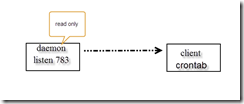
- server端设置
修改/etc/default/rsync
RSYNC_ENABLE=true
RSYNC_OPTS='--address=10.192.0.5'
RSYNC_NICE=''
- 修改/etc/rsyncd.conf
# sample rsyncd.conf configuration file
# GLOBAL OPTIONS
#motd file=/etc/motd
uid = nobody
gid = nogroup
use chroot = no
max connections = 10
strict modes = yes
log file=/var/log/rsyncd.log
# for pid file, do not use /var/run/rsync.pid if
# you are going to run rsync out of the init.d script.
# pid file=/var/run/rsyncd.pid
#syslog facility=daemon
#socket options=
# MODULE OPTIONS
[cashare]
comment = CA-Share
path = /home/cashare
uid = root
gid = root
read only = yes
hosts allow = 10.192.0.0/24
list = false
ignore erros
auth users = backup
secrets file = /etc/rsync.pass
transfer logging = yes
log format = %t: host %h (%a) %o %f (%l bytes). Total %b bytes.
基本上配置还是比较好理解的了。
创建/etc/rsync.pass
chmod 600 /etc/rsync.pass
echo ‘backup:backup’ > /etc/rsync.pass
- 客户端配置:
命令格式:
/usr/bin/rsync -vzrtopg --delete --progress backup@10.192.0.5::cashare /backup-10.192.0.5 --password-file=/etc/rsync.pass
写入到crontab
cat /etc/rsync.pass
backup
- 犯得错误:
rsync: failed to connect to 192.168.1.106: Connection refused (111)
rsync error: error in socket IO (code 10) at clientserver.c(124) [receiver=3.0.6]
应该和下面原因相同
root@InnerServer3:/etc# rsync -vzrtopg --delete --progress gitlab@10.192.0.5:gitlab /backup-10.192.0.5/
gitlab@10.192.0.5's password:
Permission denied, please try again
ip之后应该是::而不是:,疏忽啊
@ERROR: auth failed on module gitlab
rsync error: error starting client-server protocol (code 5) at main.c(1534) [Receiver=3.0.8]
在client的密码文件中,只保存密码。
[rsync]rsync设定及错误处理的更多相关文章
- Linux-非结构化数据同步-Linux下Rsync+Rsync实现非结构化增量差异数据的同步2
说明: 操作系统:CentOS 5.X 源服务器:192.168.21.129 目标服务器:192.168.21.127,192.168.21.128 目的:把源服务器上/home/www.osyun ...
- [rsync]——rsync文件同步和备份
实验环境 (1) Rsync服务器:10.0.10.158 (2) Rsync客户端:10.0.10.173 Rsync服务器端的配置 1. 安装xinetd和rsync # yum install ...
- [daily][archlinux][rsync] rsync
科普文档:https://wiki.archlinux.org/index.php/Rsync 之前改文件系统时,用过. 然而用的不太对,导致一部分文件的权限出了问题. [troubleshoot][ ...
- centos linux 系统日常管理4 scp,rsync,md5sum,sha1sum,strace ,find Rsync 常见错误及解决方法 第十七节课
centos linux 系统日常管理4 scp,rsync,md5sum,sha1sum,strace ,find Rsync 常见错误及解决方法 第十七节课 rsync可以增量同步,scp不行 ...
- Linux下rsync daemon模式下的错误汇总
一.前言:最近学习服务环境搭建,遇到了许多大大小小的问题,不过还好,经过我的一通努力终于都解决了,所以分享出来给自己留个纪念,同时也希望能帮助学习中的朋友. 二.环境:两台服务器环境相同 1 [roo ...
- rsync常见错误
rsync使用时的常见问题: 错误1: rsync: read error: Connection reset by peer (104) rsync error: error in rsync pr ...
- rsync错误
rsync error:No route to host rsync服务端开启的iptables防火墙 [root@nfs01 tmp]# rsync -avz /etc/hosts rsync_ba ...
- 【集群实战】Rsync常见错误总结
1. 服务端指定模块没有对应目录 报错详情: @ERROR: chdir failed rsync error: error startingclient-server protocol (code ...
- 配置rsync服务,数据同步。
这部分设计服务器端和客户端. [服务器端] 如果服务器没有安装rsync服务则使用yum安装rsync服务. yum install rsync 然后 vim /etc/xinetd.d/rsync ...
随机推荐
- python数据文件读写
CSV格式读写 Comma-Separated Values 有时也称为字符分隔值,因为分隔字符也可以不是逗号.以,分隔的文件叫csv,以\t分隔的叫tsv 需要注意的一点:分隔符 import cs ...
- Python练习—文件
1.随机生成20个两位正整数,将其升序排序后再写入文本文件data_asc.txt中! import random alist = [random.randint(10,100) for i in r ...
- 常用算法Java实现之冒泡排序
冒泡排序是所有排序算法中最基本.最简单的一种.思想就是交换排序,通过比较和交换相邻的数据来达到排序的目的. 具体流程如下: 1.对要排序的数组中的数据,依次比较相邻的两个数据的大小. 2.如果前面的数 ...
- 解决python中文编码错误问题
对于初学者而言,编码问题或许还没有没重视起来,但是编码问题是中文开发者必须面对的.今天来看下python开发中如何解决编码问题.注意:本篇讲的是最常见的一种编码问题,其他编码问题,如json函数引起的 ...
- C#及时释放代码
using语句,定义一个范围,在范围结束时释放对象. 场景: 当在某个代码段中使用了类的实例,而希望无论因为什么原因,只要离开了这个代码段就自动调用这个类实例的Dispose. 要达到这样的目的,用t ...
- epoll&ext4文件系统
1.第一个终端运行nesttest,nesttest首先fork一个子进程,然后父进程退出,子进程首先打开一个txt普通文件对应fd为3,然后创建一个epfd,对应fd为4 lybxin@Inspir ...
- TCP系列02—连接管理—1、三次握手与四次挥手
一.TCP连接管理概述 正如我们在之前所说TCP是一个面向连接的通信协议,因此在进行数据传输前一般需要先建立连接(TFO除外),因此我们首先来介绍TCP的连接管理. 通常一次完整的TCP数据传输一般包 ...
- 【redis数据库学习】用JAVA连接redis数据库各种报错
最近项目中,需要用到redis数据库,然后使用Jedis让JAVA连接redis. 首先,安装redis数据库,参考的是:http://www.runoob.com/redis/redis-insta ...
- 优化mysql的内存
Mysql占用CPU过高的时候,该从哪些方面下手进行优化? 占用CPU过高,可以做如下考虑:1)一般来讲,排除高并发的因素,还是要找到导致你CPU过高的哪几条在执行的SQL,show processl ...
- vc6.0批量加注释
MATLAB批量加注释的方法非常简单明了,加注释是ctrl+R,去注释是ctrl+T 然后在VC中我对一条一条加注释的方法非常烦恼,我想也许会有简单的方法可以批量家注释.果然,先贴代码 '------ ...