
influxdb得导出与导入
转载请注明出处:
1、备份元数据
基本语法:
influxd backup <path-to-backup>
备份元数据,没有任何其他参数,备份将只转移当前状态的系统元数据到path-to-backup。path-to-backup为备份保存的目录,不存在会自动创建。
该备份会备份所有数据库以及所有保存策略下得数据。
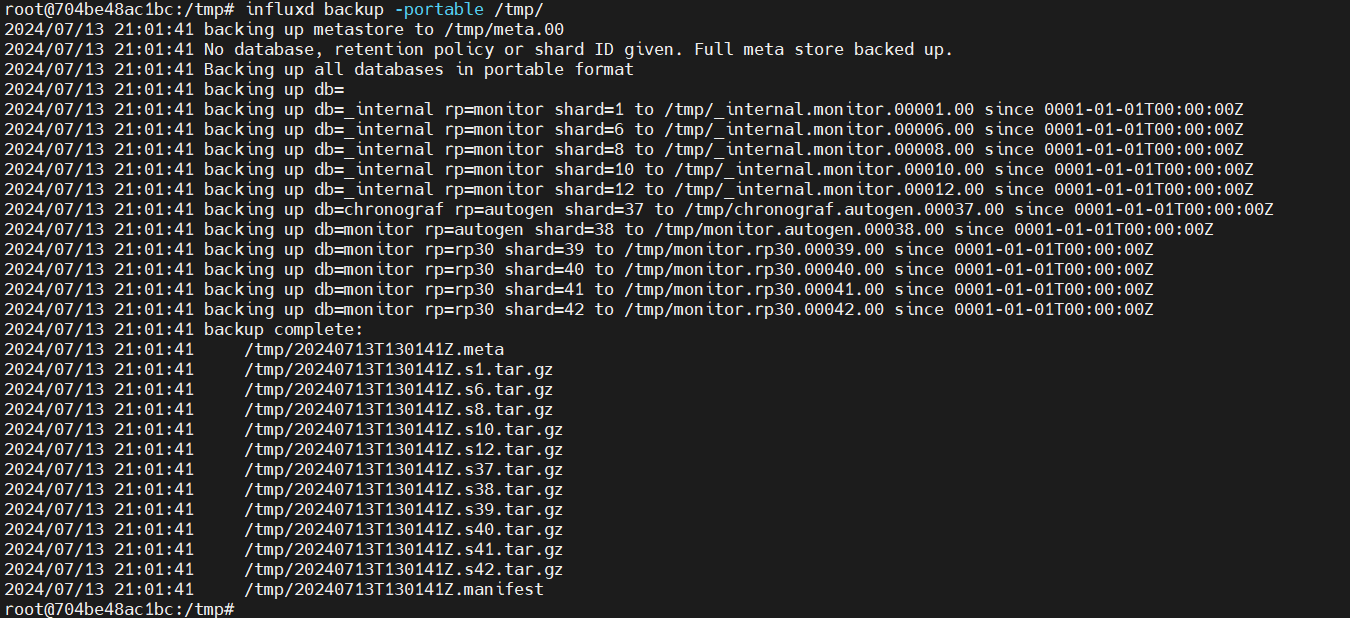
导出常用得其他参数:
root@704be48ac1bc:/# influxd backup -h

Creates a backup copy of specified InfluxDB OSS database(s) and saves the files in an Enterprise-compatible

format to PATH (directory where backups are saved).

Usage: influxd backup [options] PATH

    -portable

            Required to generate backup files in a portable format that can be restored to InfluxDB OSS or InfluxDB

            Enterprise. Use unless the legacy backup is required.

    -host <host:port>

            InfluxDB OSS host to back up from. Optional. Defaults to 127.0.0.1:8088.

    -db <name>

            InfluxDB OSS database name to back up. Optional. If not specified, all databases are backed up when

            using '-portable'.

    -rp <name>

            Retention policy to use for the backup. Optional. If not specified, all retention policies are used by

            default.

    -shard <id>

            The identifier of the shard to back up. Optional. If specified, '-rp <rp_name>' is required.

    -start <2015-12-24T08:12:23Z>

            Include all points starting with specified timestamp (RFC3339 format).

            Not compatible with '-since <timestamp>'.

    -end <2015-12-24T08:12:23Z>

            Exclude all points after timestamp (RFC3339 format).

            Not compatible with '-since <timestamp>'.

    -since <2015-12-24T08:12:23Z>

            Create an incremental backup of all points after the timestamp (RFC3339 format). Optional.

            Recommend using '-start <timestamp>' instead.

    -skip-errors

            Optional flag to continue backing up the remaining shards when the current shard fails to backup.

backup: flag: help requested
具体如下:
Usage: influxd backup [options] PATH

    -portable   # 在线备份,必选

    -host <host:port> # 需要备份的influxdb服务机器地址,可选,Defaults to 127.0.0.1:8088.

    -db <name> # 需要备份的db名称,可选,若没有指定,将备份所有数据库

    -rp <name> # 备份某个保留策略的数据,未指定,则备份所有rp的数据。

    -shard <id> # 需要备份的shard id,可选,若指定了备份shard,必须先选择rp

    -start # 需要备份的数据的起始时间,timestamp (RFC3339 format). 不能和-since一起使用

    -end # 需要备份的数据的结束时间,timestamp (RFC3339 format). 不能和-since一起使用

    -since # 备份这个timestamp之后的数据,建议用-start <timestamp>代替

    -skip-errors # 可选,当备份shards时,跳过备份失败的shard,继续备份其他shard。
2.influxdb导入
1.先删除数据库
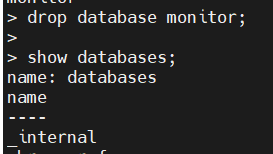
2.导入备份数据:

这种方式只能导入按个数据库进行导入;
3.导入其他配置项参数:
root@704be48ac1bc:/# influxd restore -h

Uses backup copies from the specified PATH to restore databases or specific shards from InfluxDB OSS

  or InfluxDB Enterprise to an InfluxDB OSS instance.

Usage: influxd restore -portable [options] PATH

Note: Restore using the '-portable' option consumes files in an improved Enterprise-compatible

  format that includes a file manifest.

Options:

    -portable

            Required to activate the portable restore mode. If not specified, the legacy restore mode is used.

    -host  <host:port>

            InfluxDB OSS host to connect to where the data will be restored. Defaults to '127.0.0.1:8088'.

    -db    <name>

            Name of database to be restored from the backup (InfluxDB OSS or InfluxDB Enterprise)

    -newdb <name>

            Name of the InfluxDB OSS database into which the archived data will be imported on the target system.

            Optional. If not given, then the value of '-db <db_name>' is used.  The new database name must be unique

            to the target system.

    -rp    <name>

            Name of retention policy from the backup that will be restored. Optional.

            Requires that '-db <db_name>' is specified.

    -newrp <name>

            Name of the retention policy to be created on the target system. Optional. Requires that '-rp <rp_name>'

            is set. If not given, the '-rp <rp_name>' value is used.

    -shard <id>

            Identifier of the shard to be restored. Optional. If specified, then '-db <db_name>' and '-rp <rp_name>' are

            required.

    PATH

            Path to directory containing the backup files.

restore: flag: help requested
主要作用:
Usage: influxd restore -portable [options] PATH

Options:

    -portable #

    -host  <host:port>

    -db    <name> # 从备份数据的哪个库恢复数据Name of database to be restored from the backup

    -newdb <name>

            # 数据恢复到新库名称,若没有指定,选择-db <name>的名称。newdb必须不存在,恢复时会自动创建

    -rp    <name> # 从备份数据的哪个rp恢复数据,指定了-rp,必须指定-db

    -newrp <name> #恢复数据新的rp名称,newrp必须存在。指定了-rp,未指定-newrp则使用-rp

    -shard <id> # 需要恢复的shard,如果指定了'-db <db_name>' and '-rp <rp_name>',必须-shard<id>

    PATH #备份数据文件list
4.第二种导入方式:
删除influxdb数据库存储得元数据文件,将influxdb得数据库元文件目录指定为备份得目录,然后再重启influxdb数据库即可完成导入
influxd restore -metadir <path-to-meta-or-data-directory> <path-to-backup>
从/var/lib/influxdb/ 目录下删除meta目录,即 rm -rf /var/lib/influxdb/meta,然后重启influxdb,service influxdb restart。
influxdb得导出与导入的更多相关文章
- [moka同学笔记]PHPexcel之excel导出和导入
原案例来自http://www.sucaihuo.com/有修改 1.目录结构(文件不用解释,应该都可以看得懂,直接看代码)
- ORACLE 导出(exp) & 导入(imp)
导出(exp) & 导入(imp) 利用Export可将数据从数据库中提取出来,就是将select的结果存到一个FS二进制文件上 利用Import则可将提取出来的数据送回到Ora ...
- OCR磁盘的导出和导入、备份和恢复以及移动(ocrconfig命令的应用)
数据库版本:10.2.0.1 一,使用导出.导入进行备份和恢复 Oracle推荐在对集群做调整时,比如增加.删除节点之前,应该对OCR做一个备份,可以使用export 备份到指定文件.如果做了repl ...
- paip 自定义输入法多多输入法词库的备份导出以及导入
paip 自定义输入法词库的备份导出以及导入 作者Attilax 艾龙, EMAIL:1466519819@qq.com 来源:attilax的专栏 地址:http://blog.csdn.net/ ...
- mysql如何利用Navicat 导出和导入数据库
MySql是我们经常用到的数据,无论是开发人员用来练习,还是小型私服游戏服务器,或者是个人软件使用,都十分方便.对于做一些个人辅助软件, 选择mysql数据库是个明智的选择,有一个好的工具更是事半功倍 ...
- 用命令行导出和导入MySQL数据库
php 用命令行导出和导入MySQL数据库 命令行导出数据库:1,进入MySQL目录下的bin文件夹:cd MySQL中到bin文件夹的目录如我输入的命令行:cd C:\Program Files ...
- Java CSV操作(导出和导入)
Java CSV操作(导出和导入) CSV是逗号分隔文件(Comma Separated Values)的首字母英文缩写,是一种用来存储数据的纯文本格式,通常用于电子表格或数据库软件.在 CSV文件 ...
- oracle数据库数据导出和导入
oracle的客户端里面的bin下面有两个可执行文件,名称分别为exp.exe和imp.exe. 他俩的用途就是导出和导入数据用的. 全库 导出:exp 用户名/密码@数据库名 full=y file ...
- shell导出和导入redis
1.导出redis #!/bin/bash REDIS_HOST=localhost REDIS_PORT=6379 REDIS_DB=1 KEYNAME=redis:hash:* KEYFILE=k ...
- .Net程序员学用Oracle系列(19):我知道的导出和导入
1.传统的导出/导入工具 1.1.EXP 命令详解 1.2.IMP 命令详解 1.3.EXP/IMP 使用技巧 2.新的导出/导入工具 2.1.EXPDP/IMPDP 参数说明 2.2.EXPDP/I ...
随机推荐
- 国产系统UOS安装体验
原文链接 https://www.giantliu.cn/2020/09/04/200904InstallUOS/ UOS简介 统信桌面操作系统(Uniontech OS)个人正式版是统信软件基于Li ...
- 详解 XSS 攻击原理
更多优质博文请关注:听到微笑的博客 跨站脚本攻击(Cross Site Scripting)本来的缩写为CSS,为了与层叠样式表(Cascading Style Sheets,CSS)的缩写进行区分, ...
- ubuntu18.04最小化安装
ubuntu 18.04虚拟机安装 镜像下载地址: https://releases.ubuntu.com/18.04/ubuntu-18.04.6-live-server-amd64.iso 创建虚 ...
- Swift 计算字符串展示的区域
一.如果是普通文本,那么可以采用NSString的方法,代码如下: import UIKit import PlaygroundSupport class MyViewController : UIV ...
- FlexBox 行间距
问题背景 在Flex布局方式下, 父容器约定是换行的方式, 不足以容纳一行子元素的时候, 会单独进行折行, 那么折行的行间距如何处理呢? 解决办法 通过在子Item上面设置margin-top可以模拟 ...
- NOIP模拟59
T1 柱状图 解题思路 二分答案+线段树check 显然对于最后的限制,我们希望向上移的和向下移的柱子数尽量接近. 因此枚举每一个柱子当做最高的一个的时刻,二分找到一个当前最优解更新答案. 开两棵线段 ...
- Centos安装Redis(极速安装)
下载 从官网找到下载文件,我下载的是redis-6.0.16.tar.gz. 安装 1. 解压文件 解压文件然后,进入解压文件夹: tar -zxvf redis-6.0.16.tar.gz cd r ...
- 内置对象Date
// 内置对象 Date 时间对象 // 可以通过 内置对象 data来获取和存储时间 // 使用方式步骤 // 1,创建时间对象 // ...
- zkq 数学听课笔记
线性代数 域 \(F\),OI 中常用的域是 \(\Z_{p^c}\). \(n\) 维向量 \(\vec x \in F^n\),其中 \(x_i \in F\),注意向量是列向量. \(F^n\) ...
- MAPJOIN中无法使用UDF
今天在写SQL时,遇到了一个异常,提示semantic exception generate map join error unable to find class,udf编写的没毛病,其他SQL也有 ...