
Container killed by YARN for exceeding memory limits
19/08/12 14:15:35 ERROR cluster.YarnScheduler: Lost executor 5 on worker01.hadoop.mobile.cn: Container killed by YARN for exceeding memory limits. 5 GB of 5 GB physical memory used. Consider boosting spark.yarn.executor.memoryOverhead.
在看这个问题之前,首先解释下下面参数的含义:
hadoop yarn-site.xml部分资源定义相关参数,更详细的内容可参考官网链接
yarn.nodemanager.resource.memory-mb //每个NodeManager可以供yarn调度(分配给container)的物理内存,单位MB
yarn.nodemanager.resource.cpu-vcores  //每个NodeManager可以供yarn调度(分配给container)的vcore个数

yarn.scheduler.maximum-allocation-mb //每个container能够申请到的最大内存
yarn.scheduler.minimum-allocation-mb //每个container能够申请到的最小内存,如果设置的值比该值小,默认就是该值
yarn.scheduler.increment-allocation-mb //container内存不够用时一次性加多少内存 单位MB。CDH默认512M
yarn.scheduler.minimum-allocation-vcores //每个container能够申请到的最小vcore个数,如果设置的值比该值小,默认就是该值
yarn.scheduler.maximum-allocation-vcores //每个container能够申请到的最大vcore个数。

yarn.nodemanager.pmem-check-enabled //是否对contanier实施物理内存限制,会通过一个线程去监控container内存使用情况,超过了container的内存限制以后,就会被kill掉。
yarn.nodemanager.vmem-check-enabled //是否对container实施虚拟内存限制
executor-memory和executor-memory-overhead源码含义
EXECUTOR_MEMORY:
Amount of memory to use per executor process

EXECUTOR_MEMORY_OVERHEAD:
The amount of off-heap memory to be allocated per executor in cluster mode
spark.yarn.executor.memoryOverhead源代码实现:
  val MEMORY_OVERHEAD_FACTOR = 0.10
  val MEMORY_OVERHEAD_MIN = 384L
// Executor memory in MB.
protected val executorMemory = sparkConf.get(EXECUTOR_MEMORY).toInt
// Additional memory overhead.
protected val memoryOverhead: Int = sparkConf.get(EXECUTOR_MEMORY_OVERHEAD).getOrElse(
  math.max((MEMORY_OVERHEAD_FACTOR * executorMemory).toInt, MEMORY_OVERHEAD_MIN)).toInt
到这里,可能有的同学大概就明白了,比如设置了--executor-memory为2G,为什么报错时候是Container killed by YARN for exceeding memory limits. 2.5 GB of 2.5 GB physical memory used,2.5G从哪里来的?是这样,首先计算出memoryOverhead 默认值是max(2G*0.1,384),也就是384M,又根据上面的yarn.scheduler.increment-allocation-mb值,就会分配2G+512M大小的container...
好了,我们再看问题,从报错的描述上可以大概了解到,container超过了内存的限制从而被kill掉,从上面的参数yarn.nodemanager.pmem-check-enabled可以了解到该参数默认是true,也就是会由它来控制监控container的内存使用,所以第一步我们可以尝试关闭该参数看应用是否可以正常运行
调整一:设置yarn.nodemanager.pmem-check-enabled=false
结果:应用成功运行,但是关闭了对container内存的监控,虽然可以运行,但是明显没有实际性的处理问题,而且不可控的内存使用,对多租户的环境不友好
调整二:根据提示 Consider boosting spark.yarn.executor.memoryOverhead
但是什么是memoryOverhead呢? 如下图:
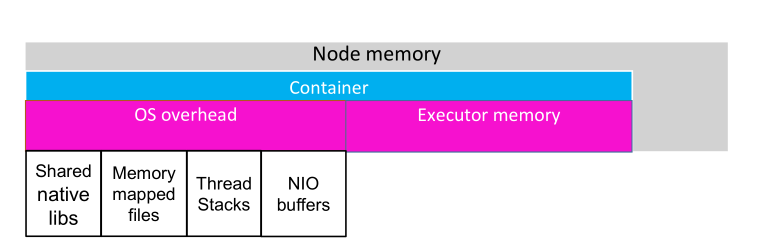
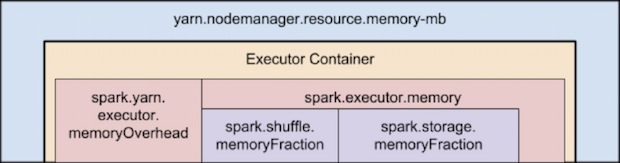
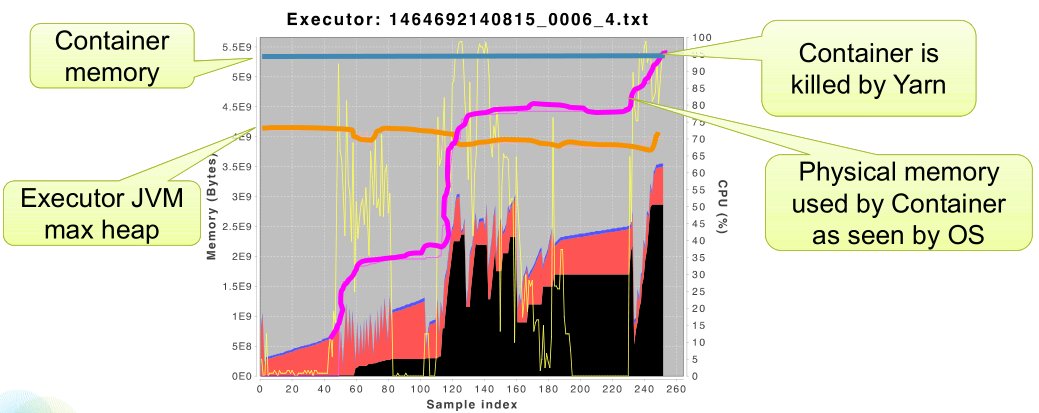
container内存使用情况的时线图:
尝试提升spark.yarn.executor.memoryOverhead参数值至1.5G,可以看到container预留了更多空间给 OS overhead,没有超过container的内存限制
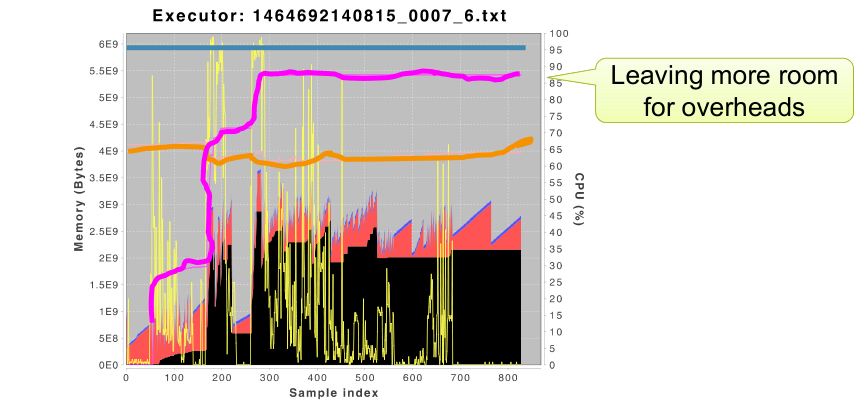
不过很明显,我们是牺牲内存资源来换取应用稳定性。
但是真正的原因到底是什么呢?看下图:
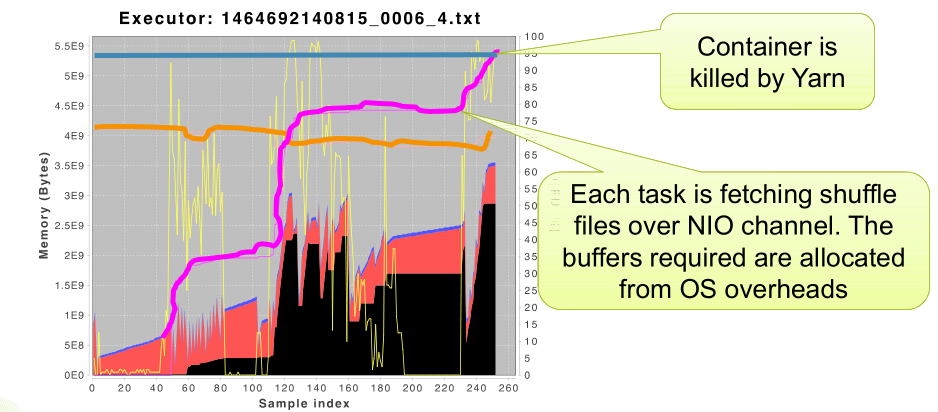
每个任务都是通过NIO channel 去获取shuffle文件。并且所需的缓冲区是从OS overheads中分配的,这也就导致了os overhead越来越大,因此我们也可以通过减少并行度来减少同时运行的任务来尝试避免这样的问题。
调整三:降低参数--excutor-cores值

结果也可以成功运行,但是同样,我们是牺牲了应用的性能和cpu的利用率来换取应用稳定性。
最后,如果有同学单独调整以上参数应用仍然不可用的话,可以尝试上述多种方式同时使用,另外注意
1.对于发生shuffle的算子,比如groupby,可以通过repartition提升并行度
2.避免数据倾斜
Container killed by YARN for exceeding memory limits的更多相关文章
- Hive-Container killed by YARN for exceeding memory limits. 9.2 GB of 9 GB physical memory used. Consider boosting spark.yarn.executor.memoryOverhead.
Caused by: org.apache.spark.SparkException: Job aborted due to stage failure: Task times, most recen ...
- hadoop的job执行在yarn中内存分配调节————Container [pid=108284,containerID=container_e19_1533108188813_12125_01_000002] is running beyond virtual memory limits. Current usage: 653.1 MB of 2 GB physical memory used
实际遇到的真实问题,解决方法: 1.调整虚拟内存率yarn.nodemanager.vmem-pmem-ratio (这个hadoop默认是2.1) 2.调整map与reduce的在AM中的大小大于y ...
- Kafka:ZK+Kafka+Spark Streaming集群环境搭建(十三)kafka+spark streaming打包好的程序提交时提示虚拟内存不足(Container is running beyond virtual memory limits. Current usage: 119.5 MB of 1 GB physical memory used; 2.2 GB of 2.1 G)
异常问题:Container is running beyond virtual memory limits. Current usage: 119.5 MB of 1 GB physical mem ...
- spark运行任务报错:Container [...] is running beyond physical memory limits. Current usage: 3.0 GB of 3 GB physical memory used; 5.0 GB of 6.3 GB virtual memory used. Killing container.
spark版本:1.6.0 scala版本:2.10 报错日志: Application application_1562341921664_2123 failed 2 times due to AM ...
- [hadoop] - Container [xxxx] is running beyond physical/virtual memory limits.
当运行mapreduce的时候,有时候会出现异常信息,提示物理内存或者虚拟内存超出限制,默认情况下:虚拟内存是物理内存的2.1倍.异常信息类似如下: Container [pid=13026,cont ...
- Container [pid=6263,containerID=container_1494900155967_0001_02_000001] is running beyond virtual memory limits
以Spark-Client模式运行,Spark-Submit时出现了下面的错误: User: hadoop Name: Spark Pi Application Type: SPARK Applica ...
- hive: insert数据时Error during job, obtaining debugging information 以及beyond physical memory limits
insert overwrite table canal_amt1...... 2014-10-09 10:40:27,368 Stage-1 map = 100%, reduce = 32%, Cu ...
- hadoop is running beyond virtual memory limits问题解决
单机搭建了2.6.5的伪分布式集群,写了一个tf-idf计算程序,分词用的是结巴分词,使用standalone模式运行没有任何问题,切换到伪分布式模式运行一直报错: hadoop is running ...
- 运行hadoop的时候提示物理内存或虚拟内存溢出的解决方案running beyond physical memory或者beyond vitual memory limits
当运行中出现Container is running beyond physical memory这个问题出现主要是因为物理内存不足导致的,在执行mapreduce的时候,每个map和reduce都有 ...
随机推荐
- 性能测试-实例讲解VU、RPS、RT公式换算
概述 今天看到一篇文章讲解VU.RPS.RT,中间有一个公式如下图 并发数 = RPS * 响应时间 于是我在本地做了几次实验,试图验证一下公式的准确性 实验网站 www.baidu.com 第一次 ...
- [转载]linux下清除Squid缓存的方法记录
在日常运维工作中,只要用到squid缓存服务,就会常常被要求清理squid缓存. 比如公司领导要求删一篇新闻,新闻是生成的静态.运维人员把服务器上静态的新闻页面删除了后,不料代理服务器上缓存还有.缓存 ...
- spring mvc 拦截器的使用
Spring MVC 拦截器的使用 拦截器简介 Spring MVC 中的拦截器(Interceptor)类似于 Servler 中的过滤器(Filter).用于对处理器进行预处理和后处理.常用于日志 ...
- python 3.5学习笔记(第五章)
本章内容 1.什么是模块 2.模块的导入方法 3.搜索路径 4.重要标准库 一.什么是模块 1.模块本质上是一个以.py 结尾的python文件,包含了python对象定义和python语句. 2.模 ...
- Mysql常用增删查改及入门(二)
常用:数据库常用就是DML:增删查改 1.增加数据: insert into 表名 values (值1,值2...); insert into 表名 (字段1,字段2) values (值1,值2) ...
- 洛谷 P2671 求和
题目描述 一条狭长的纸带被均匀划分出了nn个格子,格子编号从11到nn.每个格子上都染了一种颜色color\_icolor_i用[1,m][1,m]当中的一个整数表示),并且写了一个数字number\ ...
- spring全局异常抓取validation校验信息
@ControllerAdvicepublic class GlobalExceptionHandler { @ExceptionHandler({Exception.class}) @Respons ...
- Git命令行之快速入门
从头开始创建一个版本库,添加一些内容,然后管理一些修订版本. 有两种建立 Git版本库 的基础技术.第一:从头开始创建,用现有的内容填充它.第二:可以克隆一个已有的版本库.这里选择从一个空的版本库开始 ...
- 模拟ssh远程执行命令,粘包问题,基于socketserver实现并发的socket
06.27自我总结 1.模拟ssh远程执行命令 利用套接字编来进行远程执行命令 服务端 from socket import * import subprocess server = socket(A ...
- python3.x 与 python2.x 差别记录
从2.x过渡到3.x的时候,遇到了大大小小的坑,于是便记录下来- 1.print: 3.x 所有print都要加 "( )",print更像(就是)一个函数了. 2.x 可以加& ...