
apache ignite系列(五):分布式计算
ignite分布式计算
在ignite中,有传统的MapReduce模型的分布式计算,也有基于分布式存储的并置计算,当数据分散到不同的节点上时,根据提供的并置键,计算会传播到数据所在的节点进行计算,再结合数据并置,相关联的数据存储在相同节点,这样可以避免在计算过程中涉及到大量的数据移动,有效保证计算的性能。
ignite分布式计算的主要特点如下:
| 特性 | 描述 |
|---|---|
| 自动部署 | 计算用到的类可以自动传播,而不需要在每个节点都部署相关的类,这个可以通过配置peerClassLoadingEnabled选项开启计算类的自动传播,但是缓存的实体类是无法自动传播的。 |
| 平衡加载 | 数据在加载之后会在集群中进行一个再平衡的过程,保证数据均匀分布在各个节点,当有计算在集群中执行的时候,可以根据提供的并置键定位到数据所在节点进行计算,也就是并置计算。 |
| 故障转移 | 当节点出现故障或者其它计算的时候,任务会自动转移到集群中的其他节点执行 |
1.分布式闭包:
Ignite计算网格可以对集群或者集群组内的任何闭包进行广播和负载平衡,包括纯Java的
runnables和callables
| 闭包类型 | 功能 |
|---|---|
| broadcast | 将任务传播到部分指定节点或者全部节点 |
| call/run | 执行单个任务或者任务集 |
| apply | apply接收一个闭包和一个集合作为参数,生成与参数数量等量的任务,每个任务分别是将闭包应用在其中一个参数上,并且会返回结果集。 |
ComputeTestController.java
    /** broadCast测试*/

    @RequestMapping("/broadcast")

    String broadcastTest(HttpServletRequest request, HttpServletResponse response) {

//        IgniteCompute compute = ignite.compute(ignite.cluster().forRemotes());  //只传播远程节点

        IgniteCompute compute = ignite.compute();

        compute.broadcast(() -> System.out.println("Hello Node: " + ignite.cluster().localNode().id()));

        return "all executed.";

    }

    /** call和run测试 */

    @RequestMapping("/call")

    public @ResponseBody

    String callTest(HttpServletRequest request, HttpServletResponse response) {

        Collection<IgniteCallable<Integer>> calls = new ArrayList<>();

        /** call */

        System.out.println("-----------call-----------");

        for(String word : "How many characters".split(" ")) {

            calls.add(word::length);

//            calls.add(() -> word.length());

        }

        Collection<Integer> res = ignite.compute().call(calls);

        int total = res.stream().mapToInt(Integer::intValue).sum();

        System.out.println(String.format("the total lengths of all words is [%s].", total));

        /** run */

        System.out.println("-----------run-----------");

        for (String word : "Print words on different cluster nodes".split(" ")) {

            ignite.compute().run(() -> System.out.println(word));

        }

        /** async call */

        System.out.println("-----------async call-----------");

        IgniteCompute asyncCompute =  ignite.compute().withAsync();

        asyncCompute.call(calls);

        asyncCompute.future().listen(fut -> {

            Collection<Integer> result = (Collection<Integer>)fut.get();

            int t = result.stream().mapToInt(Integer::intValue).sum();

            System.out.println("Total number of characters: " + total);

        });

        /** async run */

        System.out.println("-----------async run-----------");

        Collection<ComputeTaskFuture<?>> futs = new ArrayList<>();

        asyncCompute = ignite.compute().withAsync();

        for (String word : "Print words on different cluster nodes".split(" ")) {

            asyncCompute.run(() -> System.out.println(word));

            futs.add(asyncCompute.future());

        }

        futs.stream().forEach(ComputeTaskFuture::get);

        return "all executed.";

    }

    /** apply测试 */

    @RequestMapping("/apply")

    public @ResponseBody

    String applyTest(HttpServletRequest request, HttpServletResponse response) {

        /** apply */

        System.out.println("-----------apply-----------");

        IgniteCompute compute = ignite.compute();

        Collection<Integer> res = compute.apply(

                String::length,

                Arrays.asList("How many characters".split(" "))

        );

        int total = res.stream().mapToInt(Integer::intValue).sum();

        System.out.println(String.format("the total lengths of all words is [%s].", total));

        /** async apply */

        IgniteCompute asyncCompute = ignite.compute().withAsync();

        res = asyncCompute.apply(

                String::length,

                Arrays.asList("How many characters".split(" "))

        );

        asyncCompute.future().listen(fut -> {

            int t = ((Collection<Integer>)fut.get()).stream().mapToInt(Integer::intValue).sum();

            System.out.println(String.format("Total number of characters: " + total));

        });

        return "all executed.";

    }
2. MapReduce:
在ignite中MapReduce的实现是ComputeTask,其主要方法是map()和reduce(),map()可以控制任务映射到节点的过程,而reduce()则是对最终计算结果集的一个处理。ComputeTask有两个主要实现ComputeTaskAdapter和ComputeTaskSplitAdapter, 主要的区别在于ComputeTaskAdapter需要手动实现map()方法,而ComputeTaskSplitAdapter可以自动映射任务。
ComputeTaskAdapter:
    /**ComputeTaskAdapter*/

    @RequestMapping("/taskMap")

    public @ResponseBody

    String taskMapTest(HttpServletRequest request, HttpServletResponse response) {

        /**ComputeTaskMap*/

        int cnt = ignite.compute().execute(MapExampleCharacterCountTask.class, "Hello Ignite Enable World!");

        System.out.println(String.format(">>> Total number of characters in the phrase is %s.", cnt));

        return "all executed.";

    }

    private static class MapExampleCharacterCountTask extends ComputeTaskAdapter<String, Integer> {

        /**节点映射*/

        @Override

        public Map<? extends ComputeJob, ClusterNode> map(List<ClusterNode> nodes, String arg) throws IgniteException {

            Map<ComputeJob, ClusterNode> map = new HashMap<>();

            Iterator<ClusterNode> it = nodes.iterator();

            for (final String word : arg.split(" ")) {

                // If we used all nodes, restart the iterator.

                if (!it.hasNext()) {

                    it = nodes.iterator();

                }

                ClusterNode node = it.next();

                map.put(new ComputeJobAdapter() {

                    @Override

                    public Object execute() throws IgniteException {

                        System.out.println("-------------------------------------");

                        System.out.println(String.format(">>> Printing [%s] on this node from ignite job.", word));

                        return word.length();

                    }

                }, node);

            }

            return map;

        }

        /**结果汇总*/

        @Override

        public Integer reduce(List<ComputeJobResult> results) throws IgniteException {

            int sum = 0;

            for (ComputeJobResult res : results) {

                sum += res.<Integer>getData();

            }

            return sum;

        }

    }
运行结果:
-------------------------------------

>>> Printing [Ignite] on this node from ignite job.

-------------------------------------

>>> Printing [World!] on this node from ignite job.

>>> Total number of characters in the phrase is 23.
ComputeTaskSplitAdapter:
    /**ComputeTaskSplitAdapter*/

    @RequestMapping("/taskSplit")

    public @ResponseBody

    String taskSplitTest(HttpServletRequest request, HttpServletResponse response) {

        /**ComputeTaskSplitAdapter(自动映射) */

        int result = ignite.compute().execute(SplitExampleDistributedCompute.class, null);

        System.out.println(String.format(">>> result: [%s]", result));

        return "all executed.";

    }

    private static class SplitExampleDistributedCompute extends ComputeTaskSplitAdapter<String, Integer> {

        @Override

        protected Collection<? extends ComputeJob> split(int gridSize, String arg) throws IgniteException {

            Collection<ComputeJob> jobs = new LinkedList<>();

            jobs.add(new ComputeJobAdapter() {

                @Override

                public Object execute() throws IgniteException {

//                    IgniteCache<Long, Student> cache = Ignition.ignite().cache(CacheKeyConstant.STUDENT);

                    IgniteCache<Long, BinaryObject> cache = Ignition.ignite().cache(CacheKeyConstant.STUDENT).withKeepBinary();

                    /**普通查询*/

                    String sql_query = "name = ? and email = ?";

//                    SqlQuery<Long, Student> cSqlQuery = new SqlQuery<>(Student.class, sql_query);

                    SqlQuery<Long, BinaryObject> cSqlQuery = new SqlQuery<>(Student.class, sql_query);

                    cSqlQuery.setReplicatedOnly(true).setArgs("student_54", "student_54gmail.com");

//                  List<Cache.Entry<Long, Student>> result = cache.query(cSqlQuery).getAll();

                    List<Cache.Entry<Long, BinaryObject>> result = cache.query(cSqlQuery).getAll();

                    System.out.println("--------------------");

                    result.stream().map(x -> {

                        Integer studId = x.getValue().field("studId");

                        String name = x.getValue().field("name");

                        return String.format("name=[%s], studId=[%s].", name, studId);

                    }).forEach(System.out::println);

                    System.out.println(String.format("the query size is [%s].", result.size()));

                    return result.size();

                }

            });

            return jobs;

        }

        @Override

        public Integer reduce(List<ComputeJobResult> results) throws IgniteException {

            int sum = results.stream().mapToInt(x -> x.<Integer>getData()).sum();

            return sum;

        }

    }
运行结果:
--------------------

name=[student_54], studId=[54].

the query size is [1].

>>> result: [1]
MapReduce的局限性:
MapReduce适合解决并行和批处理的场景,不适合串行,迭代和递归一类无法并行和分割任务的场景。
分布式计算存在的问题以及注意点
在使用ignite的分布式计算功能的时候,如果用到了缓存, 并且缓存value不是平台类型(java基础类型),则需要考虑反序列化的问题。
现有两种解决方案:
- 部署缓存实体类包到ignite节点
缓存实体类得实现Serializable接口,并且得指定serialVersionUID
serialVersionUID表示实体类的当前版本,每个实现Serializable接口的类都有,如果没有的设置该值,java序列化机制会帮你默认生成一个。最好在使用serializable接口时,设定serialVersionUID为某个值,不然当在传输的某一端修改实体类时,serialVersionUID会被虚拟机设置成一个新的值,造成两端的serialVersionUID不一致会发生异常。
public class Student implements Serializable {

    private static final long serialVersionUID = -5941489737545326242L;

    ....

}
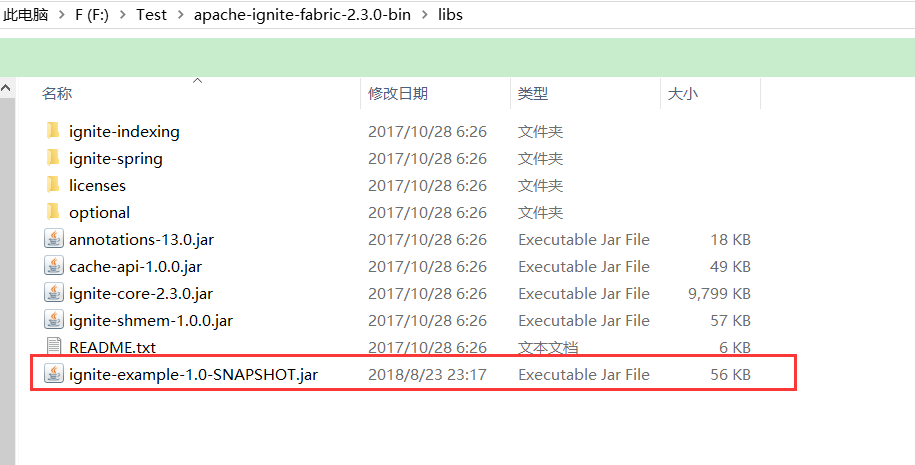
将实体类打包成普通jar包,并放在$IGNITE_HOME/libs/路径下面:
注意:打包的时候不能打包成spring-boot的可执行包,要打包成普通jar包,这样相关类才能正常加载。当然如果集群里的节点均为应用节点,则可以不用考虑这个问题。
使用二进制对象对缓存进行操作
Ignite默认使用反序列化值作为最常见的使用场景,要启用
BinaryObject处理,需要获得一个IgniteCache的实例然后使用withKeepBinary()方法。启用之后,如果可能,这个标志会确保从缓存返回的对象都是BinaryObject格式的。
 IgniteCache<Long, BinaryObject> cache = ignite.cache("student").withKeepBinary();

 BinaryObject obj = cache.get(k);  //获取二进制对象

 String name = obj.<String>field("name");  //读取二进制对象属性值<使用field方法>
3.并置计算:
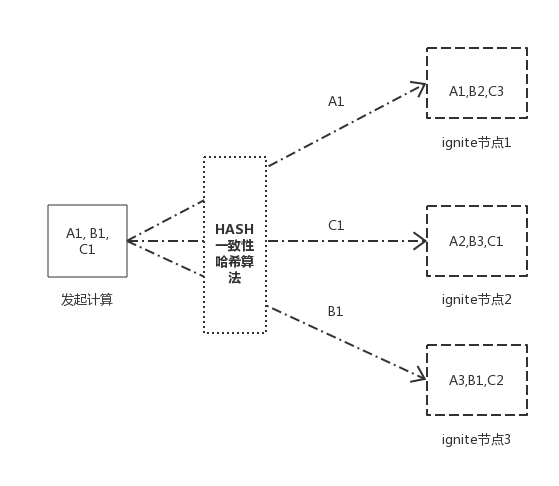
affinityCall(...)和affinityRun(...)方法使作业和缓存着数据的节点位于一处,换句话说,给定缓存名字和关系键,这些方法会试图在指定的缓存中定位键所在的节点,然后在那里执行作业。
并置的两种类型以及区别:
| 并置 | 特点 |
|---|---|
| 数据并置 | 将相关的缓存数据并置到一起,确保其所有键会缓存在同一个节点上,避免节点间数据移动产生的网络开销。 |
| 计算并置 | 根据关系键和缓存名称,定位关系键所在节点,并在该节点执行作业单元。 |
ComputeTestController.class
    /**并置计算测试*/

    @RequestMapping("/affinity")

    public @ResponseBody

    String affinityTest(HttpServletRequest request, HttpServletResponse response) {

        /** affinityRun call */

        System.out.println("-----------affinityRun call-----------");

        IgniteCompute compute = ignite.compute();

//        IgniteCompute compute = ignite.compute(ignite.cluster().forRemotes());

        for(int key = 0; key < 100; key++) {

//            final long k = key;

            //生成随机k值

            final long k = IntStream.generate(() -> (int)(System.nanoTime() % 100)).limit(1).findFirst().getAsInt();

            compute.affinityRun(CacheKeyConstant.STUDENT, k, () -> {

                IgniteCache<Long, BinaryObject> cache = ignite.cache(CacheKeyConstant.STUDENT).withKeepBinary();

                BinaryObject obj = cache.get(k);

                if(obj!=null) {

                    System.out.println(String.format("Co-located[key= %s, value= %s]", k, obj.<String>field("name")));

                }

            });

        }

        IgniteCache<Long, BinaryObject> cache = ignite.cache(CacheKeyConstant.STUDENT).withKeepBinary();

        cache.forEach(lo -> compute.affinityRun(CacheKeyConstant.STUDENT, lo.getKey(), () -> {

            System.out.println(lo.getValue().<String>field("name"));

        }));

        return "all executed.";

    }
运行结果:
-----------affinityRun call-----------

student_495

student_496

student_498

...
至此,ignite分布式计算完毕。
apache ignite系列(五):分布式计算的更多相关文章
- apache ignite系列(八):问题汇总
1,java.lang.ClassNotFoundException Unknown pair 1.Please try to turn on isStoreKeepBinary in cache s ...
- apache ignite系列(六): 服务网格
简介 服务网格本质上还是远程方法调用(RPC),而在ignite中注册的服务本质体现还是以cache的形式存在,集群中的节点可以相互调用部署在其它节点上的服务,而且ignite集群会负责部署服务的 ...
- apache ignite系列(三):数据处理(数据加载,数据并置,数据查询)
使用ignite的一个常见思路就是将现有的关系型数据库中的数据导入到ignite中,然后直接使用ignite中的数据,相当于将ignite作为一个缓存服务,当然ignite的功能远不止于此,下面以 ...
- apache ignite系列(二):配置
ignite有两种配置方式,一种是基于XML文件的配置,一种是基于JAVA代码的配置: 这里将ignite常用的配置集中罗列出来了,一般建议使用xml配置. 1,基于XML的配置 <beans ...
- apache ignite系列(一): 简介
apache-ignite简介(一) 1,简介 ignite是分布式内存网格的一种实现,其基于java平台,具有可持久化,分布式事务,分布式计算等特点,此外还支持丰富的键值存储以及SQL语法(基于 ...
- apache ignite系列(九):ignite调优
1,配置文件调优 1.1 设置页面大小(pagesize) 先查看系统pagesiz,使用PAGE_SIZE或者PAGESIZE # getconf PAGE_SIZE 4096 # getconf ...
- apache ignite系列(九):使用ddl和dml脚本初始化ignite并使用mybatis查询缓存
博客又断了一段时间,本篇将记录一下基于ignite对jdbc支持的特性在实际使用过程中的使用. 使用ddl和dml脚本初始化ignite 由于spring-boot中支持通过spring.dataso ...
- apache ignite系列(四):持久化
ignite持久化与固化内存 1.持久化的机制 ignite持久化的关键点如下: ignite持久化可防止内存溢出导致数据丢失的情况: 持久化可以定制化配置,按需持久化; 持久化能解决在大量缓存数据情 ...
- Apache Kafka系列(五) Kafka Connect及FileConnector示例
Apache Kafka系列(一) 起步 Apache Kafka系列(二) 命令行工具(CLI) Apache Kafka系列(三) Java API使用 Apache Kafka系列(四) 多线程 ...
随机推荐
- SBT安装及命令行打包spark程序
1.从https://www.scala-sbt.org/download.html官网上寻找所需要的安装包 可以直接本地下载完扔进去也可以wget路径,在这里我用的是sbt1.2.8版本的,下载到/ ...
- 使用pandoc简单教程
使用pandoc作为过滤器 {#step-4-using-pandoc-as-a-filter} 类型 pandoc 并按Enter键.你应该看到光标就在那里,等着你输入一些东西.输入: Hello ...
- 微服务架构 - 网关 Spring Cloud Gateway
Spring Cloud Gateway 工作原理 客户端向 Spring Cloud Gateway 发出请求,如果请求与网关程序定义的路由匹配,则将其发送到网关 Web 处理程序,此处理程序运行特 ...
- 微服务API通过ip可访问,域名不可访问问题分析
摘要 经常会有同学遇到api通过ip可以访问,但是通过域名却不可以访问.本篇文章总结了造成这种情况可能的原因. 因为与具体技术的选型.规则配置有关,所以没有深入讨论,只是列出可能性,仅供参考. 分析 ...
- socket-遇到一枚假程序员
1. 一脸懵比 今天又偶然看到socket,对socket有点简单的概念,知道是网络编程.客户端与服务端通信等,但是不是太了解,就随便搜了下,几千万条记录,随便点开看了几页,socket跟网络编程也是 ...
- 随笔编号-06 MYSQL数据库相关知识合集
1 MYSQL取得某一范围随机数: 关键词:RAND() [产生0~1之间的随机数] mysql> SELECT RAND( ), RAND( ), RAND( ); +----------- ...
- Markdown表格宽度调整
Markdown 表格默认宽度是根据内容来的,如果某一列内容很长的话会将其他列的宽度占用导致显示样式很丑.我们可以在表格前增加 CSS 样式来限制列的宽度: <style> table t ...
- HDU 6242
题意略. 思路:这个题的思路非常诡异.由于题目保证存在这样一个圆,那么每个点在这个圆上的概率是1/2,我任选3个点,这3个点都在这个圆上的概率是1 / 8. 不都在这个圆上的概率是7 / 8,在这样选 ...
- SpringCloud(二)- 服务注册与发现Eureka
离上一篇微服务的基本概念已经过去了几个月,在写那篇博客之前,自己还并未真正的使用微服务架构,很多理解还存在概念上.后面换了公司,新公司既用了SpringCloud也用了Dubbo+Zookeeper, ...
- HelloDjango 第 13 篇:分类、归档和标签页
作者:HelloGitHub-追梦人物 文中涉及的示例代码,已同步更新到 HelloGitHub-Team 仓库 侧边栏已经正确地显示了最新文章列表.归档.分类.标签等信息.现在来完善归档.分类和标签 ...