
微服务架构 - 网关 Spring Cloud Gateway

Spring Cloud Gateway 工作原理
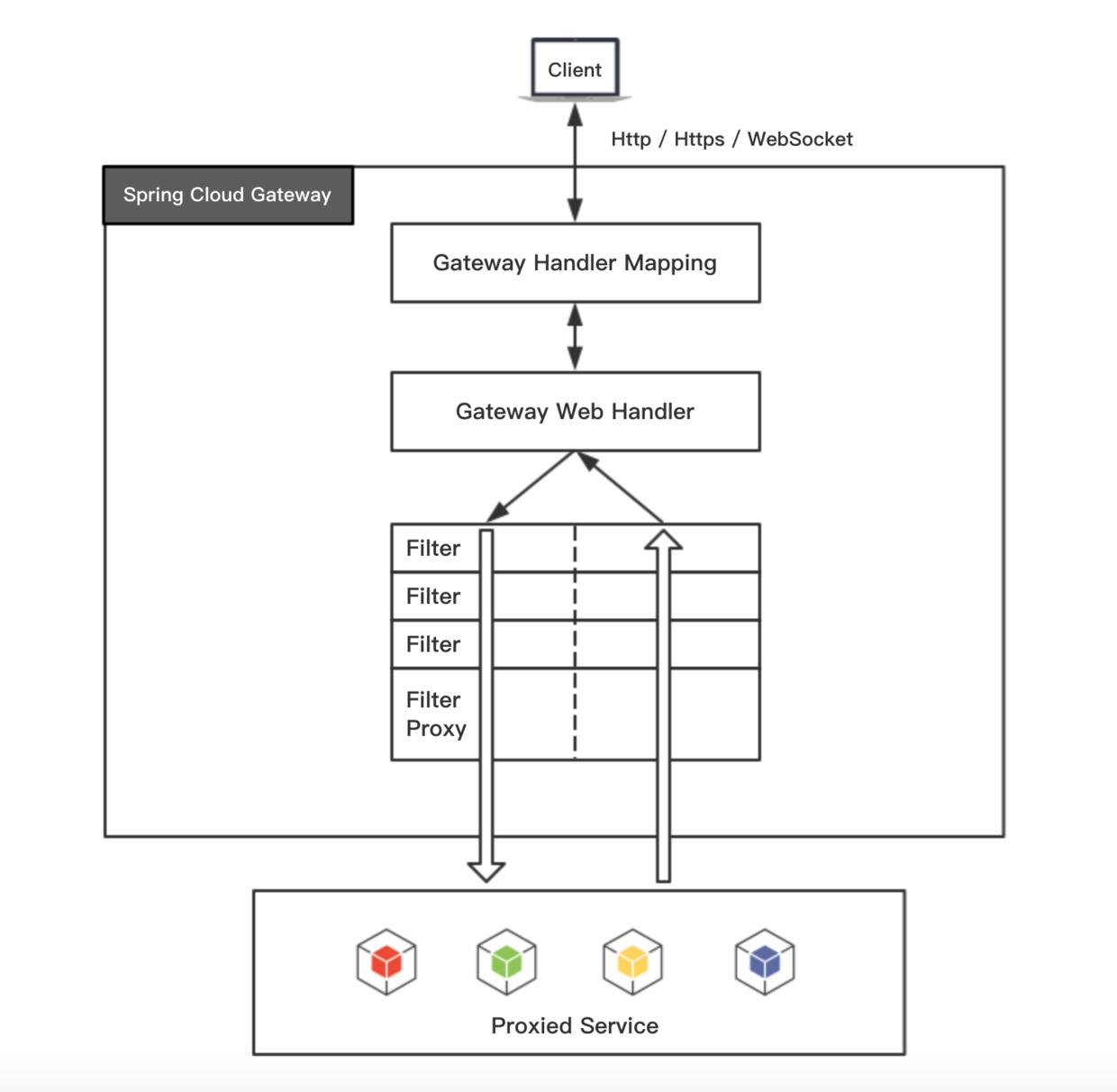
客户端向 Spring Cloud Gateway 发出请求,如果请求与网关程序定义的路由匹配,则将其发送到网关 Web 处理程序,此处理程序运行特定的请求过滤器链。
过滤器之间用虚线分开的原因是过滤器可能会在发送代理请求之前或之后执行逻辑。所有 "pre" 过滤器逻辑先执行,然后执行代理请求,代理请求完成后,执行 "post" 过滤器逻辑。
如何启动 Spring Cloud Gateway
1、新建 Maven 工程,添加相关依赖 pom.xml
<?xml version="1.0" encoding="UTF-8"?>
<project xmlns="http://maven.apache.org/POM/4.0.0" xmlns:xsi="http://www.w3.org/2001/XMLSchema-instance"
         xsi:schemaLocation="http://maven.apache.org/POM/4.0.0 http://maven.apache.org/xsd/maven-4.0.0.xsd">
    <modelVersion>4.0.0</modelVersion>

    <groupId>com.anoyi</groupId>
    <artifactId>core-gateway</artifactId>
    <version>0.0.1-SNAPSHOT</version>

    <name>core-gateway</name>
    <description>gateway for miroservice</description>

    <properties>
        <project.build.sourceEncoding>UTF-8</project.build.sourceEncoding>
        <project.reporting.outputEncoding>UTF-8</project.reporting.outputEncoding>
        <java.version>1.8</java.version>
    </properties>

    <dependencyManagement>
        <dependencies>
            <dependency>
                <groupId>org.springframework.cloud</groupId>
                <artifactId>spring-cloud-gateway</artifactId>
                <version>2.0.0.RELEASE</version>
                <type>pom</type>
                <scope>import</scope>
            </dependency>
        </dependencies>
    </dependencyManagement>

    <dependencies>

        <dependency>
            <groupId>org.springframework.cloud</groupId>
            <artifactId>spring-cloud-starter-gateway</artifactId>
        </dependency>

    </dependencies>

    <build>
        <plugins>
            <plugin>
                <groupId>org.springframework.boot</groupId>
                <artifactId>spring-boot-maven-plugin</artifactId>
            </plugin>
        </plugins>
    </build>

</project>
2、添加启动类 Application.java
import org.springframework.boot.SpringApplication;
import org.springframework.boot.autoconfigure.SpringBootApplication;
import org.springframework.context.annotation.Configuration;

@Configuration
@SpringBootApplication
public class Application {

    public static void main(String[] args) {
        SpringApplication.run(Application.class, args);
    }

}
3、启动 Application(和 Spring Boot 项目一样)
访问 http://localhost:8080/ 报错 404,同时日志输出:
2018-06-27 09:18:48.981  WARN 44156 --- [ctor-http-nio-2] .a.w.r.e.DefaultErrorWebExceptionHandler :
Failed to handle request [GET http://localhost:8080/]: Response status 404
配置服务的路由:配置文件方式
假设本地启动了另外两个 Spring Boot 服务,分别是 服务A( http://localhost:8081 )、服务B( http://localhost:8082 ),下面通过 Spring Cloud Gateway 来路由到这两个服务。
1、在 resources 路径下添加配置文件 application.yml
spring:
  cloud:
    gateway:
      routes:
      - id: host_route
        uri: http://localhost:8081
        predicates:
        - Path=/a/**
        filters:
        - StripPrefix=1
      - id: host_route
        uri: http://localhost:8082
        predicates:
        - Path=/b/**
        filters:
- StripPrefix=1- id:固定,不同 id 对应不同的功能,可参考 官方文档
- uri:目标服务地址
- predicates:路由条件
- filters:过滤规则
2、重启 Gateway 服务
3、测试
访问 http://localhost:8080/a/ 路由到 服务A http://localhost:8081/
访问 http://localhost:8080/b/ 路由到 服务B http://localhost:8082/
其他地址,例如 http://localhost:8080/a/user/all 路由到 服务A http://localhost:8081/user/all
配置服务的路由:编码方式
实现如上服务路由,还可以通过编码的方式实现。
1、删除配置文件 application.yml
2、修改 Application.java, 添加自定义路由配置
import org.springframework.boot.SpringApplication;
import org.springframework.boot.autoconfigure.SpringBootApplication;
import org.springframework.cloud.gateway.filter.factory.StripPrefixGatewayFilterFactory;
import org.springframework.cloud.gateway.route.RouteLocator;
import org.springframework.cloud.gateway.route.builder.RouteLocatorBuilder;
import org.springframework.context.annotation.Bean;

@SpringBootApplication
public class Application {

    @Bean
    public RouteLocator customRouteLocator(RouteLocatorBuilder builder) {
        StripPrefixGatewayFilterFactory.Config config = new StripPrefixGatewayFilterFactory.Config();
        config.setParts(1);
        return builder.routes()
                .route("host_route", r -> r.path("/a/**").filters(f -> f.stripPrefix(1)).uri("http://localhost:8081"))
                .route("host_route", r -> r.path("/b/**").filters(f -> f.stripPrefix(1)).uri("http://localhost:8082"))
                .build();
    }

    public static void main(String[] args) {
        SpringApplication.run(Application.class, args);
    }

}
其他功能
http://cloud.spring.io/spring-cloud-gateway/single/spring-cloud-gateway.html
官方提供了大量的路由规则,比如Time、Host、Header 等等,同时也提供了大量的过滤器,比如AddRequestHeader、AddRequestParameter、AddResponseHeader 等等。仅通过简单的配置即可实现功能强大的网关服务。
微服务架构 - 网关 Spring Cloud Gateway的更多相关文章
- 微服务架构之spring cloud gateway
Spring Cloud Gateway是spring cloud中起着非常重要的作用,是终端调用服务的入口,同时也是项目中每个服务对外暴露的统一口径,我们可以在网关中实现路径映射.权限验证.负载均衡 ...
- Spring Cloud 微服务五:Spring cloud gateway限流
前言:在互联网应用中,特别是电商,高并发的场景非常多,比如:秒杀.抢购.双11等,在开始时间点会使流量爆发式地涌入,如果对网络流量不加控制很有可能造成后台实例资源耗尽.限流是指通过指定的策略削减流量, ...
- 微服务架构集大成者—Spring Cloud (转载)
软件是有生命的,你做出来的架构决定了这个软件它这一生是坎坷还是幸福. 本文不是讲解如何使用Spring Cloud的教程,而是探讨Spring Cloud是什么,以及它诞生的背景和意义. 1 背景 2 ...
- 微服务架构之spring cloud 介绍
在当前的软件开发行业中,尤其是互联网,微服务是非常炽热的一个词语,市面上已经有一些成型的微服务框架来帮助开发者简化开发工作量,但spring cloud 绝对占有一席之地,不管你是否为java开发,大 ...
- 微服务架构-选择Spring Cloud,放弃Dubbo
Spring Cloud 在国内中小型公司能用起来吗?从 2016 年初一直到现在,我们在这条路上已经走了一年多. 在使用 Spring Cloud 之前,我们对微服务实践是没有太多的体会和经验的.从 ...
- 微服务架构之spring cloud eureka
Spring Cloud Eureka是spring cloud的核心组件,负责服务治理功能,起到中心枢纽作用,其它组件都依赖eureka来获取服务,然后再根据项目需求实现自己的业务,eureka在整 ...
- 微服务架构之spring cloud zipkin
Spring Cloud Zipkin是微服务的链路跟踪组件,帮助详细了解一次request&response的总计时,及每个微服务的消耗时间.微服务名称.异常信息等等过程信息. (一) 版本 ...
- 微服务架构之spring cloud turbine
在前面介绍了spring cloud hystrix及其hystrix dashboard,但都是对单个项目的监控,对于一个为项目而言,必定有很多微服务,一个一个去看非常的不方便,如果有一个能集中熔断 ...
- 微服务架构之spring cloud hystrix&hystrix dashboard
在前面介绍spring cloud feign中我们已经使用过hystrix,只是没有介绍,spring cloud hystrix在spring cloud中起到保护微服务的作用,不会让发生的异常无 ...
随机推荐
- 编译AMQP-CPP
1 cd ./AMQP-CPP/examples/boost$ 2.cmake . 提示boost版本太低, 首先要编译生成boost安装工具bjam进入boost目录执行:./bootstrap. ...
- python面向过程编程 - ATM
前面程序整合加自定义日志 1.文件摆放 ├── xxxx │ ├── src.py │ └── fil_mode.py │ └── data_time.py │ └── loading.py │ └─ ...
- [leetcode] 63. Unique Paths II (medium)
原题 思路: 用到dp的思想,到row,col点路径数量 : path[row][col]=path[row][col-1]+path[row-1][col]; 遍历row*col,如果map[row ...
- Appium+python自动化(二十三)- 真假美猴王Monkeyrunner与Monkey傻傻的分不清楚(超详解)
简介 看<西游记>第五十七回,说是“六耳猕猴”化作孙悟空的摸样,伤了唐僧,后又和孙悟空大打出手…… 这位假孙悟空,实力不用多说了吧,和真孙悟空一般无二,大战孙悟空,闹到上天入地下海. 在唐 ...
- linux初学者-软件安装与管理篇
linux初学者-软件安装与管理篇 在linux的学习和工作中需要安装许多的软件.在redhat的linux操作系统下,软件一般都是rpm格式的.以下将介绍一些软件安装和管理的内容. 1.软件名称 在 ...
- Linux学习(一)--VMware下Linux安装和配置
本片随便将给大家讲述linux在VM虚拟机上安装及终端的安装和配置 一.Linux介绍 Linux是一套免费使用和自由传播的类Unix操作系统,是一个基于POSIX和UNIX的多用户.多任务.支持多线 ...
- spring与actionMQ整合
出处:http://www.cnblogs.com/leiOOlei/p/5075402.html 一.配置部分 ActiveMQ的安装这就不说了,很简单, 这个例子采用maven构建,首先看一下po ...
- SSD+HDD 安装ubuntu16.04+win7双系统
本人电脑是联想天逸100 前段时间把光驱拆了加了一个128G的SSD 顺便把SSD装上了win7 机械硬盘500G放资料和一般软件之类的 后来想要用到ubuntu 就在官网下载ubuntu1 ...
- 【Machine Learning·机器学习】决策树之ID3算法(Iterative Dichotomiser 3)
目录 1.什么是决策树 2.如何构造一棵决策树? 2.1.基本方法 2.2.评价标准是什么/如何量化评价一个特征的好坏? 2.3.信息熵.信息增益的计算 2.4.决策树构建方法 3.算法总结 @ 1. ...
- 微信支付java开发
微信公众平台 (此处只讲pay) 微信商户平台,公众号的后台管理工具,包含公众号的商户信息,公众号支付,扫码支付,刷卡支付 1.商户信息包含商户号,和此公众平台关联的商户号,需登录商户平台设置商户秘钥 ...